Possible solution(s) to my RAM problems?

kwitel

New member
Member
VIP
Local time
7:39 PM
Messages
104
Thanks in advance for reading.
Im using a Del Optiplex with Windows 7/64 bit, 6GB of RAM and a 4th Gen i5.

About a month ago a tech-friend replaced my 500gb internal drive with one 256ssd for the OS and a 1TB optical drive for storage.

Ever since then (and it could just be coincidence), I keep getting low memory alerts. Its usually Firefox or Chrome that is the culprit but its been iTunes and even Evernote as well. I dont use anything very memory intensive and I rarely keep more than 3 browser tabs open.

Have any ideas what could be the problem here?

I just ordered another 2gbs of ram from Crucial...
 

My Computer

Computer type
Laptop
Computer Manufacturer/Model Number
Dell E6400
OS
7/64 bit
CPU
Intel Core i-5-3470
Motherboard
Dell-042P49
Memory
4gb
Graphics Card(s)
Intel HD Graphics-1920x1080
Sound Card
Intel Display Audio
Monitor(s) Displays
Dell P2211H
Screen Resolution
19620*1080
Hard Drives
Samsung SSD
WDC 1TB
Browser
Chrome
Have you run Memtest 86?

Have you monitored actual RAM usage at any given moment in Task Manager? How much does it say is installed and in use?

If you truly "don't use anything very memory intensive", the new 2 GB of RAM is a waste of money, particularly if you don't know if you've been using all of the current 6.
 

My Computer

Computer type
PC/Desktop
Computer Manufacturer/Model Number
Ignatz Special; 4 speed manual gearbox; factory air conditioning; one of one
OS
Windows 7 Home Premium SP1, 64-bit
CPU
Intel Skylake i5-6600K, not overclocked
Motherboard
AsRock Z170M Extreme 4, micro ATX
Memory
8 GB HyperX DDR4-2666 (2 x 4 GB)
Graphics Card(s)
none; graphics are integrated on CPU
Sound Card
onboard: Realtek ALC1150; external: USB Behringer UF0-202
Monitor(s) Displays
Dell S2340M 23 inch IPS
Screen Resolution
1600 x 900
Hard Drives
System: Crucial MX100 series SSD, 128 GB;
Data: Samsung Spinpoint 103SJ, 1 TB;
Backup: WD Caviar Green WD30EZRX-00D8PB0, 3 TB
PSU
Rosewill SilentNight 500 watt fanless, semi-modular
Case
Antec Solo II
Cooling
Noctua NH-U12S; Noctua F12 intake, Noctua S12A exhaust
Keyboard
Microsoft 200 6JH-00001 USB
Mouse
Dell or Microsoft optical wired; USB
Antivirus
Microsoft Security Essentials and Malwarebytes Premium
Browser
Pale Moon
Other Info
All fans PWM; speeds at idle: CPU circa 500 rpm; intake circa 600 rpm; exhaust circa 600 rpm; CPU temps 27 idle and 47 C load in a warm room (27 C/81 F) when running Intel Extreme Tuning Utility stress test.
Have you run Memtest 86?

Have you monitored actual RAM usage at any given moment in Task Manager? How much does it say is installed and in use?

If you truly "don't use anything very memory intensive", the new 2 GB of RAM is a waste of money, particularly if you don't know if you've been using all of the current 6.

I have not. I will download and try that out.

I am looking at TM right now and its says I have 6046mbs of RAM which sounds right and 4.36gbs or 74% of my RAM is being used, which sounds correct as well.
Thats said and maybe im doing this wrong, but when adding up all the memory usage on the Processes tag I get maybe a Gig or a gig and half of memory.

Why then does it say 4.36 of gigs is being used in the performance tab?
 

My Computer

Computer type
Laptop
Computer Manufacturer/Model Number
Dell E6400
OS
7/64 bit
CPU
Intel Core i-5-3470
Motherboard
Dell-042P49
Memory
4gb
Graphics Card(s)
Intel HD Graphics-1920x1080
Sound Card
Intel Display Audio
Monitor(s) Displays
Dell P2211H
Screen Resolution
19620*1080
Hard Drives
Samsung SSD
WDC 1TB
Browser
Chrome
4.36 is highly suspicious. I've never ever used more than 3 plus, including times when I've had 50 or more browser tabs open.

A gig or gig and a half sounds much more likely.

I'd run complete virus and malware scans as a starting point.

Any odd looking stuff in processes or installed apps that you can't readily identify? Or in non-Microsoft services?

Maybe others have better ideas. I'm not a memory guru.
 

My Computer

Computer type
PC/Desktop
Computer Manufacturer/Model Number
Ignatz Special; 4 speed manual gearbox; factory air conditioning; one of one
OS
Windows 7 Home Premium SP1, 64-bit
CPU
Intel Skylake i5-6600K, not overclocked
Motherboard
AsRock Z170M Extreme 4, micro ATX
Memory
8 GB HyperX DDR4-2666 (2 x 4 GB)
Graphics Card(s)
none; graphics are integrated on CPU
Sound Card
onboard: Realtek ALC1150; external: USB Behringer UF0-202
Monitor(s) Displays
Dell S2340M 23 inch IPS
Screen Resolution
1600 x 900
Hard Drives
System: Crucial MX100 series SSD, 128 GB;
Data: Samsung Spinpoint 103SJ, 1 TB;
Backup: WD Caviar Green WD30EZRX-00D8PB0, 3 TB
PSU
Rosewill SilentNight 500 watt fanless, semi-modular
Case
Antec Solo II
Cooling
Noctua NH-U12S; Noctua F12 intake, Noctua S12A exhaust
Keyboard
Microsoft 200 6JH-00001 USB
Mouse
Dell or Microsoft optical wired; USB
Antivirus
Microsoft Security Essentials and Malwarebytes Premium
Browser
Pale Moon
Other Info
All fans PWM; speeds at idle: CPU circa 500 rpm; intake circa 600 rpm; exhaust circa 600 rpm; CPU temps 27 idle and 47 C load in a warm room (27 C/81 F) when running Intel Extreme Tuning Utility stress test.
4.36 is highly suspicious. I've never ever used more than 3 plus, including times when I've had 50 or more browser tabs open.

A gig or gig and a half sounds much more likely.

I'd run complete virus and malware scans as a starting point.

Any odd looking stuff in processes or installed apps that you can't readily identify? Or in non-Microsoft services?

Maybe others have better ideas. I'm not a memory guru.

Have done all of that and cant seem to find anything suspicious.

Appreciate the help.
 

My Computer

Computer type
Laptop
Computer Manufacturer/Model Number
Dell E6400
OS
7/64 bit
CPU
Intel Core i-5-3470
Motherboard
Dell-042P49
Memory
4gb
Graphics Card(s)
Intel HD Graphics-1920x1080
Sound Card
Intel Display Audio
Monitor(s) Displays
Dell P2211H
Screen Resolution
19620*1080
Hard Drives
Samsung SSD
WDC 1TB
Browser
Chrome
Yes, 74% is way high.
 

My Computer

Computer type
PC/Desktop
Computer Manufacturer/Model Number
Skylake Special #666
OS
Windows 10 Pro x64
CPU
Intel Core i7 6700K
Motherboard
Asus Sabertooth Z170 Mark 1
Memory
GSkill TridentZ RGB 16GB 3600 16-16-16-36
Graphics Card(s)
EVGA GTX 980 Ti SC x2
Sound Card
Realtek High Definition
Monitor(s) Displays
AOC G2460PG
Screen Resolution
1920 x 1080 144Hz
Hard Drives
Samsung 860 Pro 256GB, Seagate Barracuda 4TB x2
PSU
EVGA 1000 P2, EVGA White Custom Braided Cables
Case
Corsair Vengeance C70 Gunmetal Black
Cooling
Corsair H100i v2, Corsair ML120 x2, Thermal Grizzly Kryonaut
Keyboard
Logitech G910 Orion Spectrum
Mouse
Logitech G700s
Internet Speed
Verizon Fios Quantum Gateway 75/75
Antivirus
Windows Defender, Malwarebytes Free 3.8.3
Browser
Chrome
Other Info
Corsair SP120 x4, LG Blu-ray Drive, Durabrand HT-395 100 Watt Dolby Digital Amp, Corsair H2100 Wireless 7.1 Headset
I am looking at TM right now and its says I have 6046mbs of RAM which sounds right and 4.36gbs or 74% of my RAM is being used, which sounds correct as well.
Thats said and maybe im doing this wrong, but when adding up all the memory usage on the Processes tag I get maybe a Gig or a gig and half of memory.

Why then does it say 4.36 of gigs is being used in the performance tab?

Adding up the numbers in the memory usage column will never equal total usage. It was never intended that it would. With default configuration the numbers do not show full process usage and there are some very significant users of memory that are not processes, not all of which are shown in Task Manager.

74% usage does seem high. A good place to start would be to post a screenshot of Task Manager - Performance tab. This will provide a high level view of memory usage and is more important at this point than a look a process usage. The problem may not be a process at all and in many cases it isn't.
 

My Computer

Computer type
PC/Desktop
Computer Manufacturer/Model Number
HP
OS
Windows 7 Pro 64 bit
CPU
Xeon W3520
Memory
8 GB
Graphics Card(s)
Nvidia Geforce 210
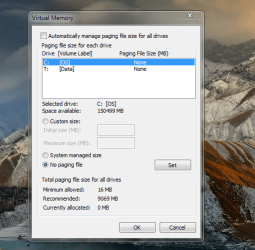
Check Page File settings:

Start> Run

type sysdm.cpl

press Enter.

Advanced> Performance> Settings> Advanced> Virtual Memory> Change

Post a screenshot for us to look at.
 

My Computer

Computer type
Laptop
Computer Manufacturer/Model Number
ASUS
OS
Microsoft Windows 7 Home Premium 64-bit 7601 Multiprocessor Free Service Pack 1
CPU
AMD C-60 APU with Radeon(tm) HD Graphics
Motherboard
ASUSTeK COMPUTER INC. X501U
Memory
4.00 GB
Graphics Card(s)
AMD Radeon HD 6290 Graphics
Sound Card
(1) AMD High Definition Audio Device (2) Realtek High Defi
Screen Resolution
1366 x 768 x 32 bits (4294967296 colors) @ 60 Hz
Hard Drives
Hitachi HTS545050A7E380 SATA Disk Device
Antivirus
Comodo CIS & FW, SecureAplus App Whitelisting, Threatfire
Browser
Cyberfox 64bit, Opera 64bit, Airfox
Other Info
Spy-The-Spy, HitmanPro.Alert, Norton Connect Safe, MJRegWatcher, BitDefender TrafficLight, Voodoo Shield, Zemana AntiMalware
I am looking at TM right now and its says I have 6046mbs of RAM which sounds right and 4.36gbs or 74% of my RAM is being used, which sounds correct as well.
Thats said and maybe im doing this wrong, but when adding up all the memory usage on the Processes tag I get maybe a Gig or a gig and half of memory.

Why then does it say 4.36 of gigs is being used in the performance tab?

Adding up the numbers in the memory usage column will never equal total usage. It was never intended that it would. With default configuration the numbers do not show full process usage and there are some very significant users of memory that are not processes, not all of which are shown in Task Manager.

74% usage does seem high. A good place to start would be to post a screenshot of Task Manager - Performance tab. This will provide a high level view of memory usage and is more important at this point than a look a process usage. The problem may not be a process at all and in many cases it isn't.

Check Page File settings:

Start> Run

type sysdm.cpl

press Enter.

Advanced> Performance> Settings> Advanced> Virtual Memory> Change

Post a screenshot for us to look at.

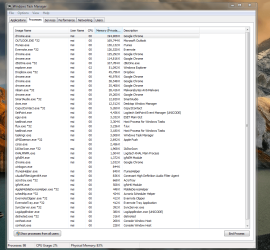
Please see attached.

Thanks.
 

Attachments

  • Task Mgr.PNG
    Task Mgr.PNG
    324.8 KB · Views: 1
  • Virtual memory.PNG
    Virtual memory.PNG
    271.6 KB · Views: 42

My Computer

Computer type
Laptop
Computer Manufacturer/Model Number
Dell E6400
OS
7/64 bit
CPU
Intel Core i-5-3470
Motherboard
Dell-042P49
Memory
4gb
Graphics Card(s)
Intel HD Graphics-1920x1080
Sound Card
Intel Display Audio
Monitor(s) Displays
Dell P2211H
Screen Resolution
19620*1080
Hard Drives
Samsung SSD
WDC 1TB
Browser
Chrome
And Performance:
 

Attachments

  • Performance.PNG
    Performance.PNG
    205 KB · Views: 2

My Computer

Computer type
Laptop
Computer Manufacturer/Model Number
Dell E6400
OS
7/64 bit
CPU
Intel Core i-5-3470
Motherboard
Dell-042P49
Memory
4gb
Graphics Card(s)
Intel HD Graphics-1920x1080
Sound Card
Intel Display Audio
Monitor(s) Displays
Dell P2211H
Screen Resolution
19620*1080
Hard Drives
Samsung SSD
WDC 1TB
Browser
Chrome
Someone, maybe your friend, turned off your paging file, per the last pic in post 9--for unknown reasons.

Put a checkmark in that "automatically manage paging file size for all drives" box and make sure that "no paging file" choice below it is NOT checked. Just let Windows manage it.

You have 98 processes. That's high, but I've seen higher. Somewhere in the 60s might be closer to average. I have 61 processes at this moment. So you have a lot of things going on in that PC. Maybe you need each and every one of them, that's up to you--but they all gnaw on your RAM and performance a little bit.

Right now, you have about 2 GB RAM cached and about 1 GB available. Those figures are tolerable, but as a point of reference, I have 8 GB installed and right now I have over 6 GB cached and over 6 GB available. So you are using a lot more than I am----somewhere, somehow.
 

My Computer

Computer type
PC/Desktop
Computer Manufacturer/Model Number
Ignatz Special; 4 speed manual gearbox; factory air conditioning; one of one
OS
Windows 7 Home Premium SP1, 64-bit
CPU
Intel Skylake i5-6600K, not overclocked
Motherboard
AsRock Z170M Extreme 4, micro ATX
Memory
8 GB HyperX DDR4-2666 (2 x 4 GB)
Graphics Card(s)
none; graphics are integrated on CPU
Sound Card
onboard: Realtek ALC1150; external: USB Behringer UF0-202
Monitor(s) Displays
Dell S2340M 23 inch IPS
Screen Resolution
1600 x 900
Hard Drives
System: Crucial MX100 series SSD, 128 GB;
Data: Samsung Spinpoint 103SJ, 1 TB;
Backup: WD Caviar Green WD30EZRX-00D8PB0, 3 TB
PSU
Rosewill SilentNight 500 watt fanless, semi-modular
Case
Antec Solo II
Cooling
Noctua NH-U12S; Noctua F12 intake, Noctua S12A exhaust
Keyboard
Microsoft 200 6JH-00001 USB
Mouse
Dell or Microsoft optical wired; USB
Antivirus
Microsoft Security Essentials and Malwarebytes Premium
Browser
Pale Moon
Other Info
All fans PWM; speeds at idle: CPU circa 500 rpm; intake circa 600 rpm; exhaust circa 600 rpm; CPU temps 27 idle and 47 C load in a warm room (27 C/81 F) when running Intel Extreme Tuning Utility stress test.
Someone, maybe your friend, turned off your paging file, per the last pic in post 9--for unknown reasons.

Put a checkmark in that "automatically manage paging file size for all drives" box and make sure that "no paging file" choice below it is NOT checked. Just let Windows manage it.

You have 98 processes. That's high, but I've seen higher. Somewhere in the 60s might be closer to average. I have 61 processes at this moment. So you have a lot of things going on in that PC. Maybe you need each and every one of them, that's up to you--but they all gnaw on your RAM and performance a little bit.

Right now, you have about 2 GB RAM cached and about 1 GB available. Those figures are tolerable, but as a point of reference, I have 8 GB installed and right now I have over 6 GB cached and over 6 GB available. So you are using a lot more than I am----somewhere, somehow.

Done and that seems to have lowered my physical memory usage dramatically (although I still need to wait and see with more usage).
Im not sure why I have so many processes relative to you or the average user but I will go through each of them and see if I can figure whats what.
On a daily basis I never use more than the following:


  1. Outlook
  2. Firefox
  3. Itunes
  4. CRM
  5. Dropbox
I would consider that basic use, no?


Other than that, I have the usual Anti-Virus, Malwarebytes, some Logitech apps and thats about it.
 

My Computer

Computer type
Laptop
Computer Manufacturer/Model Number
Dell E6400
OS
7/64 bit
CPU
Intel Core i-5-3470
Motherboard
Dell-042P49
Memory
4gb
Graphics Card(s)
Intel HD Graphics-1920x1080
Sound Card
Intel Display Audio
Monitor(s) Displays
Dell P2211H
Screen Resolution
19620*1080
Hard Drives
Samsung SSD
WDC 1TB
Browser
Chrome
You may knowingly USE only those 5 things daily, but you've got a carload of things going regardless, probably most of them "automatically" when you start up.

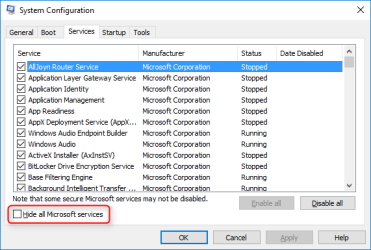
How many non-Microsoft services do you have running?

How many things do you have checked off in msconfig startup tab? You need zero to run Windows.
 

My Computer

Computer type
PC/Desktop
Computer Manufacturer/Model Number
Ignatz Special; 4 speed manual gearbox; factory air conditioning; one of one
OS
Windows 7 Home Premium SP1, 64-bit
CPU
Intel Skylake i5-6600K, not overclocked
Motherboard
AsRock Z170M Extreme 4, micro ATX
Memory
8 GB HyperX DDR4-2666 (2 x 4 GB)
Graphics Card(s)
none; graphics are integrated on CPU
Sound Card
onboard: Realtek ALC1150; external: USB Behringer UF0-202
Monitor(s) Displays
Dell S2340M 23 inch IPS
Screen Resolution
1600 x 900
Hard Drives
System: Crucial MX100 series SSD, 128 GB;
Data: Samsung Spinpoint 103SJ, 1 TB;
Backup: WD Caviar Green WD30EZRX-00D8PB0, 3 TB
PSU
Rosewill SilentNight 500 watt fanless, semi-modular
Case
Antec Solo II
Cooling
Noctua NH-U12S; Noctua F12 intake, Noctua S12A exhaust
Keyboard
Microsoft 200 6JH-00001 USB
Mouse
Dell or Microsoft optical wired; USB
Antivirus
Microsoft Security Essentials and Malwarebytes Premium
Browser
Pale Moon
Other Info
All fans PWM; speeds at idle: CPU circa 500 rpm; intake circa 600 rpm; exhaust circa 600 rpm; CPU temps 27 idle and 47 C load in a warm room (27 C/81 F) when running Intel Extreme Tuning Utility stress test.
You may knowingly USE only those 5 things daily, but you've got a carload of things going regardless, probably most of them "automatically" when you start up.

How many non-Microsoft services do you have running?

How many things do you have checked off in msconfig startup tab? You need zero to run Windows.


I have a huge list of startup services and all are checked but a large portion of them say they have been stopped.
The one s that are stopped, do i have to uncheck those as well?

Btw, I think you solved my problem.
I have a number of things running right now including 4 tabs open in FF, all of which would normally prompt a memory warning but im at 52% of memory...
 

My Computer

Computer type
Laptop
Computer Manufacturer/Model Number
Dell E6400
OS
7/64 bit
CPU
Intel Core i-5-3470
Motherboard
Dell-042P49
Memory
4gb
Graphics Card(s)
Intel HD Graphics-1920x1080
Sound Card
Intel Display Audio
Monitor(s) Displays
Dell P2211H
Screen Resolution
19620*1080
Hard Drives
Samsung SSD
WDC 1TB
Browser
Chrome
Try holding down the windows key and press R. Type msconfig in the search box and press enter, go to the startup page. Uncheck everything you can live without. Nothing but your AV is necessary to run at startup. All programs will run just fine when you need them, they will just not start with Windows and will only be running when you open them.
 

My Computers

System One System Two

  • Computer type
    PC/Desktop
    Computer Manufacturer/Model Number
    ALWAYS UNDER CONSTRUCTION
    OS
    Windows 11 Pro
    CPU
    Ryzen 9 5900X
    Motherboard
    Asus X570 Crosshair Viii Hero
    Memory
    32GB G Skill DDR4-3600
    Graphics Card(s)
    EVGA RTX 3080 FTW 3 Ultra
    Sound Card
    On Board/Sennheiser PC37X Headset
    Monitor(s) Displays
    3 X Asus 27"
    Screen Resolution
    2560x1440
    Hard Drives
    2 X 1 TB NVME drives
    PSU
    EVGA 850
    Case
    Phanteks Eclipse P400A
    Cooling
    EVGA 280 AIO
    Keyboard
    Logitech G510s/ Logitech G13
    Mouse
    Logitech G502
    Internet Speed
    24/1
    Antivirus
    ESET/MBAM Pro/SAS Pro
    Browser
    Chrome/ Firefox/ Edge
  • Computer type
    Laptop
    System Manufacturer/Model Number
    Dell 16 Plus
    OS
    Windows 11 Pro
    CPU
    Intel Ultra 9 288V
    Memory
    32 GB LPDDR5X 8533
    Monitor(s) Displays
    16" Mini-LED HDR600 Touch 90 Hz
    Screen Resolution
    2560X1600
    Hard Drives
    1 TB NVME

My Computer

Computer type
Laptop
Computer Manufacturer/Model Number
ASUS
OS
Microsoft Windows 7 Home Premium 64-bit 7601 Multiprocessor Free Service Pack 1
CPU
AMD C-60 APU with Radeon(tm) HD Graphics
Motherboard
ASUSTeK COMPUTER INC. X501U
Memory
4.00 GB
Graphics Card(s)
AMD Radeon HD 6290 Graphics
Sound Card
(1) AMD High Definition Audio Device (2) Realtek High Defi
Screen Resolution
1366 x 768 x 32 bits (4294967296 colors) @ 60 Hz
Hard Drives
Hitachi HTS545050A7E380 SATA Disk Device
Antivirus
Comodo CIS & FW, SecureAplus App Whitelisting, Threatfire
Browser
Cyberfox 64bit, Opera 64bit, Airfox
Other Info
Spy-The-Spy, HitmanPro.Alert, Norton Connect Safe, MJRegWatcher, BitDefender TrafficLight, Voodoo Shield, Zemana AntiMalware
You may knowingly USE only those 5 things daily, but you've got a carload of things going regardless, probably most of them "automatically" when you start up.

How many non-Microsoft services do you have running?

How many things do you have checked off in msconfig startup tab? You need zero to run Windows.

So it looks like im back up at 70-80% again, even though I thought this was resolved.

How do I know what is "non-Microsoft"?

And are you referring to processes or start-up items?
 

My Computer

Computer type
Laptop
Computer Manufacturer/Model Number
Dell E6400
OS
7/64 bit
CPU
Intel Core i-5-3470
Motherboard
Dell-042P49
Memory
4gb
Graphics Card(s)
Intel HD Graphics-1920x1080
Sound Card
Intel Display Audio
Monitor(s) Displays
Dell P2211H
Screen Resolution
19620*1080
Hard Drives
Samsung SSD
WDC 1TB
Browser
Chrome

My Computer

Computer type
PC/Desktop
Computer Manufacturer/Model Number
Self Built
OS
Win 10 Pro x64
CPU
Intel I5-2500K @3.3GHz
Motherboard
Asrock P67 Extreme4
Memory
16GB G.Skill Ripjaws X (4x4GB)
Graphics Card(s)
EVGA GeForce 750 Ti SC 2GB
Sound Card
ASUS Xonar DG 5.1 Channels 24-bit 96KHz PCI Interface Sound
Monitor(s) Displays
auria eq2367
Screen Resolution
1920 x 1080
Hard Drives
250GB Samsung 850 EVO SSD
1TB WD Blue
1TB Hitachi
PSU
SeaSonic X 650W 80 Plus Gold
Case
Corsair Obsidian 750D
Cooling
Corsair H60, Three 140mm case fans
Keyboard
Logitech Wireless Keyboard K520
Mouse
Logitech Wireless Mouse M310
Internet Speed
Wave Broadband ~ 100 dn 5 up
Antivirus
Windows Defender, Malwarebytes Premium
Browser
Edge, IE11, Chrome
Other Info
Laptop specs: HP g7-1365dx /
CPU: AMD A6-3420M APU with Radeon(tm) HD Graphics /
RAM: Crucial 8Gb (2x4Gb) /
SSD: Crucial M4-CT128M4SSD2 ATA Device/ FW 000F /
GFX: AMD Radeon HD 6520G /
OS: Windows 10 Pro x64

My Computer

Computer type
Laptop
Computer Manufacturer/Model Number
Dell E6400
OS
7/64 bit
CPU
Intel Core i-5-3470
Motherboard
Dell-042P49
Memory
4gb
Graphics Card(s)
Intel HD Graphics-1920x1080
Sound Card
Intel Display Audio
Monitor(s) Displays
Dell P2211H
Screen Resolution
19620*1080
Hard Drives
Samsung SSD
WDC 1TB
Browser
Chrome
I've got 11 running and 3 stopped.

Of my 11 running, 6 are Intel, 3 are related to antimalware, and I think the other 2 are unnecessary--I just haven't shut them off.
 

My Computer

Computer type
PC/Desktop
Computer Manufacturer/Model Number
Ignatz Special; 4 speed manual gearbox; factory air conditioning; one of one
OS
Windows 7 Home Premium SP1, 64-bit
CPU
Intel Skylake i5-6600K, not overclocked
Motherboard
AsRock Z170M Extreme 4, micro ATX
Memory
8 GB HyperX DDR4-2666 (2 x 4 GB)
Graphics Card(s)
none; graphics are integrated on CPU
Sound Card
onboard: Realtek ALC1150; external: USB Behringer UF0-202
Monitor(s) Displays
Dell S2340M 23 inch IPS
Screen Resolution
1600 x 900
Hard Drives
System: Crucial MX100 series SSD, 128 GB;
Data: Samsung Spinpoint 103SJ, 1 TB;
Backup: WD Caviar Green WD30EZRX-00D8PB0, 3 TB
PSU
Rosewill SilentNight 500 watt fanless, semi-modular
Case
Antec Solo II
Cooling
Noctua NH-U12S; Noctua F12 intake, Noctua S12A exhaust
Keyboard
Microsoft 200 6JH-00001 USB
Mouse
Dell or Microsoft optical wired; USB
Antivirus
Microsoft Security Essentials and Malwarebytes Premium
Browser
Pale Moon
Other Info
All fans PWM; speeds at idle: CPU circa 500 rpm; intake circa 600 rpm; exhaust circa 600 rpm; CPU temps 27 idle and 47 C load in a warm room (27 C/81 F) when running Intel Extreme Tuning Utility stress test.
Back
Top