Hello to all, I'd like to ask for some help about my laptop which suddenly died yesterday.
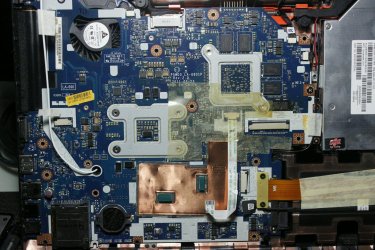
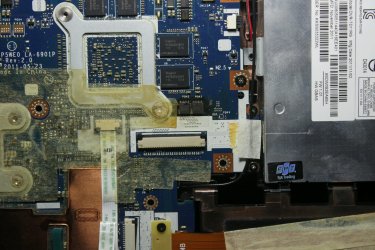
The past week or so I suddenly started getting the BSOD with the dxgkrnl.sys. I did a driver update with multiple older versions in which the bsod still occured, reinstalled Windows and it still would occur mainly when gaming. I play TERA and Starcraft often so I think something might've overheated and burned? I have a mini personal fan that I direct towards my laptop when I play games but sometimes I forget. I tried searching for solutions for the BSOD in which I came across this thread http://www.sevenforums.com/bsod-help-support/339937-bsod-0x00000116-dxgkrnl-sys.html so I tried the Furmark test. It was then during the test I left on that I heard a poof and my laptop died. So, today I took my laptop apart to see what happened and here is the motherboard top side. bottom side. Everything seemed fine except for some dusts. I tried looking for anything unusual which I then saw this top side. bottom side. The area around it seems darker so I think something there burnt or can someone help clarify? If it's the motherboard then does that mean I need to replace it?
Thanks for replying Layback Bear but as of now i am posting via my tablet because my laptop cannot be started so i cant link images according to the tutorial link you provided. Any other way to post images from mobile?
Thanks for your reply.
I don't know what can or can not be done by mobile. I have never owned one.
Sorry wish I could help. I would like to see the pictures but I won't go off this forum to see them.
Just wait for others to drop by and offer assistance.
My Computer
At a glance
Windows 10 Pro. 64/ version 1709 Windows 7 Pr...Intel i7-6800K @ 4.3Corsair Platinum 16 gig @2400EVGA GTX 1070 OC
Computer type
PC/Desktop
Computer Manufacturer/Model Number
Home made Desktop
OS
Windows 10 Pro. 64/ version 1709 Windows 7 Pro/64
CPU
Intel i7-6800K @ 4.3
Motherboard
ASUS X-99 Deluxe II
Memory
Corsair Platinum 16 gig @2400
Graphics Card(s)
EVGA GTX 1070 OC
Monitor(s) Displays
Asus 27" LED LCD/VE278Q
Screen Resolution
1920-1080 or 1280-720 HDMI
Hard Drives
INTEL SSD 730-240 Gb Sata 3.0/
PSU
EVGA Platium 1200W
Case
Phanteks Luxe Tempered Glass 8 fans/ one radiator
Cooling
XSPC/ Water Cooled CPU
Keyboard
Das 4 Professional
Mouse
Logitech M705/MX Anywhere 2-S
Internet Speed
100 mbits
Antivirus
Microsoft Security Essentials/ Malwarebytes Premium 3.0/ SAS
Browser
I.E. 11 default/Firefox/ ISP Time Warner Cable/Spectrum
Other Info
LG BluRay Burner/
Sound system-KLipsch-THX/
Icy Dock ssd Hot Swap bays.
Hello again Layback Bear. So I managed to attach the images according to forums from my tablet. I guess it was the Paint and Snipping tool that fooled me. Choosing attachment still works. I have edited my post hopefully it is correct this time.
There does appear to be some discoloration in areas of the motherboard which suggests a new motherboard would be the repair. Fixing a motherboard is seldom useful and usually not cost-effective compared with a new board or a new machine with a warranty.
My Computer
At a glance
Windows 7 Ultimate 64-bit, Windows 8.1 64-bit...
Computer type
PC/Desktop
Computer Manufacturer/Model Number
Customs, Dell, Gateway, HP, Toshiba, Acer, ASUS
OS
Windows 7 Ultimate 64-bit, Windows 8.1 64-bit, Mac OS X 10.10, Linux Mint 17, Windows 10 Pro TP
I also notice some problems. For sure around PQ 42 and 43 from what I can see.
Their is probably more we can't see.
If a laptop is out of warranty it normally cost more to fix it than to buy another one. I will bet if you smell the motherboard you will get that funny burnt smell.
My Computer
At a glance
Windows 10 Pro. 64/ version 1709 Windows 7 Pr...Intel i7-6800K @ 4.3Corsair Platinum 16 gig @2400EVGA GTX 1070 OC
Computer type
PC/Desktop
Computer Manufacturer/Model Number
Home made Desktop
OS
Windows 10 Pro. 64/ version 1709 Windows 7 Pro/64
CPU
Intel i7-6800K @ 4.3
Motherboard
ASUS X-99 Deluxe II
Memory
Corsair Platinum 16 gig @2400
Graphics Card(s)
EVGA GTX 1070 OC
Monitor(s) Displays
Asus 27" LED LCD/VE278Q
Screen Resolution
1920-1080 or 1280-720 HDMI
Hard Drives
INTEL SSD 730-240 Gb Sata 3.0/
PSU
EVGA Platium 1200W
Case
Phanteks Luxe Tempered Glass 8 fans/ one radiator
Cooling
XSPC/ Water Cooled CPU
Keyboard
Das 4 Professional
Mouse
Logitech M705/MX Anywhere 2-S
Internet Speed
100 mbits
Antivirus
Microsoft Security Essentials/ Malwarebytes Premium 3.0/ SAS
Browser
I.E. 11 default/Firefox/ ISP Time Warner Cable/Spectrum
Other Info
LG BluRay Burner/
Sound system-KLipsch-THX/
Icy Dock ssd Hot Swap bays.
May I ask what those chips are? I have no idea what the words on the motherboard means other then the obvious ones. I never thought of smelling the board for burnt smell. Guess I should try and see
So I just took apart the top of my laptop again and definitley I could smell something in that area. I tried taking some pics under white lighting hopefully it's easier to see color differences
Your eyes and nose are better for this than ours.
If you also can see spots that got over heated and you can smell the burnt oder.
Them game is over for that laptop.
My Computer
At a glance
Windows 10 Pro. 64/ version 1709 Windows 7 Pr...Intel i7-6800K @ 4.3Corsair Platinum 16 gig @2400EVGA GTX 1070 OC
Computer type
PC/Desktop
Computer Manufacturer/Model Number
Home made Desktop
OS
Windows 10 Pro. 64/ version 1709 Windows 7 Pro/64
CPU
Intel i7-6800K @ 4.3
Motherboard
ASUS X-99 Deluxe II
Memory
Corsair Platinum 16 gig @2400
Graphics Card(s)
EVGA GTX 1070 OC
Monitor(s) Displays
Asus 27" LED LCD/VE278Q
Screen Resolution
1920-1080 or 1280-720 HDMI
Hard Drives
INTEL SSD 730-240 Gb Sata 3.0/
PSU
EVGA Platium 1200W
Case
Phanteks Luxe Tempered Glass 8 fans/ one radiator
Cooling
XSPC/ Water Cooled CPU
Keyboard
Das 4 Professional
Mouse
Logitech M705/MX Anywhere 2-S
Internet Speed
100 mbits
Antivirus
Microsoft Security Essentials/ Malwarebytes Premium 3.0/ SAS
Browser
I.E. 11 default/Firefox/ ISP Time Warner Cable/Spectrum
Other Info
LG BluRay Burner/
Sound system-KLipsch-THX/
Icy Dock ssd Hot Swap bays.
Well I guess this is farewell for this laptop until I can get a replacement board or a new machine. I must keep in mind not to do so much gaming anymore. Thank you for the help guys.
Remember all laptops have something in common. They cool poorly.
This means that what ever cooling it has must work 100% properly or it will not live gaming.
In my opinion no laptop is meant for gaming because of it's lack of heat dissipation. Their will be many that don't agree with my opinion.
My Computer
At a glance
Windows 10 Pro. 64/ version 1709 Windows 7 Pr...Intel i7-6800K @ 4.3Corsair Platinum 16 gig @2400EVGA GTX 1070 OC
Computer type
PC/Desktop
Computer Manufacturer/Model Number
Home made Desktop
OS
Windows 10 Pro. 64/ version 1709 Windows 7 Pro/64
CPU
Intel i7-6800K @ 4.3
Motherboard
ASUS X-99 Deluxe II
Memory
Corsair Platinum 16 gig @2400
Graphics Card(s)
EVGA GTX 1070 OC
Monitor(s) Displays
Asus 27" LED LCD/VE278Q
Screen Resolution
1920-1080 or 1280-720 HDMI
Hard Drives
INTEL SSD 730-240 Gb Sata 3.0/
PSU
EVGA Platium 1200W
Case
Phanteks Luxe Tempered Glass 8 fans/ one radiator
Cooling
XSPC/ Water Cooled CPU
Keyboard
Das 4 Professional
Mouse
Logitech M705/MX Anywhere 2-S
Internet Speed
100 mbits
Antivirus
Microsoft Security Essentials/ Malwarebytes Premium 3.0/ SAS
Browser
I.E. 11 default/Firefox/ ISP Time Warner Cable/Spectrum
Other Info
LG BluRay Burner/
Sound system-KLipsch-THX/
Icy Dock ssd Hot Swap bays.
I also suggest using a program to monitor temperatures, voltages, etc. such as HWMonitor HWMONITOR | Softwares | CPUID
You don't have to always use it, but use it initially to check different conditions such as gaming, and then periodically, to make sure things aren't getting noticeably worse due to dust build up ...
Gyration wireless, Logitech wireless, Dell USB wired
Mouse
Gyration wireless, Logitech wireless, V7 USB wired
Internet Speed
Spectrum - 100Mbps D / 10Mbps U
Antivirus
Avast, MBAM3, EMET, WinPatrol
Browser
Pale Moon, Firefox, IE
Other Info
2 multi-boot PC's
Mainly HTPC/Office/Gen purpose (no gaming).
Trendnet USB KVM.
LG DVD burner/Blue Ray Player.
Tray system for removable SATA backup drives.
Not currently OCd, under-volted.
I use Hybrid sleep, rarely re-boot or shutdown.
Hauppauge HD-PVR, Avermedia PCIe TV Tuner, Hauppauge PCI TV Tuner.

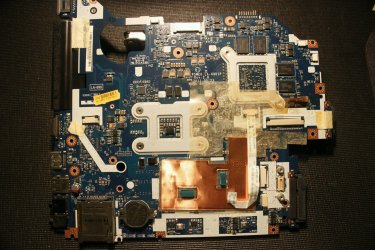 top side.
 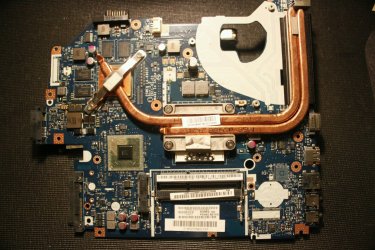 bottom side. Everything seemed fine except for some dusts. I tried looking for anything unusual which I then saw this
 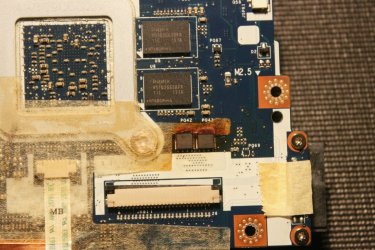 top side.
 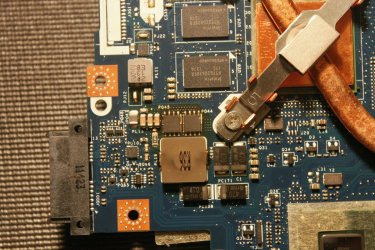 bottom side. The area around it seems darker so I think something there burnt or can someone help clarify? If it's the motherboard then does that mean I need to replace it?