
Solved Possible strange network activity in Process Hacker?

ultimatedorkboy

New member
Local time
11:01 AM
Messages
5
I use Process Hacker as a task manager replacement and I sometimes glance at the “Network” tab. Last week when I was looking at the “Network” tab, I saw a weird website under the “Local Address” column that I’ve never seen before: traffic.acwebconnecting [dot]com
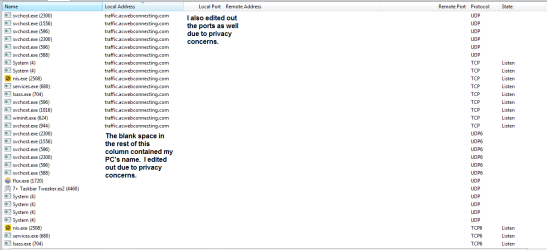
Process Hacker pic.png

Honestly, I cannot recall if that “traffic.acwebconnecting [dot]” com was always there or not. I only noticed it in Process Hacker last week.

Anyway, I did some research on acwebconnecting and I found out that they are supposedly a legitimate company. But there are two things that concern about this acwebconnecting website.

1. The website “traffic.acwebconnecting [dot] com” is listed as an entry in the MVPS hosts file.
2. I looked up acwebconnecting on URLVoid and found out that there are several dodgy websites that share acwebconnecting’s IP Address.

Find websites hosted in IP address 91.208.175.119 - Browsing page 1

I became worried about this so I ran numerous virus scans but they didn’t detect anything suspicious. The scanners I ran were Norton, Malwarebytes, Emsisoft, HitmanPro, Comodo Cleaning Essentials, and TDSKiller.

Ironically, I have not been experiencing any freezes, crashes, or any other problems that are potentially caused by viruses. My internet speed has also been fine as well.

A few more important points:
1. I don’t think acwebconnecting is phoning home. I’ve never seen any of the acwebconnecting processes connect to the web. Then again, I am a novice when it comes to understanding networking.
2. I recently installed Winpcap as a requirement for another program [FONT=&quot](could Winpcap be causing the problem?).[/FONT] I uninstalled Winpcap but that didn't help.
3. I ran some of the virus scanners in Safe Mode but they still didn’t find anything.

Is this acwebconnecting [dot]com a normal thing or do I have a potential problem?

Any help or advice will be appreciated!

Thanks.
 
Last edited:

My Computer

Computer type
Laptop
OS
Windows 7 Home Premium x64
Browser
Palemoon x64
Try this:

RogueKiller Download

Please select all options to and scan and delete everything it finds. Also, please upload the logs. They are usually found on the desktop.

Also, run this

AdwCleaner Download

Scan and press the Clean button. It will restart your computer immediately. Also post the AdwCleaner logs. They are usually found in C:\AdwCleaner.

Finally, run this

Junkware Removal Tool Download

It will open a CMD window telling you to press any key to continue. Save all work before continuing. Also, post the log. The JRT logs are usually found on the desktop.

Try these and post back the results.
 

My Computer

Computer type
Laptop
Computer Manufacturer/Model Number
Dell Inspiron N4030
OS
Windows 10 Home 64-Bit
CPU
Intel Core i3 380M @ 2.53GHz Arrandale 32nm Technology
Motherboard
Dell Inc. 0K13WN (CPU 1)
Memory
Total RAM = 4.00 GB and Usable RAM = 3.80 GB
Graphics Card(s)
Generic PnP Monitor (1366x768@60Hz) Intel HD Graphics (Dell)
Sound Card
IDT High Definition Audio CODEC Bluetooth Hands-free Audio
Monitor(s) Displays
1
Screen Resolution
1366 x 768 x 32 bits (4294967296 colors) @ 59 Hz
Hard Drives
ATA WDC WD3200BEVT-7 SCSI Disk Device Size = 320.00 GB
Internet Speed
6-14 Mbps Max and 153 Kbps Min
Antivirus
MBAM Pro, Windows Defender, SuperAntiSpyware, SpyBot S&D
Browser
Microsoft Edge, IE11, Google Chrome, Firefox
Other Info
Your dude.
What it might be

It might just be some recently installed software or a browser toolbar that either transmits usage statistics or displays adverts. Check any recently installed items and maybe disable them one by one to see if the problem vanishes.

I see that every instance is running under svchost.exe and that would indicate that a service has been installed by third party software.

Suggest that you don't run Rogue Killer and let it delete everything as it's far too aggressive. Better to scan only then post the results for an expert to look at.

EDIT:

You might want to take a look at the Forum Rules in particular item no.14
 
Last edited:

My Computer

Computer type
Laptop
Computer Manufacturer/Model Number
ASUS
OS
Microsoft Windows 7 Home Premium 64-bit 7601 Multiprocessor Free Service Pack 1
CPU
AMD C-60 APU with Radeon(tm) HD Graphics
Motherboard
ASUSTeK COMPUTER INC. X501U
Memory
4.00 GB
Graphics Card(s)
AMD Radeon HD 6290 Graphics
Sound Card
(1) AMD High Definition Audio Device (2) Realtek High Defi
Screen Resolution
1366 x 768 x 32 bits (4294967296 colors) @ 60 Hz
Hard Drives
Hitachi HTS545050A7E380 SATA Disk Device
Antivirus
Comodo CIS & FW, SecureAplus App Whitelisting, Threatfire
Browser
Cyberfox 64bit, Opera 64bit, Airfox
Other Info
Spy-The-Spy, HitmanPro.Alert, Norton Connect Safe, MJRegWatcher, BitDefender TrafficLight, Voodoo Shield, Zemana AntiMalware
It might just be some recently installed software or a browser toolbar that either transmits usage statistics or displays adverts. Check any recently installed items and maybe disable them one by one to see if the problem vanishes.

I see that every instance is running under svchost.exe and that would indicate that a service has been installed by third party software.

Suggest that you don't run Rogue Killer and let it delete everything as it's far too aggressive. Better to scan only then post the results for an expert to look at.

I did install some stuff within the last month but I'm positive that those programs did not contain any toolbars. I have also not been experiencing any problems with adware. But then again, there is also the possibility that the programs could be phoning home as well. I did try to uninstall a few suspect programs but the "traffic.acwebconnecting" still persisted.
 

My Computer

Computer type
Laptop
OS
Windows 7 Home Premium x64
Browser
Palemoon x64
Update

Sorry for the very late reply. I've been busy all week.

Anyway, I decided to give RogueKiller and AdwCleaner a try and it found some stuff. Though, for the things that were found by both programs, I don't think they're malicious. Then again, I'm not an malware expert.

I'll upload the RogueKiller logs and AdwCleaner if requested.

At this point, I'm beginning to think that I'm overreacting to this issue. This "acwebconnecting" could just be some harmless thing.

Though, I'm still curious on why it is listed as a Local Address on my computer? (At least according to Process Hacker).
 
Last edited:

My Computer

Computer type
Laptop
OS
Windows 7 Home Premium x64
Browser
Palemoon x64
Your question has been answered by a Malware expert on another forum.


Is your Anti-virus program Norton?
 

My Computer

Computer type
PC/Desktop
Computer Manufacturer/Model Number
Bruce ... somewhere in his 40's
OS
Windows 7 Ultimate 32bit SP1
CPU
Intel(R) Core(TM)2 Quad CPU @ 2.40GHz, 2400 MHz
Motherboard
INTEL/D975XBX2
Memory
4 GB
Graphics Card(s)
ATI Radeon HD 2600 Pro
Monitor(s) Displays
Samsung SyncMaster 914v
Screen Resolution
1280 x 1024
Hard Drives
2/500GB each ... ST3500630AS ATA Device.
One is not connected
PSU
Rocketfish 700 W
Case
G.Skill Gigabyte Chassis
Keyboard
Standard PS/2 Keyboard
Mouse
Microsoft PS/2 Mouse
Internet Speed
DSL
Antivirus
Avira Internet Security
Browser
IE 11
Other Info
ATI HDMI Audio
Your question has been answered by a Malware expert on another forum.


Is your Anti-virus program Norton?

Yes, my Anti-virus is Norton.

I don't think Norton is causing this "traffic.acwebconnecting" thing to happen as there are other processes that have it too (as seen in the picture).

By the way, I am very sorry for posting this question at another forum. I promise that I won't do something like this again. :o

Though, I do appreciate the suggestions that I received thus far, so thank you all for your input. :D

PS: Since I asked this question at other forum, the mods can close this topic if they want to.
 

My Computer

Computer type
Laptop
OS
Windows 7 Home Premium x64
Browser
Palemoon x64
It's up to you to either continue here or go back to Bleeping. Let us know.
 

My Computer

Computer type
PC/Desktop
Computer Manufacturer/Model Number
Bruce ... somewhere in his 40's
OS
Windows 7 Ultimate 32bit SP1
CPU
Intel(R) Core(TM)2 Quad CPU @ 2.40GHz, 2400 MHz
Motherboard
INTEL/D975XBX2
Memory
4 GB
Graphics Card(s)
ATI Radeon HD 2600 Pro
Monitor(s) Displays
Samsung SyncMaster 914v
Screen Resolution
1280 x 1024
Hard Drives
2/500GB each ... ST3500630AS ATA Device.
One is not connected
PSU
Rocketfish 700 W
Case
G.Skill Gigabyte Chassis
Keyboard
Standard PS/2 Keyboard
Mouse
Microsoft PS/2 Mouse
Internet Speed
DSL
Antivirus
Avira Internet Security
Browser
IE 11
Other Info
ATI HDMI Audio
After thinking about it, I think I'll stick with Bleeping. This forum has been of some help but I think it's more convenient for me to stick with Bleeping.

I'm going to mark this thread as solved and close it.

Once again, thank you all for the suggestions.

Though of course, if I have any future problems, I'll be sure to come here first. ;)
 

My Computer

Computer type
Laptop
OS
Windows 7 Home Premium x64
Browser
Palemoon x64
I saw a weird website under the “Local Address” column that I’ve never seen before: traffic.acwebconnecting [dot]com

Hi Ultimatedorkboy,

Somewhat old thread but it doesn't look like you got an answer here or @ Bleeping... You'll see this occur when you have blocked an internet address using your Hosts file ;)

For example Spybot Search and Destroy might add XYZ.com to the Hosts file redirecting Adware domains to 127.0.0.1 for completely blocking any connection to that address. However, sometime later when Process Hacker attempts to lookup the DNS hostname for 127.0.0.1, Windows will resolve the 127.0.0.1 hostname using the last entry in your hosts file (e.g. XYZ.com) instead of localhost.

Is this acwebconnecting [dot]com a normal thing or do I have a potential problem?

Depends if you intended to block the address or are having issues connecting to an address? :confused:

-dmex (Process Hacker developer)
 
Back
Top