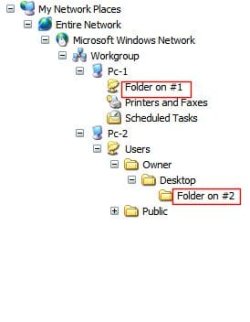
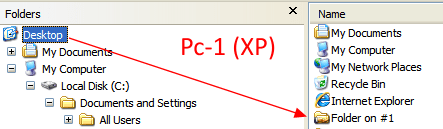
Folder 1 looks like it's directly on the C drive, not on desktop, and folder 2 is on the desktop. Move 2 out of Users and directly under Pc-2. I also have more meaningful names so I don't get the 2 halves of the network confused when moving data. My User has a name in each machine, and my machines are called HP and Gateway. My 2 personal data folders are called MyHPDoc and MyGateDoc, etc.
My Computer
At a glance
Win 7 Ult 64-bitG620 2.6GHZ Pentium R6 GB
Computer type
PC/Desktop
Computer Manufacturer/Model Number
HP p6-2020t
OS
Win 7 Ult 64-bit
CPU
G620 2.6GHZ Pentium R
Memory
6 GB
Monitor(s) Displays
25" HPLV2311
Screen Resolution
1920 x 1200
Hard Drives
1 SATA, 1 exterior SATA
Case
HP
Cooling
PSU
Antivirus
Glasswire
Browser
Waterfox; Firefox; Chrome for work
Other Info
Firewall--Glasswire
Similar specs in Gateway DX4200
Verizon FIOS Wired network
Both folders are on the Desktop per screenshots below.
Pc-2 (Win 7) doesn't allow me to move Folder 2 on the network tree into Pc-2 (cursor becomes slashed circle), as it's already on the Desktop.
This isn't a big deal, but I have 6 machines networked (5 Win7, 1 XP) and I'd prefer consistent folder trees, ideally all like the neater XP-style short path, not sure if Win7 allows it.