Possible to delete language updates?

Monsoon

Banned
Local time
5:21 AM
Messages
91
I have Windows 7 Ultimate.

It's set to download updates, but lets me choose which ones to install.

Well there's nearly a couple dozen language updates that I'm not intending to install, and the only option is to hide the update.

It seems to me that they are still on my computer, since it gives me the option to un-hide those updates.

So is there any way of deleting them from my computer?

This install went from 9gb to 14gb just from the updates!
 

My Computer

OS
Win 7 Ultimate x64
Hello there. This thread was solved. Take a look there. :)
 

My Computer

Computer type
PC/Desktop
Computer Manufacturer/Model Number
Custom Build
OS
Windows 10 Pro x64
CPU
Intel Core i5 4440 @Stock
Motherboard
Gigabyte Z97 D3H
Memory
4 x 4GB HyperX Fury DDR3
Graphics Card(s)
Gigabyte GTX 1050Ti O4G
Sound Card
Integrated
Monitor(s) Displays
Dell P2417H
Screen Resolution
1920 x 1080
Hard Drives
Samsung EVO 850 120GB / Toshiba DT01ACA050 1TB 7200prm 32MB
PSU
Riotoro Onyx 750W
Case
NZXT H500 Black-Red
Cooling
Stock CPU + NZXT 120mm + 2x120mm red fans
Keyboard
Modecom Volcano Lanparty
Mouse
Asus ROG Gladius / DeepCool E-Pad Plus
Internet Speed
DOCSIS 50/3 Mbit
Browser
Google Chrome
Other Info
Asus K55VJ(i5 3210M, GT635M / 2GB, 8GB DDR3, 500GB HDD)
Well i've already got them hidden.

I want to know how to delete them from my hard drive.
 

My Computer

OS
Win 7 Ultimate x64
They are not on your hard drive. When a language (or more) is installed, it's no longer showing in optional updates.

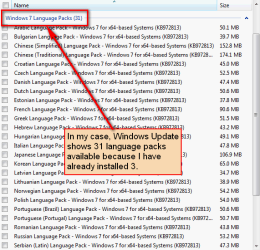
Windows 7 is available in 35 languages. When you install Seven in your language, the rest i.e. 34 languages are available as optional updates. Check your optional updates; if you have 34 language packs available, there's not a single one installed on your computer therefore nothing to delete. In my case the list of available language packs shows 31 because I have installed Finnish, German and Swedish packs on top of my English Seven.

w7_language_packs.png

In other words: That you can see a language pack in Windows Update Optional Updates means that it is not installed on your computer, so there's nothing you need to delete.

Kari
 

My Computer

Computer type
Laptop
Computer Manufacturer/Model Number
HP ENVY 17-1150eg
OS
Windows 10 Pro x64 EN-GB
CPU
1.6 GHz Intel Core i7-720QM Processor
Memory
6 GB
Graphics Card(s)
ATI Mobility Radeon HD 5850 Graphics
Sound Card
Beats sound system with integrated subwoofer
Monitor(s) Displays
17" laptop display, 22" LED and 32" Full HD TV through HDMI
Screen Resolution
1600*900 (1), 1920*1080 (2&3)
Hard Drives
Internal: 2 x 500 GB SATA Hard Disk Drive 7200 rpm
External: 2TB for backups, 3TB USB3 network drive for media
Cooling
As Envy runs a bit warm, I have it on a Cooler Master pad
Keyboard
Logitech diNovo Media Desktop Laser (bluetooth)
Mouse
Logitech Performance Mouse MX
Internet Speed
50/10 Mbps VDSL
Antivirus
Windows Defender 4.3.9431.0
Browser
Maxthon 3.5.2., IE11
I'm guessing you've never set your downloads the way I do.

Because I don't think you understand that they are in fact on my computer.

With the setting I use, the entire update downloads to your hard drive.

I know this, because I can uplug my computer from the internet and it will still install the updates.

Thus the reason behind "hiding" the update.
 

My Computer

OS
Win 7 Ultimate x64

My Computer

Computer type
PC/Desktop
Computer Manufacturer/Model Number
Custom Build
OS
Windows 10 Pro x64
CPU
Intel Core i5 4440 @Stock
Motherboard
Gigabyte Z97 D3H
Memory
4 x 4GB HyperX Fury DDR3
Graphics Card(s)
Gigabyte GTX 1050Ti O4G
Sound Card
Integrated
Monitor(s) Displays
Dell P2417H
Screen Resolution
1920 x 1080
Hard Drives
Samsung EVO 850 120GB / Toshiba DT01ACA050 1TB 7200prm 32MB
PSU
Riotoro Onyx 750W
Case
NZXT H500 Black-Red
Cooling
Stock CPU + NZXT 120mm + 2x120mm red fans
Keyboard
Modecom Volcano Lanparty
Mouse
Asus ROG Gladius / DeepCool E-Pad Plus
Internet Speed
DOCSIS 50/3 Mbit
Browser
Google Chrome
Other Info
Asus K55VJ(i5 3210M, GT635M / 2GB, 8GB DDR3, 500GB HDD)

My Computer

OS
Win 7 Ultimate x64
I'm guessing you've never set your downloads the way I do.

Because I don't think you understand that they are in fact on my computer.

With the setting I use, the entire update downloads to your hard drive.

I know this, because I can uplug my computer from the internet and it will still install the updates.

Thus the reason behind "hiding" the update.
A language pack is not installed on your computer if it's still available as an optional update, therefore there's nothing to uninstall. I know this can now be taken wrong but you can be absolutely sure I know both Windows Update and Language packs!

If you are using some third party update tool you should have mentioned that, and also which tool you are using. It is of course absolutely impossible to know which third party tool you are using, and therefore impossible to say how you can delete some of the downloaded but not installed updates. If you are using Windows Update to update your Windows 7, what I have said earlier is correct: a Language Pack that Windows Update shows as available is most definitely not installed on your computer, you can not uninstall something that has never been installed!

If you have not chosen to download the language packs, they are not on your computer. You are correct in thing though: one of us seems not to understand something essential.

Kari
 

My Computer

Computer type
Laptop
Computer Manufacturer/Model Number
HP ENVY 17-1150eg
OS
Windows 10 Pro x64 EN-GB
CPU
1.6 GHz Intel Core i7-720QM Processor
Memory
6 GB
Graphics Card(s)
ATI Mobility Radeon HD 5850 Graphics
Sound Card
Beats sound system with integrated subwoofer
Monitor(s) Displays
17" laptop display, 22" LED and 32" Full HD TV through HDMI
Screen Resolution
1600*900 (1), 1920*1080 (2&3)
Hard Drives
Internal: 2 x 500 GB SATA Hard Disk Drive 7200 rpm
External: 2TB for backups, 3TB USB3 network drive for media
Cooling
As Envy runs a bit warm, I have it on a Cooler Master pad
Keyboard
Logitech diNovo Media Desktop Laser (bluetooth)
Mouse
Logitech Performance Mouse MX
Internet Speed
50/10 Mbps VDSL
Antivirus
Windows Defender 4.3.9431.0
Browser
Maxthon 3.5.2., IE11
It seems clear to me, that the words used in the update window are very specific here:

Download updates, but let me choose whether to install them.

OR

Install updates automatically.

If the updates are not in fact downloaded to my computer in the first option, then Microsoft has used very poor language indeed!
 

My Computer

OS
Win 7 Ultimate x64
I re-read your original post. An important sentence there:
It's set to download updates, but lets me choose which ones to install.
So I assume you are not using any third party updaters like for instance this.

It looks you are using Windows Update normally, using these settings:

WU_1.png

If so, then let me try to explain it to you:
  • Only important updates are downloaded automatically and installed when you decide to do that, and Recommended updates if you have ticked the checkbox
  • The whole page says nothing about optional updates. They are, as the name says, optional. Not a single optional update, including language packs, is downloaded. You need to manually choose to download an optional update
  • You have absolutely, most definitely sure no language packs installed on your computer if the optional updates list still shows 34 available languages. In this case you also have absolutely, most definitely no language pack files downloaded and saved in to your computer to wait to be installed.
  • Therefore you have absolutely, most definitely no language packs to uninstall nor do you have any language pack files to delete
Please could you confirm if you understand this?

It seems clear to me, that the words used in the update window are very specific here:

Download updates, but let me choose whether to install them.

OR

Install updates automatically.

If the updates are not in fact downloaded to my computer in the first option, then Microsoft has used very poor language indeed!

The language and wording is correct, plain English written so simply even a non-native English speaker as I am has absolutely no problems to understand it. It asks if you want to download the IMPORTANT updates automatically and then install them later. The next question then asks if you want to receive RECOMMENDED UPDATES automatically, too.

IT SAYS NOTHING ABOUT OPTIONAL UPDATES, which you always have to download and install manually.

Kari
 

My Computer

Computer type
Laptop
Computer Manufacturer/Model Number
HP ENVY 17-1150eg
OS
Windows 10 Pro x64 EN-GB
CPU
1.6 GHz Intel Core i7-720QM Processor
Memory
6 GB
Graphics Card(s)
ATI Mobility Radeon HD 5850 Graphics
Sound Card
Beats sound system with integrated subwoofer
Monitor(s) Displays
17" laptop display, 22" LED and 32" Full HD TV through HDMI
Screen Resolution
1600*900 (1), 1920*1080 (2&3)
Hard Drives
Internal: 2 x 500 GB SATA Hard Disk Drive 7200 rpm
External: 2TB for backups, 3TB USB3 network drive for media
Cooling
As Envy runs a bit warm, I have it on a Cooler Master pad
Keyboard
Logitech diNovo Media Desktop Laser (bluetooth)
Mouse
Logitech Performance Mouse MX
Internet Speed
50/10 Mbps VDSL
Antivirus
Windows Defender 4.3.9431.0
Browser
Maxthon 3.5.2., IE11
Well then why didn't you just say so?


:D
 

My Computer

OS
Win 7 Ultimate x64
Actually, it was the optional update part that I missed.

Thanks!
 

My Computer

OS
Win 7 Ultimate x64
There is however a setting which would also download the optional updates,
Right where it says Give me recommended updates the same way I receive important updates.

As far as the non-english speaking part goes though, i'm not american either.

I'm french.

So english is also my second language.
 

My Computer

OS
Win 7 Ultimate x64
The fact that the optional updates don't download automatically, makes it all the more bizarre as far as how much the downloads have added to this install.

It was only 9gb off of the dvd, and it's now up to 14gb.

That's 5gb with barely a few hundred mb accounted for by various small applications i've installed, like a firewall, antivirus, etc.
 

My Computer

OS
Win 7 Ultimate x64
Well then why didn't you just say so?
:D
I resent that remark. My first post in this thread was a valid and correct answer to your question. I can see no reason for this kind of remark, especially when thinking I have done nothing else than trying to explain the thing to you, to show your issue is non-existent.

Read the thread through once more before saying something like that again.

There is however a setting which would also download the optional updates,
Right where it says Give me recommended updates the same way I receive important updates.
NO THERE IS NOT! Recommended updates and optional updates are two completely different things.

Kari
 

My Computer

Computer type
Laptop
Computer Manufacturer/Model Number
HP ENVY 17-1150eg
OS
Windows 10 Pro x64 EN-GB
CPU
1.6 GHz Intel Core i7-720QM Processor
Memory
6 GB
Graphics Card(s)
ATI Mobility Radeon HD 5850 Graphics
Sound Card
Beats sound system with integrated subwoofer
Monitor(s) Displays
17" laptop display, 22" LED and 32" Full HD TV through HDMI
Screen Resolution
1600*900 (1), 1920*1080 (2&3)
Hard Drives
Internal: 2 x 500 GB SATA Hard Disk Drive 7200 rpm
External: 2TB for backups, 3TB USB3 network drive for media
Cooling
As Envy runs a bit warm, I have it on a Cooler Master pad
Keyboard
Logitech diNovo Media Desktop Laser (bluetooth)
Mouse
Logitech Performance Mouse MX
Internet Speed
50/10 Mbps VDSL
Antivirus
Windows Defender 4.3.9431.0
Browser
Maxthon 3.5.2., IE11
That's a joke when someone says "why didn't you say so".
That's something even I as a frenchman "get".

Thanks for the help.
 

My Computer

OS
Win 7 Ultimate x64
You are welcome.
 

My Computer

Computer type
Laptop
Computer Manufacturer/Model Number
HP ENVY 17-1150eg
OS
Windows 10 Pro x64 EN-GB
CPU
1.6 GHz Intel Core i7-720QM Processor
Memory
6 GB
Graphics Card(s)
ATI Mobility Radeon HD 5850 Graphics
Sound Card
Beats sound system with integrated subwoofer
Monitor(s) Displays
17" laptop display, 22" LED and 32" Full HD TV through HDMI
Screen Resolution
1600*900 (1), 1920*1080 (2&3)
Hard Drives
Internal: 2 x 500 GB SATA Hard Disk Drive 7200 rpm
External: 2TB for backups, 3TB USB3 network drive for media
Cooling
As Envy runs a bit warm, I have it on a Cooler Master pad
Keyboard
Logitech diNovo Media Desktop Laser (bluetooth)
Mouse
Logitech Performance Mouse MX
Internet Speed
50/10 Mbps VDSL
Antivirus
Windows Defender 4.3.9431.0
Browser
Maxthon 3.5.2., IE11
Back
Top