Possible to have 2 drives linked with one shortcut?

tys

New member
Member
Local time
8:53 AM
Messages
38
Hi all,

Just curious as to whether it is possible to have a shortcut to a folder which leads to two drives.

Basically, I wan't to be able to work on my projects within a folder and this to be then backed-up automatically to a NAS drive and the local C drive from this one folder.

I don't think this is possible, but who knows?

Thanks :)
 

My Computer My Computer

At a glance

Windows 7 Professional x64
OS
Windows 7 Professional x64
Hi there
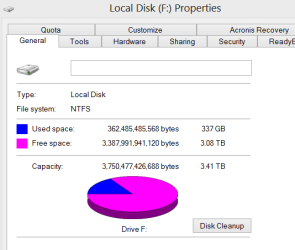
A way which gets round the problem is to create a SPANNED Drive which the computer sees as one logical drive even though it can consist of several physical drives.

For instance I have a LARGE music library which spans more than one physical HDD -
Note though - if ONE volume in the spanned set fails then you lose data from the whole spanned volume.

IMO though HDD's fail very very rarely - so if you have a decent backup strategy this shouldn't be a problem --certainly not if you backup data as data -- not as a disk / partition image-- regularly.

Enc screenshot here -- two physical disks which the system thinks is drive "F".

I use this quite a lot -- for example on another system I've got 4 500 GB disks which I use as a Video library -- it's far more convenient to have this whole lot grouped together as a single " 2TB spanned volume" as I don't have to worry about filling the 500 GB drive half way through a video download etc etc.

Hi quality HD video uses a LOT of disk space BTW and doing it this way you can keep your libraries decently organised on the same "Volume" and use some of your older smaller capacity HDD's. For these types of applications the speed / performance of the HDD's isn't important --just data drives -- I always use separate SSD's for my OS.

(A lot of music / photo software doesn't handle multi volume data - so by spanning you've avoided the problem as it's treated as a SINGLE disk).

There is a trade off -- if you lose a disk you lose all the data so do back up regularly --in any case you should be doing that anyway.

Cheers
jimbo


Enc screenshot
 

Attachments

  • spanned.png
    spanned.png
    6.3 KB · Views: 0
  • span3.png
    span3.png
    9.4 KB · Views: 0

My Computer My Computer

At a glance

Linux CENTOS 7 / various Windows OS'es and se...Intel i7 Intel i58GB, 16GBOn Motherboard
Computer type
PC/Desktop
Computer Manufacturer/Model Number
Custom built, several laptops HP/ASUS
OS
Linux CENTOS 7 / various Windows OS'es and servers
CPU
Intel i7 Intel i5
Memory
8GB, 16GB
Graphics Card(s)
On Motherboard
Sound Card
Realtek HD audio
Monitor(s) Displays
Apple Cinema display, Samsung LCD
Screen Resolution
1920 X 1080
Hard Drives
4 X 1TB SATA
Mouse
Toshiba wireless laser
Internet Speed
> 20MB up

My Computer My Computer

At a glance

Win 7 Ultimate 64 bitIntel i7-3930KKingston HyperX Genesis 32GB Kit (8x4GB Modul...MSI R7850 Twin Frozr 2GD5/OC Radeon HD 7850 2...
Computer type
PC/Desktop
Computer Manufacturer/Model Number
Custom Build
OS
Win 7 Ultimate 64 bit
CPU
Intel i7-3930K
Motherboard
ASUS P9X79 WS
Memory
Kingston HyperX Genesis 32GB Kit (8x4GB Modules) 1600MHz DDR
Graphics Card(s)
MSI R7850 Twin Frozr 2GD5/OC Radeon HD 7850 2GB 256-bit GDDR
Sound Card
Asus Xonar Essence STX
Monitor(s) Displays
3x Asus VG248QE 24", Vizio 32" TV
Screen Resolution
1920 x 1080, ?
Hard Drives
Samsung 128GB 840 Pro SSD (1),
Samsung 4TB 850 EVO SSDs (4)
Samsung 4TB 850 EVO SSDs (16) external backup drives used in 2.5" hot swap bays in the computer.
PSU
Corsair HX750w
Case
Antec Two Hundred v2 (modified)
Cooling
Cooler Master GeminII S524 120mm (fan replaced with a 140mm)
Keyboard
Logitech G510s
Mouse
Logitech M525 (two in use)
Internet Speed
=< 32Mbps down, 8Mbps up
Antivirus
AVAST!, MBAM, SAS, Spybot S&D (all but MBAM free) Glary Util
Browser
IE11
Other Info
LSI 9211-8i HBA card (8 SATA III ports), 2.5" & 3.5" Hot Swap Bays, HooToo HT-CR001 PCI-E to USB 3.0 Internal Hub + 6 Slot Card Reader, and LG Model CH12LS28 BD-ROM Optical Drive. Also, ScanSnap S1500 ADF duplexing scanner, Canon 9000F flat bed scanner, Corsair SP2500 2.1 speakers, Samsung CLP 415nw laser color printer, Cyberpower PP2200SW UPS
Thanks guys,

How would I go about the libraries? I tried to add a new folder from the NAS drive and it wouldn't allow me because it isn't indexed.
 

My Computer My Computer

At a glance

Windows 7 Professional x64
OS
Windows 7 Professional x64
actually, just tried to add another network drive, that worked, although when I save a document into the Library, it only saves to the C drive and not to the Network drive aswell.
 

My Computer My Computer

At a glance

Windows 7 Professional x64
OS
Windows 7 Professional x64
Anyone... help ?
 

My Computer My Computer

At a glance

Windows 7 Professional x64
OS
Windows 7 Professional x64
Back
Top