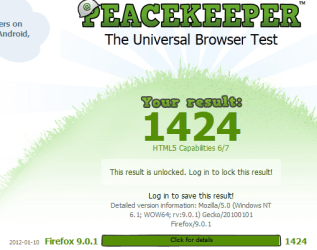
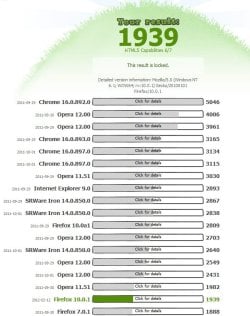
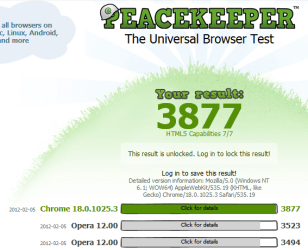
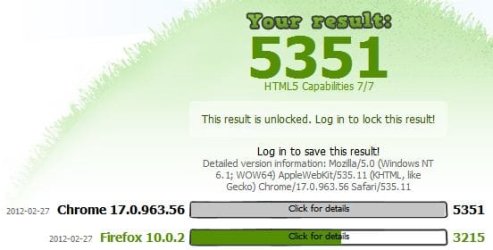
Because a tablet or smart phone model are all identical & return the same score so helpfully their scores are shown so you can compare them to your PC.
With a PC its different so many different hardware configuration's everyone gets different scores you need to run Pecekeeper on a different browser to see how Firefox rates versus the competition on your own PC.
My Computer
Computer type
PC/Desktop
Computer Manufacturer/Model Number
self build
OS
Windows 7 Ultimate 64 bit
CPU
Intel Core i7 4770K overclocked to 4.7GHz Quad Core Haswell
Motherboard
Asus Z87 Pro (Socket 1150) ATX Motherboard
Memory
16GB Team Group Vulcan Gold 2133MHz
Graphics Card(s)
ATI Radeon HD 7880 Series Display adapter
Monitor(s) Displays
NEC LCD2690WUXi2
Screen Resolution
26" 1920 x 1200
Hard Drives
Samsung 500GB SSD 840 EVO SATA 6Gb/s
Samsung 250GB SSD 840 EVO SATA 6Gb/s
PSU
Corsair AX760 Platinum
Case
Cooler Master HAF X Gaming Tower
Cooling
XSPC RayStorm 750 RS360 Water cooling
Mouse
Razer Death Adder left handed
Internet Speed
126Mb download 11.5Mb up
Antivirus
Avast free
Browser
Opera
Other Info
Main Browser is Opera
Favorite software Adobe Lightroom & Photoshop
best plugins Nik software
Firewall : Private firewall 7
Samsung 850 Pro 256GB (OS), Samsung 2x 128GB 840 Pro SSD in RAID0, 3x WD Blue 6Gb/s 1TB RAID0, WD 2TB Black external USB 3.0, 2TB WD20EARS Green external USB 3.0, 2x 500GB Seagate and 1 750 GB external USB, 1x 350GB external USB3
Well, i noticed, that runing tests and browsing real pages are different things, and all that hardware acceleration stuff in new browsers, even if disabled, makes lags and doesn't help at all (except introducing new bugs ), so i'm back to firefox 3
I disabled hardwarew acceleration in IE and firefox for pwoer saving reasons, if its on in IE, then some pages will ramp up the clocks on my gfx card, FF is much worse tho if hardware direct3d and directdraw is enabled (the default) then simply opening the browser to any page ramps up the 3d graphics card to full clocks. I think until html5 is much widespread use using software graphics mode is fine. I also run flash in software mode as well so youtube doesnt ramp up my 3d hardware.
My Computer
Computer type
PC/Desktop
Computer Manufacturer/Model Number
home built
OS
windows 8.1 Pro x64
CPU
intel i5 4670k @ 4.3ghz
Motherboard
asus z87-plus
Memory
16 gig ram ddr3 @ 1600 corsair vengeance
Graphics Card(s)
evga 970 GTX 4 GIG FTW ACX 2.0
Sound Card
asus xonar D2X
Monitor(s) Displays
benq gw2765ht
Screen Resolution
2560x1440
Hard Drives
Samsung 850 pro SSD 512gig - boot device wooosh
WD black cavalier 640gig WD6401AALS
Seagate 500gig ST3500630AS
WD 2TB Green WDC20EARS
2 x WD Red 3TB WD30EFRX
Samsung 750gig HD753LG - on asmedia controller
PSU
coolermaster silent pro 600watt modular
Case
fractal define R4
Cooling
artic freezer i30, 3 case fans
Keyboard
microsoft business ps2 keyboard
Mouse
microsoft optical black mouse
Internet Speed
80/20 FTTC SkyBB
Antivirus
Nod32 AV v8, HitmanProAlert, SRP, System Hardening
Browser
Chrome x64
Other Info
Intel controller is in AHCI mode currently using IaSTOR 12.8.0.1016 drivers
Welcome to Seven Forums The silent. It's not about running smoothest, although that is likely what you want to use as a benchmark. It's about the latest web standards, and how well the browsers support them. Nothing matters more then your experience while using them. A Guy
Maybe useful for comparing browsers on ones own system. But not for comparing to others as the system specs, codecs installed, etc. influence the result. here's Opera 11.64
Primary: Asus PB287Q 28" 4K, Secondary: Samsung 55" 4k
Screen Resolution
3840 x 2160
Hard Drives
1 x SM-951 .M2 SSD 512Gb (System)
1 x Samsung 850 Pro 256Gb SSD (Games)
1 x OCZ Vector 150 240Gb SSD (Games)
3 x Western Digital Caviar Black 1TB S300 16mb 7200rpm :
1 x 10Gb RamDisk
PSU
Corsair CMPSU-850AX
Case
Coolermaster Stormtrooper
Cooling
Noctua NH-D14 SE2011
Keyboard
Apple Keyboard USB
Mouse
Logitech MX Master
Internet Speed
76mb down /16mb up
Antivirus
ESET NOD V8
Browser
Firefox, Chrome, Opera, IE
Other Info
CPU Idle Temp = 36°
CPU Load Temp = 48° @100% for 40mins