
Post Your Overclock!

Status
Not open for further replies.
At 400FSB 333/800 Strap and 8GB RAM at 960ish ..

mines showing a little over 8100Mb/s with 5-5-5-12
So far im happy with this as 24/7 OC, as it only needs 1.32NB core :) to be happy
and runs cool.
For my board, past this, with 8GB RAM things start really taking a lot more juice.


Ive seen some get theses Q9650s over 500FSB ... I couldnt with mine regardless how hard i tried to push it though :( Guess I dont have that "magical" chip

Best I could do was a x8 multi 485 FSB

But with all slots full, 450ish bout all I could manage :(
And at that it takes a good deal to get stable. Far more than Im comfy with for 24/7.


As far as stress , Im a HUGE fan of IBT. especially when your looking for that FSB wall etc.
5 minutes = something like 8hrs Prime 95 (or so they say)

I know it does tend to find instabilities really fast.

lol....stop it ppl, your making my H/W look worse & worse :p
 

My Computer

Computer Manufacturer/Model Number
myself
OS
SEVEN x64
CPU
Q9450 @ 3.6GHZ 1.34v
Motherboard
ASUS P5K PREMIUM P35
Memory
8GB 1066 buffalo firestix @ 1152mhz CL5
Graphics Card(s)
Sapphire HD 5970 + GTX260 (physX)
Sound Card
Creative X-FI Xtreme Gamer
Monitor(s) Displays
SAMSUNG 20'' & SAMSUNG 23'' (dual screens)
Screen Resolution
2048x1152 & 1680x1050
Hard Drives
1x seagate 160gb IDE & 1x seagate 160gb SATA
PSU
XCILIO 850w (78A)
Case
CM590 1x 120x38mm & 2x92x38mm / 4x 120x25mm
Cooling
AC7 PRO @ 92x38mm blower, Lamptron military bus bay controll
Keyboard
LOGITECH E110
Mouse
logitech NX5
Internet Speed
2MB
Other Info
its a continual ''work in progress''....

My Computer

Computer Manufacturer/Model Number
custom of course...built by grimreaper
OS
Windows 7 Ultimate X64
CPU
Intel Core 2 Quad Q9650 3.0GHz (3.6GHz 24/7) maxed 4.05GHz
Motherboard
EVGA 790i Ultra SLi Model#132-CK-NF79-A1 BIOS P10
Memory
8GB OCZ DDR3 PC3-14400 @ 1800MHz NVIDIA SLi-Ready
Graphics Card(s)
2XBFG GeForce GTX 280 OC Edition SLi'd
Sound Card
SoundBlaster X-Fi Titanium Fatal1ty Pro Series
Monitor(s) Displays
Samsung 52" 1080P LCD HDTV (LN52B550)
Screen Resolution
1920X1080 @ 60Hz
Hard Drives
3xWestern Digital WD1001FALS Caviar Black 1TB Hard Drive(s) RAID 0 x2 encased in 3xMasscool KuFormula SHF1 HDD Cooler(s)
PSU
ThermalTake ToughPower 1200W P/N:W0133RU Modularized
Case
ThermalTake P/N: VH6000BWS Armor Full-Tower
Cooling
ThermalTake SpinQ P/N: P0466 CPU Cooler
Keyboard
Logitech cordless Y-RAJ56A piece of ****
Mouse
Logitech G7 Laser Cordless mouse black
Internet Speed
10 Mbps DL-1Mbps UL wirelessly DWA-552 extreme N
Other Info
1XSamsung DVD burner SH-S223Q/BEBN SATA
1XSamsung DVD burner SH-S223L/BEBN SATA
1XLG GGW-H20L Blu-Ray burner
4XCooler Master 120mm Blue LED SickleFlow 2000 RPM
1XBelkin UPS F6C1500TWRK) backup power supply
lol....stop it ppl, your making my H/W look worse & worse :p

that was never our intention hehe but i bet when you get your x58 i can just see that smile now ...
 

My Computer

Computer Manufacturer/Model Number
custom of course...built by grimreaper
OS
Windows 7 Ultimate X64
CPU
Intel Core 2 Quad Q9650 3.0GHz (3.6GHz 24/7) maxed 4.05GHz
Motherboard
EVGA 790i Ultra SLi Model#132-CK-NF79-A1 BIOS P10
Memory
8GB OCZ DDR3 PC3-14400 @ 1800MHz NVIDIA SLi-Ready
Graphics Card(s)
2XBFG GeForce GTX 280 OC Edition SLi'd
Sound Card
SoundBlaster X-Fi Titanium Fatal1ty Pro Series
Monitor(s) Displays
Samsung 52" 1080P LCD HDTV (LN52B550)
Screen Resolution
1920X1080 @ 60Hz
Hard Drives
3xWestern Digital WD1001FALS Caviar Black 1TB Hard Drive(s) RAID 0 x2 encased in 3xMasscool KuFormula SHF1 HDD Cooler(s)
PSU
ThermalTake ToughPower 1200W P/N:W0133RU Modularized
Case
ThermalTake P/N: VH6000BWS Armor Full-Tower
Cooling
ThermalTake SpinQ P/N: P0466 CPU Cooler
Keyboard
Logitech cordless Y-RAJ56A piece of ****
Mouse
Logitech G7 Laser Cordless mouse black
Internet Speed
10 Mbps DL-1Mbps UL wirelessly DWA-552 extreme N
Other Info
1XSamsung DVD burner SH-S223Q/BEBN SATA
1XSamsung DVD burner SH-S223L/BEBN SATA
1XLG GGW-H20L Blu-Ray burner
4XCooler Master 120mm Blue LED SickleFlow 2000 RPM
1XBelkin UPS F6C1500TWRK) backup power supply

My Computer

Computer Manufacturer/Model Number
myself
OS
SEVEN x64
CPU
Q9450 @ 3.6GHZ 1.34v
Motherboard
ASUS P5K PREMIUM P35
Memory
8GB 1066 buffalo firestix @ 1152mhz CL5
Graphics Card(s)
Sapphire HD 5970 + GTX260 (physX)
Sound Card
Creative X-FI Xtreme Gamer
Monitor(s) Displays
SAMSUNG 20'' & SAMSUNG 23'' (dual screens)
Screen Resolution
2048x1152 & 1680x1050
Hard Drives
1x seagate 160gb IDE & 1x seagate 160gb SATA
PSU
XCILIO 850w (78A)
Case
CM590 1x 120x38mm & 2x92x38mm / 4x 120x25mm
Cooling
AC7 PRO @ 92x38mm blower, Lamptron military bus bay controll
Keyboard
LOGITECH E110
Mouse
logitech NX5
Internet Speed
2MB
Other Info
its a continual ''work in progress''....
Ive seen some get theses Q9650s over 500FSB ... I couldnt with mine regardless how hard i tried to push it though :( Guess I dont have that "magical" chip

over 500FSB?? wow now i really got to hit up Google:shock:
 

My Computer

Computer Manufacturer/Model Number
custom of course...built by grimreaper
OS
Windows 7 Ultimate X64
CPU
Intel Core 2 Quad Q9650 3.0GHz (3.6GHz 24/7) maxed 4.05GHz
Motherboard
EVGA 790i Ultra SLi Model#132-CK-NF79-A1 BIOS P10
Memory
8GB OCZ DDR3 PC3-14400 @ 1800MHz NVIDIA SLi-Ready
Graphics Card(s)
2XBFG GeForce GTX 280 OC Edition SLi'd
Sound Card
SoundBlaster X-Fi Titanium Fatal1ty Pro Series
Monitor(s) Displays
Samsung 52" 1080P LCD HDTV (LN52B550)
Screen Resolution
1920X1080 @ 60Hz
Hard Drives
3xWestern Digital WD1001FALS Caviar Black 1TB Hard Drive(s) RAID 0 x2 encased in 3xMasscool KuFormula SHF1 HDD Cooler(s)
PSU
ThermalTake ToughPower 1200W P/N:W0133RU Modularized
Case
ThermalTake P/N: VH6000BWS Armor Full-Tower
Cooling
ThermalTake SpinQ P/N: P0466 CPU Cooler
Keyboard
Logitech cordless Y-RAJ56A piece of ****
Mouse
Logitech G7 Laser Cordless mouse black
Internet Speed
10 Mbps DL-1Mbps UL wirelessly DWA-552 extreme N
Other Info
1XSamsung DVD burner SH-S223Q/BEBN SATA
1XSamsung DVD burner SH-S223L/BEBN SATA
1XLG GGW-H20L Blu-Ray burner
4XCooler Master 120mm Blue LED SickleFlow 2000 RPM
1XBelkin UPS F6C1500TWRK) backup power supply
Please, beginner need expert consulting and advices on OC

I am not sure if I have to keep memo and ht/nt at stock to get more increase on processor. the question is: does that OC makes sense?
I can go to 3600 if I raise +0.150mV keeping other settings but I prefer to maintain +0.100mV just to avoid the limit I've found
temp is fine under heavy loading 50C - ambient is 30C (very hot)
very stable - prime 95 runs fine 8 hours - gaming is fine for several hours in days.


Proc 2800 -> 3500
200x14 -> 212 x 16.5
+ 0.100mV (1.44mV)

mem 1066 5-5-5 -> 1130 5-5-5

ht/nb 2000 -> 2333
nb +0.33mV (1.2mV)

video 640 -> 700
mem 993 -> 1000

--------------------------------------------

WEI with stock x OC is here:

http://www.sevenforums.com/performance-maintenance/342-show-us-your-wei-210.html#post451826

--------------------------------------------

memory latency stats is here:

http://www.sevenforums.com/performa...-ddr2-1066-only-runs-800mhz-3.html#post489967
 

My Computer

Computer Manufacturer/Model Number
Personal Built (frankenstein) - WEI Here -> http://www.sevenforums.com/451826-post2094.html
OS
dual: windows 7 Ultimate x64 7600 and XP SP3
CPU
AMD PHENOM II 720 2800MHz
Motherboard
ASUS M4A78 sb700
Memory
2 X 2 OCZ REAPER 1066MHz
Graphics Card(s)
MSI 4850 1GB OC
Sound Card
REALTEK HD ONBOARD
Monitor(s) Displays
LCD SAMSUNG 21" T220
Screen Resolution
1680 x 1050 - 60Hz
Hard Drives
1.5 TB SEAGATE SATA II 7200 RPM
PSU
THERMALTAKE 430W PFC ACTIVE W0069
Case
SOLID FULL ATX
Cooling
COOLER MASTER TX-3 HEAT PIPES
Keyboard
logitech cordless keyboard
Mouse
microsoft wireless
Internet Speed
4Mb
Other Info
sound system: logitech x540 5.1
Zboard Fang gaming keyboard
PS2 joystick
Philips VOIP fone
not too great with the AMD OC's you may have to wait for someone running a phenom for a definitive answer, but that looks pretty good....:)

dont worry about your idle temps they're not that important.....& a 50c load out temp is VERY GOOD!! :), maybe you can squeeze it for 3.8ghz

if your ''prime stable'' for 8hrs+ then its safe to say the OC is solid.
 

My Computer

Computer Manufacturer/Model Number
myself
OS
SEVEN x64
CPU
Q9450 @ 3.6GHZ 1.34v
Motherboard
ASUS P5K PREMIUM P35
Memory
8GB 1066 buffalo firestix @ 1152mhz CL5
Graphics Card(s)
Sapphire HD 5970 + GTX260 (physX)
Sound Card
Creative X-FI Xtreme Gamer
Monitor(s) Displays
SAMSUNG 20'' & SAMSUNG 23'' (dual screens)
Screen Resolution
2048x1152 & 1680x1050
Hard Drives
1x seagate 160gb IDE & 1x seagate 160gb SATA
PSU
XCILIO 850w (78A)
Case
CM590 1x 120x38mm & 2x92x38mm / 4x 120x25mm
Cooling
AC7 PRO @ 92x38mm blower, Lamptron military bus bay controll
Keyboard
LOGITECH E110
Mouse
logitech NX5
Internet Speed
2MB
Other Info
its a continual ''work in progress''....
Mr. Skunksmash, your answer is the assurance I was looking for since I am newbie in OC. but no need to worry. I am doing tests for over a month and as you can see temps are well monitored with minimum voltage increases. "wise man says... only fools rush in" - elvis' birthdays today!

there is no way to go further than 3.6GHz, my Motherboard is a regular standard cheapest M4a78 asus TDP 125V and the Vcore increases are too limited (+50, +100 and +150 only) and I just can't have a stable system with 3.7 using 212 x 17.5 (+150mV) even if I increase NB and chipset voltages - note: 212 is the limit I've found to push memories at 1130MHz keeping latency 5.

Based on Phenon's x3 OC's I saw in internet in most cases people don't push their HTs/NBs and memory frequencies just to achieve higher clock values, so that pops me another question:

If I let ht and memory in stocks (200 and 2000) I am supposing I can go further than 3.7 / 3.8GHz but is that settings will be better than the previous choice? I've also read there is no point to OC Phenoms without OC the North Bridge.

I really aprreciate your reply. thanks for your time.
 

My Computer

Computer Manufacturer/Model Number
Personal Built (frankenstein) - WEI Here -> http://www.sevenforums.com/451826-post2094.html
OS
dual: windows 7 Ultimate x64 7600 and XP SP3
CPU
AMD PHENOM II 720 2800MHz
Motherboard
ASUS M4A78 sb700
Memory
2 X 2 OCZ REAPER 1066MHz
Graphics Card(s)
MSI 4850 1GB OC
Sound Card
REALTEK HD ONBOARD
Monitor(s) Displays
LCD SAMSUNG 21" T220
Screen Resolution
1680 x 1050 - 60Hz
Hard Drives
1.5 TB SEAGATE SATA II 7200 RPM
PSU
THERMALTAKE 430W PFC ACTIVE W0069
Case
SOLID FULL ATX
Cooling
COOLER MASTER TX-3 HEAT PIPES
Keyboard
logitech cordless keyboard
Mouse
microsoft wireless
Internet Speed
4Mb
Other Info
sound system: logitech x540 5.1
Zboard Fang gaming keyboard
PS2 joystick
Philips VOIP fone
Mr. Skunksmash, your answer is the assurance I was looking for since I am newbie in OC. but no need to worry. I am doing tests for over a month and as you can see temps are well monitored with minimum voltage increases. "wise man says... only fools rush in" - elvis' birthdays today!

there is no way to go further than 3.6GHz, my Motherboard is a regular standard cheapest M4a78 asus TDP 125V and the Vcore increases are too limited (+50, +100 and +150 only) and I just can't have a stable system with 3.7 using 212 x 17.5 (+150mV) even if I increase NB and chipset voltages - note: 212 is the limit I've found to push memories at 1130MHz keeping latency 5.

Based on Phenon's x3 OC's I saw in internet in most cases people don't push their HTs/NBs and memory frequencies just to achieve higher clock values, so that pops me another question:

If I let ht and memory in stocks (200 and 2000) I am supposing I can go further than 3.7 / 3.8GHz but is that settings will be better than the previous choice? I've also read there is no point to OC Phenoms without OC the North Bridge.

I really appreciate your reply. thanks for your time.

no worries mate, glad i could offer some assurance.... :p

your overall CPU speed will gain you more than higher RAM bandwidth, so you might wanna look at loosening the RAM timings to CL6 & then further trying to bump up your overall OC..??

its all trial & error though my friend, even if i had matching H/W to yours here, i wouldn't be able to produce the same results...... each case is different. :)
 

My Computer

Computer Manufacturer/Model Number
myself
OS
SEVEN x64
CPU
Q9450 @ 3.6GHZ 1.34v
Motherboard
ASUS P5K PREMIUM P35
Memory
8GB 1066 buffalo firestix @ 1152mhz CL5
Graphics Card(s)
Sapphire HD 5970 + GTX260 (physX)
Sound Card
Creative X-FI Xtreme Gamer
Monitor(s) Displays
SAMSUNG 20'' & SAMSUNG 23'' (dual screens)
Screen Resolution
2048x1152 & 1680x1050
Hard Drives
1x seagate 160gb IDE & 1x seagate 160gb SATA
PSU
XCILIO 850w (78A)
Case
CM590 1x 120x38mm & 2x92x38mm / 4x 120x25mm
Cooling
AC7 PRO @ 92x38mm blower, Lamptron military bus bay controll
Keyboard
LOGITECH E110
Mouse
logitech NX5
Internet Speed
2MB
Other Info
its a continual ''work in progress''....
Sure thing Mr. Skunksmash, I was enlightened:

I will simulate these two scenarios running a benchmark for each one just to figure out wich is better.

If you would kindly recommends me an effective benchmark software for that purpose I promisse to stop annoying you.

thanks again
 

My Computer

Computer Manufacturer/Model Number
Personal Built (frankenstein) - WEI Here -> http://www.sevenforums.com/451826-post2094.html
OS
dual: windows 7 Ultimate x64 7600 and XP SP3
CPU
AMD PHENOM II 720 2800MHz
Motherboard
ASUS M4A78 sb700
Memory
2 X 2 OCZ REAPER 1066MHz
Graphics Card(s)
MSI 4850 1GB OC
Sound Card
REALTEK HD ONBOARD
Monitor(s) Displays
LCD SAMSUNG 21" T220
Screen Resolution
1680 x 1050 - 60Hz
Hard Drives
1.5 TB SEAGATE SATA II 7200 RPM
PSU
THERMALTAKE 430W PFC ACTIVE W0069
Case
SOLID FULL ATX
Cooling
COOLER MASTER TX-3 HEAT PIPES
Keyboard
logitech cordless keyboard
Mouse
microsoft wireless
Internet Speed
4Mb
Other Info
sound system: logitech x540 5.1
Zboard Fang gaming keyboard
PS2 joystick
Philips VOIP fone
Sure thing Mr. Skunksmash, I was enlightened:

I will simulate these two scenarios running a benchmark for each one just to figure out wich is better.

If you would kindly recommends me an effective benchmark software for that purpose I promisse to stop annoying you.

thanks again

lol....... your far from annoying mate ;)

the general bench standards are set by...

3dmark06

3dmark vantage

any of these benchmarks will work well for overall system performance....run them on standard settings, so your able to make a comparison to other machines.

if you wanna just test RAM throughput, i'd suggest SISsandra, then run the RAM bandwidth bench....


:)
 

My Computer

Computer Manufacturer/Model Number
myself
OS
SEVEN x64
CPU
Q9450 @ 3.6GHZ 1.34v
Motherboard
ASUS P5K PREMIUM P35
Memory
8GB 1066 buffalo firestix @ 1152mhz CL5
Graphics Card(s)
Sapphire HD 5970 + GTX260 (physX)
Sound Card
Creative X-FI Xtreme Gamer
Monitor(s) Displays
SAMSUNG 20'' & SAMSUNG 23'' (dual screens)
Screen Resolution
2048x1152 & 1680x1050
Hard Drives
1x seagate 160gb IDE & 1x seagate 160gb SATA
PSU
XCILIO 850w (78A)
Case
CM590 1x 120x38mm & 2x92x38mm / 4x 120x25mm
Cooling
AC7 PRO @ 92x38mm blower, Lamptron military bus bay controll
Keyboard
LOGITECH E110
Mouse
logitech NX5
Internet Speed
2MB
Other Info
its a continual ''work in progress''....
looks good to me as well :)

I also agrre w/Skunk.
In the grand scheme of things, MEM bandwidth will not make a sig. diff. other than benchmarks.

I seem to recall reading somewhere that for AMD CPUS, they need to be kept at 50-55C MAX temp at full load ...
now i could be wrong here, can someone please confirm?


Couple other benchmarks i like: (beyond that thats already mentioned)

EVEREST is good. (has a 30 trial) (for MEM bandwidth -- prob. just as well off Sisandra tho))
SuperPi is another for calculations
Cinebench (CPU rendering)
less popular but good tests :)

These are basically limited to CPU testing though where as the ones Skunksmash reccomended are more all round, and generally the accepted "norm" for benchmarking.
 

My Computer

Computer Manufacturer/Model Number
Custom (Self Build)
OS
Windows 7 Home Premium 64bit
CPU
Intel Core i7 2700k
Motherboard
eVGA P67 SLI
Memory
8GB Mushkin Redline Ridgebacks @1866
Graphics Card(s)
EVGA GTX570 SC
Sound Card
XiFi Titanium HD
Monitor(s) Displays
LG W2453V
Screen Resolution
1920x1080
Hard Drives
Intel 320 80GB -- Intel X25-V 40GB --WD Black 1TB x2 -- WD Blue 640GB
PSU
Seasonic x750
Case
Corsair 600T SE White
Cooling
eVGA Superclocked CPU Cooler
Keyboard
Saitek Cyborg
Antivirus
Kaspersky
Browser
IE
Other Info
LG BD/DVD
looks good to me as well :)

I also agrre w/Skunk.
In the grand scheme of things, MEM bandwidth will not make a sig. diff. other than benchmarks.

I seem to recall reading somewhere that for AMD CPUS, they need to be kept at 50-55C MAX temp at full load ...
now i could be wrong here, can someone please confirm?


Couple other benchmarks i like: (beyond that thats already mentioned)

EVEREST is good. (has a 30 trial) (for MEM bandwidth -- prob. just as well off Sisandra tho))
SuperPi is another for calculations
Cinebench (CPU rendering)
less popular but good tests :)

These are basically limited to CPU testing though where as the ones Skunksmash reccomended are more all round, and generally the accepted "norm" for benchmarking.

ahh yes.....''superPI'' is a great little app, this will quickly show any slight increase in CPU performance.. :)
 

My Computer

Computer Manufacturer/Model Number
myself
OS
SEVEN x64
CPU
Q9450 @ 3.6GHZ 1.34v
Motherboard
ASUS P5K PREMIUM P35
Memory
8GB 1066 buffalo firestix @ 1152mhz CL5
Graphics Card(s)
Sapphire HD 5970 + GTX260 (physX)
Sound Card
Creative X-FI Xtreme Gamer
Monitor(s) Displays
SAMSUNG 20'' & SAMSUNG 23'' (dual screens)
Screen Resolution
2048x1152 & 1680x1050
Hard Drives
1x seagate 160gb IDE & 1x seagate 160gb SATA
PSU
XCILIO 850w (78A)
Case
CM590 1x 120x38mm & 2x92x38mm / 4x 120x25mm
Cooling
AC7 PRO @ 92x38mm blower, Lamptron military bus bay controll
Keyboard
LOGITECH E110
Mouse
logitech NX5
Internet Speed
2MB
Other Info
its a continual ''work in progress''....
I seem to recall reading somewhere that for AMD CPUS, they need to be kept at 50-55C MAX temp at full load ...

Thanks for the warning Mr. Wishmaster, I am aware of that and that's exactly the limit I've imposed to myself to overclock in summer (worst case scenario). I've read the Phenoms became unstable when >60ºC and can be burned when >70º.

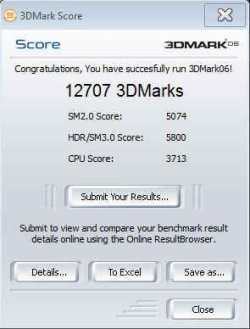
I am running SuperPi and 3dMark06 and now I am able to compare my stats with another overclockers. thanks for you and Mr. Skunksmash for the recommendations.

Unfortunately I am unable to go over 3.6GHz (1.475V) with my asus m4a78. 3.7 GHz is unstable no matter the HT / FSB / VCore / VNNB I choose. It is probably a limitation imposed by the Motherboard wich is too way limited in Vcore settings and has only 125W of TDP.

It's not a problem at all, running in 3.5GHz 1.425V (WEI 7.1) its a 7% of effective increase in CPU benchmark and that helps a lot to make my system follow the GPU (WEI 7.4) - anyway I just have a modest coolermaster TX-3 to breeze the CPU and 3.5GHz is a sweet spot for that humble setup;)

I know that its a crappy OC compared to your Intel Icores' OCs but it can serve as reference for another Phenoms + Asus owners, I mean if you want to go further with Phenoms II do NOT go ASUS M4A78 standard. you will be limited to 3.6GHz on phenom 720 because Vcore is 1.475 topped.

Here is a SS for your Knowledge base (stock value is 3463):

Thanks mr. skunksmash and wishmaster for your leads, I am turning this page and go gaming.
 

Attachments

  • SNAG-0001.jpg
    SNAG-0001.jpg
    15.6 KB · Views: 3

My Computer

Computer Manufacturer/Model Number
Personal Built (frankenstein) - WEI Here -> http://www.sevenforums.com/451826-post2094.html
OS
dual: windows 7 Ultimate x64 7600 and XP SP3
CPU
AMD PHENOM II 720 2800MHz
Motherboard
ASUS M4A78 sb700
Memory
2 X 2 OCZ REAPER 1066MHz
Graphics Card(s)
MSI 4850 1GB OC
Sound Card
REALTEK HD ONBOARD
Monitor(s) Displays
LCD SAMSUNG 21" T220
Screen Resolution
1680 x 1050 - 60Hz
Hard Drives
1.5 TB SEAGATE SATA II 7200 RPM
PSU
THERMALTAKE 430W PFC ACTIVE W0069
Case
SOLID FULL ATX
Cooling
COOLER MASTER TX-3 HEAT PIPES
Keyboard
logitech cordless keyboard
Mouse
microsoft wireless
Internet Speed
4Mb
Other Info
sound system: logitech x540 5.1
Zboard Fang gaming keyboard
PS2 joystick
Philips VOIP fone
I seem to recall reading somewhere that for AMD CPUS, they need to be kept at 50-55C MAX temp at full load ...

Thanks for the warning Mr. Wishmaster, I am aware of that and that's exactly the limit I've imposed to myself to overclock in summer (worst case scenario). I've read the Phenoms became unstable when >60ºC and can be burned when >70º.

I am running SuperPi and 3dMark06 and now I am able to compare my stats with another overclockers. thanks for you and Mr. Skunksmash for the recommendations.

Unfortunately I am unable to go over 3.6GHz (1.475V) with my asus m4a78. 3.7 GHz is unstable no matter the HT / FSB / VCore / VNNB I choose. It is probably a limitation imposed by the Motherboard wich is too way limited in Vcore settings and has only 125W of TDP.

It's not a problem at all, running in 3.5GHz 1.425V (WEI 7.1) its a 7% of effective increase in CPU benchmark and that helps a lot to make my system follow the GPU (WEI 7.4) - anyway I just have a modest coolermaster TX-3 to breeze the CPU and 3.5GHz is a sweet spot for that humble setup;)

I know that its a crappy OC compared to your Intel Icores' OCs but it can serve as reference for another Phenoms + Asus owners, I mean if you want to go further with Phenoms II do NOT go ASUS M4A78 standard. you will be limited to 3.6GHz on phenom 720 because Vcore is 1.475 topped.

Here is a SS for your Knowledge base (stock value is 3463):

Thanks mr. skunksmash and wishmaster for your leads.


that's pretty good mate, i scored less with my 8800GT (i scored 12,008 with an E2180 @ 3.8ghz) & the 8800 outperforms the 4850 by quite a bit.. so your CPU is carrying the score pretty well..

you cant compare AMD to Intel in terms of how far they clock b/c intel have always been pretty easy to crank past stock...the new phenoms are very good clockers though

its a shame your board has run out of VCORE adjustment, you could of gone further.

still im sure its plenty fast enough as it is ;)
 

My Computer

Computer Manufacturer/Model Number
myself
OS
SEVEN x64
CPU
Q9450 @ 3.6GHZ 1.34v
Motherboard
ASUS P5K PREMIUM P35
Memory
8GB 1066 buffalo firestix @ 1152mhz CL5
Graphics Card(s)
Sapphire HD 5970 + GTX260 (physX)
Sound Card
Creative X-FI Xtreme Gamer
Monitor(s) Displays
SAMSUNG 20'' & SAMSUNG 23'' (dual screens)
Screen Resolution
2048x1152 & 1680x1050
Hard Drives
1x seagate 160gb IDE & 1x seagate 160gb SATA
PSU
XCILIO 850w (78A)
Case
CM590 1x 120x38mm & 2x92x38mm / 4x 120x25mm
Cooling
AC7 PRO @ 92x38mm blower, Lamptron military bus bay controll
Keyboard
LOGITECH E110
Mouse
logitech NX5
Internet Speed
2MB
Other Info
its a continual ''work in progress''....
not too great with the AMD OC's you may have to wait for someone running a phenom for a definitive answer, but that looks pretty good....:)

dont worry about your idle temps they're not that important.....& a 50c load out temp is VERY GOOD!! :), maybe you can squeeze it for 3.8ghz

if your ''prime stable'' for 8hrs+ then its safe to say the OC is solid.


Skunksmash I disagree. Prime 95 is not a adequte test by itself. I have seen many times system that run prime 95 for hours yet still will fail tougher tests. Try it yourself rume prime 95 at full blast and the open another program. System performance is hardly impacted. Then run Linpac and try it!

The measure is not "good enough" its all or nothing. If your PC can not run with ALL subsystems at 100 percent with out silent corruption or heat failure then it is not stable.

There are other CPU tests Linpac for one, that can blue screen Prime 95 Stable PC's in minuets.

In short Prime 95 for a OC test is not enough because:

1. It simply does not stress CPUS hard enough. Other test includeing Linpac will produce temps 10-15c higher.
2. It does not stress any other subsystem at the same time. Video, Disk I/O, audio, are not impacted.
3. Due to the limited nature of Prime 95 testing, max system temps are not reached.
4. Power supply is not test at maximum load.

I have battle tested my OC at 100 percent load of all of all system drawing nearly 730 watts at the wall plug for hours! To do this I had to limit my OC to 3.8 Running only that weak sister of a test Prime 95 I could OC to 4.2 and still control heat.

The point of all this is that OC of PC's is risky in terms of possible system corruption and data loss. Great back up and far more testing than most people do is justified.
 
Last edited:

My Computer

Computer Manufacturer/Model Number
HomeBuilt
OS
Win 7 64 Ultimate- Win 7 Home premium 64- XP- Adndroid 3.1 and 2.3 Ubantu- Vista Ultimate 64
CPU
Intel I7 920 OC'd 3.8
Motherboard
Asus Rampage Extreme 11
Memory
12 gigs Dominator 1600
Graphics Card(s)
2ea Nvidia 280's SLI superclocked version
Sound Card
XFI
Monitor(s) Displays
Twin HP 2745's
Hard Drives
2ea 1 TB internal Drives - 6 TB External NAS
PSU
Thermaltake toughpower 1200 watt
Case
Lain Li A70b
Cooling
Air Cooled
Internet Speed
15 down 3 up Comcast
Got my 720BEx3 at 3.6ghz 1.55volts 52hours prime stable, 30hours linpack stable with my xigmatek s1284 w/scythe ultra kaze. It gets about 36c load too :D. i can push it to 4.1ghz stable with 1.65volts but i see not enough performance in games to go that high.

on my video card(ati 4870) i can push it 832mhz on core and 1100mhz on memory and it gets me 4 more fps in crysis. it gets about 57c load on core and vrm's get only to 70c. its 3 hours furmark stable and countless hours of gaming stable.

edit: forgot about my memory and cpu-nb. i got my memory from 1066mhz at 7-7-7-25 to 1600mhz 7-7-7-20 with 1.74volts. with my cpu-nb i got 2764mhz with 1.5volts on it.
 

My Computer

Computer Manufacturer/Model Number
home made
OS
windows 7/windows vista 64bit
CPU
amd 720BE x3 3.6ghz
Motherboard
gigabyte ud3p am3
Memory
crucial ddr3 1600mhz 2x2gb ram
Graphics Card(s)
xfx ati radeon 4870 1gb
Monitor(s) Displays
asus 21.5inch 1920X1080
Hard Drives
western digital blue 500gb
western digital scorpio 250gb
PSU
corsair 550watt
Case
cooler master cm690
Cooling
xigmatek s1283 on processor
not too great with the AMD OC's you may have to wait for someone running a phenom for a definitive answer, but that looks pretty good....:)

dont worry about your idle temps they're not that important.....& a 50c load out temp is VERY GOOD!! :), maybe you can squeeze it for 3.8ghz

if your ''prime stable'' for 8hrs+ then its safe to say the OC is solid.


Skunksmash I disagree. Prime 95 is not a adequte test by itself. I have seen many times system that run prime 95 for hours yet still will fail tougher tests. Try it yourself rume prime 95 at full blast and the open another program. System performance is hardly impacted. Then run Linpac and try it!

The measure is not "good enough" its all or nothing. If your PC can not run with ALL subsystems at 100 percent with out silent corruption or heat failure then it is not stable.

There are other CPU tests Linpac for one, that can blue screen Prime 95 Stable PC's in minuets.

In short Prime 95 for a OC test is not enough because:

1. It simply does not stress CPUS hard enough. Other test includeing Linpac will produce temps 10-15c higher.

crap...... its been used & is STILL being used by OCers worldwide


2. It does not stress any other subsystem at the same time. Video, Disk I/O, audio, are not impacted.

lol..... when testing for my max OC im not looking to stress these sub-systems anyway, why the hell would i stress test a soundcard..??, & my GPU is completely separate from these tests

3. Due to the limited nature of Prime 95 testing, max system temps are not reached.

prime is plenty good enough for the average user, 99% of OCers upon reaching max ''stable'' OC wont even be stressing the system anywhere near where these apps take the components..... ive yet to play a game or run an app which will utilize my CPU @ 100% load for the duration of use.

4. Power supply is not test at maximum load.

well...... if your PSU is a concern while OCing, then you really shouldn't be doing it, considering it only adds a few watts...:rolleyes:

I have battle tested my OC at 100 percent load of all of all system drawing nearly 730 watts at the wall plug for hours! To do this I had to limit my OC to 3.8 Running only that weak sister of a test Prime 95 I could OC to 4.2 and still control heat.

i admire your thorough testing acumen...... but its really not necessary, if there's a problem with the clocks the machine will soon let you know.... it wont BLOW UP!!

The point of all this is that OC of PC's is risky in terms of possible system corruption and data loss. Great back up and far more testing than most people do is justified.

there are many reasons you could end up with data corruption, & yes OCing is one of them....... but in 5 years of OCing ive yet to loose / corrupt Data on my HDD


dont get me wrong, some of what you've said has merit....but its a little off for you to completely disregard ''prime'' as a viable app, its a tried & tested method.... proven to determine ALL OC's stability.

i personally dont use prime, i use Orthos...... this app is UBER intensive on ''priority 8 / blend & stress''

IMO, all in all....taking your rig to the brink of destruction, is not necessary for the majority of clockers.... ;)
 

My Computer

Computer Manufacturer/Model Number
myself
OS
SEVEN x64
CPU
Q9450 @ 3.6GHZ 1.34v
Motherboard
ASUS P5K PREMIUM P35
Memory
8GB 1066 buffalo firestix @ 1152mhz CL5
Graphics Card(s)
Sapphire HD 5970 + GTX260 (physX)
Sound Card
Creative X-FI Xtreme Gamer
Monitor(s) Displays
SAMSUNG 20'' & SAMSUNG 23'' (dual screens)
Screen Resolution
2048x1152 & 1680x1050
Hard Drives
1x seagate 160gb IDE & 1x seagate 160gb SATA
PSU
XCILIO 850w (78A)
Case
CM590 1x 120x38mm & 2x92x38mm / 4x 120x25mm
Cooling
AC7 PRO @ 92x38mm blower, Lamptron military bus bay controll
Keyboard
LOGITECH E110
Mouse
logitech NX5
Internet Speed
2MB
Other Info
its a continual ''work in progress''....
you should all use a variety of stress testers, i could run prime95, linpack, and wprime all day without any BSOD but as soon is start a game its bluescreens on me.
 

My Computer

Computer Manufacturer/Model Number
home made
OS
windows 7/windows vista 64bit
CPU
amd 720BE x3 3.6ghz
Motherboard
gigabyte ud3p am3
Memory
crucial ddr3 1600mhz 2x2gb ram
Graphics Card(s)
xfx ati radeon 4870 1gb
Monitor(s) Displays
asus 21.5inch 1920X1080
Hard Drives
western digital blue 500gb
western digital scorpio 250gb
PSU
corsair 550watt
Case
cooler master cm690
Cooling
xigmatek s1283 on processor
Got my 720BEx3 at 3.6ghz 1.55volts 52hours prime stable, 30hours linpack stable with my xigmatek s1284 w/scythe ultra kaze. It gets about 36c load too :D. i can push it to 4.1ghz stable with 1.65volts but i see not enough performance in games to go that high.


on my video card(ati 4870) i can push it 832mhz on core and 1100mhz on memory and it gets me 4 more fps in crysis. it gets about 57c load on core and vrm's get only to 70c. its 3 hours furmark stable and countless hours of gaming stable.

edit: forgot about my memory and cpu-nb. i got my memory from 1066mhz at 7-7-7-25 to 1600mhz 7-7-7-20 with 1.74volts. with my cpu-nb i got 2764mhz with 1.5volts on it.

Mr. Mooneyham, thanks for the update. So far I can see setting 1.49V vcore to get 3.6 is OK in my case. I was wondering if that Vcore wasn't too much... but you had reached 1.65V? oh boy, you're really brave!

you got really impressive NB and temperature values. I will look for your cooler review.
I am supposing you can get these high NB values because you're choose DDR3 instead DDR2, is that correct?

BTW don't you have a 3dmark06 score of your 3.6GHz setup to post us? or your WEI scores?

Do you think its ok to get 55ºC fully load on the hottest ambient temp - 32C?
Thanks a lot!
 
Last edited:

My Computer

Computer Manufacturer/Model Number
Personal Built (frankenstein) - WEI Here -> http://www.sevenforums.com/451826-post2094.html
OS
dual: windows 7 Ultimate x64 7600 and XP SP3
CPU
AMD PHENOM II 720 2800MHz
Motherboard
ASUS M4A78 sb700
Memory
2 X 2 OCZ REAPER 1066MHz
Graphics Card(s)
MSI 4850 1GB OC
Sound Card
REALTEK HD ONBOARD
Monitor(s) Displays
LCD SAMSUNG 21" T220
Screen Resolution
1680 x 1050 - 60Hz
Hard Drives
1.5 TB SEAGATE SATA II 7200 RPM
PSU
THERMALTAKE 430W PFC ACTIVE W0069
Case
SOLID FULL ATX
Cooling
COOLER MASTER TX-3 HEAT PIPES
Keyboard
logitech cordless keyboard
Mouse
microsoft wireless
Internet Speed
4Mb
Other Info
sound system: logitech x540 5.1
Zboard Fang gaming keyboard
PS2 joystick
Philips VOIP fone
Status
Not open for further replies.
Back
Top