Post Your Overclock!

Status
Not open for further replies.
Indeed, that is one thing I didn't really think of, thank the computer Gurus for CNQ.

Most definite. I just enabled mine 2 days ago.

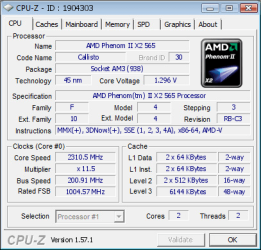
Have a look at this image. :D:)


Attachments

  • 1904303.png
    1904303.png
    38.8 KB · Views: 12

My Computer

Computer Manufacturer/Model Number
Customised
OS
Windows 7 64Bit Ultimate Edition SP1
CPU
AMD Phenom II X5 955 @ 3200 Mhz
Motherboard
Asus M5A99X EVO
Memory
G.Skill 12GB DDR3 1333MHz
Graphics Card(s)
Palit GeForce GTX 550 Ti OC Sonic 1GB
Sound Card
Onboard
Monitor(s) Displays
LG 32" HDTV
Screen Resolution
1920x1080 @ 60Hz
Hard Drives
Internal 250GB SATA 3.0 Western Digital WDC WD25 00AAKX-001CA0

Internal 500GB SATA 2.0 Seagate ST350041 3AS

Internal 500GB SATA 2.0 Western Digital WDC WD50 00AAKS-00WWP

External 1TB USB 2.0 Western Digital

External 2TB USB 2.0 Buffalo
PSU
Colors-IT 750w BLACK 12CM Silent
Case
Xigamatek CPC-T45UB-U01 Asgard Chassis
Cooling
4 120mm Fans In Total
Keyboard
ADVENT Illuminated Keyboard
Mouse
Genius
Internet Speed
30MB
Other Info
CPU Cooler - Cooler Master Hyper 212 Plus Cooler
I can unlock my Phenom to a x4, but the wattage goes right up and surpasses my Mobo which is only 90watts. CNQ would work lovely for a 4 core.
 

My Computer

Computer Manufacturer/Model Number
Customised
OS
Windows 7 64Bit Ultimate Edition SP1
CPU
AMD Phenom II X5 955 @ 3200 Mhz
Motherboard
Asus M5A99X EVO
Memory
G.Skill 12GB DDR3 1333MHz
Graphics Card(s)
Palit GeForce GTX 550 Ti OC Sonic 1GB
Sound Card
Onboard
Monitor(s) Displays
LG 32" HDTV
Screen Resolution
1920x1080 @ 60Hz
Hard Drives
Internal 250GB SATA 3.0 Western Digital WDC WD25 00AAKX-001CA0

Internal 500GB SATA 2.0 Seagate ST350041 3AS

Internal 500GB SATA 2.0 Western Digital WDC WD50 00AAKS-00WWP

External 1TB USB 2.0 Western Digital

External 2TB USB 2.0 Buffalo
PSU
Colors-IT 750w BLACK 12CM Silent
Case
Xigamatek CPC-T45UB-U01 Asgard Chassis
Cooling
4 120mm Fans In Total
Keyboard
ADVENT Illuminated Keyboard
Mouse
Genius
Internet Speed
30MB
Other Info
CPU Cooler - Cooler Master Hyper 212 Plus Cooler
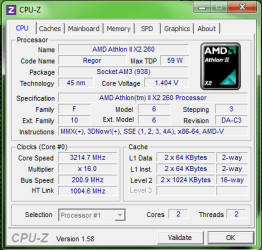
I caught it during a moment of high CPU usage.
 

Attachments

  • cpu2.png
    cpu2.png
    18.2 KB · Views: 7

My Computer

Computer type
PC/Desktop
Computer Manufacturer/Model Number
Frankenstein PC
OS
Windows 7 Home Premium 64-bit SP1
CPU
Intel core i7 920 @ 2.67Ghz; Bloomfield 45nm Technology
Motherboard
Intel Corporation DX58SO (J1PR)
Memory
16GB Dual-Channel DDR3 @ 540MHz (7-7-7-19)
Graphics Card(s)
4095MB NVIDIA GeForce GTX 960 (EVGA)
Sound Card
N/A Integrated Audio
Monitor(s) Displays
Acer S231HLbid LED Monitor 23"
Screen Resolution
1920x1080 1080p 60Hz
Hard Drives
BOOT: 59GB ADATA SP900 (SSD)
STORAGE 1: 977GB Hitachi HDS721010CLA (SATA) @7200RPM;
STORAGE 2: 465GB Western Digital WDC WD5000AAKS-65YGA0 (SATA) @ 7200RPM;
PSU
EVGA SuperNOVA 750 G1 80+ Gold (120-G1-0750-XR)
Case
Cooler Master Elite Gaming Case Black 430
Cooling
Cooler Master Hyper 212 Heatsink. Front and rear 120mm fan
Keyboard
Rosewill RIKB-11003
Mouse
James Donkey 112S
Internet Speed
200/40
Antivirus
Avast! Antivirus Free
Browser
Cyberfox x64 / FireFox / PaleMoon x64; kept up-to-date
Other Info
Windows Installed on March 21, 2014

My Computer

Computer Manufacturer/Model Number
Customised
OS
Windows 7 64Bit Ultimate Edition SP1
CPU
AMD Phenom II X5 955 @ 3200 Mhz
Motherboard
Asus M5A99X EVO
Memory
G.Skill 12GB DDR3 1333MHz
Graphics Card(s)
Palit GeForce GTX 550 Ti OC Sonic 1GB
Sound Card
Onboard
Monitor(s) Displays
LG 32" HDTV
Screen Resolution
1920x1080 @ 60Hz
Hard Drives
Internal 250GB SATA 3.0 Western Digital WDC WD25 00AAKX-001CA0

Internal 500GB SATA 2.0 Seagate ST350041 3AS

Internal 500GB SATA 2.0 Western Digital WDC WD50 00AAKS-00WWP

External 1TB USB 2.0 Western Digital

External 2TB USB 2.0 Buffalo
PSU
Colors-IT 750w BLACK 12CM Silent
Case
Xigamatek CPC-T45UB-U01 Asgard Chassis
Cooling
4 120mm Fans In Total
Keyboard
ADVENT Illuminated Keyboard
Mouse
Genius
Internet Speed
30MB
Other Info
CPU Cooler - Cooler Master Hyper 212 Plus Cooler
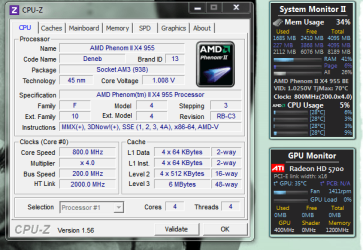
heres mine. just stock for right now on H70 cooler
 

Attachments

  • sadasdasdasdas.png
    sadasdasdasdas.png
    40.2 KB · Views: 44

My Computer

Computer type
PC/Desktop
Computer Manufacturer/Model Number
love-amd...also love-nvidia
OS
Windows 8.1 Pro x64
CPU
AMD FX 8320 OC'd to 4.5 GHz
Motherboard
ASUS Sabertooth 990FX AM3+ SATA III
Memory
16GB G.Skill Sniper 1866 9-10-9-28 1.5v
Graphics Card(s)
EVGA GeForce GTX 650 TI SLi
Sound Card
HD on board Audio
Monitor(s) Displays
LG FLATRON E2260, Vizio 47 inch LCD 1080p
Screen Resolution
1920x1080
Hard Drives
Crucial CT64M4 SSD
Western Digital 750Gb Caviar Black 7200RPM 32MB Cache
Western Digital 2 TB Cavier Green 7200RPM 16MB Cache
PSU
Corsair 700 watt PSU
Case
Cooler Master CM II Advanced Nvidia Edition
Cooling
Corsair H70 Hydro Cooling
Keyboard
Microsoft Sidewinder X4
Mouse
CM Storm Spawn 3500 DPI
Internet Speed
150+ mbps
Other Info
Sound Blaster Tactic Alpha THX headset

My Computer

Computer Manufacturer/Model Number
Customised
OS
Windows 7 64Bit Ultimate Edition SP1
CPU
AMD Phenom II X5 955 @ 3200 Mhz
Motherboard
Asus M5A99X EVO
Memory
G.Skill 12GB DDR3 1333MHz
Graphics Card(s)
Palit GeForce GTX 550 Ti OC Sonic 1GB
Sound Card
Onboard
Monitor(s) Displays
LG 32" HDTV
Screen Resolution
1920x1080 @ 60Hz
Hard Drives
Internal 250GB SATA 3.0 Western Digital WDC WD25 00AAKX-001CA0

Internal 500GB SATA 2.0 Seagate ST350041 3AS

Internal 500GB SATA 2.0 Western Digital WDC WD50 00AAKS-00WWP

External 1TB USB 2.0 Western Digital

External 2TB USB 2.0 Buffalo
PSU
Colors-IT 750w BLACK 12CM Silent
Case
Xigamatek CPC-T45UB-U01 Asgard Chassis
Cooling
4 120mm Fans In Total
Keyboard
ADVENT Illuminated Keyboard
Mouse
Genius
Internet Speed
30MB
Other Info
CPU Cooler - Cooler Master Hyper 212 Plus Cooler
Lol! I thought I was seeing things when I looked at the CPU. I didn't see the II in Athlon II, and i thought "It's broken or something."

CNQ. That's hilarious, you got me. What does it do with CNQ turned off?
With CNQ turned off the CPU heatsink fan ramps-up and the processor goes into full performance mode, even though what it is pushing out is not needed. And my room will start to spike up in temperature due to the excessive heat which is one of the reasons I have Cool n' Quiet on.

This is what Cool n' Quiet is made to do:

  • Helps enable electricity cost savings.
  • Helps enable smaller form factors that take up less space for both practical and aesthetic purposes.
  • Helps enable systems that are quiet and do not generate excessive heat - ideal for growing media center PC market.
Cool n' Quiet 2.0 Additions:

  • Independent Dynamic Core Technology- Helps users get more efficient performance by dynamically adjusting individual core frequencies as required by utilization needs
  • Dual Dynamic Power Management™ - Helps improve platform efficiency by providing full-speed memory performance while enabling decreased system power consumption.
  • AMD CoolCore™ Technology - Helps users get more efficient performance by dynamically activating or turning off parts of the processor.
  • AMD Wideband Frequency Control - Allows the processor to respond more precisely to user demands, maximizing performance to deliver a better PC user experience.
  • Multi-Point Thermal Control - Prevents processor from creating too much heat and enables a cooler, quieter PC experience
Cool n' Quiet 3.0 Additions:

  • AMD Smart Fetch Technology - Fewer processing cycles are required to locate information since data storage is streamlined and stored in the shared L3 cache. Provides CPU power savings by maintaining processor sleep states and sharing cached data between cores.
  • 45 nm Process Technology with Immersion Lithography - puts more transistors in less space and delivers better processor performance while using less power.

Thanks for the info. I already knew it, but the 3.0 additions was new to me, so that was good to find out. :)

Actually, what I was asking was how fast the CPU runs without CNQ enabled.
 

My Computer

Computer type
PC/Desktop
Computer Manufacturer/Model Number
Mellon Labs (custom build)
OS
Win 7 Pro x64/Win 10 Pro x64 dual boot
CPU
AMD FX 8350 Vishera @ 4200
Motherboard
ASUS M5A97 R2.0
Memory
16 GB Mushkin Blackline DDR3-2400 @ 1866 (9-10-10-10-31)
Graphics Card(s)
XFX Radeon R9 280 Double D Black Edition
Sound Card
Realtek HD Audio on MB. Sounds great.
Monitor(s) Displays
Acer 24", Acer 22"
Screen Resolution
3840 x 1080
Hard Drives
1 x Mushkin Chronos 120 GB SSD (Win 10)
1 x Samsung 850 EVO 250 GB SSD (Win 7)
1 x WD 1TB SATA Blue
1 x WD 1TB SATA Green
PSU
Corsair TX-750
Case
CoolerMaster HAF 912+
Cooling
Coolermaster Seidon 240M Liquid AIO. 6 case fans
Keyboard
Logitech G710+
Mouse
Logitech G500s
Internet Speed
Much better since I got fiber, but still way overpriced.
Antivirus
MSE, Malware Bytes for scanning
Browser
Firefox
Other Info
Corsair VOID USB headphones.

A Mellon Labs X-1 - LCD Smartie driven system status display.

Brought to you by the letter E
Lol! I thought I was seeing things when I looked at the CPU. I didn't see the II in Athlon II, and i thought "It's broken or something."

CNQ. That's hilarious, you got me. What does it do with CNQ turned off?
With CNQ turned off the CPU heatsink fan ramps-up and the processor goes into full performance mode, even though what it is pushing out is not needed. And my room will start to spike up in temperature due to the excessive heat which is one of the reasons I have Cool n' Quiet on.

This is what Cool n' Quiet is made to do:

  • Helps enable electricity cost savings.
  • Helps enable smaller form factors that take up less space for both practical and aesthetic purposes.
  • Helps enable systems that are quiet and do not generate excessive heat - ideal for growing media center PC market.
Cool n' Quiet 2.0 Additions:

  • Independent Dynamic Core Technology- Helps users get more efficient performance by dynamically adjusting individual core frequencies as required by utilization needs
  • Dual Dynamic Power Management™ - Helps improve platform efficiency by providing full-speed memory performance while enabling decreased system power consumption.
  • AMD CoolCore™ Technology - Helps users get more efficient performance by dynamically activating or turning off parts of the processor.
  • AMD Wideband Frequency Control - Allows the processor to respond more precisely to user demands, maximizing performance to deliver a better PC user experience.
  • Multi-Point Thermal Control - Prevents processor from creating too much heat and enables a cooler, quieter PC experience
Cool n' Quiet 3.0 Additions:

  • AMD Smart Fetch Technology - Fewer processing cycles are required to locate information since data storage is streamlined and stored in the shared L3 cache. Provides CPU power savings by maintaining processor sleep states and sharing cached data between cores.
  • 45 nm Process Technology with Immersion Lithography - puts more transistors in less space and delivers better processor performance while using less power.
Thanks for the info. I already knew it, but the 3.0 additions was new to me, so that was good to find out. :)

Actually, what I was asking was how fast the CPU runs without CNQ enabled.

When CNQ is off, the cpu should run at its highest.
 

My Computer

Computer Manufacturer/Model Number
Customised
OS
Windows 7 64Bit Ultimate Edition SP1
CPU
AMD Phenom II X5 955 @ 3200 Mhz
Motherboard
Asus M5A99X EVO
Memory
G.Skill 12GB DDR3 1333MHz
Graphics Card(s)
Palit GeForce GTX 550 Ti OC Sonic 1GB
Sound Card
Onboard
Monitor(s) Displays
LG 32" HDTV
Screen Resolution
1920x1080 @ 60Hz
Hard Drives
Internal 250GB SATA 3.0 Western Digital WDC WD25 00AAKX-001CA0

Internal 500GB SATA 2.0 Seagate ST350041 3AS

Internal 500GB SATA 2.0 Western Digital WDC WD50 00AAKS-00WWP

External 1TB USB 2.0 Western Digital

External 2TB USB 2.0 Buffalo
PSU
Colors-IT 750w BLACK 12CM Silent
Case
Xigamatek CPC-T45UB-U01 Asgard Chassis
Cooling
4 120mm Fans In Total
Keyboard
ADVENT Illuminated Keyboard
Mouse
Genius
Internet Speed
30MB
Other Info
CPU Cooler - Cooler Master Hyper 212 Plus Cooler
@Mellon Head:
The CPU performs amazingly well with CNQ enabled, and the small room I basically live in stays cool due to CNQ keeping the CPU at the coldest temps I have ever seen of a processor that I have owned. It is very fast too, it actually outperforms and stays colder than my friends i7 920.
:roflmao:
 

My Computer

Computer type
PC/Desktop
Computer Manufacturer/Model Number
Frankenstein PC
OS
Windows 7 Home Premium 64-bit SP1
CPU
Intel core i7 920 @ 2.67Ghz; Bloomfield 45nm Technology
Motherboard
Intel Corporation DX58SO (J1PR)
Memory
16GB Dual-Channel DDR3 @ 540MHz (7-7-7-19)
Graphics Card(s)
4095MB NVIDIA GeForce GTX 960 (EVGA)
Sound Card
N/A Integrated Audio
Monitor(s) Displays
Acer S231HLbid LED Monitor 23"
Screen Resolution
1920x1080 1080p 60Hz
Hard Drives
BOOT: 59GB ADATA SP900 (SSD)
STORAGE 1: 977GB Hitachi HDS721010CLA (SATA) @7200RPM;
STORAGE 2: 465GB Western Digital WDC WD5000AAKS-65YGA0 (SATA) @ 7200RPM;
PSU
EVGA SuperNOVA 750 G1 80+ Gold (120-G1-0750-XR)
Case
Cooler Master Elite Gaming Case Black 430
Cooling
Cooler Master Hyper 212 Heatsink. Front and rear 120mm fan
Keyboard
Rosewill RIKB-11003
Mouse
James Donkey 112S
Internet Speed
200/40
Antivirus
Avast! Antivirus Free
Browser
Cyberfox x64 / FireFox / PaleMoon x64; kept up-to-date
Other Info
Windows Installed on March 21, 2014
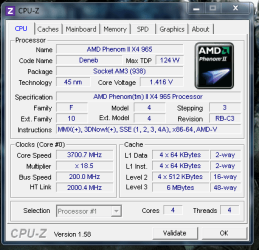
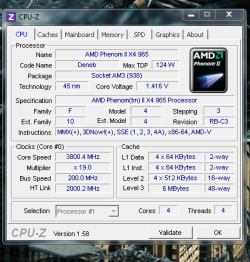
Well here is mine 965 BE installed in a new board :D Im sorry i just had to up the multiplyer a bit
 

Attachments

  • cpu.PNG
    cpu.PNG
    19.1 KB · Views: 13

My Computer

Computer type
PC/Desktop
Computer Manufacturer/Model Number
CoreI7-6700K MrFingerIII Special Builds
OS
Windows 10 Home Premium 64bit sp1
CPU
Intel I7-6700K @ 4.6 Ghz 1.344 volts everyday OC
Motherboard
Asrock Fatality K6 Z170 Socket 1151
Memory
32GB G-Skill TridentZ 3200mhz 16-18-18-38 DDR4
Graphics Card(s)
Sli Gigabyte Windforce GTX 980 G1
Sound Card
AC97 Creative Rage Tactic 3D Headphones Bluetooth
Monitor(s) Displays
27" Asus ROG Swift PG278Q G-Sync 48" Vizio Smart HD TV
Screen Resolution
2560x1440p 27"- 48" Currently Gaming at 2560x1440p Res 2K
Hard Drives
250GB Samsung Evo840SSD Seagate baracuda 500 GB WD Mybook 500Gb 1TB Seagate Barracuda
PSU
HX1050w Corsair Silver 80plus certified crosfire/sli
Case
Enthod Pro Full Tower
Cooling
Corsair H110i GT 280 mm High Performance WaterBlock
Keyboard
Logitech wireless keyboard
Mouse
Logitech wireless mouse
Internet Speed
Cox Cable 100+ mb
Antivirus
WebRoot Spysweeper with Antivirus
Browser
IE-10, Chrome, Opera
Other Info
My Other Rig is a AMD FX8320E @4.6Ghz 16GB Ballistic Sport Ram
Mobo Asrock Fatality 990FX 120GB OCZ SSD 1TB Seagate Barracuda Corsair H75 Cooling PSU Corsair CX750
GPU GTX Gigabyte 970G1
this is my best OC for now we will see if i can get it up a lil more :D
and this it with HT still on

CPU-Z Validator 3.1
 

My Computer

Computer Manufacturer/Model Number
Myself - Costume billed First time with water-cooling (:
OS
Windows 7 Ultimate 64bit SP1
CPU
Intel Core i7 980x @ 4.6GHz
Motherboard
Asus Rampage III Extreme
Memory
12GB (3 X 4GB ) Corsair Dominator GT 2000Mhz
Graphics Card(s)
GTX 580 in Tri-SLI
Sound Card
On Board
Monitor(s) Displays
Samsung BX2450
Screen Resolution
1920 x 1080
Hard Drives
OCZ Vertex 3 240GB SATA 3
WD Caviar Black 1TB SATA 3
PSU
Corsair AX1200 80% Gold
Case
Cooler Master HAF X
Cooling
Costume water-cooling
Keyboard
Microsoft x4
Mouse
Razor Naga Molten
Internet Speed
12 Mbps
Other Info
2 loop water-cooled pc (:
1 for ram CPU and Mobo
2 for my Sli GTX 580's

My Computer

Computer type
PC/Desktop
Computer Manufacturer/Model Number
Jeepmann/Custom Built
OS
Windows 7 Ultimate 64bit
CPU
Intel Core i7-2600K Sandy Bridge 3.4GHz (@[email protected])
Motherboard
Asus Maximus IV Extreme LGA 1155 Intel P67
Memory
G.SKILL Ripjaws X Series 16GB 1600Mhz (4 x 4GB) (Stock)
Graphics Card(s)
x2 EVGA GeForce GTX 760's w/ACXCoolers in SLI Surround
Sound Card
On-Board
Monitor(s) Displays
3x Acer 24" HDMI Widescreen LCD Monitor
Screen Resolution
3@ 1920x1080 (5760x1080 In Surround)
Hard Drives
Samsung 830 128gb ssd
Western Digital Caviar Black 640GB 7200 RPM
Western Digital Caviar Black 500GB 7200 RPM
Seagate 2tb 7200 RPM
PSU
COOLER MASTER Silent Pro 1000W
Case
COOLER MASTER HAF X Black
Cooling
CORSAIR Hydro H70
Keyboard
Logitech G510
Mouse
Zalman M300
Internet Speed
100mbps-ish Down & 5mbps-ish Up
Other Info
I installed the stock 140mm case fan outside of case then installed the H70+ 1 of its 120mm fans inside case. Used the 2nd 120mm from the H70 to go in the Gpu tunnel.
230mm Front,200mm side,200mm top,120mm Gpu tunnel,120mm&140mm on H70.
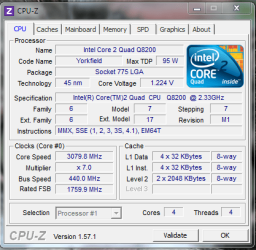
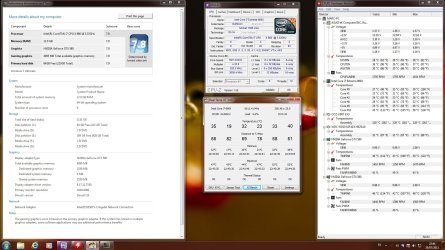
Not much but still a gain of 743Mhz :(

Capture.PNG
 

My Computer

Computer type
PC/Desktop
Computer Manufacturer/Model Number
Custom Build
OS
Windows 10 Pro x64, Arch Linux
CPU
Intel Core 2 Quad Q8200 OC'd 3.08GHz
Motherboard
Asus Rampage formula LGA775
Memory
8GB DDR2 900Mhz
Graphics Card(s)
MSI GT730 2GB GDDR5 (Kepler)
Sound Card
Supreme FX2
Monitor(s) Displays
Samsung LS22F350 LED
Screen Resolution
1080P
Hard Drives
Kingston SSDNow UV400 120GB, 500GB Hitachi, 2TB Samsung, 500GB Seagate FreeAgent, 640GB Samsung, 160GB Toshiba (Arch)
PSU
AeroCool 500W Bronze
Cooling
Cooler Master V6 + 3X fans
Keyboard
Prolink keyboard
Mouse
Logitech M705
Internet Speed
1MiB/s
Browser
Chrome Beta
this is my best OC for now we will see if i can get it up a lil more :D
and this it with HT still on

CPU-Z Validator 3.1

Nice oc :thumbsup:
What volts are you at? Hows temps? I did not see ether in your snip.

thank mate im really new to oc so it is nice to get some good feedback :)
the vcore is 1.55000 tamps idle 39c 40c on the hotest core and 95c at lod
not for a 24/7 lol i can ron a 24/7 of a 4.6 or 4.8 with 1.40000 or 1.450000
on the 4.6 lod tamps are 69c and the 4.8 79c 80c
but i like the 4.6 more dont like to much volts for a 24/7
 

Attachments

  • 5GHz.jpg
    5GHz.jpg
    245.8 KB · Views: 15

My Computer

Computer Manufacturer/Model Number
Myself - Costume billed First time with water-cooling (:
OS
Windows 7 Ultimate 64bit SP1
CPU
Intel Core i7 980x @ 4.6GHz
Motherboard
Asus Rampage III Extreme
Memory
12GB (3 X 4GB ) Corsair Dominator GT 2000Mhz
Graphics Card(s)
GTX 580 in Tri-SLI
Sound Card
On Board
Monitor(s) Displays
Samsung BX2450
Screen Resolution
1920 x 1080
Hard Drives
OCZ Vertex 3 240GB SATA 3
WD Caviar Black 1TB SATA 3
PSU
Corsair AX1200 80% Gold
Case
Cooler Master HAF X
Cooling
Costume water-cooling
Keyboard
Microsoft x4
Mouse
Razor Naga Molten
Internet Speed
12 Mbps
Other Info
2 loop water-cooled pc (:
1 for ram CPU and Mobo
2 for my Sli GTX 580's
Sweet oc and sweet rig Ghostdog , defininatly a bit toasty under load tho, but fun for a bit of benchmarking and stuff :cool:
 

My Computer

OS
Windows 7 Professional 64 bit
this is my best OC for now we will see if i can get it up a lil more :D
and this it with HT still on

CPU-Z Validator 3.1

Nice oc :thumbsup:
What volts are you at? Hows temps? I did not see ether in your snip.

thank mate im really new to oc so it is nice to get some good feedback :)
the vcore is 1.55000 tamps idle 39c 40c on the hotest core and 95c at lod
not for a 24/7 lol i can ron a 24/7 of a 4.6 or 4.8 with 1.40000 or 1.450000
on the 4.6 lod tamps are 69c and the 4.8 79c 80c
but i like the 4.6 more dont like to much volts for a 24/7


Just FYI.

Intel® Core™ i7-980X Processor Extreme Edition

Your Tcase, max temp for the CPU case, is 67.9°C add 5°C for the core temp, Intel's recommended max core temp is 72.9°C.
A lot of people go over this recommended temp, it's a personal choice, but good to keep in mind.

I keep mine below the recommended max temp, but did go over while testing for max OC frequency.
My 24/7 is 3.84 MHz max temp during Prime95 is 57°C.
Max OC 4.2 MHz max temp during Prime95 was 82°C.

Nice OC's, just keep an eye on the temps.
 

My Computer

Computer type
PC/Desktop
Computer Manufacturer/Model Number
76~2.0
OS
Windows 7 Ult x64 - SP1/ Windows 8 Pro x64
CPU
Intel Core i5-3570K 4.6GHz
Motherboard
Gigabyte GA-Z77X UD3H, f18
Memory
8GB (2X4GB) DDR3 1600 Corsair Vengeance CL8 1.5v
Graphics Card(s)
Sapphire HD 7770 Vapor-X OC 1GB DDR5
Sound Card
Onboard VIA VT2021
Monitor(s) Displays
22" LCD Dell
Screen Resolution
1680x1050
Hard Drives
Samsung 840Pro 128GB SSD,
Seagate Barracuda 500GB SATA2 7200rpm 32MB cache, Seagate Barracuda 1TB SATA2 7200rpm 32MB cache,
PSU
Corsair HX650W
Case
Cooler Master Storm Scout
Cooling
Corsair H80 2x12cm Noctua NF P12 , 2x14cm case fans
Keyboard
Logitech Wave
Mouse
CM Sentinel
Internet Speed
Dismal
Antivirus
Avast
Browser
Opera Next
Other Info
Haswell laptop: HP Envy 17t-j, i7-4700MQ, GeForce 740M 2GB DDR3, 17.3" Full HD 1920x1080, 16GB RAM, Samsung 840 Pro 128GB, 1TB Hitachi 7200 HDD,
Desktop: eSATA ports,
External eSATA Seagate 500GB SATA2 7200rpm,
External WD USB 500GB
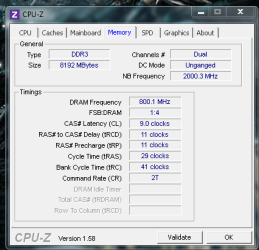
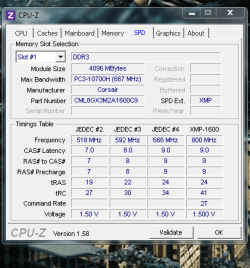
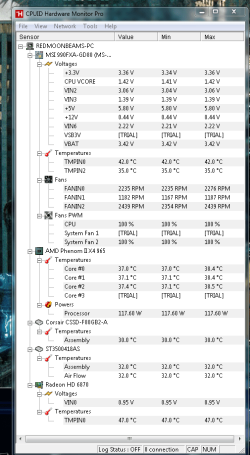
slight oc nothing fancy like you guys but i might bring it back down

Im just waiting on the new chips to arrive i up the multiplyer and ram to 1600mhz from 1333mhz i didnt fiddle with the voltages they are actually with in spec already
 

Attachments

  • oc.PNG
    oc.PNG
    31.5 KB · Views: 4
  • speed.PNG
    speed.PNG
    15.6 KB · Views: 0
  • mem.PNG
    mem.PNG
    28.5 KB · Views: 1
  • temps.PNG
    temps.PNG
    42.8 KB · Views: 5

My Computer

Computer type
PC/Desktop
Computer Manufacturer/Model Number
CoreI7-6700K MrFingerIII Special Builds
OS
Windows 10 Home Premium 64bit sp1
CPU
Intel I7-6700K @ 4.6 Ghz 1.344 volts everyday OC
Motherboard
Asrock Fatality K6 Z170 Socket 1151
Memory
32GB G-Skill TridentZ 3200mhz 16-18-18-38 DDR4
Graphics Card(s)
Sli Gigabyte Windforce GTX 980 G1
Sound Card
AC97 Creative Rage Tactic 3D Headphones Bluetooth
Monitor(s) Displays
27" Asus ROG Swift PG278Q G-Sync 48" Vizio Smart HD TV
Screen Resolution
2560x1440p 27"- 48" Currently Gaming at 2560x1440p Res 2K
Hard Drives
250GB Samsung Evo840SSD Seagate baracuda 500 GB WD Mybook 500Gb 1TB Seagate Barracuda
PSU
HX1050w Corsair Silver 80plus certified crosfire/sli
Case
Enthod Pro Full Tower
Cooling
Corsair H110i GT 280 mm High Performance WaterBlock
Keyboard
Logitech wireless keyboard
Mouse
Logitech wireless mouse
Internet Speed
Cox Cable 100+ mb
Antivirus
WebRoot Spysweeper with Antivirus
Browser
IE-10, Chrome, Opera
Other Info
My Other Rig is a AMD FX8320E @4.6Ghz 16GB Ballistic Sport Ram
Mobo Asrock Fatality 990FX 120GB OCZ SSD 1TB Seagate Barracuda Corsair H75 Cooling PSU Corsair CX750
GPU GTX Gigabyte 970G1
Nice oc :thumbsup:
What volts are you at? Hows temps? I did not see ether in your snip.

thank mate im really new to oc so it is nice to get some good feedback :)
the vcore is 1.55000 tamps idle 39c 40c on the hotest core and 95c at lod
not for a 24/7 lol i can ron a 24/7 of a 4.6 or 4.8 with 1.40000 or 1.450000
on the 4.6 lod tamps are 69c and the 4.8 79c 80c
but i like the 4.6 more dont like to much volts for a 24/7


Just FYI.

Intel® Core™ i7-980X Processor Extreme Edition

Your Tcase, max temp for the CPU case, is 67.9°C add 5°C for the core temp, Intel's recommended max core temp is 72.9°C.
A lot of people go over this recommended temp, it's a personal choice, but good to keep in mind.

I keep mine below the recommended max temp, but did go over while testing for max OC frequency.
My 24/7 is 3.84 MHz max temp during Prime95 is 57°C.
Max OC 4.2 MHz max temp during Prime95 was 82°C.

Nice OC's, just keep an eye on the temps.

thank mate didnt know that my new 24/7 is 4.4GHZ with a Vcore of 1.35 max tamps are 61 now i fell a lot better :D

new bast oc http://valid.canardpc.com/show_oc.php?id=1916824
 

My Computer

Computer Manufacturer/Model Number
Myself - Costume billed First time with water-cooling (:
OS
Windows 7 Ultimate 64bit SP1
CPU
Intel Core i7 980x @ 4.6GHz
Motherboard
Asus Rampage III Extreme
Memory
12GB (3 X 4GB ) Corsair Dominator GT 2000Mhz
Graphics Card(s)
GTX 580 in Tri-SLI
Sound Card
On Board
Monitor(s) Displays
Samsung BX2450
Screen Resolution
1920 x 1080
Hard Drives
OCZ Vertex 3 240GB SATA 3
WD Caviar Black 1TB SATA 3
PSU
Corsair AX1200 80% Gold
Case
Cooler Master HAF X
Cooling
Costume water-cooling
Keyboard
Microsoft x4
Mouse
Razor Naga Molten
Internet Speed
12 Mbps
Other Info
2 loop water-cooled pc (:
1 for ram CPU and Mobo
2 for my Sli GTX 580's
You're welcome.
 

My Computer

Computer type
PC/Desktop
Computer Manufacturer/Model Number
76~2.0
OS
Windows 7 Ult x64 - SP1/ Windows 8 Pro x64
CPU
Intel Core i5-3570K 4.6GHz
Motherboard
Gigabyte GA-Z77X UD3H, f18
Memory
8GB (2X4GB) DDR3 1600 Corsair Vengeance CL8 1.5v
Graphics Card(s)
Sapphire HD 7770 Vapor-X OC 1GB DDR5
Sound Card
Onboard VIA VT2021
Monitor(s) Displays
22" LCD Dell
Screen Resolution
1680x1050
Hard Drives
Samsung 840Pro 128GB SSD,
Seagate Barracuda 500GB SATA2 7200rpm 32MB cache, Seagate Barracuda 1TB SATA2 7200rpm 32MB cache,
PSU
Corsair HX650W
Case
Cooler Master Storm Scout
Cooling
Corsair H80 2x12cm Noctua NF P12 , 2x14cm case fans
Keyboard
Logitech Wave
Mouse
CM Sentinel
Internet Speed
Dismal
Antivirus
Avast
Browser
Opera Next
Other Info
Haswell laptop: HP Envy 17t-j, i7-4700MQ, GeForce 740M 2GB DDR3, 17.3" Full HD 1920x1080, 16GB RAM, Samsung 840 Pro 128GB, 1TB Hitachi 7200 HDD,
Desktop: eSATA ports,
External eSATA Seagate 500GB SATA2 7200rpm,
External WD USB 500GB
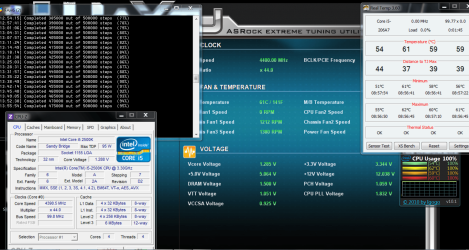
Here's mine. It will go faster but this is every day.
6 HR @ 100% 4.4.PNG
 

My Computers

System One System Two

  • Computer type
    PC/Desktop
    Computer Manufacturer/Model Number
    ALWAYS UNDER CONSTRUCTION
    OS
    Windows 11 Pro
    CPU
    Ryzen 9 5900X
    Motherboard
    Asus X570 Crosshair Viii Hero
    Memory
    32GB G Skill DDR4-3600
    Graphics Card(s)
    EVGA RTX 3080 FTW 3 Ultra
    Sound Card
    On Board/Sennheiser PC37X Headset
    Monitor(s) Displays
    3 X Asus 27"
    Screen Resolution
    2560x1440
    Hard Drives
    2 X 1 TB NVME drives
    PSU
    EVGA 850
    Case
    Phanteks Eclipse P400A
    Cooling
    EVGA 280 AIO
    Keyboard
    Logitech G510s/ Logitech G13
    Mouse
    Logitech G502
    Internet Speed
    24/1
    Antivirus
    ESET/MBAM Pro/SAS Pro
    Browser
    Chrome/ Firefox/ Edge
  • Computer type
    Laptop
    System Manufacturer/Model Number
    Dell 16 Plus
    OS
    Windows 11 Pro
    CPU
    Intel Ultra 9 288V
    Memory
    32 GB LPDDR5X 8533
    Monitor(s) Displays
    16" Mini-LED HDR600 Touch 90 Hz
    Screen Resolution
    2560X1600
    Hard Drives
    1 TB NVME
Status
Not open for further replies.
Back
Top