Post your questions to the MSFT Virtualization team

I'm crystal now. This cleared it up for me...

XP mode runs the 32 bit version of XP.

You can't use Virtual PC to run (say) 64 bit Vista on 64bit Windows 7.But you could use it to run 32 bit vista on 64 bit 7

Thanks :D

Thanks Kari.
 

My Computer My Computer

At a glance

Windows 10 ProIntel Core i7-4770K (3.5Ghz)32 gig Corsair Dominator Platinum (4x8Gig)Sapphire Tri-X R9 Fury
Computer type
PC/Desktop
Computer Manufacturer/Model Number
Custom built by me.
OS
Windows 10 Pro
CPU
Intel Core i7-4770K (3.5Ghz)
Motherboard
Gigabyte G1 Sniper 5 (F10 Bios)
Memory
32 gig Corsair Dominator Platinum (4x8Gig)
Graphics Card(s)
Sapphire Tri-X R9 Fury
Sound Card
Soundblaster ZXR
Monitor(s) Displays
NEC PA242W 24" LCD Monitor
Screen Resolution
1920 x 1200
Hard Drives
Primary - Samsung 850 Pro (512gig), Samsung 840 Pro (256gig), 2TB WD Caviar Black.
PSU
EVGA Supernova 1000 G2
Case
Cooler Master HAF X
Cooling
Corsair H100i with Corsair Air Series SP120 Quiet Fans
Keyboard
Logitech Wireless Wave
Mouse
Logitech Performance MX
Internet Speed
High Speed Cable
Antivirus
Norton Security
Browser
IE11
Other Info
Memory Timings - 1866MHz @ 9-9-9-27-1T @ 1.5 volts
I'm crystal now. This cleared it up for me...

XP mode runs the 32 bit version of XP.

You can't use Virtual PC to run (say) 64 bit Vista on 64bit Windows 7.But you could use it to run 32 bit vista on 64 bit 7

Thanks :D

Thanks Kari.

Sygnus21,

If you do need to run x64 OSes in a VM, you can use Microsoft Hyper-V Server 2008 R2. It's a free download and supports x64 OS inside the VM. I posted a link in the Server thread.
 

My Computer My Computer

At a glance

Windows 7 UltimateIntel Core 2 Duo U9400 :(8GB Kingston DDR3
Computer Manufacturer/Model Number
Lenovo Thinkpad X301
OS
Windows 7 Ultimate
CPU
Intel Core 2 Duo U9400 :(
Memory
8GB Kingston DDR3
Monitor(s) Displays
Dell 2709wb
Screen Resolution
1900x1200
What would you VPC geeks recommend to speed up XP Mode? Assigning more RAM, or does it have any effect after 1 gig? What else?

Kari

My 3 rules for improving perf.
1. Add more RAM
2. Add more RAM
3. If there are any empty memory sockets , add RAM.

With XP mode it is always a compromise because adding memory to the VM takes it away from the host. So you need to balance VM performance against host performance.

The other thing which will make a difference is the type of virtual hard disk you use. By default XP-Mode creates differencing disk for each XP VM , a differencing disk is slower than a single disk, and if you have a single disk a Fixed disk is better quicker on writes than the a dynamically expanding disk .

Then the speed of the disk has an impact.
 
If you do need to run x64 OSes in a VM, you can use Microsoft Hyper-V Server 2008 R2. It's a free download and supports x64 OS inside the VM. I posted a link in the Server thread.

Thanks, I'll probabbly give it a try just to play with, but I really don't have much use for a VM in my day to day computing. But, it's always nice to learn something new; that's why I'm here. :)

Thanks.
 

My Computer My Computer

At a glance

Windows 10 ProIntel Core i7-4770K (3.5Ghz)32 gig Corsair Dominator Platinum (4x8Gig)Sapphire Tri-X R9 Fury
Computer type
PC/Desktop
Computer Manufacturer/Model Number
Custom built by me.
OS
Windows 10 Pro
CPU
Intel Core i7-4770K (3.5Ghz)
Motherboard
Gigabyte G1 Sniper 5 (F10 Bios)
Memory
32 gig Corsair Dominator Platinum (4x8Gig)
Graphics Card(s)
Sapphire Tri-X R9 Fury
Sound Card
Soundblaster ZXR
Monitor(s) Displays
NEC PA242W 24" LCD Monitor
Screen Resolution
1920 x 1200
Hard Drives
Primary - Samsung 850 Pro (512gig), Samsung 840 Pro (256gig), 2TB WD Caviar Black.
PSU
EVGA Supernova 1000 G2
Case
Cooler Master HAF X
Cooling
Corsair H100i with Corsair Air Series SP120 Quiet Fans
Keyboard
Logitech Wireless Wave
Mouse
Logitech Performance MX
Internet Speed
High Speed Cable
Antivirus
Norton Security
Browser
IE11
Other Info
Memory Timings - 1866MHz @ 9-9-9-27-1T @ 1.5 volts
What would you VPC geeks recommend to speed up XP Mode? Assigning more RAM, or does it have any effect after 1 gig? What else?

Kari

Not necessarily a speed increase, but for photographers, such as myself, or graphic artists, it would be nice to operate in a 32-bit color mode environment should we need to use a VPC or XP mode due to compatibility issues under Windows 7 or 64-bit mode.

I think this would be a blessing for a lot of people.
 

My Computer My Computer

At a glance

Windows 10 ProIntel Core i7-4770K (3.5Ghz)32 gig Corsair Dominator Platinum (4x8Gig)Sapphire Tri-X R9 Fury
Computer type
PC/Desktop
Computer Manufacturer/Model Number
Custom built by me.
OS
Windows 10 Pro
CPU
Intel Core i7-4770K (3.5Ghz)
Motherboard
Gigabyte G1 Sniper 5 (F10 Bios)
Memory
32 gig Corsair Dominator Platinum (4x8Gig)
Graphics Card(s)
Sapphire Tri-X R9 Fury
Sound Card
Soundblaster ZXR
Monitor(s) Displays
NEC PA242W 24" LCD Monitor
Screen Resolution
1920 x 1200
Hard Drives
Primary - Samsung 850 Pro (512gig), Samsung 840 Pro (256gig), 2TB WD Caviar Black.
PSU
EVGA Supernova 1000 G2
Case
Cooler Master HAF X
Cooling
Corsair H100i with Corsair Air Series SP120 Quiet Fans
Keyboard
Logitech Wireless Wave
Mouse
Logitech Performance MX
Internet Speed
High Speed Cable
Antivirus
Norton Security
Browser
IE11
Other Info
Memory Timings - 1866MHz @ 9-9-9-27-1T @ 1.5 volts
What would you VPC geeks recommend to speed up XP Mode? Assigning more RAM, or does it have any effect after 1 gig? What else?

Kari

Not necessarily a speed increase, but for photographers, such as myself, or graphic artists, it would be nice to operate in a 32-bit color mode environment should we need to use a VPC or XP mode due to compatibility issues under Windows 7 or 64-bit mode.

I think this would be a blessing for a lot of people.
If you disable the integration features, you can use 32-bit gfx.

About the speed, I got some time ago a tip from a colleague to add this to C:\Users\Your_Username\AppData\Local\Microsoft\Windows Virtual PC\Options.xml, somewhere between the Preferences tags:
Code:
<virtual_machines>
      <enable_idle_thread type="boolean">true</enable_idle_thread>
</virtual_machines><br/>
It seems to give some extra speed but I'm completely willing to admit it's like placebo medicine; it works because I want to believe it works ;)

Kari
 

My Computer My Computer

At a glance

Windows 10 Pro x64 EN-GB1.6 GHz Intel Core i7-720QM Processor6 GBATI Mobility Radeon HD 5850 Graphics
Computer type
Laptop
Computer Manufacturer/Model Number
HP ENVY 17-1150eg
OS
Windows 10 Pro x64 EN-GB
CPU
1.6 GHz Intel Core i7-720QM Processor
Memory
6 GB
Graphics Card(s)
ATI Mobility Radeon HD 5850 Graphics
Sound Card
Beats sound system with integrated subwoofer
Monitor(s) Displays
17" laptop display, 22" LED and 32" Full HD TV through HDMI
Screen Resolution
1600*900 (1), 1920*1080 (2&3)
Hard Drives
Internal: 2 x 500 GB SATA Hard Disk Drive 7200 rpm
External: 2TB for backups, 3TB USB3 network drive for media
Cooling
As Envy runs a bit warm, I have it on a Cooler Master pad
Keyboard
Logitech diNovo Media Desktop Laser (bluetooth)
Mouse
Logitech Performance Mouse MX
Internet Speed
50/10 Mbps VDSL
Antivirus
Windows Defender 4.3.9431.0
Browser
Maxthon 3.5.2., IE11
If you disable the integration features, you can use 32-bit gfx.

Care to help me out (explain), and what "side" effects will this have or cause?

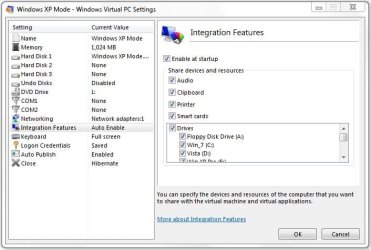
VPC Settings.JPG

Thanks
 

My Computer My Computer

At a glance

Windows 10 ProIntel Core i7-4770K (3.5Ghz)32 gig Corsair Dominator Platinum (4x8Gig)Sapphire Tri-X R9 Fury
Computer type
PC/Desktop
Computer Manufacturer/Model Number
Custom built by me.
OS
Windows 10 Pro
CPU
Intel Core i7-4770K (3.5Ghz)
Motherboard
Gigabyte G1 Sniper 5 (F10 Bios)
Memory
32 gig Corsair Dominator Platinum (4x8Gig)
Graphics Card(s)
Sapphire Tri-X R9 Fury
Sound Card
Soundblaster ZXR
Monitor(s) Displays
NEC PA242W 24" LCD Monitor
Screen Resolution
1920 x 1200
Hard Drives
Primary - Samsung 850 Pro (512gig), Samsung 840 Pro (256gig), 2TB WD Caviar Black.
PSU
EVGA Supernova 1000 G2
Case
Cooler Master HAF X
Cooling
Corsair H100i with Corsair Air Series SP120 Quiet Fans
Keyboard
Logitech Wireless Wave
Mouse
Logitech Performance MX
Internet Speed
High Speed Cable
Antivirus
Norton Security
Browser
IE11
Other Info
Memory Timings - 1866MHz @ 9-9-9-27-1T @ 1.5 volts
Care to help me out (explain), and what "side" effects will this have or cause?

Thanks

Basically, you do not have access to any of the host's resources if integration is disabled.

This post shows a typical example. Integration enabled, all the host's drives are available. Integration disabled, only way to access host is over the network.

Bidirectional clipboard is also included in integration features, as is printing from XP Mode directly to host's printer.

Kari
 

My Computer My Computer

At a glance

Windows 10 Pro x64 EN-GB1.6 GHz Intel Core i7-720QM Processor6 GBATI Mobility Radeon HD 5850 Graphics
Computer type
Laptop
Computer Manufacturer/Model Number
HP ENVY 17-1150eg
OS
Windows 10 Pro x64 EN-GB
CPU
1.6 GHz Intel Core i7-720QM Processor
Memory
6 GB
Graphics Card(s)
ATI Mobility Radeon HD 5850 Graphics
Sound Card
Beats sound system with integrated subwoofer
Monitor(s) Displays
17" laptop display, 22" LED and 32" Full HD TV through HDMI
Screen Resolution
1600*900 (1), 1920*1080 (2&3)
Hard Drives
Internal: 2 x 500 GB SATA Hard Disk Drive 7200 rpm
External: 2TB for backups, 3TB USB3 network drive for media
Cooling
As Envy runs a bit warm, I have it on a Cooler Master pad
Keyboard
Logitech diNovo Media Desktop Laser (bluetooth)
Mouse
Logitech Performance Mouse MX
Internet Speed
50/10 Mbps VDSL
Antivirus
Windows Defender 4.3.9431.0
Browser
Maxthon 3.5.2., IE11

My Computer My Computer

At a glance

Windows 10 ProIntel Core i7-4770K (3.5Ghz)32 gig Corsair Dominator Platinum (4x8Gig)Sapphire Tri-X R9 Fury
Computer type
PC/Desktop
Computer Manufacturer/Model Number
Custom built by me.
OS
Windows 10 Pro
CPU
Intel Core i7-4770K (3.5Ghz)
Motherboard
Gigabyte G1 Sniper 5 (F10 Bios)
Memory
32 gig Corsair Dominator Platinum (4x8Gig)
Graphics Card(s)
Sapphire Tri-X R9 Fury
Sound Card
Soundblaster ZXR
Monitor(s) Displays
NEC PA242W 24" LCD Monitor
Screen Resolution
1920 x 1200
Hard Drives
Primary - Samsung 850 Pro (512gig), Samsung 840 Pro (256gig), 2TB WD Caviar Black.
PSU
EVGA Supernova 1000 G2
Case
Cooler Master HAF X
Cooling
Corsair H100i with Corsair Air Series SP120 Quiet Fans
Keyboard
Logitech Wireless Wave
Mouse
Logitech Performance MX
Internet Speed
High Speed Cable
Antivirus
Norton Security
Browser
IE11
Other Info
Memory Timings - 1866MHz @ 9-9-9-27-1T @ 1.5 volts
What would you VPC geeks recommend to speed up XP Mode? Assigning more RAM, or does it have any effect after 1 gig? What else?

Kari

My 3 rules for improving perf.
1. Add more RAM
2. Add more RAM
3. If there are any empty memory sockets , add RAM.

With XP mode it is always a compromise because adding memory to the VM takes it away from the host. So you need to balance VM performance against host performance.

The other thing which will make a difference is the type of virtual hard disk you use. By default XP-Mode creates differencing disk for each XP VM , a differencing disk is slower than a single disk, and if you have a single disk a Fixed disk is better quicker on writes than the a dynamically expanding disk .

Then the speed of the disk has an impact.

I'm a systems admin for a living with a considerable amount of experience with virtual machines...both stand-alone applications as well as hypervisor based products.

My only complaint with Windows XP Mode...is that it's terribly slow compared to other 3rd party products. While I understand where you are coming from with more RAM and faster hard drives...these aren't really necessary with the 3rd party products.
 

My Computer My Computer

At a glance

Windows 7 Ultimate x64Intel Q9550 2.83Ghz OC'd to 3.40Ghz8GB G.Skill PI DDR2-800, 4-4-4-12 timingsEVGA 1280MB Nvidia GeForce GTX570
Computer Manufacturer/Model Number
Self-Built in July 2009
OS
Windows 7 Ultimate x64
CPU
Intel Q9550 2.83Ghz OC'd to 3.40Ghz
Motherboard
Gigabyte GA-EP45-UD3R rev. 1.1, F12 BIOS
Memory
8GB G.Skill PI DDR2-800, 4-4-4-12 timings
Graphics Card(s)
EVGA 1280MB Nvidia GeForce GTX570
Sound Card
Realtek ALC899A 8 channel onboard audio
Monitor(s) Displays
23" Acer x233H
Screen Resolution
1920x1080
Hard Drives
Intel X25-M 80GB Gen 2 SSD
Western Digital 1TB Caviar Black, 32MB cache. WD1001FALS
PSU
Corsair 620HX modular
Case
Antec P182
Cooling
stock
Keyboard
ABS M1 Mechanical
Mouse
Logitech G9 Laser Mouse
Internet Speed
15/2 cable modem
Other Info
Windows and Linux enthusiast. Logitech G35 Headset.
What would you VPC geeks recommend to speed up XP Mode? Assigning more RAM, or does it have any effect after 1 gig? What else?

Kari

My 3 rules for improving perf.
1. Add more RAM
2. Add more RAM
3. If there are any empty memory sockets , add RAM.

With XP mode it is always a compromise because adding memory to the VM takes it away from the host. So you need to balance VM performance against host performance.

The other thing which will make a difference is the type of virtual hard disk you use. By default XP-Mode creates differencing disk for each XP VM , a differencing disk is slower than a single disk, and if you have a single disk a Fixed disk is better quicker on writes than the a dynamically expanding disk .

Then the speed of the disk has an impact.

I'm a systems admin for a living with a considerable amount of experience with virtual machines...both stand-alone applications as well as hypervisor based products.

My only complaint with Windows XP Mode...is that it's terribly slow compared to other 3rd party products. While I understand where you are coming from with more RAM and faster hard drives...these aren't really necessary with the 3rd party products.

Are you talking about Virtual PC, or when you use applications from (XP/Win 7 etc) virtualized into the host environment?
 

My Computer My Computer

At a glance

Win 7 Pro x64 x 3, Win 7 Pro x86, Ubuntu 9.042 x C2D [email protected] Ghz, C2D [email protected] ghz, P4...2x8 GB Corsair, 4GB Kingston, 2GB GSkillATI Radeon 4670 1 GB DDR3, 2600 Pro, 2400 Pro...
Computer Manufacturer/Model Number
fakeasdf (c)
OS
Win 7 Pro x64 x 3, Win 7 Pro x86, Ubuntu 9.04
CPU
2 x C2D [email protected] Ghz, C2D [email protected] ghz, P4 @ 3.0 ghz,
Motherboard
GIGABYTE GA-EP35-DS3P LGA 775 Intel P35 ATX Dynamic Energy S
Memory
2x8 GB Corsair, 4GB Kingston, 2GB GSkill
Graphics Card(s)
ATI Radeon 4670 1 GB DDR3, 2600 Pro, 2400 Pro, Intel 965
Sound Card
I don't care... Connected using Optical on Media Center
Monitor(s) Displays
Panasonic Viera 50" Plasma, 2x 19"
Screen Resolution
1080P, 1280x1024's
Hard Drives
4 Terabytes
Case
Antec P182 Gun Metal Black
Internet Speed
20 Mbit U/D
Are you talking about Virtual PC, or when you use applications from (XP/Win 7 etc) virtualized into the host environment?

You can have a look at this other thread to get the main point that I am making
http://www.sevenforums.com/virtualization/21575-xp-mode-slow-any-way-improve.html

In a nutshell, the XP Mode while easy to install and use...but is considerably slower to boot and launch applications than running XP installed under VMWare Player 3.0 or Sun VirtualBox 3.x

Originally, I was very bummed because I wanted to make use of the activated copy of XP that I was entitled to when I purchased Windows 7 Ultimate. However, since that time, VMWare Player 3.0 has introduced the ability to convert that instance and use within VMWare Player 3.0 without violating the MS EULA...so I got what I wanted in the end.
 

My Computer My Computer

At a glance

Windows 7 Ultimate x64Intel Q9550 2.83Ghz OC'd to 3.40Ghz8GB G.Skill PI DDR2-800, 4-4-4-12 timingsEVGA 1280MB Nvidia GeForce GTX570
Computer Manufacturer/Model Number
Self-Built in July 2009
OS
Windows 7 Ultimate x64
CPU
Intel Q9550 2.83Ghz OC'd to 3.40Ghz
Motherboard
Gigabyte GA-EP45-UD3R rev. 1.1, F12 BIOS
Memory
8GB G.Skill PI DDR2-800, 4-4-4-12 timings
Graphics Card(s)
EVGA 1280MB Nvidia GeForce GTX570
Sound Card
Realtek ALC899A 8 channel onboard audio
Monitor(s) Displays
23" Acer x233H
Screen Resolution
1920x1080
Hard Drives
Intel X25-M 80GB Gen 2 SSD
Western Digital 1TB Caviar Black, 32MB cache. WD1001FALS
PSU
Corsair 620HX modular
Case
Antec P182
Cooling
stock
Keyboard
ABS M1 Mechanical
Mouse
Logitech G9 Laser Mouse
Internet Speed
15/2 cable modem
Other Info
Windows and Linux enthusiast. Logitech G35 Headset.
What would you VPC geeks recommend to speed up XP Mode? Assigning more RAM, or does it have any effect after 1 gig? What else?

Kari

My 3 rules for improving perf.
1. Add more RAM
2. Add more RAM
3. If there are any empty memory sockets , add RAM.

With XP mode it is always a compromise because adding memory to the VM takes it away from the host. So you need to balance VM performance against host performance.

The other thing which will make a difference is the type of virtual hard disk you use. By default XP-Mode creates differencing disk for each XP VM , a differencing disk is slower than a single disk, and if you have a single disk a Fixed disk is better quicker on writes than the a dynamically expanding disk .

Then the speed of the disk has an impact.

I'm a systems admin for a living with a considerable amount of experience with virtual machines...both stand-alone applications as well as hypervisor based products.

My only complaint with Windows XP Mode...is that it's terribly slow compared to other 3rd party products. While I understand where you are coming from with more RAM and faster hard drives...these aren't really necessary with the 3rd party products.

Yes. I too found that XP Mode is slower than others such as VMWare and VirtualBox.
 

My Computer My Computer

At a glance

Windows 7 x64 / SameIntel Core 2 Duo T7250 / Intel Core i7 9304GB / 6GBNVIDIA GeForce 8400M GS / ASUS 1GB
Computer Manufacturer/Model Number
Dell Inspiron 1520 (Laptop)/ Home (Desktop)
OS
Windows 7 x64 / Same
CPU
Intel Core 2 Duo T7250 / Intel Core i7 930
Motherboard
Intel 945 / Asus P6X58D-E
Memory
4GB / 6GB
Graphics Card(s)
NVIDIA GeForce 8400M GS / ASUS 1GB
Sound Card
Whatever Dell gave me :-( / Onboard
Monitor(s) Displays
15.4" LCD / Crappy CRT
Hard Drives
Seagate 500GB SATA; 7200 RPM / Seagate 1TB SATA; 7200 RPM
PSU
N/A / OCZ Fatal1ty 550W Modular
Case
N/A / Antec 900
Cooling
Air
Mouse
Microsoft Presenter (Bluetooth)
Are you talking about Virtual PC, or when you use applications from (XP/Win 7 etc) virtualized into the host environment?

You can have a look at this other thread to get the main point that I am making
http://www.sevenforums.com/virtualization/21575-xp-mode-slow-any-way-improve.html

In a nutshell, the XP Mode while easy to install and use...but is considerably slower to boot and launch applications than running XP installed under VMWare Player 3.0 or Sun VirtualBox 3.x

Originally, I was very bummed because I wanted to make use of the activated copy of XP that I was entitled to when I purchased Windows 7 Ultimate. However, since that time, VMWare Player 3.0 has introduced the ability to convert that instance and use within VMWare Player 3.0 without violating the MS EULA...so I got what I wanted in the end.

Can VMWare Player 3.0 and Windows Virtual PC co-exist on the same machine?
 

My Computer My Computer

At a glance

Windows 7 Professional x64 x86 VISTA XP 98SE ...Intel(R) Core(TM)2 Quad CPU Q9400 @ 2.66GHz8 GB
OS
Windows 7 Professional x64 x86 VISTA XP 98SE 95 3.x
CPU
Intel(R) Core(TM)2 Quad CPU Q9400 @ 2.66GHz
Memory
8 GB
Screen Resolution
1920 x 1200
PSU
OCZ Fatal1ty OCZ550FTY 550W ATX12V v2.2 25A on each rail
Can VMWare Player 3.0 and Windows Virtual PC co-exist on the same machine?
You can have VMWare, Sun VirtulaBox and Virtual PC installed on the same machine at the same time, but you can only have one of those running on any given moment. When I want to run Mandriva Linux which I have installed on VirtualBox, I have to first shut down Virtual PC and XP Mode

Kari
 

My Computer My Computer

At a glance

Windows 10 Pro x64 EN-GB1.6 GHz Intel Core i7-720QM Processor6 GBATI Mobility Radeon HD 5850 Graphics
Computer type
Laptop
Computer Manufacturer/Model Number
HP ENVY 17-1150eg
OS
Windows 10 Pro x64 EN-GB
CPU
1.6 GHz Intel Core i7-720QM Processor
Memory
6 GB
Graphics Card(s)
ATI Mobility Radeon HD 5850 Graphics
Sound Card
Beats sound system with integrated subwoofer
Monitor(s) Displays
17" laptop display, 22" LED and 32" Full HD TV through HDMI
Screen Resolution
1600*900 (1), 1920*1080 (2&3)
Hard Drives
Internal: 2 x 500 GB SATA Hard Disk Drive 7200 rpm
External: 2TB for backups, 3TB USB3 network drive for media
Cooling
As Envy runs a bit warm, I have it on a Cooler Master pad
Keyboard
Logitech diNovo Media Desktop Laser (bluetooth)
Mouse
Logitech Performance Mouse MX
Internet Speed
50/10 Mbps VDSL
Antivirus
Windows Defender 4.3.9431.0
Browser
Maxthon 3.5.2., IE11
Can VMWare Player 3.0 and Windows Virtual PC co-exist on the same machine?
You can have VMWare, Sun VirtulaBox and Virtual PC installed on the same machine at the same time, but you can only have one of those running on any given moment. When I want to run Mandriva Linux which I have installed on VirtualBox, I have to first shut down Virtual PC and XP Mode

Kari

Yeah, I tried running XP Mode and VirtualBox but a nasty error came up.

I enjoyed this Q & A with the MS people. We should shoot for that again for another topic or topics.
 

My Computer My Computer

At a glance

Windows 7 x64 / SameIntel Core 2 Duo T7250 / Intel Core i7 9304GB / 6GBNVIDIA GeForce 8400M GS / ASUS 1GB
Computer Manufacturer/Model Number
Dell Inspiron 1520 (Laptop)/ Home (Desktop)
OS
Windows 7 x64 / Same
CPU
Intel Core 2 Duo T7250 / Intel Core i7 930
Motherboard
Intel 945 / Asus P6X58D-E
Memory
4GB / 6GB
Graphics Card(s)
NVIDIA GeForce 8400M GS / ASUS 1GB
Sound Card
Whatever Dell gave me :-( / Onboard
Monitor(s) Displays
15.4" LCD / Crappy CRT
Hard Drives
Seagate 500GB SATA; 7200 RPM / Seagate 1TB SATA; 7200 RPM
PSU
N/A / OCZ Fatal1ty 550W Modular
Case
N/A / Antec 900
Cooling
Air
Mouse
Microsoft Presenter (Bluetooth)

My Computer My Computer

At a glance

Windows 10 ProIntel Core i7-4770K (3.5Ghz)32 gig Corsair Dominator Platinum (4x8Gig)Sapphire Tri-X R9 Fury
Computer type
PC/Desktop
Computer Manufacturer/Model Number
Custom built by me.
OS
Windows 10 Pro
CPU
Intel Core i7-4770K (3.5Ghz)
Motherboard
Gigabyte G1 Sniper 5 (F10 Bios)
Memory
32 gig Corsair Dominator Platinum (4x8Gig)
Graphics Card(s)
Sapphire Tri-X R9 Fury
Sound Card
Soundblaster ZXR
Monitor(s) Displays
NEC PA242W 24" LCD Monitor
Screen Resolution
1920 x 1200
Hard Drives
Primary - Samsung 850 Pro (512gig), Samsung 840 Pro (256gig), 2TB WD Caviar Black.
PSU
EVGA Supernova 1000 G2
Case
Cooler Master HAF X
Cooling
Corsair H100i with Corsair Air Series SP120 Quiet Fans
Keyboard
Logitech Wireless Wave
Mouse
Logitech Performance MX
Internet Speed
High Speed Cable
Antivirus
Norton Security
Browser
IE11
Other Info
Memory Timings - 1866MHz @ 9-9-9-27-1T @ 1.5 volts
I enjoyed this Q & A with the MS people. We should shoot for that again for another topic or topics.
+1

Hopefully it was not the last time...
 

My Computer My Computer

At a glance

Windows 10 Pro x64 EN-GB1.6 GHz Intel Core i7-720QM Processor6 GBATI Mobility Radeon HD 5850 Graphics
Computer type
Laptop
Computer Manufacturer/Model Number
HP ENVY 17-1150eg
OS
Windows 10 Pro x64 EN-GB
CPU
1.6 GHz Intel Core i7-720QM Processor
Memory
6 GB
Graphics Card(s)
ATI Mobility Radeon HD 5850 Graphics
Sound Card
Beats sound system with integrated subwoofer
Monitor(s) Displays
17" laptop display, 22" LED and 32" Full HD TV through HDMI
Screen Resolution
1600*900 (1), 1920*1080 (2&3)
Hard Drives
Internal: 2 x 500 GB SATA Hard Disk Drive 7200 rpm
External: 2TB for backups, 3TB USB3 network drive for media
Cooling
As Envy runs a bit warm, I have it on a Cooler Master pad
Keyboard
Logitech diNovo Media Desktop Laser (bluetooth)
Mouse
Logitech Performance Mouse MX
Internet Speed
50/10 Mbps VDSL
Antivirus
Windows Defender 4.3.9431.0
Browser
Maxthon 3.5.2., IE11
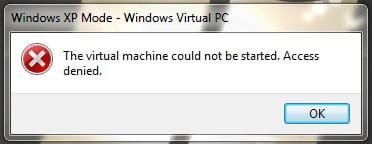
OK, so I just now tried to get into my Virtual PC/XP Mode and got this error when clicking the "Windows XP Mode" icon...

Virtual Machine error.JPG

Anybody know what's going on here. I haven't made any changes to the machine since installing it. And it initially worked, as I was posting about it here. Now for some odd reason it doesn't :(

If I click on the "Windows Virtual PC" icon, it takes me here.... C:\Users\MyName\Virtual Machines

XP Mode location.JPG

...and clicking that link (windows xp mode.vmcx) gives the same error... :huh:

I'm thinking about doing a reinstall. However when I did attempt to do the uninstall, I was warned that the files on the VHD will also be removed. So I’d like to try going around that first.

Again, don’t know why the error since I’ve made no changes to the machine since installing the program.

Any suggestions on a fix?

Thanks.
 

My Computer My Computer

At a glance

Windows 10 ProIntel Core i7-4770K (3.5Ghz)32 gig Corsair Dominator Platinum (4x8Gig)Sapphire Tri-X R9 Fury
Computer type
PC/Desktop
Computer Manufacturer/Model Number
Custom built by me.
OS
Windows 10 Pro
CPU
Intel Core i7-4770K (3.5Ghz)
Motherboard
Gigabyte G1 Sniper 5 (F10 Bios)
Memory
32 gig Corsair Dominator Platinum (4x8Gig)
Graphics Card(s)
Sapphire Tri-X R9 Fury
Sound Card
Soundblaster ZXR
Monitor(s) Displays
NEC PA242W 24" LCD Monitor
Screen Resolution
1920 x 1200
Hard Drives
Primary - Samsung 850 Pro (512gig), Samsung 840 Pro (256gig), 2TB WD Caviar Black.
PSU
EVGA Supernova 1000 G2
Case
Cooler Master HAF X
Cooling
Corsair H100i with Corsair Air Series SP120 Quiet Fans
Keyboard
Logitech Wireless Wave
Mouse
Logitech Performance MX
Internet Speed
High Speed Cable
Antivirus
Norton Security
Browser
IE11
Other Info
Memory Timings - 1866MHz @ 9-9-9-27-1T @ 1.5 volts
This has happened two times to me. Only workaround I've found is to create a new virtual machine using your existing XP Mode vhd-file.

Goes like this:

  • Open C:\Users\Your_Username\Virtual Machines, click Create virtual machine
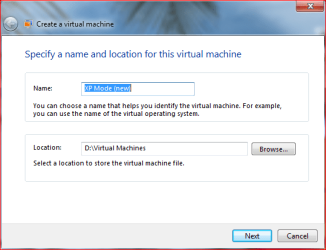
  • Name the new vm, click Next
    XPM_New.PNG
  • Specify amount of RAM you want to assign to this vm, click Next
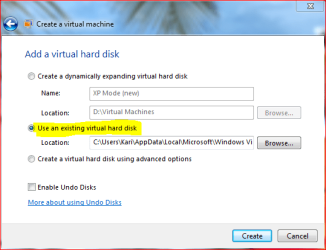
  • Choose Use an existing virtual hard disk
  • Click Browse, choose the existing XPM vhd (default location C:\Users\Your_Username\AppData\Local\Microsoft\Windows Virtual PC\Virtual Machines\Windows XP Mode.vhd)
    XPM_New2.PNG
  • Click Create
  • Test your new XP Mode. If it starts and runs, you can now delete the old XP Mode by removing following files:
    • Windows XP Mode.vhd
    • Windows XP Mode.vmc
    • Windows XP Mode.vmc.vpcbackup
    • Windows XP Mode.vsv (exists only if vhd was hibernated)
      The above mentioned files are located in C:\Users\Your_Username\AppData\Local\Microsoft\Windows Virtual PC\Virtual Machines
    • Windows XP Mode.vmcx in C:\Users\Your_Username\Virtual Machines

This has worked for me.

Kari
 
Last edited:

My Computer My Computer

At a glance

Windows 10 Pro x64 EN-GB1.6 GHz Intel Core i7-720QM Processor6 GBATI Mobility Radeon HD 5850 Graphics
Computer type
Laptop
Computer Manufacturer/Model Number
HP ENVY 17-1150eg
OS
Windows 10 Pro x64 EN-GB
CPU
1.6 GHz Intel Core i7-720QM Processor
Memory
6 GB
Graphics Card(s)
ATI Mobility Radeon HD 5850 Graphics
Sound Card
Beats sound system with integrated subwoofer
Monitor(s) Displays
17" laptop display, 22" LED and 32" Full HD TV through HDMI
Screen Resolution
1600*900 (1), 1920*1080 (2&3)
Hard Drives
Internal: 2 x 500 GB SATA Hard Disk Drive 7200 rpm
External: 2TB for backups, 3TB USB3 network drive for media
Cooling
As Envy runs a bit warm, I have it on a Cooler Master pad
Keyboard
Logitech diNovo Media Desktop Laser (bluetooth)
Mouse
Logitech Performance Mouse MX
Internet Speed
50/10 Mbps VDSL
Antivirus
Windows Defender 4.3.9431.0
Browser
Maxthon 3.5.2., IE11
Back
Top