Solved Potential hard drive issue?

Teekz

New member
Power User
Local time
7:44 PM
Messages
142
Location
Doncaster, UK.
Hello, all.

I've just run HD Tune 2.55 on my C drive, because it can be quite noisy at times, and I wanted to see if I can find anything wrong with the drive. (Hopefully not, it's fairly new! :()

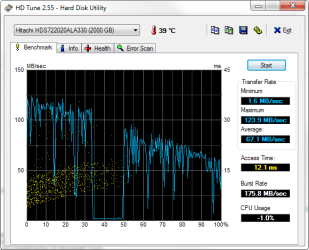
I have attached the results, as I would like to know what the sudden dip from around 35% to 50% is. The hard drive made almost no noise throughout the test, apart from in that area, where it was really quite loud. :confused:

I'm hoping it's not bad news. Can anyone shed some light on what these results show? :(

Cheers,
Tom. :)

PS - I am now running an "Error Scan" test on HD Tune, but it looks like it may take some time. (I ran a "Quick Scan", which ended up saying 0.0% Damaged blocks, and I am now running a.. non-quick scan? slow scan? :p).
 

Attachments

  • hd tune.png
    hd tune.png
    15.2 KB · Views: 17
Last edited:

My Computer

OS
Windows 7 Ultimate (x64) Service Pack 1
CPU
AMD Athlon 64 X2 Dual Core Processor 5600+ 2.80 GHz
Motherboard
GIGABYTE GA-M720-US3
Memory
4GB, Dual Channel, DDR2
Graphics Card(s)
NVIDIA GeForce 8600 GT
Sound Card
Creative SB X-Fi
Monitor(s) Displays
Dual Screen - Dell SE198WFP (19"), & GRUNDIG GU37BLKSE (37")
Screen Resolution
1440x900, 1600x1200
Hard Drives
Hitachi HDS722020ALA330 (2TB Internal), WD 15EADS (1.5TB External)
Keyboard
Microsoft Wireless Laser Keyboard 7000
Mouse
Microsoft Wireless Laser Mouse 7000
Go to Hatachi and download this tool.

Downloads

Read all the information to create a test disk and then run the test.

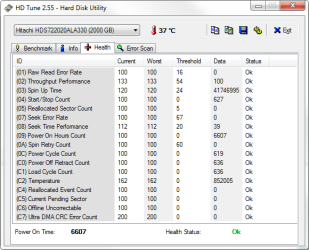
Also on HDD Tune check the Health tab and post a picture.

Jim :geek:
 

My Computer

Computer type
PC/Desktop
Computer Manufacturer/Model Number
Home Built
OS
Windows 8.1 Pro w/Media Center 64bit, Windows 7 HP 64bit
CPU
Phenom II X6 1100T
Motherboard
ASUS M5A99X EVO
Memory
Crucial Balistic 8gb DDR3-1866 CL9
Graphics Card(s)
MSI R6850 Cyclone IGD5 PE
Sound Card
On Board
Monitor(s) Displays
ASUS VE258Q 25" LED with DVI-HDMI-DisplayPort
Screen Resolution
1920 x 1080
Hard Drives
Two WD Cavier Black 2TB Sata III, WD My Book Essential 2TB USB 3.0
PSU
Seasonic X650 80 Plus GOLD Modular
Case
Corsair 400R
Cooling
Antec Kuhler H2O 620, Two 120mm and four 140mm
Keyboard
Logitech K120
Mouse
Logitech Marble Mouse USB, Logitech Precision Game Pad
Internet Speed
15MB
Antivirus
Norton IS 2013, Malwarebytes Pro Beta 2
Browser
IE-11, FF-27
Other Info
APC UPS ES 750, Netgear WNR3500L Gigabit & Wireless N Router with SamKnows Test Program, Motorola SB6120 Gigabit Cable Modem. Brother HL-2170W Laser Printer, Epson V300 Scanner
I'll download and run the tool now, thanks. I'll report back when I have the results.

I've attached a screenshot of the Health tab in HD Tune. The HD Tune scan was taking a while, so I plan to do that later instead.
 

Attachments

  • health.png
    health.png
    17.4 KB · Views: 19

My Computer

OS
Windows 7 Ultimate (x64) Service Pack 1
CPU
AMD Athlon 64 X2 Dual Core Processor 5600+ 2.80 GHz
Motherboard
GIGABYTE GA-M720-US3
Memory
4GB, Dual Channel, DDR2
Graphics Card(s)
NVIDIA GeForce 8600 GT
Sound Card
Creative SB X-Fi
Monitor(s) Displays
Dual Screen - Dell SE198WFP (19"), & GRUNDIG GU37BLKSE (37")
Screen Resolution
1440x900, 1600x1200
Hard Drives
Hitachi HDS722020ALA330 (2TB Internal), WD 15EADS (1.5TB External)
Keyboard
Microsoft Wireless Laser Keyboard 7000
Mouse
Microsoft Wireless Laser Mouse 7000
I've booted into the tool, and ran a basic scan. This turned up no errors. I am now running an advanced scan, which tests the entire media. Because the drive is 2000gb, I imagine this will take some time. :(

Depending on how long it takes, I might cancel it later, and run it over overnight tonight. EDIT - I have now decided to do this. I'll report back here tomorrow with the results of the advanced scan.

Thanks for the help. :)
 
Last edited:

My Computer

OS
Windows 7 Ultimate (x64) Service Pack 1
CPU
AMD Athlon 64 X2 Dual Core Processor 5600+ 2.80 GHz
Motherboard
GIGABYTE GA-M720-US3
Memory
4GB, Dual Channel, DDR2
Graphics Card(s)
NVIDIA GeForce 8600 GT
Sound Card
Creative SB X-Fi
Monitor(s) Displays
Dual Screen - Dell SE198WFP (19"), & GRUNDIG GU37BLKSE (37")
Screen Resolution
1440x900, 1600x1200
Hard Drives
Hitachi HDS722020ALA330 (2TB Internal), WD 15EADS (1.5TB External)
Keyboard
Microsoft Wireless Laser Keyboard 7000
Mouse
Microsoft Wireless Laser Mouse 7000
CrystalDiskInfo will give the disk SMART data and a good indication of it's health.
 

My Computer

Computer type
PC/Desktop
Computer Manufacturer/Model Number
Own build
OS
Windows 7x64 Home Premium SP1
CPU
Intel i7 2600k
Motherboard
ASUS P8Z68 Deluxe
Memory
G.Skill Ripjaws (DDR3-1600) 2x4GB
Graphics Card(s)
Nvidia GeForce GTS 450; Intel HD Graphics 3000(GT2+)
Monitor(s) Displays
Dell Ultrasharp IPS panel U2311H, Samsung SyncMaster P2350
Screen Resolution
1920x1080
Hard Drives
Samsung 850 Pro SSD 256GB, Samsung SSD 840 120GB, Seagates 1TB Barracuda ST31000528AS x2
PSU
Seasonic M12II 520W
Case
Lian Li Lancool PC-K60
Cooling
Case: 1x120mm, 3x140mm CPU: Hyper 212+
Keyboard
Logitech MK520 (wireless)
Mouse
Logitech MK520
Internet Speed
6-7 Mbps
Antivirus
Norton Security Premium, Malwarebytes on 2 (MSE on 3rd PC)
Browser
FireFox
Other Info
Audio: Logitech Z523 2.1
I have just set an Advanced Scan running on the Hitatchi tool, which will hopefully gove me some (positive? :() results by tomorrow morning.

I had a thought earlier. The computer the hard drive is in is a tower PC, which is stood on the bottom shelf-type part of my old computer table. I think that the flat surface that the PC stands on has bent over the years, which would mean that the tower is slightly leaning to one side. Could a hard drive at an angle have negative effects? Could it be the cause of the dip in my HD Tune results? Just a thought. Could be nothing.
 

My Computer

OS
Windows 7 Ultimate (x64) Service Pack 1
CPU
AMD Athlon 64 X2 Dual Core Processor 5600+ 2.80 GHz
Motherboard
GIGABYTE GA-M720-US3
Memory
4GB, Dual Channel, DDR2
Graphics Card(s)
NVIDIA GeForce 8600 GT
Sound Card
Creative SB X-Fi
Monitor(s) Displays
Dual Screen - Dell SE198WFP (19"), & GRUNDIG GU37BLKSE (37")
Screen Resolution
1440x900, 1600x1200
Hard Drives
Hitachi HDS722020ALA330 (2TB Internal), WD 15EADS (1.5TB External)
Keyboard
Microsoft Wireless Laser Keyboard 7000
Mouse
Microsoft Wireless Laser Mouse 7000
Right, the Advanced test completed successfully, with disposition code 0x00, which I assume means that there were no errors. What should I do now?

Also, could anyone actually explain what the dip in the HD Tune results actually means?

Cheers, Tom.

EDIT - Sorry mjf, I didn't see your post, as I updated this from my iPod before. Must have scrolled past it. I've attached a screenshot from CrystalDiskInfo, and all seems well there.
 

Attachments

  • crystal.png
    crystal.png
    35 KB · Views: 9
Last edited:

My Computer

OS
Windows 7 Ultimate (x64) Service Pack 1
CPU
AMD Athlon 64 X2 Dual Core Processor 5600+ 2.80 GHz
Motherboard
GIGABYTE GA-M720-US3
Memory
4GB, Dual Channel, DDR2
Graphics Card(s)
NVIDIA GeForce 8600 GT
Sound Card
Creative SB X-Fi
Monitor(s) Displays
Dual Screen - Dell SE198WFP (19"), & GRUNDIG GU37BLKSE (37")
Screen Resolution
1440x900, 1600x1200
Hard Drives
Hitachi HDS722020ALA330 (2TB Internal), WD 15EADS (1.5TB External)
Keyboard
Microsoft Wireless Laser Keyboard 7000
Mouse
Microsoft Wireless Laser Mouse 7000
Hi Teekz,

Regarding your question about the slope causing a Negative effect, I have found that it does. An old machine that i was asked to rebuild was on a sloped surface so it clicked every 3-5 seconds and had a disk error pop up in XP.

NOw when i rebuilt it i Had it on the Workbench which is a Flat surface which removed the clicking and i didnt get the errors. I replaced it anyway however after some research and tests i found that if the Hared drive is on a slight angle then that can cause it to R/w wrong or even not work at all.

This can also Cause S.M.A.R.T to report a HDD Failure.

Try putting your Harddrive on a Flat surface if you can or make sure that the way it is mounted is flat.

And yes i know that some PC's are Mounted Vertically and some horizontally, but it cannot be mounted at say a 45* angle as the disk cannot read properly in some cases.
 

My Computer

Computer type
PC/Desktop
Computer Manufacturer/Model Number
Custom Build
OS
Windows 8.1
CPU
Intel i5 3750k OC'd 4.0Ghz
Motherboard
P8Z77-V LX3
Memory
16GB Vengence Corsair
Graphics Card(s)
GTX 770 OC 2GB Windforce
Sound Card
C-Media 7.1 Surround Card
Monitor(s) Displays
Asus 3D 23" & BenQ 24" & LG 19"
Screen Resolution
1920*1080, 1920*1080, 1440*900
Hard Drives
Crucial 512GB SSD
WD 1.5 TB
WD 500Gb
PSU
850MW Silverstone
Case
inWin DragonRider
Cooling
4 * 140mm LED Akasa, One 140mm Fan Akasa
Keyboard
Corsair k95
Mouse
R.A.T 7 Contagion
Internet Speed
152 Mb Fiber Optic
Antivirus
ESET Nod32
Browser
Waterfox x64 / Chrome x64
Other Info
Freenas / Plex Media server
Q6600
6Gb DDR3
6TB ZFS Raid
500W PSu
2 x Intel NIC's
Thanks for the info, Windows Sniper. I'll try moving my PC onto the floor or something, and then redoing the HD Tune test. See if it makes a difference.
 

My Computer

OS
Windows 7 Ultimate (x64) Service Pack 1
CPU
AMD Athlon 64 X2 Dual Core Processor 5600+ 2.80 GHz
Motherboard
GIGABYTE GA-M720-US3
Memory
4GB, Dual Channel, DDR2
Graphics Card(s)
NVIDIA GeForce 8600 GT
Sound Card
Creative SB X-Fi
Monitor(s) Displays
Dual Screen - Dell SE198WFP (19"), & GRUNDIG GU37BLKSE (37")
Screen Resolution
1440x900, 1600x1200
Hard Drives
Hitachi HDS722020ALA330 (2TB Internal), WD 15EADS (1.5TB External)
Keyboard
Microsoft Wireless Laser Keyboard 7000
Mouse
Microsoft Wireless Laser Mouse 7000
No problems Teekz, Let Me know if it makes a Difference, Then i can add that to my research also xD
 

My Computer

Computer type
PC/Desktop
Computer Manufacturer/Model Number
Custom Build
OS
Windows 8.1
CPU
Intel i5 3750k OC'd 4.0Ghz
Motherboard
P8Z77-V LX3
Memory
16GB Vengence Corsair
Graphics Card(s)
GTX 770 OC 2GB Windforce
Sound Card
C-Media 7.1 Surround Card
Monitor(s) Displays
Asus 3D 23" & BenQ 24" & LG 19"
Screen Resolution
1920*1080, 1920*1080, 1440*900
Hard Drives
Crucial 512GB SSD
WD 1.5 TB
WD 500Gb
PSU
850MW Silverstone
Case
inWin DragonRider
Cooling
4 * 140mm LED Akasa, One 140mm Fan Akasa
Keyboard
Corsair k95
Mouse
R.A.T 7 Contagion
Internet Speed
152 Mb Fiber Optic
Antivirus
ESET Nod32
Browser
Waterfox x64 / Chrome x64
Other Info
Freenas / Plex Media server
Q6600
6Gb DDR3
6TB ZFS Raid
500W PSu
2 x Intel NIC's
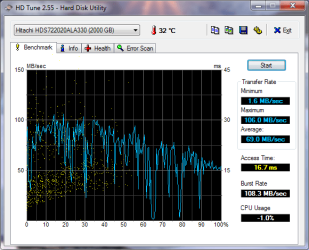
Wow! I just did a HD Tune test on the floor, and there are only occasional small spikes (Which I presume are normal-ish). I might run one more test with it back on the cabinet, just to make sure, but I think it's safe to say we've isolated the cause of the noise/dip in previous results!
 

Attachments

  • hd tune 2.png
    hd tune 2.png
    21 KB · Views: 3

My Computer

OS
Windows 7 Ultimate (x64) Service Pack 1
CPU
AMD Athlon 64 X2 Dual Core Processor 5600+ 2.80 GHz
Motherboard
GIGABYTE GA-M720-US3
Memory
4GB, Dual Channel, DDR2
Graphics Card(s)
NVIDIA GeForce 8600 GT
Sound Card
Creative SB X-Fi
Monitor(s) Displays
Dual Screen - Dell SE198WFP (19"), & GRUNDIG GU37BLKSE (37")
Screen Resolution
1440x900, 1600x1200
Hard Drives
Hitachi HDS722020ALA330 (2TB Internal), WD 15EADS (1.5TB External)
Keyboard
Microsoft Wireless Laser Keyboard 7000
Mouse
Microsoft Wireless Laser Mouse 7000
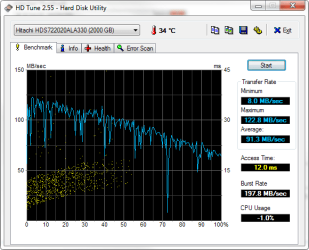
Hm. I just did another test with the tower back on the shelf, and the results are fine. :confused: I may have been mistaken in thinking it was slanted, maybe my perception was off or something.

Taking this into consideration, I think those initial results were anomalous, and since the Drive Fitness Test returned no errors, I think it's nothing to worry about, so I'm going to mark this as solved.

Looking back, I should have repeated my initial scan, to see if the same thing happened again, and that would have avoided wasting everyone's time. My apologies.

At least I know my drive is working OK! :D

Thanks a lot for all the help, guys.
Tom. :)
 

My Computer

OS
Windows 7 Ultimate (x64) Service Pack 1
CPU
AMD Athlon 64 X2 Dual Core Processor 5600+ 2.80 GHz
Motherboard
GIGABYTE GA-M720-US3
Memory
4GB, Dual Channel, DDR2
Graphics Card(s)
NVIDIA GeForce 8600 GT
Sound Card
Creative SB X-Fi
Monitor(s) Displays
Dual Screen - Dell SE198WFP (19"), & GRUNDIG GU37BLKSE (37")
Screen Resolution
1440x900, 1600x1200
Hard Drives
Hitachi HDS722020ALA330 (2TB Internal), WD 15EADS (1.5TB External)
Keyboard
Microsoft Wireless Laser Keyboard 7000
Mouse
Microsoft Wireless Laser Mouse 7000
Dear Teekz,
The Hitachi advanced test turned out good for the HD! That is the acid test and should settle the issue! HD Tune, Acronics Disk Monitor and Crystal disk info are good harbingers of any trouble ahead and i'll bet you are not going to replace the "relatively new"TwoTB internal HD based on those tests!

If i were you(which i am not), i will IMMEDIATELY (sorry for the bold type) place the cpu casing cabinet on an even and firm surface! Except for SSDs ( I do not know about the Hybrid ones), the regular ones are platters and read/write heads and anything could have happened to ruin the whole show!The Gods were smiling on you, lucky you!

You should repeat the HD Tune test once the Cabinet is set evenly and see if that huge dip has gone or not!Please look if the loud noice has gone or not! Kindly comeback to tell us the unfinished story

Regards,
Sreedhav
 

My Computer

Computer Manufacturer/Model Number
Sony Vaio C series VPCCB35FN laptop
OS
MS Windows 7 Home Premium 64-bit SP1
CPU
IntelCore [email protected]; Sandy Bridge 32nm Tech.
Motherboard
Sony Vaio Version:C609NJYJ
Memory
4096Mb RAM; Single ChannelDDR3@665MHz; DRAM Freq:662MHz
Graphics Card(s)
AMD Radeon HD 6630M; GPU:Whistler;BIOS Core&mem Clock:123.36
Sound Card
REALTEK High Definition Audio Device; INTEL Display Card
Monitor(s) Displays
Generic PnP Intel HD;Resolution:1920*1040 Pixels; BPP:32bits
Screen Resolution
Current Resolution:1920*1080 Pixels; Monitor Frequency:60Hz
Hard Drives
Internal HD:TOSHIBA MK5061GSY; Real Size:488 GB;NTFS; 3 Partitions; SATA; HEADS:16

External HDD: WD Elements 1023 PORTABLE; Estimated Size: 1TB; NTFS; 3 Partitions
Cooling
Lateral Exhaust with a Cooling Pad Placed Beneath.
Keyboard
Logitech Bluetooth+ Generic Integrated K-B
Mouse
Logitech Bluetooth
Internet Speed
2MBPS
Other Info
1)Trend Micro Titanium Maximum Security Suite Version:3
2)SAS-PRO

3)MBAM--PRO


4)WATERFOX+IE9 +WOT+LINKEXTEND+ DRWEBCUREIT LINK CHECKER

5)SPYWAREBLASTER

6) WINPATROL PLUS

7) SANDBOXIE and
8) A BIT OF COMMON SENSE.
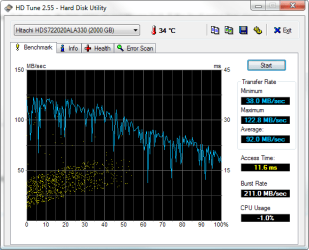
I have placed a DVD spike underneath the cabinet, in between it's legs to prop it up, and ensure that it remains level. I just did two more tests, and the results seem fine. I have attached them. :)
 

Attachments

  • hd tune 3.png
    hd tune 3.png
    15.6 KB · Views: 2
  • hd tune 4.png
    hd tune 4.png
    15.4 KB · Views: 2

My Computer

OS
Windows 7 Ultimate (x64) Service Pack 1
CPU
AMD Athlon 64 X2 Dual Core Processor 5600+ 2.80 GHz
Motherboard
GIGABYTE GA-M720-US3
Memory
4GB, Dual Channel, DDR2
Graphics Card(s)
NVIDIA GeForce 8600 GT
Sound Card
Creative SB X-Fi
Monitor(s) Displays
Dual Screen - Dell SE198WFP (19"), & GRUNDIG GU37BLKSE (37")
Screen Resolution
1440x900, 1600x1200
Hard Drives
Hitachi HDS722020ALA330 (2TB Internal), WD 15EADS (1.5TB External)
Keyboard
Microsoft Wireless Laser Keyboard 7000
Mouse
Microsoft Wireless Laser Mouse 7000
Yeah that all looks normal Now Teekz, Looks Like another Case solved

Well Done
 

My Computer

Computer type
PC/Desktop
Computer Manufacturer/Model Number
Custom Build
OS
Windows 8.1
CPU
Intel i5 3750k OC'd 4.0Ghz
Motherboard
P8Z77-V LX3
Memory
16GB Vengence Corsair
Graphics Card(s)
GTX 770 OC 2GB Windforce
Sound Card
C-Media 7.1 Surround Card
Monitor(s) Displays
Asus 3D 23" & BenQ 24" & LG 19"
Screen Resolution
1920*1080, 1920*1080, 1440*900
Hard Drives
Crucial 512GB SSD
WD 1.5 TB
WD 500Gb
PSU
850MW Silverstone
Case
inWin DragonRider
Cooling
4 * 140mm LED Akasa, One 140mm Fan Akasa
Keyboard
Corsair k95
Mouse
R.A.T 7 Contagion
Internet Speed
152 Mb Fiber Optic
Antivirus
ESET Nod32
Browser
Waterfox x64 / Chrome x64
Other Info
Freenas / Plex Media server
Q6600
6Gb DDR3
6TB ZFS Raid
500W PSu
2 x Intel NIC's
Dear Teekz,
Once the Hitachi advanced test came out thumbs up, i never doubted the integrity of the HD. I was imagining about any noisy fans! Once the noise goes, you can enjoy the pure lifting music of Bach, Bethoven and Mozart on your "Creative" sound card
regards,
Sreedhav:)
 

My Computer

Computer Manufacturer/Model Number
Sony Vaio C series VPCCB35FN laptop
OS
MS Windows 7 Home Premium 64-bit SP1
CPU
IntelCore [email protected]; Sandy Bridge 32nm Tech.
Motherboard
Sony Vaio Version:C609NJYJ
Memory
4096Mb RAM; Single ChannelDDR3@665MHz; DRAM Freq:662MHz
Graphics Card(s)
AMD Radeon HD 6630M; GPU:Whistler;BIOS Core&mem Clock:123.36
Sound Card
REALTEK High Definition Audio Device; INTEL Display Card
Monitor(s) Displays
Generic PnP Intel HD;Resolution:1920*1040 Pixels; BPP:32bits
Screen Resolution
Current Resolution:1920*1080 Pixels; Monitor Frequency:60Hz
Hard Drives
Internal HD:TOSHIBA MK5061GSY; Real Size:488 GB;NTFS; 3 Partitions; SATA; HEADS:16

External HDD: WD Elements 1023 PORTABLE; Estimated Size: 1TB; NTFS; 3 Partitions
Cooling
Lateral Exhaust with a Cooling Pad Placed Beneath.
Keyboard
Logitech Bluetooth+ Generic Integrated K-B
Mouse
Logitech Bluetooth
Internet Speed
2MBPS
Other Info
1)Trend Micro Titanium Maximum Security Suite Version:3
2)SAS-PRO

3)MBAM--PRO


4)WATERFOX+IE9 +WOT+LINKEXTEND+ DRWEBCUREIT LINK CHECKER

5)SPYWAREBLASTER

6) WINPATROL PLUS

7) SANDBOXIE and
8) A BIT OF COMMON SENSE.

My Computer

Computer type
PC/Desktop
Computer Manufacturer/Model Number
Home Built
OS
Windows 8.1 Pro w/Media Center 64bit, Windows 7 HP 64bit
CPU
Phenom II X6 1100T
Motherboard
ASUS M5A99X EVO
Memory
Crucial Balistic 8gb DDR3-1866 CL9
Graphics Card(s)
MSI R6850 Cyclone IGD5 PE
Sound Card
On Board
Monitor(s) Displays
ASUS VE258Q 25" LED with DVI-HDMI-DisplayPort
Screen Resolution
1920 x 1080
Hard Drives
Two WD Cavier Black 2TB Sata III, WD My Book Essential 2TB USB 3.0
PSU
Seasonic X650 80 Plus GOLD Modular
Case
Corsair 400R
Cooling
Antec Kuhler H2O 620, Two 120mm and four 140mm
Keyboard
Logitech K120
Mouse
Logitech Marble Mouse USB, Logitech Precision Game Pad
Internet Speed
15MB
Antivirus
Norton IS 2013, Malwarebytes Pro Beta 2
Browser
IE-11, FF-27
Other Info
APC UPS ES 750, Netgear WNR3500L Gigabit & Wireless N Router with SamKnows Test Program, Motorola SB6120 Gigabit Cable Modem. Brother HL-2170W Laser Printer, Epson V300 Scanner
Back
Top