UberGoober
New member
- Local time
- 3:54 PM
- Messages
- 44
Thanks a million (trillion these days?) all you volunteers who help us clueless geek wannabees. You are the bombs for doing this!
So...back to work!
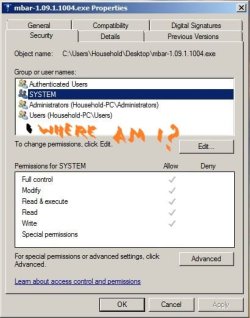
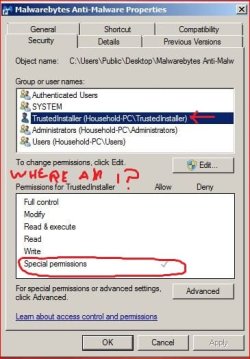
Every user & group now has special permissions with checks in grayed-out boxes. Trusted Installer as a user seems to have total control of the PC. I can't run anything UAC needs permission for, and cannot get elevated admin rights in safe mode.
I tried a Hiren's-style CD full of various utilities in safe mode to change the admin password back to mine. Said it was successful, but it wasn't. I think this nasty bug takes ownership of anything you work with - mouse click, command line, even security web pages. It glitched for a second and I saw it replace the ESET page with something else, then overlay that with maybe a spoof of the ESET page that took 10 seconds to load!
The concept I'm thinking of is using my Vista PC to sterilize a thumb drive and load all the offline installers found in the various Poweliks and similar threads onto it in case I need them. (I'd like to be able to run the online installers from the thumb drive, too, but don't know how.)
Then boot my 7PC into safe w/ networking and run this ESET Poweliks remover from the thumb drive if possible:
FULL REMOVAL PACKAGE
ESET | Antivirus, Internet Security Software & Virus Protection :: Download :: Thank You
http://download.eset.com/manuals/eset_eav_8_quickstartguide_enu.pdf
http://download.eset.com/manuals/eset_eav_8_userguide_enu.pdf
ADDITIONAL INFO FOR PACKAGE
http://kb.eset.com/library/ESET/KB Team Only/Malware/ServicesRepair.exe
How do I remove a Poweliks or Gootkit infection? - ESET Knowledgebase
KernelMode.info
How do I remove a Poweliks or Gootkit infection? - ESET Knowledgebase
Any thoughts, my beloved security geeks? Or point me in the right direction if I've veered off the path.
So...back to work!
Every user & group now has special permissions with checks in grayed-out boxes. Trusted Installer as a user seems to have total control of the PC. I can't run anything UAC needs permission for, and cannot get elevated admin rights in safe mode.
I tried a Hiren's-style CD full of various utilities in safe mode to change the admin password back to mine. Said it was successful, but it wasn't. I think this nasty bug takes ownership of anything you work with - mouse click, command line, even security web pages. It glitched for a second and I saw it replace the ESET page with something else, then overlay that with maybe a spoof of the ESET page that took 10 seconds to load!
The concept I'm thinking of is using my Vista PC to sterilize a thumb drive and load all the offline installers found in the various Poweliks and similar threads onto it in case I need them. (I'd like to be able to run the online installers from the thumb drive, too, but don't know how.)
Then boot my 7PC into safe w/ networking and run this ESET Poweliks remover from the thumb drive if possible:
FULL REMOVAL PACKAGE
ESET | Antivirus, Internet Security Software & Virus Protection :: Download :: Thank You
http://download.eset.com/manuals/eset_eav_8_quickstartguide_enu.pdf
http://download.eset.com/manuals/eset_eav_8_userguide_enu.pdf
ADDITIONAL INFO FOR PACKAGE
http://kb.eset.com/library/ESET/KB Team Only/Malware/ServicesRepair.exe
How do I remove a Poweliks or Gootkit infection? - ESET Knowledgebase
KernelMode.info
How do I remove a Poweliks or Gootkit infection? - ESET Knowledgebase
Any thoughts, my beloved security geeks? Or point me in the right direction if I've veered off the path.
My Computer
- Computer type
- PC/Desktop
- Computer Manufacturer/Model Number
- HP Pro 6005 SFF refurbished by Joy
- OS
- Windows 7 Pro 64 bit
- CPU
- Athlon II X2 B24
- Motherboard
- HP 3047-h
- Memory
- 8 GB
- Graphics Card(s)
- Integrated Radeon HD4200
- Hard Drives
- GB0750C8047
Seagate Barracuda 7200.9 250GB
- Browser
- IE 11