

Happy Saturday Everyone -
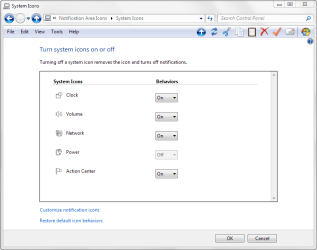
Does anyone have any ideas as to where exactly I can find the registry location and value for the icons in the system tray? More precisely the Battery / Power icons. For some reason when I noticed it missing I discovered that it's greyed out (see pic) on the screen where you're supposed to be able to turn it on or off.
- I've Downloaded some registry fixes from the tutorial section on both enabling the icon and reseting the system tray icons but nothing made a difference.
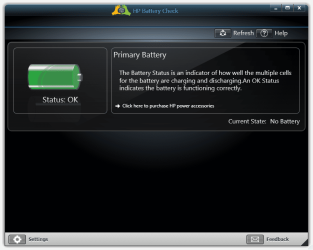
- Also ran a HP diagnostic on the battery (see pic) in which the support assistant shows the battery as being ok status BUT then you see it also says that there is currently no battery available...?
- Ran system monitor gadget (pic) and according to it I had 30 minutes of battery life left which is pretty good since it originally said 4 minutes and somehow recharged back upto 30 minutes all the while not being plugged in anywhere. Yeah, this is messed up.
- Ran sfc /SCANNOW and there were no errors. Also rebuilt all system components and rebuilt the wmi inventory - nothing.
Any help would be much appreciated. Thanks !
- Tagen
Does anyone have any ideas as to where exactly I can find the registry location and value for the icons in the system tray? More precisely the Battery / Power icons. For some reason when I noticed it missing I discovered that it's greyed out (see pic) on the screen where you're supposed to be able to turn it on or off.
- I've Downloaded some registry fixes from the tutorial section on both enabling the icon and reseting the system tray icons but nothing made a difference.
- Also ran a HP diagnostic on the battery (see pic) in which the support assistant shows the battery as being ok status BUT then you see it also says that there is currently no battery available...?
- Ran system monitor gadget (pic) and according to it I had 30 minutes of battery life left which is pretty good since it originally said 4 minutes and somehow recharged back upto 30 minutes all the while not being plugged in anywhere. Yeah, this is messed up.
- Ran sfc /SCANNOW and there were no errors. Also rebuilt all system components and rebuilt the wmi inventory - nothing.
Any help would be much appreciated. Thanks !
- Tagen
Attachments

My Computer
At a glance
windows 7 64 BitIntel(R) Core(TM)2 Duo CPU T6600 @ 220GHz4 GB (2) 2 GB SODIMM DDR-2 800MHz Kinston(2) Mobile Intell (R) 4 Series Express Chipse...
- Computer Manufacturer/Model Number
- Hewlett Packard G71-340US
- OS
- windows 7 64 Bit
- CPU
- Intel(R) Core(TM)2 Duo CPU T6600 @ 220GHz
- Memory
- 4 GB (2) 2 GB SODIMM DDR-2 800MHz Kinston
- Graphics Card(s)
- (2) Mobile Intell (R) 4 Series Express Chipset Family
- Screen Resolution
- 1600 X 900 HD TrueBrite
- Keyboard
- IBM enhanced (101 or 102 key) keyboard
- Mouse
- Logitech Cordless and Microsoft Intelipoint 5000 Wireless
- Internet Speed
- Clearwire High Broadbrand
