
Power Plan changes not applying.

neofury

New member
Local time
5:19 PM
Messages
4
It's been 5 days since this annoying bug started, i can't watch even an 11 minute long video without even standing to move the mouse or press a key to turn on the monitor, why? Because my monitor keeps turning off every 10 minutes when i'm idle even when i'm playing videos. I changed the power plan setting "Turn off the display" in 1 minute, but it never works, i tried changing it to an hour but still persist to turning off every 10 minutes or so. I also tried changing almost everything in the advance settings and yet nothing happens. There are no screen savers on and i also tried command lines to change them and also removing the usb mouse and keyboard. Has anyone experienced this before? would appreciate the help, i tried almost everything i see on google already.
 

My Computer

Computer type
PC/Desktop
OS
Windows 7 Ultimate x64
Welcome to the forums neofury!

Excuse me for asking this, but you are clicking "save" when you finish, correct? Also what power plan are you using?

Have you tried using the Powercfg.exe tool? Set the plan/settings you want then click Start > All Programs > Accessories. Right click on Command Prompt and Run as administrator. When the command box/window comes up type Powercfg -setactive Scheme_GUID and press enter.

Hope this helps.
 
Last edited:

My Computer

Computer type
Laptop
Computer Manufacturer/Model Number
MSI GE72VR Apache Pro-416
OS
Windows 10x64 Build 1709
CPU
Intel i7 7700HQ Kaby Lake
Motherboard
Micro-Star Intl. MS-179B (U3C1)
Memory
16 GB DDR4 @2400
Graphics Card(s)
Nvidia Geforce GTX 1060
Screen Resolution
1920x1080 120Hz
Hard Drives
256 GB Nvme M.2 SSD

1TB HDD@7200
Cooling
Cooler Blast 4
Keyboard
Steel Series
Antivirus
Bit Defender Free
Browser
Edge
Thanks for the welcome. :) and yes i save every time. I'm currently using balanced, i tried the high performance and power saver with same results and also made my own plan and still ended up the same, I'm already considering formating my unit if this still persists. and yes, i also tried the Powercfg.exe tool in command prompt.
 

My Computer

Computer type
PC/Desktop
OS
Windows 7 Ultimate x64

My Computer

Computer type
Laptop
Computer Manufacturer/Model Number
MSI GE72VR Apache Pro-416
OS
Windows 10x64 Build 1709
CPU
Intel i7 7700HQ Kaby Lake
Motherboard
Micro-Star Intl. MS-179B (U3C1)
Memory
16 GB DDR4 @2400
Graphics Card(s)
Nvidia Geforce GTX 1060
Screen Resolution
1920x1080 120Hz
Hard Drives
256 GB Nvme M.2 SSD

1TB HDD@7200
Cooling
Cooler Blast 4
Keyboard
Steel Series
Antivirus
Bit Defender Free
Browser
Edge
Still nothing, last time i updated was 2 Days ago, 2/16/2016 because of this bug. I also tried that sfc /scannnow
it found no errors of what sort. Probably repair or format is the best choice i have for now. Nonetheless, thanks for trying to help. :)
 

My Computer

Computer type
PC/Desktop
OS
Windows 7 Ultimate x64
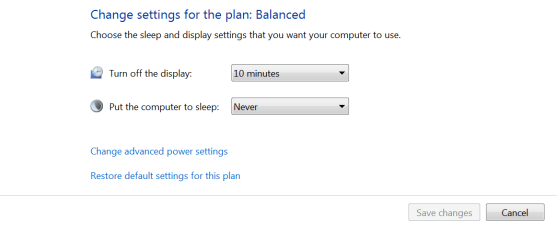
I don't know if this is what you did, but I hope this will help. Go into your Control Panel and Power Settings. This should do it. Make the time longer but the Sleep should be Never.
 

Attachments

  • Capture.PNG
    Capture.PNG
    20.1 KB · Views: 0

My Computer

Computer type
PC/Desktop
Computer Manufacturer/Model Number
Custom Build
OS
Windows 7 Home Premium 32-Bit - Build 7600 SP1
CPU
Intel Core i3-2120 3.30Ghz
Motherboard
Asus P8Z68-V LX Intel Z68 Socket H2 ATX
Memory
Kingston 4 GB DDR3 1333 mhz
Graphics Card(s)
AMD Radeon HD6670
Sound Card
Sound Blaster Audigy SE 24-Bit
Monitor(s) Displays
Asus VE228
Screen Resolution
1440 X 900
Hard Drives
OCZ Vertex 3 120 GB Sata 3 SSD ==
Kingston SH103/S3 120 G Hyper X 120 GB SSD ==
Western Digital 500 GB Caviar Green 7200 RPM ==
PSU
Corsair CX600M == 600 Watt
Case
NZXT Apollo - Silver with Clear Side Panel
Cooling
Three 120 mm Fans
Keyboard
Microsoft Natural 4000
Mouse
Microsoft Custom Optical 3000
Internet Speed
AT&T Fiber Optic Wireless Network
Antivirus
Microsoft Security Essentials
Browser
Chrome
Other Info
120 mm Blue LED Fan -- Three Blue LED Lazer Light Sticks
I don't know if this is what you did, but I hope this will help. Go into your Control Panel and Power Settings. This should do it. Make the time longer but the Sleep should be Never.

Well, that is exactly what i did. I also changed the advance settings including making my own power plan setting.
 

My Computer

Computer type
PC/Desktop
OS
Windows 7 Ultimate x64
Check in screensaver that you do not have it set to start in 10 minutes and have no screensaver. The screen will black out in 10 minutes if it is set up that way.

Set the screensaver for a very long time if you don't want to keep moving the mouse.
 

My Computer

Computer type
PC/Desktop
Computer Manufacturer/Model Number
Dell, Acer, eMachine
OS
Home Premium and Pro 32 bit and 64 bit (4 computers)
Browser
Palemoon
Back
Top