Power to disc drives, but no data reading

FLaTLiN3D

New member
Local time
2:39 PM
Messages
57
Location
Southern Michigan
I'm having troubles with two disc drives I installed into my computer....

I currently have 2 plugged into my computer (Both internal). One is a CD drive, and the other a DVD.

Now, at first I had two CD drives installed and they worked fine, however I needed my computer to read DVD's also... So I removed one of my CD drives and installed a DVD drive. They both have power to them, however my computer doesn't seem to be able to communicate with them in a sense of transferring data. It doesn't even recognize the original CD drive that I had installed. I don't receive errors, they are simply non-responsive.

Code:
Optical Drives
    No optical disk drives detected

Help would be much appreciated,
FLaTLiN3D
 

My Computer My Computer

At a glance

MS Windows 7 HP 64Bit
Computer Manufacturer/Model Number
Toshiba Satellite L675D-S7052
OS
MS Windows 7 HP 64Bit
Internet Speed
2MB/s ↓
Are the drives IDE or SATA? If they are IDE you need to make sure the jumpers are set to MASTER and SLAVE or if you have a CS cable then the jumpers on both drives are set to CS.

If they are SATA there are no jumpers to set.
 

My Computer My Computer

At a glance

Windows 7 Enterprise (x64); Windows Server 20...16GB
Computer type
PC/Desktop
Computer Manufacturer/Model Number
Dell OP7010
OS
Windows 7 Enterprise (x64); Windows Server 2008 R2 (x64)
Memory
16GB
Monitor(s) Displays
4 Dell 24" LCD
Screen Resolution
1280x1024
Keyboard
Dell
Mouse
Dell Optical
Internet Speed
40meg
Does it matter which one is the master and which is the slave? I don't see how it would they both do the exact same job except with a different type of disc... I thought Master and Slave was only for HDD's?
 

My Computer My Computer

At a glance

MS Windows 7 HP 64Bit
Computer Manufacturer/Model Number
Toshiba Satellite L675D-S7052
OS
MS Windows 7 HP 64Bit
Internet Speed
2MB/s ↓
Does it matter which one is the master and which is the slave? I don't see how it would they both do the exact same job except with a different type of disc... I thought Master and Slave was only for HDD's?

Any device that is and IDE must be set to MASTER or SLAVE if you are using them together on one (1) cable. Typically CD-Rom and DVD-Rom will share a cable.

It does not matter which is MASTER or SLAVE as long as they are not both the same.
 

My Computer My Computer

At a glance

Windows 7 Enterprise (x64); Windows Server 20...16GB
Computer type
PC/Desktop
Computer Manufacturer/Model Number
Dell OP7010
OS
Windows 7 Enterprise (x64); Windows Server 2008 R2 (x64)
Memory
16GB
Monitor(s) Displays
4 Dell 24" LCD
Screen Resolution
1280x1024
Keyboard
Dell
Mouse
Dell Optical
Internet Speed
40meg
I'm not sure if I'm using the correct cable.... It looks alright but it doesn't say "Master" and "Slave" and "CPU Board" on it like the one I use for my HDD's... Here, take a look.


On the next picture, it's plugged in on the other side of this cable... I couldn't get a picture of it because it's such a small space.


FLaTLiN3D
 

My Computer My Computer

At a glance

MS Windows 7 HP 64Bit
Computer Manufacturer/Model Number
Toshiba Satellite L675D-S7052
OS
MS Windows 7 HP 64Bit
Internet Speed
2MB/s ↓
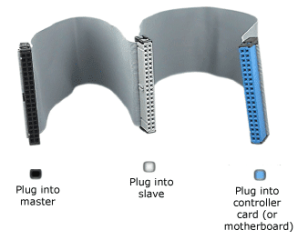
You are using an IDE cable.

2425_ide7_gif-550x0.png

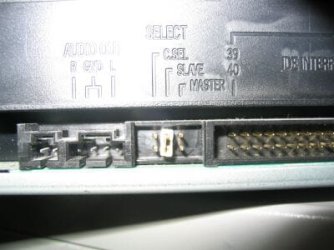
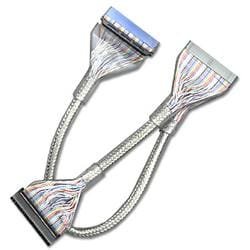
You should set the jumpers on your drives as follows: Firstly, for the drive connected to the end (black) connector, this should be MA. Secondly, for the drive connected to the middle (grey) connector, this should be SL. The blue connector should go to your motherboard. Incidentally, I don't recommend the Cable Select (CS) option. Note that the illustration shows the typical jumper positions, however you need to check your actual drive because some might be in a different order. I also recommend the use of 80-conductor cables as opposed to 40-conductor ones, and I use the rounded versions as these are easier to install.

CD6.jpg clearroundide.jpg

If using a 40-conductor cable, there is often no colour coding on the connectors. However, on all cables the middle connector is not actually in the middle, but rather towards one end, roughly splitting the cable into 1/3 and 2/3. The end of the cable where the connectors are closest together goes to the devices, whereas the other end goes to the motherboard. The individual connector positions and connections are still as described above.
 
Last edited:

My Computer My Computer

At a glance

Windows 8.1 Pro RTM x64Intel Core-i5-3570K 4-core @ 3.4GHz (Ivy Brid...4 x 4GB DDR3-1600 Corsair Vengeance CMZ8GX3M2...MSI GeForce GTX770 Gaming OC 2GB
Computer type
PC/Desktop
Computer Manufacturer/Model Number
Dwarf Dwf/11/2012 r09/2013
OS
Windows 8.1 Pro RTM x64
CPU
Intel Core-i5-3570K 4-core @ 3.4GHz (Ivy Bridge) (OC 4.4GHz)
Motherboard
ASRock Z77 Extreme4-M
Memory
4 x 4GB DDR3-1600 Corsair Vengeance CMZ8GX3M2A1600C9B (16GB)
Graphics Card(s)
MSI GeForce GTX770 Gaming OC 2GB
Sound Card
Realtek High Definition on board solution (ALC 898)
Monitor(s) Displays
ViewSonic VA1912w Widescreen (VGA)
Screen Resolution
1440x900
Hard Drives
OCZ Agility 3 SSD 120GB SATA III x2 (RAID 0)
Samsung HD501LJ 500GB SATA II x2
Hitachi HDS721010CLA332 1TB SATA II
Iomega 1.5TB Ext USB 2.0
WD 2.0TB Ext USB 3.0
PSU
XFX Pro Series 850W Semi-Modular
Case
Gigabyte IF233
Cooling
1 x 120mm Front Inlet 1 x 120mm Rear Exhaust
Keyboard
Microsoft Comfort Curve Keyboard 3000 (USB)
Mouse
Microsoft Comfort Mouse 3000 for Business (USB)
Internet Speed
NetGear DG834Gv3 ADSL Modem/Router (Ethernet) ~4.0 Mb/s (O2)
Antivirus
Avast! 8.0.1497
Browser
IE 11
Other Info
Optical Drive: HL-DT-ST BD-RE BH10LS30 SATA Bluray
Lexmark S305 Printer/Scanner/Copier (USB)
WEI Score: 8.1/8.1/8.5/8.5/8.25
Asus Eee PC 1011PX Netbook (Windows 7 x86 Starter)
Excellent information Dwarf , very easy to understand :D
 

My Computer My Computer

At a glance

win 7 ultimate32bit, Win8.1pro wmc 32bitamd phenom x4 9600corsair twinxs 2x2gb2x nvidia 1gb 8500gt
Computer type
PC/Desktop
Computer Manufacturer/Model Number
self build
OS
win 7 ultimate32bit, Win8.1pro wmc 32bit
CPU
amd phenom x4 9600
Motherboard
asus m2n32-sli deluxe
Memory
corsair twinxs 2x2gb
Graphics Card(s)
2x nvidia 1gb 8500gt
Sound Card
onboard
Monitor(s) Displays
23" PB Viseo 233d
Screen Resolution
1920x1080
Hard Drives
maxtor sata 500gb
maxtor sata 320gb
fujitsu sata200gb
PSU
oryxx tornado 750w
Case
thermaltake xaser lll
Cooling
artic freezer64 pro + 7 case fans
Very good information indeed and thank you very much... Except the IDE I'm attempting to use, all of the ends of it are black, there is no white or blue. I'll check and see if I have one that is colored like that....

FLaTLiN3D

Edit: All of the cords that I have are all black at the tips.....
 

My Computer My Computer

At a glance

MS Windows 7 HP 64Bit
Computer Manufacturer/Model Number
Toshiba Satellite L675D-S7052
OS
MS Windows 7 HP 64Bit
Internet Speed
2MB/s ↓
It doesn't matter about the colouring. The relative positions of the connectors on the cable should help to identify which is which, as per the description given in the last paragraph of my previous post.
 

My Computer My Computer

At a glance

Windows 8.1 Pro RTM x64Intel Core-i5-3570K 4-core @ 3.4GHz (Ivy Brid...4 x 4GB DDR3-1600 Corsair Vengeance CMZ8GX3M2...MSI GeForce GTX770 Gaming OC 2GB
Computer type
PC/Desktop
Computer Manufacturer/Model Number
Dwarf Dwf/11/2012 r09/2013
OS
Windows 8.1 Pro RTM x64
CPU
Intel Core-i5-3570K 4-core @ 3.4GHz (Ivy Bridge) (OC 4.4GHz)
Motherboard
ASRock Z77 Extreme4-M
Memory
4 x 4GB DDR3-1600 Corsair Vengeance CMZ8GX3M2A1600C9B (16GB)
Graphics Card(s)
MSI GeForce GTX770 Gaming OC 2GB
Sound Card
Realtek High Definition on board solution (ALC 898)
Monitor(s) Displays
ViewSonic VA1912w Widescreen (VGA)
Screen Resolution
1440x900
Hard Drives
OCZ Agility 3 SSD 120GB SATA III x2 (RAID 0)
Samsung HD501LJ 500GB SATA II x2
Hitachi HDS721010CLA332 1TB SATA II
Iomega 1.5TB Ext USB 2.0
WD 2.0TB Ext USB 3.0
PSU
XFX Pro Series 850W Semi-Modular
Case
Gigabyte IF233
Cooling
1 x 120mm Front Inlet 1 x 120mm Rear Exhaust
Keyboard
Microsoft Comfort Curve Keyboard 3000 (USB)
Mouse
Microsoft Comfort Mouse 3000 for Business (USB)
Internet Speed
NetGear DG834Gv3 ADSL Modem/Router (Ethernet) ~4.0 Mb/s (O2)
Antivirus
Avast! 8.0.1497
Browser
IE 11
Other Info
Optical Drive: HL-DT-ST BD-RE BH10LS30 SATA Bluray
Lexmark S305 Printer/Scanner/Copier (USB)
WEI Score: 8.1/8.1/8.5/8.5/8.25
Asus Eee PC 1011PX Netbook (Windows 7 x86 Starter)
Right, but the cord plugged into it now is set up like this....

1===2===========3

The numbers represent the connectors...
1. CD Drive
2. DVD Drive
3. CPU

Should I just try a different IDE cable? Perhaps it's defective.

FLaTLiN3D
 

My Computer My Computer

At a glance

MS Windows 7 HP 64Bit
Computer Manufacturer/Model Number
Toshiba Satellite L675D-S7052
OS
MS Windows 7 HP 64Bit
Internet Speed
2MB/s ↓
OK. Now check the jumpers on the drives. Drive 1 should be MA and drive 2 should be SL. If that doesn't work, then it could be the cable.
 

My Computer My Computer

At a glance

Windows 8.1 Pro RTM x64Intel Core-i5-3570K 4-core @ 3.4GHz (Ivy Brid...4 x 4GB DDR3-1600 Corsair Vengeance CMZ8GX3M2...MSI GeForce GTX770 Gaming OC 2GB
Computer type
PC/Desktop
Computer Manufacturer/Model Number
Dwarf Dwf/11/2012 r09/2013
OS
Windows 8.1 Pro RTM x64
CPU
Intel Core-i5-3570K 4-core @ 3.4GHz (Ivy Bridge) (OC 4.4GHz)
Motherboard
ASRock Z77 Extreme4-M
Memory
4 x 4GB DDR3-1600 Corsair Vengeance CMZ8GX3M2A1600C9B (16GB)
Graphics Card(s)
MSI GeForce GTX770 Gaming OC 2GB
Sound Card
Realtek High Definition on board solution (ALC 898)
Monitor(s) Displays
ViewSonic VA1912w Widescreen (VGA)
Screen Resolution
1440x900
Hard Drives
OCZ Agility 3 SSD 120GB SATA III x2 (RAID 0)
Samsung HD501LJ 500GB SATA II x2
Hitachi HDS721010CLA332 1TB SATA II
Iomega 1.5TB Ext USB 2.0
WD 2.0TB Ext USB 3.0
PSU
XFX Pro Series 850W Semi-Modular
Case
Gigabyte IF233
Cooling
1 x 120mm Front Inlet 1 x 120mm Rear Exhaust
Keyboard
Microsoft Comfort Curve Keyboard 3000 (USB)
Mouse
Microsoft Comfort Mouse 3000 for Business (USB)
Internet Speed
NetGear DG834Gv3 ADSL Modem/Router (Ethernet) ~4.0 Mb/s (O2)
Antivirus
Avast! 8.0.1497
Browser
IE 11
Other Info
Optical Drive: HL-DT-ST BD-RE BH10LS30 SATA Bluray
Lexmark S305 Printer/Scanner/Copier (USB)
WEI Score: 8.1/8.1/8.5/8.5/8.25
Asus Eee PC 1011PX Netbook (Windows 7 x86 Starter)
1. CD Drive... set jumper to MA
2. DVD Drive set jumper to SL

btw, that's an older style low-density IDE cable, you might have better performance with a high density cable that has ends colored like the one in Dwarf's post. Black/Gray/Blue

Ap
 

My Computer My Computer

At a glance

Windows 7 Home PremiumIntel Core 2 Duo @ 3.00gHz4 GBATI Radeon HD 2600 XT
Computer Manufacturer/Model Number
Assembled in my workshop
OS
Windows 7 Home Premium
CPU
Intel Core 2 Duo @ 3.00gHz
Motherboard
Gigabyte GA-P35-S3G
Memory
4 GB
Graphics Card(s)
ATI Radeon HD 2600 XT
Sound Card
RME 24/96 Card, Realtek Internal Audio PreSonus FireStudio
Monitor(s) Displays
Acer 1917 (x2)
Screen Resolution
1280 x 1024 on both monitors
Hard Drives
Three 250GB Seagate SATA Barracuda 7200rpm
PSU
Rosewill 500-watt
Case
Rosewill mid-tower
Cooling
Noctua NH-U9B (CPU), PwrSupply fan + single large case Fan
Keyboard
Macally w/2/USB ports.
Mouse
Trackman Wheel
Other Info
Event 20/20 bas studio monitors, Yamaha sub.
Rackmount Korg/Roland/Yamaha synthesizers,
Cubase MIDI/audio recording. Sony Soundforge audio/mastering software. CD Architect Mastering. RME & Presonus audio interfaces.
Any luck? What about temporarily disconnecting the DVD drive to see if the other CD drive is detected (simply remove the cables). Of course, it is quite possible (but unlikely) that you have damaged the cable when installing the DVD drive in the first place. In that case, I recommend trying a new cable, preferably one of the rounded type.
 

My Computer My Computer

At a glance

Windows 8.1 Pro RTM x64Intel Core-i5-3570K 4-core @ 3.4GHz (Ivy Brid...4 x 4GB DDR3-1600 Corsair Vengeance CMZ8GX3M2...MSI GeForce GTX770 Gaming OC 2GB
Computer type
PC/Desktop
Computer Manufacturer/Model Number
Dwarf Dwf/11/2012 r09/2013
OS
Windows 8.1 Pro RTM x64
CPU
Intel Core-i5-3570K 4-core @ 3.4GHz (Ivy Bridge) (OC 4.4GHz)
Motherboard
ASRock Z77 Extreme4-M
Memory
4 x 4GB DDR3-1600 Corsair Vengeance CMZ8GX3M2A1600C9B (16GB)
Graphics Card(s)
MSI GeForce GTX770 Gaming OC 2GB
Sound Card
Realtek High Definition on board solution (ALC 898)
Monitor(s) Displays
ViewSonic VA1912w Widescreen (VGA)
Screen Resolution
1440x900
Hard Drives
OCZ Agility 3 SSD 120GB SATA III x2 (RAID 0)
Samsung HD501LJ 500GB SATA II x2
Hitachi HDS721010CLA332 1TB SATA II
Iomega 1.5TB Ext USB 2.0
WD 2.0TB Ext USB 3.0
PSU
XFX Pro Series 850W Semi-Modular
Case
Gigabyte IF233
Cooling
1 x 120mm Front Inlet 1 x 120mm Rear Exhaust
Keyboard
Microsoft Comfort Curve Keyboard 3000 (USB)
Mouse
Microsoft Comfort Mouse 3000 for Business (USB)
Internet Speed
NetGear DG834Gv3 ADSL Modem/Router (Ethernet) ~4.0 Mb/s (O2)
Antivirus
Avast! 8.0.1497
Browser
IE 11
Other Info
Optical Drive: HL-DT-ST BD-RE BH10LS30 SATA Bluray
Lexmark S305 Printer/Scanner/Copier (USB)
WEI Score: 8.1/8.1/8.5/8.5/8.25
Asus Eee PC 1011PX Netbook (Windows 7 x86 Starter)
Ok I'll try that right now, I was mistaken earlier when I said that all the of jumpers are black, they are indeed Blue, White, and black, I simply had to unplug them to see it. I will unplug to dvd drive now to see if the CD drive is working properly by itself.

EDIT: Okay I unplugged the DVD drive and replaced it with a different CD drive.... My computer at least knows that this drive is there, however it refuses to recognize the original CD drive that I had in.

Although it still does not show up in "My Computer"....

Optical Drives
A@APA CD-R ATA Device
Media Type UNKNOWN
Name A@APA CD-R ATA Device
Availability Running/Full Power
Capabilities Random Access, Supports Removable Media
Config Manager Error Code Device cannot start
Config Manager User Config FALSE
Media Loaded FALSE
Status Error


I own several IDE cables, but I've never even seen one of the rounded type :rolleyes:
Are there such things as 'universal' disc drives? That can read and write both dvd's and cd's?
 
Last edited:

My Computer My Computer

At a glance

MS Windows 7 HP 64Bit
Computer Manufacturer/Model Number
Toshiba Satellite L675D-S7052
OS
MS Windows 7 HP 64Bit
Internet Speed
2MB/s ↓
Ok, since you have the black/white/blue cable you need to set both drives to CS (cable select) The cable will make the drive selections for you.
 

My Computer My Computer

At a glance

Windows 7 Enterprise (x64); Windows Server 20...16GB
Computer type
PC/Desktop
Computer Manufacturer/Model Number
Dell OP7010
OS
Windows 7 Enterprise (x64); Windows Server 2008 R2 (x64)
Memory
16GB
Monitor(s) Displays
4 Dell 24" LCD
Screen Resolution
1280x1024
Keyboard
Dell
Mouse
Dell Optical
Internet Speed
40meg
Ok, since you have the black/white/blue cable you need to set both drives to CS (cable select) The cable will make the drive selections for you.
How am I supposed to do that when my computer doesn't seem to acknowledge their presence?

FLaTLiN3D
 

My Computer My Computer

At a glance

MS Windows 7 HP 64Bit
Computer Manufacturer/Model Number
Toshiba Satellite L675D-S7052
OS
MS Windows 7 HP 64Bit
Internet Speed
2MB/s ↓
Ok, since you have the black/white/blue cable you need to set both drives to CS (cable select) The cable will make the drive selections for you.
How am I supposed to do that when my computer doesn't seem to acknowledge their presence?

FLaTLiN3D

We are collectively thinking the reason the computer does not acknowledge the drives is because they are not setup correctly. Once the jumpers are in the right place with luck the BIOS and then the OS will see the drives.
 

My Computer My Computer

At a glance

Windows 7 Enterprise (x64); Windows Server 20...16GB
Computer type
PC/Desktop
Computer Manufacturer/Model Number
Dell OP7010
OS
Windows 7 Enterprise (x64); Windows Server 2008 R2 (x64)
Memory
16GB
Monitor(s) Displays
4 Dell 24" LCD
Screen Resolution
1280x1024
Keyboard
Dell
Mouse
Dell Optical
Internet Speed
40meg
Ok, since you have the black/white/blue cable you need to set both drives to CS (cable select) The cable will make the drive selections for you.
How am I supposed to do that when my computer doesn't seem to acknowledge their presence?

FLaTLiN3D


Have you in fact adjusted the jumpers on the back of both the CD and DVD drives?

Ap
 

My Computer My Computer

At a glance

Windows 7 Home PremiumIntel Core 2 Duo @ 3.00gHz4 GBATI Radeon HD 2600 XT
Computer Manufacturer/Model Number
Assembled in my workshop
OS
Windows 7 Home Premium
CPU
Intel Core 2 Duo @ 3.00gHz
Motherboard
Gigabyte GA-P35-S3G
Memory
4 GB
Graphics Card(s)
ATI Radeon HD 2600 XT
Sound Card
RME 24/96 Card, Realtek Internal Audio PreSonus FireStudio
Monitor(s) Displays
Acer 1917 (x2)
Screen Resolution
1280 x 1024 on both monitors
Hard Drives
Three 250GB Seagate SATA Barracuda 7200rpm
PSU
Rosewill 500-watt
Case
Rosewill mid-tower
Cooling
Noctua NH-U9B (CPU), PwrSupply fan + single large case Fan
Keyboard
Macally w/2/USB ports.
Mouse
Trackman Wheel
Other Info
Event 20/20 bas studio monitors, Yamaha sub.
Rackmount Korg/Roland/Yamaha synthesizers,
Cubase MIDI/audio recording. Sony Soundforge audio/mastering software. CD Architect Mastering. RME & Presonus audio interfaces.
I think it may have simply been a defective cable. I took out the one I had an put one in from the CD drive to my motherboard and it works like a charm. Though the cord is only 2 sided, no place for a SL. :(

FLaTLiN3D
 

My Computer My Computer

At a glance

MS Windows 7 HP 64Bit
Computer Manufacturer/Model Number
Toshiba Satellite L675D-S7052
OS
MS Windows 7 HP 64Bit
Internet Speed
2MB/s ↓
Back
Top