Solved Powerdesk retired for me: too many incompatiblilities with Win7 + tip

IfItsX

New member
Local time
3:10 AM
Messages
14
I have for many years used Powerdesk 5 (a freebie) after first purchasing v3.x many years ago. I became extremely attached to it for various reasons, but primarily because it had an accessible feature that allowed one to copy the complete path of a file. I couldn't give that up.

To make a long story short, various efforts to get the latest and the previous version to work in a stable manner with Win7 have failed.

But there is good news! I discovered that Windows Explorer has a 'hidden' feature that allows one to copy the complete path, albeit with unnecessary double-quotes around it - but still, by pressing shift before right-clicking and there in the middle of the menu is "Copy as path" !!!

HTH

Barry
 

My Computer My Computer

At a glance

Windows 7 x64/sp1
OS
Windows 7 x64/sp1
I have all the paid for versions of Power5desk up to 8.0 and have also stopped using it. The main reason being it's just too slow. It has a lot of nice features but I don't find any I need on Win 7 any more.

The one thing I did use was it's Sync capability to occasionally keep two folders on two different computers in sync. I now do that automatically with a program called MirrorFolder, so .... bye bye PowerDesk.

The Copy as path is un-needed. When you are at the location you want in Windows Explorer, click on the Bread-crumbs (Address) bar.

C:\ > Program Files (x86) > Carbonite > Carbonite Backup
becomes
C:\Program Files (x86)\Carbonite\Carbonite Backup
. Right click and Copy!
 

My Computer My Computer

At a glance

Windows 10 Pro X64Intel Quad Core i7-4770 @ 3.4Ghz16.0GB PC3-12800 DDR3 SDRAM 1600 MHzIntel Integrated HD Graphics
Computer type
PC/Desktop
Computer Manufacturer/Model Number
Lenovo IdeaCenter 450
OS
Windows 10 Pro X64
CPU
Intel Quad Core i7-4770 @ 3.4Ghz
Memory
16.0GB PC3-12800 DDR3 SDRAM 1600 MHz
Graphics Card(s)
Intel Integrated HD Graphics
Sound Card
Realtek HD Audio
Monitor(s) Displays
HP 22" LCD
Screen Resolution
1680 x 1050
Hard Drives
250GB Samsung EVO SATA-3 SSD
2TB Seagate ST2000DM001 SATA-2
1.5TB Seagate ST3150041AS SATA
Keyboard
Dell USB
Mouse
Lenovo USB
Internet Speed
Cable via Road Runner 3MB Upload, 30MB Download
Antivirus
Windows Defender, MBAM Pro, MBAE
Browser
Seamonkey
Other Info
UEFI/GPT
PLDS DVD-RW DH16AERSH
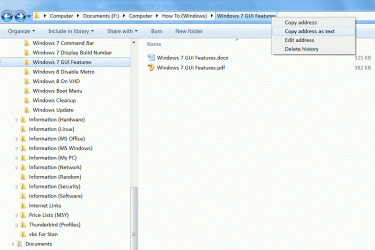
Right Click the Breadcrumb Bar

You can also just right click on the "Breadcrumb Bar" ("Address Bar") and choose "Copy address as text", to copy the path to the "Clipboard".
Click on thumbnail for animation.
Copy Address As Text.gif
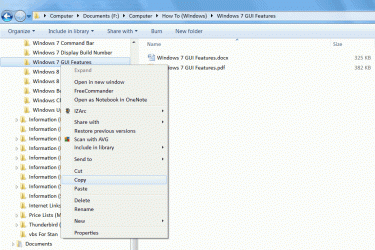
"Copy address" performs the same function as selecting the named folder in the "Navigation Pane" and copying it.
Click on thumbnail for animation.
Copy Address.gif
 

My Computer My Computer

At a glance

W7 Ultimate SP1, LM19.2 MATE, W10 Home 1703, ...AMD Phenom II x6 1100T, 3.3 GHz12GB DDR3 1333 G-Skill (4GB x 2), G-Skill (2G...NVIDIA GeForce GTX 660
Computer type
PC/Desktop
Computer Manufacturer/Model Number
n/a
OS
W7 Ultimate SP1, LM19.2 MATE, W10 Home 1703, W10 Pro 1703 VM, #All 64 bit
CPU
AMD Phenom II x6 1100T, 3.3 GHz
Motherboard
ASUS M4A88T-M/USB3 (AM3)
Memory
12GB DDR3 1333 G-Skill (4GB x 2), G-Skill (2GB x 2)
Graphics Card(s)
NVIDIA GeForce GTX 660
Sound Card
Realtek?
Monitor(s) Displays
Samsung S23B350
Screen Resolution
1920x1080
Hard Drives
WD Green 2TB (SATA), WD Green 3TB (SATA), WD Blue 4TB (SATA), WD Blue 6TB (SATA)
PSU
Cooler Master
Case
Antec GX300 Tower
Cooling
3x Antec TRICOOL 120mm Fans
Mouse
Wired Optical
Internet Speed
DSL
Antivirus
Avast
Browser
Pale Moon (64 bit)
Other Info
2018-12-27 Upgraded HDDs
2015-12-10 Upgraded case, graphics card, storage
2015-08-15 Upgraded motherboard & RAM
2015-07-15 Upgraded LM17.1 to LM17.2
Rich, PJL

Thanks! That's even better: no quotes!

Barry
 

My Computer My Computer

At a glance

Windows 7 x64/sp1
OS
Windows 7 x64/sp1

My Computer My Computer

At a glance

W7 Ultimate SP1, LM19.2 MATE, W10 Home 1703, ...AMD Phenom II x6 1100T, 3.3 GHz12GB DDR3 1333 G-Skill (4GB x 2), G-Skill (2G...NVIDIA GeForce GTX 660
Computer type
PC/Desktop
Computer Manufacturer/Model Number
n/a
OS
W7 Ultimate SP1, LM19.2 MATE, W10 Home 1703, W10 Pro 1703 VM, #All 64 bit
CPU
AMD Phenom II x6 1100T, 3.3 GHz
Motherboard
ASUS M4A88T-M/USB3 (AM3)
Memory
12GB DDR3 1333 G-Skill (4GB x 2), G-Skill (2GB x 2)
Graphics Card(s)
NVIDIA GeForce GTX 660
Sound Card
Realtek?
Monitor(s) Displays
Samsung S23B350
Screen Resolution
1920x1080
Hard Drives
WD Green 2TB (SATA), WD Green 3TB (SATA), WD Blue 4TB (SATA), WD Blue 6TB (SATA)
PSU
Cooler Master
Case
Antec GX300 Tower
Cooling
3x Antec TRICOOL 120mm Fans
Mouse
Wired Optical
Internet Speed
DSL
Antivirus
Avast
Browser
Pale Moon (64 bit)
Other Info
2018-12-27 Upgraded HDDs
2015-12-10 Upgraded case, graphics card, storage
2015-08-15 Upgraded motherboard & RAM
2015-07-15 Upgraded LM17.1 to LM17.2
I had been a LONG TIME user of PowerDesk. When I first started using Win 7 I bought the newest version, 8. had nothing but problems with it. Used the forum of at CafeCity, actually an arm of Avenquest, to log my displeasure with the program and nothing was ever resolved. They, Avenquest, actually came out with a NEWER, yeah right, version, 8.5, that was just as bad as V8.
I still use the Sync and File Finder programs as they are actually stand alone EXE files but I have uninstalled the main PD program.

I now use Explorer++ and Win Explorer. But I miss using Powerdesk.
 

My Computer My Computer

At a glance

7 x64
OS
7 x64
edwar, I commiserate with you about PD, and about the lack of useful help on CafeCity. The guy that usually responds there from AvantQuest took me around many pointless email exchanges. Oy! Rest in peace, PD. I'll have to consider my purchase price as a funeral expense.

Now, inspired by the replies to this post about my #1 favorite feature on PD which was the copy path, I have discovered that there is also a keyboard shortcut for that in Win Explorer: Alt+D: Select the address bar. Found it here:

Keyboard shortcuts

Also, edwar, thanks for the suggestion about Explorer++:

Explorer++ - A small and fast file manager for Windows

They even have 64-bit versions. I'll have to cruise the blog and forums some day to see how people feel about it.

Barry
 

My Computer My Computer

At a glance

Windows 7 x64/sp1
OS
Windows 7 x64/sp1
Back
Top