PowerDVD 9 Install Error

marcuslaw

New member
Local time
7:51 PM
Messages
1
After uninstalling and upon reinstalling, I get two error messages. The first says:

Error 1402. Could not open key: UNKNOWN/Components/F6E622E682BFF3395F33CDA210F1285D\9CA6158A1FAA9F747966302E4DDCCB84. Verify that you have sufficient access to that key or contact support personnel.

When I click "Okay", I then get this message:

Error: - 1603 Fatal error during installation. Consult Windows Installer Help (Msi.chm) or MSDN for more information.

Any suggestions?:huh:
 

Attachments

  • Error Message 1-08-10.jpg
    Error Message 1-08-10.jpg
    111.6 KB · Views: 242
  • Error Message 1-08-10 (2).jpg
    Error Message 1-08-10 (2).jpg
    113.4 KB · Views: 96

My Computer

OS
Windows 7
Hi, Welcome to SF,

I have seen simialar issue with another software but the fix is kind of same. This happens when you don't have enough permission to those Registry Key you have mentioned in the error message. It quiet lengthy fix :)

First we have to Enable Build-in Administrator

Then Login under Build in administrator

Although, the GUIDS that appear in the actual error message which are beneath the parent key, are random. Please use the following steps to work around this issue:

1. Click Start under search type regedit.
2. Click Edit and select Find. The Find dialog box appears.
3. In the Find What field, type the GUID that was referenced in the error message and click Find Next.


Once located from the search, give the registry key adequate permissions:

1. Right-click on the key and select Properties. Click on the Security tab.
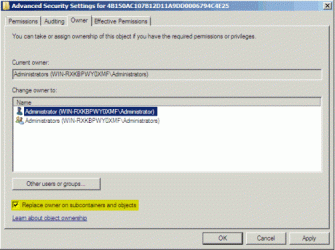
2. Click the Advanced button, then select the Owner tab.
3. Under the Owner tab, highlight the account your are currently signed into Windows as,
check the "Replace owner on subcontainers and objects" box, click Apply, then click OK.

2.gif

4. Close the Properties screen, then reopen it (see Step a).
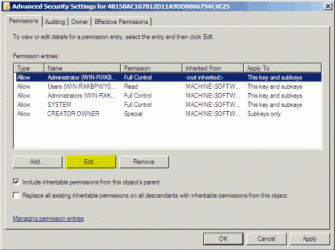
5. Click the Security tab, highlight User account you selected to be the Owner in Step d and click the Advanced button and then Edit on the Permissions tab.

3.gif

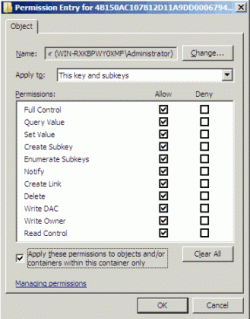
6. Check all boxes under the Allow column. Click Apply, then click OK.

4.gif

7. Close out of the registry and attempt the installation again.


Note: If you recieve the same error, but referencing another GUID after giving permission to the initial GUID that prompted the error, repeat the above section to search the registry and give the appropriate permission.


Hope this helps,
Captain
 

My Computer

Computer Manufacturer/Model Number
Samsung NP550P5C-S02IN
OS
Windows 7 Ultimate - 64-bit | Windows 8 Pro - 64-bit
CPU
Intel® Core™ i7 Processor 3,610QM (2.30Hz, 6MB L3 Cach
Memory
8 GB
Graphics Card(s)
NVIDIA® GeForce® GT 650M 2GB Graphics, Optimus™ techno
Sound Card
SoundAlive™ JBL 3 Speakers (With sub-Woofer)
Monitor(s) Displays
39.62cm (15.6) SuperBright 300nit HD+ LED Display
Screen Resolution
1,600 x 900, Anti-Reflective
Hard Drives
1TB S-ATA II Hard Drive (5,400RPM)
If i am not mistaken, couldnt this be fixed by right-clicking the file and selecting run as admin from properties? Just my suggestion, havent looked into it, correct me if im wrong.
 

My Computer

Computer Manufacturer/Model Number
Acer Veriton m261 (modded)
OS
Win 7 pro 64-bit, Ubuntu 9.10 64-bit
CPU
Intel Core 2 Duo 2.60 Ghz
Motherboard
Whatever came with the system
Memory
4 gb ddr2 667 Mhz
Graphics Card(s)
NVidia Geforce 9400 GS 1 gb ddr2 550 mhz GPU
Sound Card
Intergrated
Monitor(s) Displays
samsung SyncMaster 2494 24"
Screen Resolution
1080p
Hard Drives
80gb - IDE
750gb - SATA II
PSU
whatever came with the system
Case
whatever came with the system
Cooling
whatever came with the system
Keyboard
Apple Aluminium (Awesome)
Mouse
Some awesome Dell mouse, really good.
Internet Speed
100mbps
If i am not mistaken, couldnt this be fixed by right-clicking the file and selecting run as admin from properties? Just my suggestion, havent looked into it, correct me if im wrong.
Yes you could, but it looks like there is a registry issue and Capt. Jack is assisting the OP in rebuilding the key.
 

My Computer

Computer Manufacturer/Model Number
Custom Build
OS
Windows 7 7600 1 X64
CPU
AMD PHENOM II X 550 PROCESSOR 3.1 ghz
Motherboard
ASUS M4A78-TE
Memory
Corsair 4 gig ddr 3
Graphics Card(s)
ati radeon 3300
Sound Card
ati hd
Monitor(s) Displays
syncmaster 2033sw
Screen Resolution
1600X900 60 hz refresh
Hard Drives
twin_seagates SATA's 1 TB & 500 Gig, hitachi_slimline 160 gig
PSU
antec_550 watt
Case
cooler master GLite
Cooling
stock_heat sink
Internet Speed
20mbs up/ 1.5mbs down
Other Info
favorite child "stewie"
favorite dog "brian"
If i am not mistaken, couldnt this be fixed by right-clicking the file and selecting run as admin from properties? Just my suggestion, havent looked into it, correct me if im wrong.
Yes you could, but it looks like there is a registry issue and Capt. Jack is assisting the OP in rebuilding the key.

Alright. I stand corrected.
 

My Computer

Computer Manufacturer/Model Number
Acer Veriton m261 (modded)
OS
Win 7 pro 64-bit, Ubuntu 9.10 64-bit
CPU
Intel Core 2 Duo 2.60 Ghz
Motherboard
Whatever came with the system
Memory
4 gb ddr2 667 Mhz
Graphics Card(s)
NVidia Geforce 9400 GS 1 gb ddr2 550 mhz GPU
Sound Card
Intergrated
Monitor(s) Displays
samsung SyncMaster 2494 24"
Screen Resolution
1080p
Hard Drives
80gb - IDE
750gb - SATA II
PSU
whatever came with the system
Case
whatever came with the system
Cooling
whatever came with the system
Keyboard
Apple Aluminium (Awesome)
Mouse
Some awesome Dell mouse, really good.
Internet Speed
100mbps

My Computer

Computer Manufacturer/Model Number
Custom Build
OS
Windows 7 7600 1 X64
CPU
AMD PHENOM II X 550 PROCESSOR 3.1 ghz
Motherboard
ASUS M4A78-TE
Memory
Corsair 4 gig ddr 3
Graphics Card(s)
ati radeon 3300
Sound Card
ati hd
Monitor(s) Displays
syncmaster 2033sw
Screen Resolution
1600X900 60 hz refresh
Hard Drives
twin_seagates SATA's 1 TB & 500 Gig, hitachi_slimline 160 gig
PSU
antec_550 watt
Case
cooler master GLite
Cooling
stock_heat sink
Internet Speed
20mbs up/ 1.5mbs down
Other Info
favorite child "stewie"
favorite dog "brian"
I have seen the same issue while we install SQL Server 2005 and 2008 only on Windows 7 and Windows Server 2008 unfortunately even in build-in admin Right click and run as admin won't work because we have to take ownership for the Registry key which the error message mention and i came across a situation where i had to do the same drill 47 times to get it to install. Because we can't even inherit the Registry key permission to the Root key but we have to give permission to each registry key. That took for me like 4 hours.

Hope that answers the question,
Captain
 

My Computer

Computer Manufacturer/Model Number
Samsung NP550P5C-S02IN
OS
Windows 7 Ultimate - 64-bit | Windows 8 Pro - 64-bit
CPU
Intel® Core™ i7 Processor 3,610QM (2.30Hz, 6MB L3 Cach
Memory
8 GB
Graphics Card(s)
NVIDIA® GeForce® GT 650M 2GB Graphics, Optimus™ techno
Sound Card
SoundAlive™ JBL 3 Speakers (With sub-Woofer)
Monitor(s) Displays
39.62cm (15.6) SuperBright 300nit HD+ LED Display
Screen Resolution
1,600 x 900, Anti-Reflective
Hard Drives
1TB S-ATA II Hard Drive (5,400RPM)

My Computer

Computer Manufacturer/Model Number
Acer Veriton m261 (modded)
OS
Win 7 pro 64-bit, Ubuntu 9.10 64-bit
CPU
Intel Core 2 Duo 2.60 Ghz
Motherboard
Whatever came with the system
Memory
4 gb ddr2 667 Mhz
Graphics Card(s)
NVidia Geforce 9400 GS 1 gb ddr2 550 mhz GPU
Sound Card
Intergrated
Monitor(s) Displays
samsung SyncMaster 2494 24"
Screen Resolution
1080p
Hard Drives
80gb - IDE
750gb - SATA II
PSU
whatever came with the system
Case
whatever came with the system
Cooling
whatever came with the system
Keyboard
Apple Aluminium (Awesome)
Mouse
Some awesome Dell mouse, really good.
Internet Speed
100mbps
How About Thousands of Times

I have seen the same issue while we install SQL Server 2005 and 2008 only on Windows 7 and Windows Server 2008 unfortunately even in build-in admin Right click and run as admin won't work because we have to take ownership for the Registry key which the error message mention and i came across a situation where i had to do the same drill 47 times to get it to install. Because we can't even inherit the Registry key permission to the Root key but we have to give permission to each registry key. That took for me like 4 hours.

Hope that answers the question,
Captain

CJS:

When MS Office stopped working, I wanted to uninstall and reinstall it, but certain sections of Office entries in the registry were frozen, i.e. granting permissions to no one. Because of this, the program counld not be completely uninstalled and reinstallation also failed--I think because Windows itself is denied access to these registry sectors.

I would like to see a fix that would put Take Ownership and Full Control to all keys and subkeys in the Registry Editor Context Menu that could enforce those properties even in locked-up areas of the registry. Alternatively, could the process described for taking these frozen sections down (taking ownership and granting full control) be automated with an option in the registry context menu on right-click.
 

My Computer

Computer type
PC/Desktop
Computer Manufacturer/Model Number
Dell XPSm1710 Notebook 2007
OS
Windows 7 Professional x64
CPU
Intel Core 2 Duo [email protected]
Memory
4 GB
Graphics Card(s)
NVIDIA GeForce Go 7950 GTX
Sound Card
Soundblaster
Monitor(s) Displays
17" High Definition LED
Screen Resolution
1600 x 1200
Hard Drives
500 GB eSATA internal hard drive
PSU
130 Watt
Case
Notebook
Cooling
Rosewill RNA-7600W Widescreen Notebook Cooler, 18kFanGUI
Keyboard
integrated into laptop
Mouse
Integrated Touchpad
Internet Speed
5.5 Mbps E3000 Cisco Router Home WiFi-N Network
Antivirus
McAfee Total Protection
Browser
IE 10
Back
Top