Powerpoint font problem!

mfloresg

New member
Local time
11:49 PM
Messages
2
well i have some picture but basically i have some text on word that look likes this:

lorem ipsum dolor amet

but when i paste it on powerpoint (or just type it) it comes out like this:

l o r e m i p s u m d o l o r a m e t

which is really annoying....
i tried changing font, size, spacing. i believe this is called "tracking". i have no idea how to fix it. i would appreciate your help!

i have some screenies if u need to take a look.
 

My Computer

OS
windows 7 ultimate 32bit
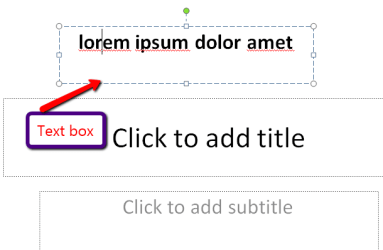
I use Powerpoint 2007 - if I need to add text to a slide, I would use the 'Insert' tab and either insert a 'Text box' or 'WordArt'.

More information would be useful to give better / more accurate guidelines. :)
 

My Computer

Computer type
PC/Desktop
Computer Manufacturer/Model Number
Packard Bell
OS
Windows 7 Home Premium 64bit
CPU
Intel(R) Core(TM) i3-2120 CPU @ 3.30GHz
Motherboard
Packard Bell IPISB-AG
Memory
3.00 GB
Graphics Card(s)
(1) Intel(R) HD Graphics (2) VNC Mirror Driver
Sound Card
Realtek High Definition Audio
Monitor(s) Displays
AIO LCD
Screen Resolution
1920 x 1080
Hard Drives
WDC WD10EADX-22TDHB0 ATA Device
Fixed hard disk media
4 partitions
931.51 GB
Keyboard
Wireless
Mouse
Wireless
Antivirus
Microsoft Security Essentials
Browser
IE; Firefox
Other Info
Also:
Samsung N220 Plus Netbook - Windows 7 Home
HP laptop
iPad 5
Insert a text box. Then it will work. Example: (but usually you would use a blank page).

LOL - Irene was 21ms faster
 

Attachments

  • 2011-01-18_1302.png
    2011-01-18_1302.png
    6.7 KB · Views: 0

My Computer

Computer Manufacturer/Model Number
HP, Dell, Gateway, Toshiba - 4 laptops and 2 desktops
OS
Vista, Windows7, Mint Mate, Zorin, Windows 8
CPU
from 1.6GHz Duo to i7
Monitor(s) Displays
2x HP w2207
Hard Drives
5x HDD, 7x SSD, 12x Externals
Keyboard
with trackball - no mices
Mouse
Trackball mice
Internet Speed
DSL 6000
i get what you guys told me (thanx for the fast response) but this is not the case... whatever i make text box, etc. just comes out like that:

h e l l o h o w a r e y o u

i figured it out anyways, i just changed the default printer to pdf printer and it just fixed itself... weird if you ask me. (had espon LX printer, changed to adobe pdf printer from acrobat pro).

now my text shows up normally.:D
 

My Computer

OS
windows 7 ultimate 32bit
Hmm, that is strange: a printer problem. Glad you got it fixed.
 

My Computer

Computer Manufacturer/Model Number
HP, Dell, Gateway, Toshiba - 4 laptops and 2 desktops
OS
Vista, Windows7, Mint Mate, Zorin, Windows 8
CPU
from 1.6GHz Duo to i7
Monitor(s) Displays
2x HP w2207
Hard Drives
5x HDD, 7x SSD, 12x Externals
Keyboard
with trackball - no mices
Mouse
Trackball mice
Internet Speed
DSL 6000
Back
Top