Solved Powershell programs keeps enabling itself after disabling it

jhefreyzz

New member
Local time
1:23 PM
Messages
10
Hello I'm so frustrated on how this thing would vanished on my computer system. It keeps checked even though I disabled or uncheck it in the msconfig
here's what I am referring to.

Microsoft Operating System Microsoft Corporation C:\Windows\system32\WindowsPowerShell\v1.0\powershell.exe -noprofile -windowstyle hidden -executionpolicy bypass iex ([Text.Encoding]::ASCII.GetString([Convert]::FromBase64String((gp 'HKCU:\Software\Classes\FeiSholEpOohbCv').sSqBn))); HKCU\SOFTWARE\Microsoft\Windows\CurrentVersion\Run

I try to delete the registry key but I can't delete it.
Going through the Run registry and found it but it keeps coming back.

What should I do.
I scanned my computer already with MBAM, Rogue Killer, Microsoft Windows Defender yet I get no possible virus infection.

Moreover I try to reg query it like this one
reg query "HKCU\Software\Classes\FeiSholEpOohbCv" /v "sSqBn"
and the result is in the attachment


Maybe someone can help me get rid of this virus or what this thing called
 

Attachments

My Computer

Computer type
PC/Desktop
Computer Manufacturer/Model Number
HP
OS
Windows 7 Ultimate x86
We've seen something like this before: PowerShell starts with Windows, can't disable it from msconfig.exe. The OP claimed that he was able to remove the start item after deleting PowerShell altogether! Not a great solution.

Btw, the data in the text file you've provided isn't complete; I wasn't able to decode it very well.

Try redirecting the registry value's contents directly to a file,
Code:
reg query "HKCU\Software\Classes\FeiSholEpOohbCv" /v "sSqBn" > "C:\Users\%USERNAME%\Desktop\FeiSholEpOohbCv.txt"
 

My Computer

Computer type
PC/Desktop
OS
Windows 10, Windows 8.1 Pro, Windows 7 Professional, OS X El Capitan
Thank you for the response sir.
I already did what you've said and I've attach the result file.

Hoping you could address my problem.
 

Attachments

My Computer

Computer type
PC/Desktop
Computer Manufacturer/Model Number
HP
OS
Windows 7 Ultimate x86
Hi,

I cannot help you combat viruses. I can only confirm to you that you're experiencing the exact same issue YUNoCake had in the thread I mentioned.

The data in that "sSqBn" registry value of yours, Jhefreyzz, decodes into the exact same script as YUNoCake's, but all the obfuscated variable names are different.

I'll see if I can get someone more experienced to help you remove that registry key and that startup entry.
 

My Computer

Computer type
PC/Desktop
OS
Windows 10, Windows 8.1 Pro, Windows 7 Professional, OS X El Capitan
Hi,
Review Jacee’s instructions to run Adwcleaner here post #7,
Ignore the title of the thread,
http://www.sevenforums.com/system-security/316404-instant-savings-app.html
On the BleepingComputer site use the button that looks like this,
adwcleaner-button.JPG

You can use these free tools to see if they find anything,
Manually Update them before running full scans,
Try not to use your computer while the scans are running, (one at a time of course).
See this tutorial on how to download and run Malwarebytes,
http://www.sevenforums.com/tutorials/338716-malwarebytes-anti-malware-free.html

Also use the Custom scan option not the Threat scan select the drives to scan,
Malwarebytes | Free Anti-Malware Detection & Removal Software
SAS is safe to remove anything it finds ;)
SUPERAntiSpyware | Remove Malware | Remove Spyware - AntiMalware, AntiSpyware, AntiAdware!

I also would use TFC,
This must be downloaded to your desktop
Then right click the desktop icon and run it as administrator
TFC - Temp File Cleaner by OldTimer Download - Geeks to Go Forum
 

My Computer

Computer type
PC/Desktop
Computer Manufacturer/Model Number
Custom assembled by me :}
OS
Win-7-Pro64bit 7-H-Prem-64bit
CPU
i7-5930K 2nd i9-9940x both water blocked VRM's too
Motherboard
ASUS SABERTOOTH X99 2nd ASUS x299 Apex
Memory
Trident-z 3200C14 2nd Trident-z 3600C16
Graphics Card(s)
EVGA 1080ti ftw3 2nd Titan Xp both water blocked
Sound Card
Built-in Realtek
Monitor(s) Displays
1-AOC G2460PG 24"G-Sync 144Hz/ 2nd 1-ASUS VG248QE 24" 144Hz
Screen Resolution
1920 x 1080 144Hz
Hard Drives
2-Samsung M.2 Evo & Evo Plus
2-Samsung 850 EVO 500GB SSD's/ 3-2.5 W.D. Black 1tb-&3-1tb/3-3.5 WD Black 1tb hdd's
PSU
EVGA SuperNOVA 1000-P2 2nd 1200-P2
Case
2-Corsair Obsidian Series 450D Black ATX Mid Tower
Cooling
Custom water loops
Keyboard
Logitech G710+/ 2nd Logitech G910
Mouse
2-RedDragon M901 Perdition 16400 dpi Gaming mouse = wired
Internet Speed
Comcast Ping 19ms 89.31mbps download speed 6.12mbps upload
Antivirus
Malwarebytes Pro/ Superantispyware Pro
Browser
FireFox & Pale moon
Other Info
2nd ASUS X299 Apex/Intel i9-9940x with Custom water loop/7H-Prem-x64/Corsair 450D case/Ram Trident-z 3600C16 4x8gb / Samsung970Evo plus 500gb SSD/Dual ssd EZ swap evo/PSU EVGA SuperNova 1200w-P2 80+Platinum/GPU Titan Xp /8-ML-140 on push-pull on 2-280GTX rads
Thank you for the suggestions

[x]Malwarebytes custom scan detects nothing
[✓] logfile attached
[✓] software updated before full scan
[x]SAS sames result with Malwarebytes
[✓] no logfile was attached as it detects almost 1000 threats yet it was browser cookies, some virus false detection
[✓] TFC run and clean the system
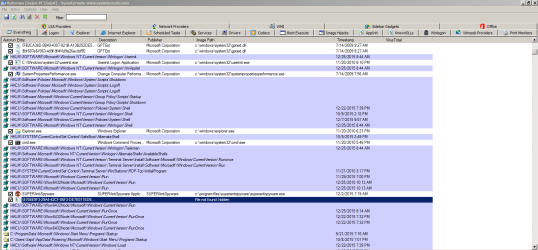
[✓] I run autoruns and found out that the persistent startup item is hidden
Screenshot attached:


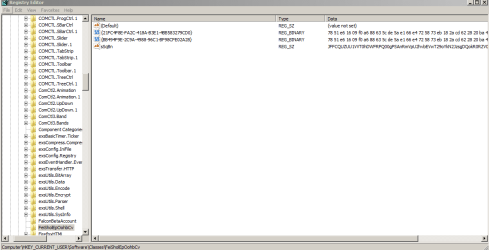
I wondered after I run autoruns and try to delete the persistent item is disappears from startup item but then again I try to trace if there's still the virus and without a surprise I found out that the registry key is still present while on the CurrentVersion\Run has empty entries
pictures show below

Try to delete the key it says "Cannot delete FeiSholEpOohbCv: Error while deleting the key
 

Attachments

  • logfile.txt
    logfile.txt
    1 KB · Views: 0
  • Capture.PNG
    Capture.PNG
    121.2 KB · Views: 1
  • Capture2.PNG
    Capture2.PNG
    68 KB · Views: 1

My Computer

Computer type
PC/Desktop
Computer Manufacturer/Model Number
HP
OS
Windows 7 Ultimate x86

My Computer

Computer type
PC/Desktop
Computer Manufacturer/Model Number
Home made Desktop
OS
Windows 10 Pro. 64/ version 1709 Windows 7 Pro/64
CPU
Intel i7-6800K @ 4.3
Motherboard
ASUS X-99 Deluxe II
Memory
Corsair Platinum 16 gig @2400
Graphics Card(s)
EVGA GTX 1070 OC
Monitor(s) Displays
Asus 27" LED LCD/VE278Q
Screen Resolution
1920-1080 or 1280-720 HDMI
Hard Drives
INTEL SSD 730-240 Gb Sata 3.0/
PSU
EVGA Platium 1200W
Case
Phanteks Luxe Tempered Glass 8 fans/ one radiator
Cooling
XSPC/ Water Cooled CPU
Keyboard
Das 4 Professional
Mouse
Logitech M705/MX Anywhere 2-S
Internet Speed
100 mbits
Antivirus
Microsoft Security Essentials/ Malwarebytes Premium 3.0/ SAS
Browser
I.E. 11 default/Firefox/ ISP Time Warner Cable/Spectrum
Other Info
LG BluRay Burner/
Sound system-KLipsch-THX/
Icy Dock ssd Hot Swap bays.

My Computer

Computer type
PC/Desktop
Computer Manufacturer/Model Number
Bruce ... somewhere in his 40's
OS
Windows 7 Ultimate 32bit SP1
CPU
Intel(R) Core(TM)2 Quad CPU @ 2.40GHz, 2400 MHz
Motherboard
INTEL/D975XBX2
Memory
4 GB
Graphics Card(s)
ATI Radeon HD 2600 Pro
Monitor(s) Displays
Samsung SyncMaster 914v
Screen Resolution
1280 x 1024
Hard Drives
2/500GB each ... ST3500630AS ATA Device.
One is not connected
PSU
Rocketfish 700 W
Case
G.Skill Gigabyte Chassis
Keyboard
Standard PS/2 Keyboard
Mouse
Microsoft PS/2 Mouse
Internet Speed
DSL
Antivirus
Avira Internet Security
Browser
IE 11
Other Info
ATI HDMI Audio
hello thank you for the concern.

Somehow helpful response here help me get rid of the virus.

It was like after many scan from different scanners it was just become terminable. I used Autoruns and delete the startup entry. I was expect it to come back after it was deleted but happily it wasn't

I traced the registry entry for that virus and delete it.

I searched for possible reappearance of the virus on the registry entry but it wasn't there.

I used malwarebytes again for the last time for the remains of the virus if it was there and detect nothing.

I think my system is already clean.

Thank you for the response guys
 

My Computer

Computer type
PC/Desktop
Computer Manufacturer/Model Number
HP
OS
Windows 7 Ultimate x86
If you system is fixed; please inform the good folks at Bleeping Computer that are helping you.
 

My Computer

Computer type
PC/Desktop
Computer Manufacturer/Model Number
Home made Desktop
OS
Windows 10 Pro. 64/ version 1709 Windows 7 Pro/64
CPU
Intel i7-6800K @ 4.3
Motherboard
ASUS X-99 Deluxe II
Memory
Corsair Platinum 16 gig @2400
Graphics Card(s)
EVGA GTX 1070 OC
Monitor(s) Displays
Asus 27" LED LCD/VE278Q
Screen Resolution
1920-1080 or 1280-720 HDMI
Hard Drives
INTEL SSD 730-240 Gb Sata 3.0/
PSU
EVGA Platium 1200W
Case
Phanteks Luxe Tempered Glass 8 fans/ one radiator
Cooling
XSPC/ Water Cooled CPU
Keyboard
Das 4 Professional
Mouse
Logitech M705/MX Anywhere 2-S
Internet Speed
100 mbits
Antivirus
Microsoft Security Essentials/ Malwarebytes Premium 3.0/ SAS
Browser
I.E. 11 default/Firefox/ ISP Time Warner Cable/Spectrum
Other Info
LG BluRay Burner/
Sound system-KLipsch-THX/
Icy Dock ssd Hot Swap bays.
Back
Top