
Solved Pre-Release version expiring

rbassman98003

New member
Member
Local time
2:42 PM
Messages
34
Location
Federal Way, Washington
Yesterday I received a pop-up message that This Pre-release version of Windows 7 will expire in 9 days. To keep using Windows, back up your files and then install any edition of Windows 7 Ultimate. I didn't even know until now that I have been using a Pre-Release version. I thought I was using an RTM version. Is that a Pre-release version?? So, do I have to do a clean install and re-install all the software I have installed or is there another way?? Your help would be appreciated. Where can I look to show I have a pre-release version? I have never seen anything?? Thanks again.... Bob Bassman
 

My Computer

OS
Windows 7 64bit
CPU
AMD Phenom II X4 955
Motherboard
ASUS M4A79T Deluxe
Memory
CORSAIR DDR3-PC3-10700H
Graphics Card(s)
ATI Radeon HD 4800
Sound Card
Creative SB Audigy 2
Monitor(s) Displays
Sceptre LCD 20"
Hard Drives
Western Digital 250GB
Hitachi 200GB
Yesterday I received a pop-up message that This Pre-release version of Windows 7 will expire in 9 days. To keep using Windows, back up your files and then install any edition of Windows 7 Ultimate. I didn't even know until now that I have been using a Pre-Release version. I thought I was using an RTM version. Is that a Pre-release version?? So, do I have to do a clean install and re-install all the software I have installed or is there another way?? Your help would be appreciated. Where can I look to show I have a pre-release version? I have never seen anything?? Thanks again.... Bob Bassman

Start>type winver. It will tell you what version you have. If you are running pre-release (win 7) either your system clock is way, way out of date, or it is a moded system. Pre-release (beta?) win 7 is at least a year expired.

Have you restored your computer from an image? Anything else "un-usual"?
 

My Computer

Computer Manufacturer/Model Number
HP Pavillion dv-7 1005 Tx
OS
Win 8 Release candidate 8400
CPU
[email protected]
Memory
4 gigs
Graphics Card(s)
Nvidia 9600M
Sound Card
HD built-in
Monitor(s) Displays
17" Wxga
Screen Resolution
1440x900
Cooling
none
Internet Speed
45Mb down 5Mb up
I have done nothing to Windows 7 since I installed it in July 2009. Attached is the screen print of winver. Makes no sense why it would be expiring 8/31/2011?????
 

Attachments

  • Expiration Date for Windows 7 Version.jpg
    Expiration Date for Windows 7 Version.jpg
    40.3 KB · Views: 75

My Computer

OS
Windows 7 64bit
CPU
AMD Phenom II X4 955
Motherboard
ASUS M4A79T Deluxe
Memory
CORSAIR DDR3-PC3-10700H
Graphics Card(s)
ATI Radeon HD 4800
Sound Card
Creative SB Audigy 2
Monitor(s) Displays
Sceptre LCD 20"
Hard Drives
Western Digital 250GB
Hitachi 200GB
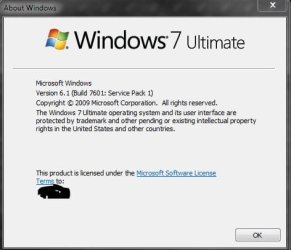
From where did you get this installation disk in 2009 - I hope not from eBay.

But to answer your question: You need not reinstall everything. You just need a valid product key and update this system.

But first you might want to talk to Microsoft if you think your copy is legit: http://support.microsoft.com/kb/326851
 

My Computer

Computer Manufacturer/Model Number
HP, Dell, Gateway, Toshiba - 4 laptops and 2 desktops
OS
Vista, Windows7, Mint Mate, Zorin, Windows 8
CPU
from 1.6GHz Duo to i7
Monitor(s) Displays
2x HP w2207
Hard Drives
5x HDD, 7x SSD, 12x Externals
Keyboard
with trackball - no mices
Mouse
Trackball mice
Internet Speed
DSL 6000
Version Expiring

I downloaded it from the MSDN Subscription website as I do all Microsoft sofware.
I have the valid product key, but how do you update this system. ??
 

My Computer

OS
Windows 7 64bit
CPU
AMD Phenom II X4 955
Motherboard
ASUS M4A79T Deluxe
Memory
CORSAIR DDR3-PC3-10700H
Graphics Card(s)
ATI Radeon HD 4800
Sound Card
Creative SB Audigy 2
Monitor(s) Displays
Sceptre LCD 20"
Hard Drives
Western Digital 250GB
Hitachi 200GB

My Computer

Computer Manufacturer/Model Number
HP, Dell, Gateway, Toshiba - 4 laptops and 2 desktops
OS
Vista, Windows7, Mint Mate, Zorin, Windows 8
CPU
from 1.6GHz Duo to i7
Monitor(s) Displays
2x HP w2207
Hard Drives
5x HDD, 7x SSD, 12x Externals
Keyboard
with trackball - no mices
Mouse
Trackball mice
Internet Speed
DSL 6000
I entered the product code and it says product activated successfully, but
winver same as it was.....
 

My Computer

OS
Windows 7 64bit
CPU
AMD Phenom II X4 955
Motherboard
ASUS M4A79T Deluxe
Memory
CORSAIR DDR3-PC3-10700H
Graphics Card(s)
ATI Radeon HD 4800
Sound Card
Creative SB Audigy 2
Monitor(s) Displays
Sceptre LCD 20"
Hard Drives
Western Digital 250GB
Hitachi 200GB
You know why it's saying that is from your winver shot you're using a Service pack that's not the finalized RTM SP1. So it will expire.

721 was I think the RC (Release Candidate) not the RTM.

You need to get the final Service pack and install it. Uninstall the earlier SP1 before installing the final one. Then your winver will look like mine.

http://www.sevenforums.com/tutorials/99064-windows-7-service-pack-1-sp1-uninstall.html

You can get it here.
http://www.sevenforums.com/windows-...1-faqs-installation-issues-helpful-links.html


Notice mine has no v.721 in the number there.
Capture.JPG
 

My Computer

Computer type
PC/Desktop
Computer Manufacturer/Model Number
Airbot 2.0
OS
Windows 7 Ultimate x64 SP1
CPU
Core i7 920 (D0) @ 4Ghz, *26c idle *65c full load on air
Motherboard
Asus P6X58D Premium - Sata 6Gb/s - USB 3.0
Memory
12GB DDR3 Corsair Dominator -CMD12GX3M6A1600C8 at 1600MHz
Graphics Card(s)
Zotac Geforce GTX 770
Sound Card
ASUS Xonar D2X
Monitor(s) Displays
1 LG 24" Flatron W2453V-PF 1 Samsung 24" P2450H both 2ms RT
Screen Resolution
1920x1080@60hz
Hard Drives
1 Samsung 250GB 840 Evo SSD
1 OCZ Vertex2 180GB SSD
1 TB Samsung Spinpoint F1 7200RPM 32MB cache
2 500GB WD Caviar Blacks 7200RPM 32MB cache (WD5001AALS)

Pioneer DVD Burner DVR-S18M
PSU
Corsair HX1000W
Case
Cooler Master HAF 932
Cooling
Case Fans *3 230mm, *1 140mm/CPU - *Tuniq Tower 120 Extreme
Keyboard
Logitech Wireless MK700
Mouse
Logitech Wireless MK700
Internet Speed
DL 15 Mbps UL 0.98 Mbps
Antivirus
None
Browser
Firefox Nightly
Other Info
Processor-7.7 *RAM- 7.9 *Graphics-7.9 *Gaming Graphics- 7.9 *SSD- 7.8 W.E.I final score= 7.7
*Phone- LG Nexus 5
I have uninstalled the SP1 that I had installed and I am now downloading the SP1 Language pack (x64). Looking at winver the expiration date line and sp1 version lines are now gone. Let you know how the new sp1 installation goes.... Thanks
 

My Computer

OS
Windows 7 64bit
CPU
AMD Phenom II X4 955
Motherboard
ASUS M4A79T Deluxe
Memory
CORSAIR DDR3-PC3-10700H
Graphics Card(s)
ATI Radeon HD 4800
Sound Card
Creative SB Audigy 2
Monitor(s) Displays
Sceptre LCD 20"
Hard Drives
Western Digital 250GB
Hitachi 200GB
I had the same issue and uninstalling SP1 (BETA) and reinstalling SP1 resolved my issue. It should resolve yours as well.
 

My Computer

Computer Manufacturer/Model Number
Custom Build
OS
windows 7 ultimate x64
CPU
AMD Phenom II x6 1090T
Motherboard
Gigabyte GA-MA770T
Memory
12gb
Graphics Card(s)
Radeon HD 4770
Sound Card
Onboard MB
Monitor(s) Displays
27" Asus LCD
Screen Resolution
Huge
Hard Drives
WD 1TB STA 3.0
PSU
Cooler MastereXtreme Power RS550
Case
Unknown
Cooling
Arctic Cooling Freezer Pro
Keyboard
Standard PS2
Mouse
USB Optical Mouse
I am having the same problem, but unable to find how to uninstall SP1 - v 721. I followed the link from airbot but was confused since it addressed update to SP1. Does that uninstall the old SP1 v 721 and install the new sp.
 

My Computer

OS
Windows 7 Professional X64
CPU
I7
Motherboard
Gigabyte
Memory
4 GB
Graphics Card(s)
Nvidia GeForce 220
Monitor(s) Displays
Dell

My Computer

Computer type
PC/Desktop
Computer Manufacturer/Model Number
Airbot 2.0
OS
Windows 7 Ultimate x64 SP1
CPU
Core i7 920 (D0) @ 4Ghz, *26c idle *65c full load on air
Motherboard
Asus P6X58D Premium - Sata 6Gb/s - USB 3.0
Memory
12GB DDR3 Corsair Dominator -CMD12GX3M6A1600C8 at 1600MHz
Graphics Card(s)
Zotac Geforce GTX 770
Sound Card
ASUS Xonar D2X
Monitor(s) Displays
1 LG 24" Flatron W2453V-PF 1 Samsung 24" P2450H both 2ms RT
Screen Resolution
1920x1080@60hz
Hard Drives
1 Samsung 250GB 840 Evo SSD
1 OCZ Vertex2 180GB SSD
1 TB Samsung Spinpoint F1 7200RPM 32MB cache
2 500GB WD Caviar Blacks 7200RPM 32MB cache (WD5001AALS)

Pioneer DVD Burner DVR-S18M
PSU
Corsair HX1000W
Case
Cooler Master HAF 932
Cooling
Case Fans *3 230mm, *1 140mm/CPU - *Tuniq Tower 120 Extreme
Keyboard
Logitech Wireless MK700
Mouse
Logitech Wireless MK700
Internet Speed
DL 15 Mbps UL 0.98 Mbps
Antivirus
None
Browser
Firefox Nightly
Other Info
Processor-7.7 *RAM- 7.9 *Graphics-7.9 *Gaming Graphics- 7.9 *SSD- 7.8 W.E.I final score= 7.7
*Phone- LG Nexus 5
I followed option 2 and it worked. Apparently I had goofed and had not put in the colon between kb and the number.
Thank you all for your great assistance
EK
 

My Computer

OS
Windows 7 Professional X64
CPU
I7
Motherboard
Gigabyte
Memory
4 GB
Graphics Card(s)
Nvidia GeForce 220
Monitor(s) Displays
Dell
Back
Top