PreInstalled Windows 7 - Remove a new XP Partition From Dual Boot

pittering

New member
Local time
11:04 PM
Messages
2
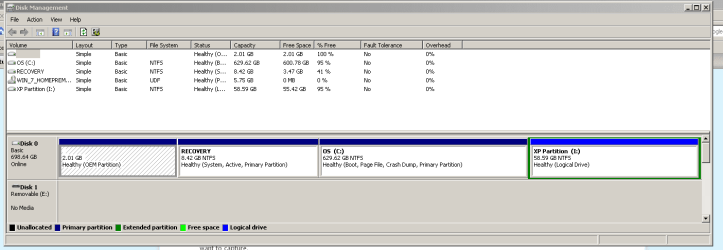
I have a pre-installed Win7 machine.

I recently made a dual boot system to add Xp however I no longer need Windows XP.

Please can you let me know how to safely remove the XP partition?
 

Attachments

  • Capture.PNG
    Capture.PNG
    13.1 KB · Views: 55

My Computer My Computer

At a glance

Windows 7 Home Premium 64bit.Cire i3 3.07Ghz4gb?
Computer Manufacturer/Model Number
Dell Inspiron 580
OS
Windows 7 Home Premium 64bit.
CPU
Cire i3 3.07Ghz
Motherboard
?
Memory
4gb
Graphics Card(s)
?
Sound Card
No
Hello pittering, welcome to Seven Forums!


The best, easiest way to remove XP and all of its code (a format will not do this) is to do a partition-specific wipe (secure erase) to the XP I: drive using the free Partition Wizard Home version; install the Partition Wizard program to Windows 7 to run the wipe from there, there's no need to boot to PW; the first link is the program download and the second is a tutorial to show an outline of the wipe process at Option Three; just be sure to do the correct partition.


Partition Wizard Home Edition

Partition Wizard : Use the Bootable CD


Be sure to post back with any further questions you may have and to keep us informed.
 

My Computer My Computer

At a glance

W 7 64-bit UltimateIntel Q9550 Yorkfield8GB Dominator 8500C5DATI : XFX 5870
Computer Manufacturer/Model Number
* BFK Customs *
OS
W 7 64-bit Ultimate
CPU
Intel Q9550 Yorkfield
Motherboard
ASUS P5Q Pro
Memory
8GB Dominator 8500C5D
Graphics Card(s)
ATI : XFX 5870
Sound Card
Realtek HD Audio 7-1
Monitor(s) Displays
1x 47" LCD HDMI & 3x 26" LCD HDMI
Screen Resolution
1920x1080P & 1920x1200
Hard Drives
1x 80GB Intel X25-M G2 SSD : 1x 500GB & 1x 640GB WD Caviar Black(s)
PSU
Corsair 620HX
Case
Cooler Master RC-690
Cooling
Tuniq Tower 120, 2x 140mm and 3x 120mm case fans
Keyboard
Microsoft 500
Mouse
Razer Diamondback 3G
Internet Speed
14 Mb/s
Other Info
1x Koutech 3Gb/s SATA HDD Hot Swap Rack
Hello pittering, welcome to Seven Forums!


The best, easiest way to remove XP and all of its code (a format will not do this) is to do a partition-specific wipe (secure erase) to the XP I: partition using the free Partition Wizard Home version; install the Partition Wizard program to Windows 7 to run the wipe from there, there's no need to boot to PW; the first link is the program download and the second is a tutorial to show an outline of the wipe process at Option Three; just be sure to do the correct partition.


Partition Wizard Home Edition

Partition Wizard : Use the Bootable CD


Be sure to post back with any further questions you may have and to keep us informed.
Hi BFK.

A little add on.
You will need to delete XP in the boot menu. using EasyBCD.
 
Last edited:

My Computer My Computer

At a glance

ME/XP/Vista/Win7
OS
ME/XP/Vista/Win7
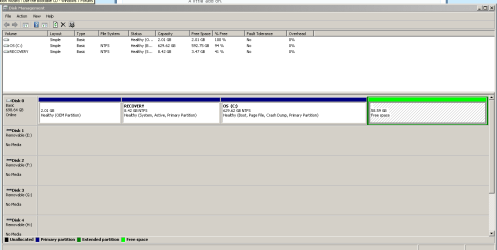
I'd just delete the XP logical partition in Disk Management, then delete the Free Space by clicking Delete Volume to change it to Unallocated Space.

As theog explains, if the Dual Boot remains you'll need to remove it on EasyBCD 2.0 Edit OS tab.
 
Thank you everyone!
One last question - I now have this 60Gb of free space. Should I leave this or is it OK to right click on it and "Delete Partition" ?
 

Attachments

  • Capture.PNG
    Capture.PNG
    13.1 KB · Views: 31

My Computer My Computer

At a glance

Windows 7 Home Premium 64bit.Cire i3 3.07Ghz4gb?
Computer Manufacturer/Model Number
Dell Inspiron 580
OS
Windows 7 Home Premium 64bit.
CPU
Cire i3 3.07Ghz
Motherboard
?
Memory
4gb
Graphics Card(s)
?
Sound Card
No
Well since everyone wants to tell you to leave all the old Windows XP code there, just delete it.
 

My Computer My Computer

At a glance

W 7 64-bit UltimateIntel Q9550 Yorkfield8GB Dominator 8500C5DATI : XFX 5870
Computer Manufacturer/Model Number
* BFK Customs *
OS
W 7 64-bit Ultimate
CPU
Intel Q9550 Yorkfield
Motherboard
ASUS P5Q Pro
Memory
8GB Dominator 8500C5D
Graphics Card(s)
ATI : XFX 5870
Sound Card
Realtek HD Audio 7-1
Monitor(s) Displays
1x 47" LCD HDMI & 3x 26" LCD HDMI
Screen Resolution
1920x1080P & 1920x1200
Hard Drives
1x 80GB Intel X25-M G2 SSD : 1x 500GB & 1x 640GB WD Caviar Black(s)
PSU
Corsair 620HX
Case
Cooler Master RC-690
Cooling
Tuniq Tower 120, 2x 140mm and 3x 120mm case fans
Keyboard
Microsoft 500
Mouse
Razer Diamondback 3G
Internet Speed
14 Mb/s
Other Info
1x Koutech 3Gb/s SATA HDD Hot Swap Rack
It doesn't matter. You have to delete it if you want unallocated (Primary) Space to extend C into, but if you want to create another partition there Disk Mgmt is going to construct it Logical anyway.

Free Space is what's left over when you delete a Logical partition, which is why it's green.
 
Back
Top
