"Preparing your desktop..." on boot everytime after successful chkdsk

Peria

New member
Local time
7:29 PM
Messages
4
"Preparing your desktop..." on boot everytime after successful chkdsk

Hello everyone,

Problem: Win 7 64bit - "Preparing your desktop..." on boot everytime after successful chkdsk.

My laptop is Acer V3-571G (Amazon.com: Acer Aspire V3-571G-6407 15.6-Inch Laptop (Black): Computers & Accessories). HDD, no SSDs. No HW malfunctions or anything since bought ~1 year ago.

Can't access any .msc ("dependency or service started to fail...") (so I can't create/access an admin account or use system restore) or .exe files , the sound is gone (I didn't install any outdated sound drivers).

At first, "preparing your desktop" caused all my start button contents gone. Then I logged off, logged back in - they were there, only "recent files" missing. Rebooting 2nd time resulted in "prep..." but start button contents intact. Some progress lol?

I also cannot download any files from the internet. This later throws some "tdDB ..." error.

Frequent "system_path... refers to a location that is unavailable. It maybe somewhere on your HDD... blahblah.".

Tried 5 subsequent reboots. None of them corrected the desktop. Made it even worse (black + Windows classic default style), so I had to log off/on again.

I don't have a Win7 64bit repair CD close by and can't access system restore. What are the options then?
Any reliable solutions/software for a rebootable CD?

P.S. I looked in the inet how to launch cmd in admin mode and such. But even run as admin doesn't work.
 
Last edited:

My Computer My Computer

At a glance

Windows 7 64bitIntel6 GBW
Computer type
Laptop
Computer Manufacturer/Model Number
Acer
OS
Windows 7 64bit
CPU
Intel
Motherboard
W
Memory
6 GB
Graphics Card(s)
W
Hard Drives
HDD
Antivirus
Avira
Browser
Firefox
ADDITIONAL NOTE: chkdsk has replaced 5-6 bad sectors on laptop's HDD. Maybe there was files in those sectors related to the "thorn apart" user profile on Win7? (It's not corrupted I think, as it does not tell me I was logged onto a temp. profile (before welcome screen).)

Please help!! This is extremely annoying.
 

My Computer My Computer

At a glance

Windows 7 64bitIntel6 GBW
Computer type
Laptop
Computer Manufacturer/Model Number
Acer
OS
Windows 7 64bit
CPU
Intel
Motherboard
W
Memory
6 GB
Graphics Card(s)
W
Hard Drives
HDD
Antivirus
Avira
Browser
Firefox

Hello and welcome Peria mate assuming you have all the data you need to keep - one option would be to factory default themachine

How to reset an acer laptop (windows 7) - YouTube this little fellow is a bit slow but an option another would be this
I need to restore my acer aspire one to the factory settings but Windows won't start.? - Yahoo! Answers the ALT + F10 key is the way to get it going.


or better because it gets rid of the bloatware that Acer load on >>
http://www.sevenforums.com/tutorials/219487-clean-reinstall-factory-oem-windows-7-a.html#post1839164
 

My Computer My Computer

At a glance

Desk1 7 Home Prem / Desk2 10 Pro / Main lap A...Desk1 i5 3750K / Laptop i7 GTX 860M / Desk2 i...Desk1 8GB (1866) / Desk2 16GB (1333) / Laptop...Desk 1& 2NVidia GTX 650 & Laptops on board Intel
Computer type
PC/Desktop
Computer Manufacturer/Model Number
Own build (new) Desk1 / Asus ROG Win 7 / Desk2 1st build
OS
Desk1 7 Home Prem / Desk2 10 Pro / Main lap Asus ROG 10 Pro 2 laptop Toshiba 7 Pro Asus P2520 7 & 10
CPU
Desk1 i5 3750K / Laptop i7 GTX 860M / Desk2 i5 2500
Motherboard
Desk1 Asus P877-V / Desk2 Gigabyte H67 UD3H / Laptop ?
Memory
Desk1 8GB (1866) / Desk2 16GB (1333) / Laptop 8Gb DDR3
Graphics Card(s)
Desk 1& 2NVidia GTX 650 & Laptops on board Intel
Sound Card
Desk 1 & 2 -XONAR DG Realtek High Def audio Laptop
Monitor(s) Displays
Desk 1 Benq HD 2450 / Desk2 Philips 24" / Laptop 17.5"
Screen Resolution
1920x1080 D1 & D2 & Laptop 1
Hard Drives
Desk1 Samsung 120GB 830 SSD
Asus ROG 256GB 850 Pro SSD
Desk2 Samsung 840 256 SSD
Toshiba 120GB EVO
PSU
Desk 1 Corsair HX 1050/ Laptop ? / Desk 2 Corsair HX 650
Case
Desk 1 Cooler HAF XM ? Toshiba laptop / Desk2 Coolermaster
Cooling
Fans on all Desk1 -2 Desk2 - all Coolermasters 5 Laptop ?
Keyboard
Desk 1 MS Sidewinder X6 Desk 2 MS Sidewinder X 4
Mouse
Desk 1&2 - Gigabyte MS 900 gamer - laptop - Logitec wireless
Internet Speed
ADSL2+
Other Info
One other Desktop (tester) and spare Toshba laptop both with SSD's
Running Kaspersky 2016 ISS on all machines config'd identically
Logitec audio stereo systems on each machine (x3)
Canon MG5250MFC
Router/modem TP-Link running WPA2SK
Hey Icit2lol,

I don't want to delete everything on all partitions. I'm looking into a solution that will affect only my C: where current Windows installation is on.

Repair from bootable USB doesn't work. It detects no OS installations on my HDD (500GB - 4 partitions, Win7 on C:/). I've tried all the boot/ stuff and fix/. This is time consuming. I guess the fastest way was to simply format C: partition and reinstall W764bit.

What do you think, people?

I don't know about that Acer eRecovery. How is it better than a Win reinstall?
 

My Computer My Computer

At a glance

Windows 7 64bitIntel6 GBW
Computer type
Laptop
Computer Manufacturer/Model Number
Acer
OS
Windows 7 64bit
CPU
Intel
Motherboard
W
Memory
6 GB
Graphics Card(s)
W
Hard Drives
HDD
Antivirus
Avira
Browser
Firefox
Hey Icit2lol,

I don't want to delete everything on all partitions. I'm looking into a solution that will affect only my C: where current Windows installation is on.

Repair from bootable USB doesn't work. It detects no OS installations on my HDD (500GB - 4 partitions, Win7 on C:/). I've tried all the boot/ stuff and fix/. This is time consuming. I guess the fastest way was to simply format C: partition and reinstall W764bit.

What do you think, people?

I don't know about that Acer eRecovery. How is it better than a Win reinstall?
Well in a nutshell Peria the Acer stuff isn't I just gave it as an option if you had no back up media :) The other ref is the best and I would disconnect all other drives / devices while you are doing this mate. Now the problem is how are you going to wipe / clean all and format that drive?
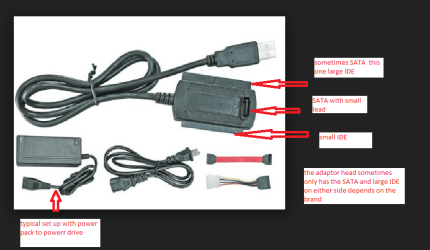
For that you are going to need access to another machine wit an OS working and use either of these options
http://www.sevenforums.com/tutorials/52129-disk-clean-clean-all-diskpart-command.html

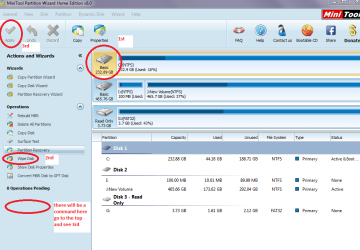
Use wipe drive with the Partition Wizard but you will need a USB to SATA adaptor for that. see pics
 

Attachments

  • ADAPTOR.PNG
    ADAPTOR.PNG
    64 KB · Views: 0
  • WIPE.PNG
    WIPE.PNG
    39.6 KB · Views: 0

My Computer My Computer

At a glance

Desk1 7 Home Prem / Desk2 10 Pro / Main lap A...Desk1 i5 3750K / Laptop i7 GTX 860M / Desk2 i...Desk1 8GB (1866) / Desk2 16GB (1333) / Laptop...Desk 1& 2NVidia GTX 650 & Laptops on board Intel
Computer type
PC/Desktop
Computer Manufacturer/Model Number
Own build (new) Desk1 / Asus ROG Win 7 / Desk2 1st build
OS
Desk1 7 Home Prem / Desk2 10 Pro / Main lap Asus ROG 10 Pro 2 laptop Toshiba 7 Pro Asus P2520 7 & 10
CPU
Desk1 i5 3750K / Laptop i7 GTX 860M / Desk2 i5 2500
Motherboard
Desk1 Asus P877-V / Desk2 Gigabyte H67 UD3H / Laptop ?
Memory
Desk1 8GB (1866) / Desk2 16GB (1333) / Laptop 8Gb DDR3
Graphics Card(s)
Desk 1& 2NVidia GTX 650 & Laptops on board Intel
Sound Card
Desk 1 & 2 -XONAR DG Realtek High Def audio Laptop
Monitor(s) Displays
Desk 1 Benq HD 2450 / Desk2 Philips 24" / Laptop 17.5"
Screen Resolution
1920x1080 D1 & D2 & Laptop 1
Hard Drives
Desk1 Samsung 120GB 830 SSD
Asus ROG 256GB 850 Pro SSD
Desk2 Samsung 840 256 SSD
Toshiba 120GB EVO
PSU
Desk 1 Corsair HX 1050/ Laptop ? / Desk 2 Corsair HX 650
Case
Desk 1 Cooler HAF XM ? Toshiba laptop / Desk2 Coolermaster
Cooling
Fans on all Desk1 -2 Desk2 - all Coolermasters 5 Laptop ?
Keyboard
Desk 1 MS Sidewinder X6 Desk 2 MS Sidewinder X 4
Mouse
Desk 1&2 - Gigabyte MS 900 gamer - laptop - Logitec wireless
Internet Speed
ADSL2+
Other Info
One other Desktop (tester) and spare Toshba laptop both with SSD's
Running Kaspersky 2016 ISS on all machines config'd identically
Logitec audio stereo systems on each machine (x3)
Canon MG5250MFC
Router/modem TP-Link running WPA2SK
ICit2lol: Thanks for your help.

Can't I just reinstall Win 7 booting from a USB, deleting C: partition, formatting it and then assigning as C: from unallocated space and select for Win7 64bit installation?

The approach you've suggest seems overcomplicated to me and may require unneeded investments.

What do you think?
 

My Computer My Computer

At a glance

Windows 7 64bitIntel6 GBW
Computer type
Laptop
Computer Manufacturer/Model Number
Acer
OS
Windows 7 64bit
CPU
Intel
Motherboard
W
Memory
6 GB
Graphics Card(s)
W
Hard Drives
HDD
Antivirus
Avira
Browser
Firefox
Ok mate it is only because I would do it that way and only if you had access to another machine. I am perhaps a little pedantic in my methods - I just like to have a completely clean drive to start with:)

Yes you can do it from a stick or DVD whichever you prefer

So all you need do is get the ISO stick / disk made set the BIOS to boot from whatever you have and use it to boot from to do that tutorial

http://www.sevenforums.com/tutorials/219487-clean-reinstall-factory-oem-windows-7-a.html
 

My Computer My Computer

At a glance

Desk1 7 Home Prem / Desk2 10 Pro / Main lap A...Desk1 i5 3750K / Laptop i7 GTX 860M / Desk2 i...Desk1 8GB (1866) / Desk2 16GB (1333) / Laptop...Desk 1& 2NVidia GTX 650 & Laptops on board Intel
Computer type
PC/Desktop
Computer Manufacturer/Model Number
Own build (new) Desk1 / Asus ROG Win 7 / Desk2 1st build
OS
Desk1 7 Home Prem / Desk2 10 Pro / Main lap Asus ROG 10 Pro 2 laptop Toshiba 7 Pro Asus P2520 7 & 10
CPU
Desk1 i5 3750K / Laptop i7 GTX 860M / Desk2 i5 2500
Motherboard
Desk1 Asus P877-V / Desk2 Gigabyte H67 UD3H / Laptop ?
Memory
Desk1 8GB (1866) / Desk2 16GB (1333) / Laptop 8Gb DDR3
Graphics Card(s)
Desk 1& 2NVidia GTX 650 & Laptops on board Intel
Sound Card
Desk 1 & 2 -XONAR DG Realtek High Def audio Laptop
Monitor(s) Displays
Desk 1 Benq HD 2450 / Desk2 Philips 24" / Laptop 17.5"
Screen Resolution
1920x1080 D1 & D2 & Laptop 1
Hard Drives
Desk1 Samsung 120GB 830 SSD
Asus ROG 256GB 850 Pro SSD
Desk2 Samsung 840 256 SSD
Toshiba 120GB EVO
PSU
Desk 1 Corsair HX 1050/ Laptop ? / Desk 2 Corsair HX 650
Case
Desk 1 Cooler HAF XM ? Toshiba laptop / Desk2 Coolermaster
Cooling
Fans on all Desk1 -2 Desk2 - all Coolermasters 5 Laptop ?
Keyboard
Desk 1 MS Sidewinder X6 Desk 2 MS Sidewinder X 4
Mouse
Desk 1&2 - Gigabyte MS 900 gamer - laptop - Logitec wireless
Internet Speed
ADSL2+
Other Info
One other Desktop (tester) and spare Toshba laptop both with SSD's
Running Kaspersky 2016 ISS on all machines config'd identically
Logitec audio stereo systems on each machine (x3)
Canon MG5250MFC
Router/modem TP-Link running WPA2SK
Back
Top