Presentation font cache problem

herbc

New member
Member
VIP
Local time
7:26 PM
Messages
255
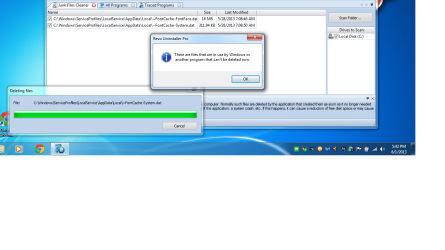
Hello everybody, i have been trying to delete my cache files(particularly the ones in the following screenshot) and find that it's an impossible task. Any ideas
 

Attachments

  • Untitled.png
    Untitled.png
    272.1 KB · Views: 11

My Computer

Computer type
Laptop
Computer Manufacturer/Model Number
asus U56E
OS
win 7 64 Home edition
CPU
2430 i5 intel
Motherboard
?Asus
Memory
6
Graphics Card(s)
imtegrated
Sound Card
Microsoft
Hard Drives
WDC WD6400BPVT-80HXZT3 ATA Device
Antivirus
Kaspersky trial AV 2014
Browser
chrome
Are these Windows fonts or a 3rd party fonts?
What program are they affiliated with?
 

My Computer

Computer type
PC/Desktop
Computer Manufacturer/Model Number
Home made Desktop
OS
Windows 10 Pro. 64/ version 1709 Windows 7 Pro/64
CPU
Intel i7-6800K @ 4.3
Motherboard
ASUS X-99 Deluxe II
Memory
Corsair Platinum 16 gig @2400
Graphics Card(s)
EVGA GTX 1070 OC
Monitor(s) Displays
Asus 27" LED LCD/VE278Q
Screen Resolution
1920-1080 or 1280-720 HDMI
Hard Drives
INTEL SSD 730-240 Gb Sata 3.0/
PSU
EVGA Platium 1200W
Case
Phanteks Luxe Tempered Glass 8 fans/ one radiator
Cooling
XSPC/ Water Cooled CPU
Keyboard
Das 4 Professional
Mouse
Logitech M705/MX Anywhere 2-S
Internet Speed
100 mbits
Antivirus
Microsoft Security Essentials/ Malwarebytes Premium 3.0/ SAS
Browser
I.E. 11 default/Firefox/ ISP Time Warner Cable/Spectrum
Other Info
LG BluRay Burner/
Sound system-KLipsch-THX/
Icy Dock ssd Hot Swap bays.
I have not installed any font third party programs so i am assuming regular windows, how would i find what they are affiliated with?

Thanks
 

My Computer

Computer type
Laptop
Computer Manufacturer/Model Number
asus U56E
OS
win 7 64 Home edition
CPU
2430 i5 intel
Motherboard
?Asus
Memory
6
Graphics Card(s)
imtegrated
Sound Card
Microsoft
Hard Drives
WDC WD6400BPVT-80HXZT3 ATA Device
Antivirus
Kaspersky trial AV 2014
Browser
chrome
What program are you using to find these files?
You could also reboot and see if those files are still there.

I highly recommend not removing anything until you find out what they are.
 

My Computer

Computer type
PC/Desktop
Computer Manufacturer/Model Number
Home made Desktop
OS
Windows 10 Pro. 64/ version 1709 Windows 7 Pro/64
CPU
Intel i7-6800K @ 4.3
Motherboard
ASUS X-99 Deluxe II
Memory
Corsair Platinum 16 gig @2400
Graphics Card(s)
EVGA GTX 1070 OC
Monitor(s) Displays
Asus 27" LED LCD/VE278Q
Screen Resolution
1920-1080 or 1280-720 HDMI
Hard Drives
INTEL SSD 730-240 Gb Sata 3.0/
PSU
EVGA Platium 1200W
Case
Phanteks Luxe Tempered Glass 8 fans/ one radiator
Cooling
XSPC/ Water Cooled CPU
Keyboard
Das 4 Professional
Mouse
Logitech M705/MX Anywhere 2-S
Internet Speed
100 mbits
Antivirus
Microsoft Security Essentials/ Malwarebytes Premium 3.0/ SAS
Browser
I.E. 11 default/Firefox/ ISP Time Warner Cable/Spectrum
Other Info
LG BluRay Burner/
Sound system-KLipsch-THX/
Icy Dock ssd Hot Swap bays.
What program are you using to find these files?
You could also reboot and see if those files are still there.

I highly recommend not removing anything until you find out what they are.


Revo Uinstaller Pro is what i found them in when i ran junk files finder, they just popped up recently because i have always cleared temp files but these don't go away even when they are considered junk.
 

My Computer

Computer type
Laptop
Computer Manufacturer/Model Number
asus U56E
OS
win 7 64 Home edition
CPU
2430 i5 intel
Motherboard
?Asus
Memory
6
Graphics Card(s)
imtegrated
Sound Card
Microsoft
Hard Drives
WDC WD6400BPVT-80HXZT3 ATA Device
Antivirus
Kaspersky trial AV 2014
Browser
chrome
It is because they are currently being used. Leave them alone. There is no reason to delete them.
 

My Computer

Computer type
PC/Desktop
Computer Manufacturer/Model Number
Alienware Aurora ALX R4
OS
Windows 10 Pro (x64)
CPU
Intel Core i7-3930K (3.2GHz - 4.5GHz)
Motherboard
Alienware Aurora-R4 x79
Memory
4x Samsung 4GB PC3-12800 DDR3 (16GB 1600MHz)
Graphics Card(s)
Nvidia Geforce GTX 690
Sound Card
SteelSeries Siberia Elite
Monitor(s) Displays
Dell UltraSharp U3011
Screen Resolution
2560x1600
Hard Drives
Samsung 850 Pro 256 GB, Seagate 1TB Desktop Hybrid HDD, 2x Western Digital 4TB Green HDD
PSU
875W Some Dell PSU <.<
Case
Alienware Aurora ALX
Cooling
Custom Liquid Cooling (EK CPU & GPU blocks) dual EK 480RAD
Keyboard
Logitech G710+ Mechanical
Mouse
Logitech G700s
Internet Speed
Verizon Fios (50 mbps average)
Other Info
Server: Intel NUC D54250WYK: i5-4250U, 16GB, 256 GB mSATA, Windows Server 2012 R2
Right click on one of them. There will be several option you can use to find out what they are.
Open
Search Google
Open container folder
Properties

I use Revo but like any kind of program that removes things you should/must know what you are removing and why.
You just got over the computer from hell with a infection. Lets not start another computer from hell by removing things that shouldn't be removed.
They are probably fonts use by windows or another legit program.
 

My Computer

Computer type
PC/Desktop
Computer Manufacturer/Model Number
Home made Desktop
OS
Windows 10 Pro. 64/ version 1709 Windows 7 Pro/64
CPU
Intel i7-6800K @ 4.3
Motherboard
ASUS X-99 Deluxe II
Memory
Corsair Platinum 16 gig @2400
Graphics Card(s)
EVGA GTX 1070 OC
Monitor(s) Displays
Asus 27" LED LCD/VE278Q
Screen Resolution
1920-1080 or 1280-720 HDMI
Hard Drives
INTEL SSD 730-240 Gb Sata 3.0/
PSU
EVGA Platium 1200W
Case
Phanteks Luxe Tempered Glass 8 fans/ one radiator
Cooling
XSPC/ Water Cooled CPU
Keyboard
Das 4 Professional
Mouse
Logitech M705/MX Anywhere 2-S
Internet Speed
100 mbits
Antivirus
Microsoft Security Essentials/ Malwarebytes Premium 3.0/ SAS
Browser
I.E. 11 default/Firefox/ ISP Time Warner Cable/Spectrum
Other Info
LG BluRay Burner/
Sound system-KLipsch-THX/
Icy Dock ssd Hot Swap bays.
I wish there were more productive answers then leave it alone. The below is why i want to get rid of it, i decided to ask people who have more experience than me because the page is no longer being monitored .


Now remember, i tried all of this to no avail.

.

Why is it burning my CPU?
The Presentation Font Cache loads all fonts into its font cache (which is stored on your hard disk, but more on that later). However, at some point, this cache may become corrupted and unreadable due to a specific font. Then, the Presentation Font Cache will start to become unresponsive and get caught in a “I try to launch, but I’m stuck, so I will try it again” loop. That’s what causes the incredibly high CPU usage, and what may even result in a sudden shutdown due to overheating. Luckily, there are a few solutions to this problem!

Solution #1: Delete the font cache file
The font cache is located under the following folder: %windir%\ServiceProfiles\LocalService\AppData\Local. Simply hold down the WIN key on your keyboard and press “R”. Then, enter the path above and click “OK”. Delete all the “FontCache…dat” files you find, such as “FontCache-System.dat” or “FontCache3.0.0.0.dat”.

This will cause the WPF font cache to rebuild itself. However, if the problem persists, you might need to shut down the WPF font cache permanently.

 

My Computer

Computer type
Laptop
Computer Manufacturer/Model Number
asus U56E
OS
win 7 64 Home edition
CPU
2430 i5 intel
Motherboard
?Asus
Memory
6
Graphics Card(s)
imtegrated
Sound Card
Microsoft
Hard Drives
WDC WD6400BPVT-80HXZT3 ATA Device
Antivirus
Kaspersky trial AV 2014
Browser
chrome
[/SIZE]Install unlocker, right click the file and unlocker may be able tell you what's using the file. It should also provide an option to delete the file at the next boot - but be aware that things could go wrong, if you do that.

Also be aware that Windows will probably rebuild them - toot sweet :) Caching is a technique that all operating systems use to improve performance.

They are only 320Mb why are you worried about them?

pjd

Addenda : I missed the fact that the quote in post 8 explains why you wanted to delete them - pity that source didn't tell you how - I think the above suggestion will help.

It would help if you posted a link to the thread where the quote came from, so that we had the context of the problem your trying to solve.


p
 
Last edited:

My Computer

Computer type
PC/Desktop
Computer Manufacturer/Model Number
generic - made to spec
OS
Win 7 Professional 64bit
CPU
I5 650 @ 3.2GHz
Motherboard
Gigabyte H55M-UD2H
Memory
6G
Graphics Card(s)
AMD Radeon R7 200 Series
Sound Card
whatever is on mobo
Monitor(s) Displays
1 x 24" Samsung
Screen Resolution
1920x1200
Hard Drives
Internal 1x256GB Toshiba SSD
Internal 1x2TB
External 2 slot USB 3.0 dock (various drives)
External 1 500GB USB 2.0 drive
PSU
850W Antech Modular
Case
Shiny Black Aluminium
Cooling
extra fans - sucker in front, blower at back - noisy & cool
Keyboard
Microsoft USB Dual Receiver Wireless Keyboard
Mouse
Microsoft USB Dual Receiver Wireless Mouse
Internet Speed
20/1Mbps down/up
Antivirus
MSE
Browser
Firefox and Chrome
Other Info
Hitachi USB 3.0 adapter
I don't understand this from you post #8.
I wish there were more productive answers then leave it alone.
You have not posted any problems with your computer.
You have been given instruction how to find out what these files are.
You have been advise until you know what they are don't delete them. (Leave them alone)
You have been told they are probably in use by Windows or a legit program. When and if you research them as instructed you find out what they are.
You have posted a quote and don't indicate where the quote came from or if you are having the same problem the owner of the quote had.
If you want to remove them because a 3rd party program indicates they are bad or not needed then do it. It's your computer.
But I will not instruct you to do so with the information I see.
 

My Computer

Computer type
PC/Desktop
Computer Manufacturer/Model Number
Home made Desktop
OS
Windows 10 Pro. 64/ version 1709 Windows 7 Pro/64
CPU
Intel i7-6800K @ 4.3
Motherboard
ASUS X-99 Deluxe II
Memory
Corsair Platinum 16 gig @2400
Graphics Card(s)
EVGA GTX 1070 OC
Monitor(s) Displays
Asus 27" LED LCD/VE278Q
Screen Resolution
1920-1080 or 1280-720 HDMI
Hard Drives
INTEL SSD 730-240 Gb Sata 3.0/
PSU
EVGA Platium 1200W
Case
Phanteks Luxe Tempered Glass 8 fans/ one radiator
Cooling
XSPC/ Water Cooled CPU
Keyboard
Das 4 Professional
Mouse
Logitech M705/MX Anywhere 2-S
Internet Speed
100 mbits
Antivirus
Microsoft Security Essentials/ Malwarebytes Premium 3.0/ SAS
Browser
I.E. 11 default/Firefox/ ISP Time Warner Cable/Spectrum
Other Info
LG BluRay Burner/
Sound system-KLipsch-THX/
Icy Dock ssd Hot Swap bays.
Back
Top