Prevent Word from saving docs in temp folders?

Zathras

New member
Member
Local time
8:14 AM
Messages
61
This always frustrates me to no end. Typically this happens when I open a Word document that is an attachment to an Outlook email. I then edit the document, save it, and shut down Word. Then when I go to my Documents folder, the file isn't there. Why isn't it there?! I know I just saved it! Oh, now I remember...Word loves to save my mission critical files to HIDDEN TEMP FOLDERS instead of, you know, a logical place like the DOCUMENTS library (which, BTW, is set as my default Word save location).

Even if this is caused by user error, careless operation, whatever you want to call it; shouldn't Word "know" that there is almost no conceivable reason why a user would ever intentionally choose to save an edited document in a hidden temp folder? Maybe it would be nice to prompt the user that "This document will be saved to a temporary folder, are you sure you want to use this location Y/N?"

So my question is: how do I FORCE Word to NEVER EVER SAVE MY FILES TO A TEMP DIRECTORY, but to always and without fail or question, save to my documents folder? No matter from what source (email attachment, floppy disc, paper punchcards) the file was opened.
 

My Computer

OS
Win7 Home Premium x64
CPU
Intel Core i7/860
Motherboard
Gigabyte GA-P55M-UD2
Memory
4 GB PC 1333
Graphics Card(s)
Nvidia GTS 250 (1 GB mem)
Sound Card
Onboard Realtek ALC888B
Hard Drives
Western Digital 500 gig, 7200 rpm
PSU
700W
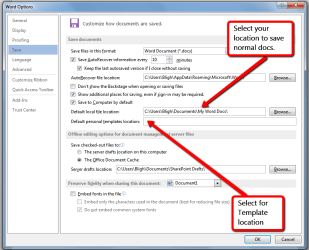
To set your saved Word Document location in office 2013, Open a Word document, select File, then Options & then Save & follow the directions on the screen shot. As far as I know Word 2010 should be the same.
You need to select or type in your preferred location for saving Word Documents & Templates.
Hope this fixes it for you.

Word_saving_file_&_template_location.png
 
Last edited:

My Computer

Computer type
PC/Desktop
Computer Manufacturer/Model Number
Self built using existing case
OS
Windows 7 Home Premium 64 bit sp1
CPU
Intel i5 3570 3.4Ghz Ivy Bridge SKT 1155 quad core
Motherboard
Gigabyte Z77-HD3 SKT 1155 2xSata 3, 4x USB 3.0
Memory
G-Skill Rip Jaws 16Gb (8x2) DDR3 -1600 PC3 12800 CL 10 red
Graphics Card(s)
Gigabyte NVIDIA GT610 1Gb DDR3 810/1200 PCI-E 2.0 Silent
Sound Card
NVIDIA High Definition & Realtech High Definition Audio
Monitor(s) Displays
2 x Philips 226V4L 16:9 aspect ratio
Screen Resolution
1920 x 1080 HD
Hard Drives
Samsung 840 Pro 256gb SSD, SATA 3.
Hitachi Touro Portable 1tb, USB 3.0 HDD used for image b/ups.
PSU
Corsair VS450
Case
Codeng
Cooling
PSU fan & CPU fan
Keyboard
Logitech
Mouse
Logitech Wireless trackball M570
Internet Speed
Wireless 3G. 3mg down & 550kb up.
Antivirus
Bitdefender Internet Security 2020
Browser
Opera (Current Version) & Firefox
Other Info
MS Office 2013 Pro. Davis weather station software. MGE Nova 600 avr UPS.
The behavior you posted is exactly correct based on how Windows computers work.

What you are doing:

  • You are working in Outlook
  • You view an email with a Word attachment
  • You open the attachment from within Outlook
  • Word launches and displays the attached file
What the computer is doing:

  • Outlook is running
  • Outlook finds the selected email and attachment in the selected PST file (basicly a compressed db file)
  • Outlook decompresses the attachment into a TEMP directory - think unzipping a ZIP file to view, then "deleting" it when done viewing (thus the TEMP directory)
  • Word opens the attachment file in the TEMP directory (where Outlook placed it during decompression)

Now you edit the file from it's default Outlook location so when you SAVE the edited file it will default to saving the file in the location where it resides, the TEMP directory. This is exactly as it should behave.

The core issue is user work flow. Outlook does not expect a user to edit an attachment without first saving (detaching) it to another location, then edit the detached copy and save.

The appropriate user action is one of two:

  • Edit the file as opened from Outlook but SAVE AS to a different location, or
  • Detach the attachment to a different location and edit that detached file

Regards,
GEWB
 

My Computer

Computer type
PC/Desktop
Computer Manufacturer/Model Number
(7 different computers booting up to 10 systems)
OS
Linux Mint / XP / Win7 Home, Pro, Ultimate / Win8.1 / Win10
Other Info
Four desktops, two laptops, one notebook and one tablet
This is the only post I can find on the problem. Unfortunately the problem still exists with NO settings fix available. The OP is exactly right and the question is still there. How to I chage settings (User Preferences) so this action NEVER HAPPENS? It is anther example of Windows not being user friendly. Word Documents are lost EVERY DAY due to this ridiculous Microsoft devotion to the arcane and the obscure. I don't like Apple but with Apple OS this would have been fixed decades ago, and probably would never have found its way into an program release. Congratulations to those who have the time to research the issue and find self help fixes on their own. You should not have had to waste your time. But the vast majority do not have that time and just tolerate a clunky system.
 

My Computer

Computer type
PC/Desktop
OS
8.1 64
As long as people do not download the attachment then edit the doc and resend I'm not sure what else can be done
Except try office 365 ;)

I suppose it would be more straight forward if when viewing a doc in an email it should not be possible to do anything with it beside viewing it then people will stop being disappointed when the edit is lost.
 

My Computer

Computer type
PC/Desktop
Computer Manufacturer/Model Number
Custom assembled by me :}
OS
Win-7-Pro64bit 7-H-Prem-64bit
CPU
i7-5930K 2nd i9-9940x both water blocked VRM's too
Motherboard
ASUS SABERTOOTH X99 2nd ASUS x299 Apex
Memory
Trident-z 3200C14 2nd Trident-z 3600C16
Graphics Card(s)
EVGA 1080ti ftw3 2nd Titan Xp both water blocked
Sound Card
Built-in Realtek
Monitor(s) Displays
1-AOC G2460PG 24"G-Sync 144Hz/ 2nd 1-ASUS VG248QE 24" 144Hz
Screen Resolution
1920 x 1080 144Hz
Hard Drives
2-Samsung M.2 Evo & Evo Plus
2-Samsung 850 EVO 500GB SSD's/ 3-2.5 W.D. Black 1tb-&3-1tb/3-3.5 WD Black 1tb hdd's
PSU
EVGA SuperNOVA 1000-P2 2nd 1200-P2
Case
2-Corsair Obsidian Series 450D Black ATX Mid Tower
Cooling
Custom water loops
Keyboard
Logitech G710+/ 2nd Logitech G910
Mouse
2-RedDragon M901 Perdition 16400 dpi Gaming mouse = wired
Internet Speed
Comcast Ping 19ms 89.31mbps download speed 6.12mbps upload
Antivirus
Malwarebytes Pro/ Superantispyware Pro
Browser
FireFox & Pale moon
Other Info
2nd ASUS X299 Apex/Intel i9-9940x with Custom water loop/7H-Prem-x64/Corsair 450D case/Ram Trident-z 3600C16 4x8gb / Samsung970Evo plus 500gb SSD/Dual ssd EZ swap evo/PSU EVGA SuperNova 1200w-P2 80+Platinum/GPU Titan Xp /8-ML-140 on push-pull on 2-280GTX rads
Back
Top