
Preview Icons Not Displaying, Sometimes No Icons Display in Explorer

AlcatrazHero07

New member
Local time
11:18 PM
Messages
2
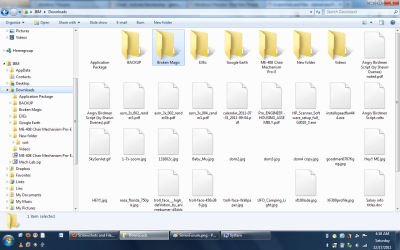
After progressively getting worse, Windows Explorer now displays as seen in the screen shot (no icons are displaying). At first I thought it was taking time to build the icons, but it never does. the loading bar stays loading at 90%. The first few times it happened, I thought I was in a folder with a lot of previews to build in it. Okay. But then it never built the previews. Then for a while, it would load previews for a few minutes after the computer restarted, and then stop displaying those previews. Now it's immediate. I have no icons displaying. Well, in some folders it decides to show the generic icon for the file type (i.e. generic picture icon for png files) instead of building previews. And other times I have a folder mixed with files that display a preview and files of the same type that display either no icon or the generic file type icon.

Even the list view does not display file type icons, and changing the icon size doesn't matter.

What could this be?

(I already deleted the "IconCache.db". It did nothing.)
 

Attachments
  • Screen1.png
    Screen1.png
    80.4 KB · Views: 78

My Computer My Computer

At a glance

Windows 7 Ultimate x64
OS
Windows 7 Ultimate x64
Welcome to the forums :)
What is the amount of RAM in your machine ? Are the working properly ? For testing , follow the tutorial http://www.sevenforums.com/tutorials/105647-ram-test-memtest86.html .

If RAM is working properly, http://www.sevenforums.com/tutorials/49819-icon-cache-rebuild.html may be tried , but dont expect anything positive. Make it sure that you have turned on the thumbnail preview (http://www.sevenforums.com/tutorials/11738-thumbnail-previews-enable-disable.html).

If still not working, you should opt for a http://www.sevenforums.com/tutorials/3413-repair-install.html .
 

My Computer My Computer

At a glance

Microsoft Windows 10 Pro Insider Preview 64-bitIntel(R) Core(TM) i3-4130 CPU @ 3.40GHzCorsair Vengence 4GB x2 (8.00GB Dual-Channel ...2047MB GeForce GTS 450 (ZOTAC International)
Computer type
PC/Desktop
Computer Manufacturer/Model Number
Self Assembled
OS
Microsoft Windows 10 Pro Insider Preview 64-bit
CPU
Intel(R) Core(TM) i3-4130 CPU @ 3.40GHz
Motherboard
Gigabyte Technology Co., Ltd. B85M-D3H
Memory
Corsair Vengence 4GB x2 (8.00GB Dual-Channel DDR3 @ 798MHz)
Graphics Card(s)
2047MB GeForce GTS 450 (ZOTAC International)
Sound Card
Onboard (Realtek High Definition Audio)
Monitor(s) Displays
LG Flatron E2040T
Screen Resolution
1600x900
Hard Drives
Western Digital 1 TB
Seagate 500 GB
PSU
Corsair VS550
Case
Cooler Master K380
Cooling
Cooler Master Seidon 120V Plus
Keyboard
Logitech MK260r
Mouse
Logitech MK260r
Internet Speed
PMPL Broadband
Antivirus
Windows Defender + MBAM
Browser
Firefox
Other Info
Dell Studio 15" Laptop
Thanks for the response and suggestions. I have an IBM laptop with 8 GB of RAM. Since I'm able to go about my day-to-day with the problem, it's low on the list of things to address (and why I haven't touched it in a week). It's also why I kind of doubt I have bad RAM, but I'll try it anyways. I've learned that everything requires testing when it comes to identifying a PC problem! I will try the Memtest86+ either tonight or tomorrow night, and update you Monday.

Again thank you!
 

My Computer My Computer

At a glance

Windows 7 Ultimate x64
OS
Windows 7 Ultimate x64
Back
Top