Preview pane on top

sergiogarcia9

︻┳テ=一
Hello SF.
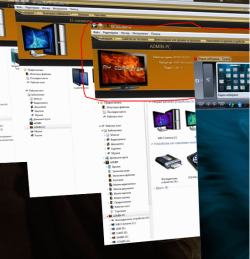
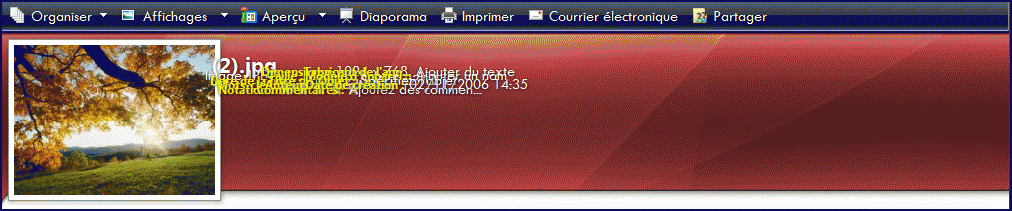
I was wondering how do you get the preview panel at top like in the screenshot below? I'm almost sure i found it here on the forums a few days ago, but i cant find it again now :(

Thanks on advance :)

35357d1257543289-post-your-windows-7-desktops-clipboard9.jpg
 
Found the solution from MallRat :)

1. We'll have to edit "%windir%\System32\Shell32.dll" file. So first take ownership of this file using following tutorial:

Add Take Ownership Option in File / Folder Context Menu

2. Now open the file in Restorator.

3. Goto "View -> Find Text" (or press Ctrl + F). It'll open Find box.

4. Now type following String in textbox:

layoutpos="bottom"

5. Click on "Find Next" button and it'll show the line containing this text.

6. You have to just replace "bottom" word with "top".

7. When you have done, click on "Compile Script" button.

8. Now press "F3" key and it'll show the next line containing the same text. Again do the same mentioned in 6th step.

9. Remember! You have to replace "bottom" word with "top" only in following locations:

3, 4, 5, 6, 19, 20, 21

10. If you also want to show the Details Pane at Top in Browse/Save/Open dialog boxes, then replace "bottom" word with "top" in 27 and 28 keys too.

11. That's it. You have done. Now save the file at some other location, for example in D: drive.

12. Rename original "Shell32.dll" file present in "System32" folder to "shell32_backup.dll".

13. Now copy your new modified "shell32.dll" file to "System32" folder.

14. Restart your system and after restart Windows will start using your new modified file and you'll get details pane at Top.

 
Last edited by a moderator:
Which pane are you talking about ? Can you circle that area for me :D .
As i know that theme is Gold... by nguyenxuanhoa , isn't it ? But it seems the user doesn't use English
 

My Computer

OS
Windows 7
Which pane are you talking about ? Can you circle that area for me :D .
As i know that theme is Gold... by nguyenxuanhoa , isn't it ? But it seems the user doesn't use English

This panel which is default on bottom ;)
 

Attachments

  • Capture.PNG
    Capture.PNG
    464.6 KB · Views: 121
I've seen that 1 before . And i know how to do it like this :
If you want , i'll show you . But i think you probably know it already :D
 

Attachments

  • 090829012402278733.gif
    090829012402278733.gif
    313.5 KB · Views: 169

My Computer

OS
Windows 7
Id love for someone to upload the edited shell32.dll file, so blind old decrepit farts like me dont have to squint in order to get the job done... :roflmao:
 

My Computer

Computer type
PC/Desktop
Computer Manufacturer/Model Number
LENOVO K450 @3.0GHZ
OS
64-bit Windows 8.1 Pro
CPU
Core(TM) i5 CPU 4330 Haswell @ 3.20GHz
Motherboard
LENOVO
Memory
12.00 GB
Graphics Card(s)
Intel(R) HD Graphics
Sound Card
Intel HD integtrated
Monitor(s) Displays
HP 25' ISP Monitor
Screen Resolution
1900/1020
Hard Drives
(1) ST1000DM003-1CH162 (2) Generic STORAGE DEVICE USB Device (3) Generic STORAGE DEVICE USB Device
Internet Speed
100mb down/10mb up
Id love for someone to upload the edited shell32.dll file, so blind old decrepit farts like me dont have to squint in order to get the job done... :roflmao:

I was about to say that :p If anyone got the modified files (shell32.dll) in x86 and x64 version, please post them here so we can use them. Make sure they are the newest version (7600 rtm)

 
It's an animated shellstyle i think . I've read a guide in Vietnamese and they said that :
1.Open shellstyle.dll by restorator .
2.extract the 1.txt in UIFILE
3. find the line :
Code:
<MetadataElement ThemeSubApp=\"DocumentsPreviewPaneControl\" />
to animate the documents .
Like this :
090829014004614504.png

4. Then copy and paste 1 of these animation code :

- "expand" animation:
<element id="atom(animation)" animation="rectangle|exp|fast"/>


- "fade out" animation:
<element id="atom(animation)" accessible="true" alpha="0" animation="alpha|s|veryslow"/]


- "position" animation:
<element id="atom(animation)" animation="position|exp|fast"/>


- "rectanglev" animation:
<element id="atom(animation)" animation="rectanglev|exp|fast"/>


- "rectangleh" animation:
<element id="atom(animation)" animation="rectangleh|exp|fast"/>

Then save them and do like that for games , music and pictures .
There're example pictures for these . Try this link : VN-Zoom Forum - View Single Post - Windows 7 Customize . Maybe you won't understand anything but just look at the picture xD .
 

My Computer

OS
Windows 7
Last edited:

My Computer

OS
Windows 7 Home Premium SP1 64-bit
CPU
Intel™ Core™ i7 920 2.66 ghz
Motherboard
Asus P6T Deluxe V2
Memory
OCZ 6gb (triple 2gb) ddr3-1333 (Gold Edition)
Graphics Card(s)
Nvidia 9800 GT 1GB - x2 SLI
Sound Card
On board
Monitor(s) Displays
19" LCD Wide Screen / Built-in TV Tuner
Screen Resolution
1440x900
Hard Drives
250 GB Maxtor
+
1 TB Seagate
PSU
Corsair GX 800 (800watts)
Case
Thermaltake Level 10 GT
Cooling
Antec Kuhler 920
Mouse
CM Storm Sentinel Advanced
Internet Speed
1MBps
Back
Top