Solved Preview-Thumbnails in YouTube’s progress bar Disappeared!

ibistot

New member
Local time
5:08 PM
Messages
16
Preview-Thumbnails in YouTube’s progress bar Disappeared!

Hi,
well, this small "tooltip" preview-video-frame which pops-up while hovering the mouse over a point in youtube's video progress bar, (which helps to quickly navigate to a desired position on video storyline) suddenly, DISAPPEARED!
In fact, didn't disappeared at all, but it shows as a small BLACK rectangle frame. No preview!
I can't think of anything I did to might have caused that. :\ :(
(May be a recent update of flashplayer for Mozilla FF).
Is there some remedy/solution to it?
thanks a lot.


PS. I forgot to check how it behaves with another browser.
So, in IE this small tooltip-preview-thumb works just fine! shows exactly the frame where I hover the mouse!
So, I guess it has to do with Mozilla FF? or, perhaps some wird "setting" in the Youtube's setting (i might have "touched" a bit without knowing...)
Is there perhaps, some Youtube setting for "enable/disabling" this preview feature?
 
Last edited:

My Computer My Computer

Computer type
PC/Desktop
OS
Windows 7 x64
Still, nobody has a suggestion ? ...

So, let me update the forum, that in my lonely attempts to FiX the problem, I tried to UN-RE-install the addon.
After UnInstalling the "NPAPI" Flashplayer addon for Mozilla, the missing preview-video-frame in youtube's videos RETURNED!!! although, the page recognizing that the missing addon was asking "If I want to install it"! but, the videos play just fine [even most responsive], and the preview frame is there! ... (the only present flashplyer addon, in the system, was the "ActiveX" one for IExplorer).
BUT, some pages with some active multimedia content, eg. with audio applet bar (with :play", "stop", "pause" buttons), do NOT even LOAD! like in this page :
????????? ???????, ????? ??????????

So, I tried to re-install again the latest fplayer NPAPI addon, but the preview-frame... again BLACK!

I even tried to clean install 2 PREViOUS versions of the FPlayer addon, the v21 and v20, but, the problem remained the same! :(

IF nobody has something else to suggest, I guess I'll have to try run FireFox in Safe Mode , though - needless to say - I have some fears doing that (that it may mess the whole system up)...
 

My Computer My Computer

Computer type
PC/Desktop
OS
Windows 7 x64
NOone has seen this thread/subject yet?

or, noone has any solution to suggest?


Anyway, I'll add something "odd" I observed:

this "mouse-over preview-frame in youtube's progress bar" does NOT show ONLY when a video is playbacked in Youtube's page;

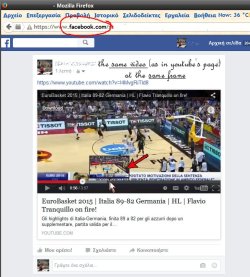
But IF the very same video is played, eg. in Facebook page, or in a blog, it shows pretty well. !!!

I guess that might mean that the problem is browser not-dependant; isn't it?

weird...


Hope someone will think of some remedy to this
 

My Computer My Computer

Computer type
PC/Desktop
OS
Windows 7 x64
Your thread has over 160 view, so I'm guessing that those that viewed and are members are like me. Don't know the answer to your problem.

If I knew how to help you I would.

I use Firefox 47.0.1 and I don't have the problem you describe.
 

My Computer My Computer

Computer type
PC/Desktop
Computer Manufacturer/Model Number
Home made Desktop
OS
Windows 10 Pro. 64/ version 1709 Windows 7 Pro/64
CPU
Intel i7-6800K @ 4.3
Motherboard
ASUS X-99 Deluxe II
Memory
Corsair Platinum 16 gig @2400
Graphics Card(s)
EVGA GTX 1070 OC
Monitor(s) Displays
Asus 27" LED LCD/VE278Q
Screen Resolution
1920-1080 or 1280-720 HDMI
Hard Drives
INTEL SSD 730-240 Gb Sata 3.0/
PSU
EVGA Platium 1200W
Case
Phanteks Luxe Tempered Glass 8 fans/ one radiator
Cooling
XSPC/ Water Cooled CPU
Keyboard
Das 4 Professional
Mouse
Logitech M705/MX Anywhere 2-S
Internet Speed
100 mbits
Antivirus
Microsoft Security Essentials/ Malwarebytes Premium 3.0/ SAS
Browser
I.E. 11 default/Firefox/ ISP Time Warner Cable/Spectrum
Other Info
LG BluRay Burner/
Sound system-KLipsch-THX/
Icy Dock ssd Hot Swap bays.
thanks for your reaction/answer (my comment was not offensive).
In fact, I'm using FF vesrion 30.0 and not intending on updating to the newest one, because after v.30 the "CoolPreviews" Addon stopped being supported and I have come to get used to it so much, that I cannot think of using a browser without this great functionality. (Haven;t found any real alternative to it, yet anyway; Nor in another of the major browsers).
But, I don't think the fact of using a previous version of the browser has anything to do with it, because I do so, since more than a year now, with no problem at all, so far. (Doing all the rest updates: Flashplayer, Java, etc.) Just about a week ago, this problem popped-up!
I guess there must be some setting in youtube's options (maybe for resources economy) that I haven't been able to discover.

UPDATE:
1. I Un-RE-Installed FireFox but the issue remained as it was : a Black mouse-over preview frame!
2. I just even tried running FF in Safe Mode as I was suggested by a friend.
Nope!!!
the "preview frame" in time-bar is STiLL BLACK.!!!

➤ The strange thing is that all work fine, if the youtube's video, playbacks EVERYWHERE ELSE
(eg.Facebook page, or in a blog), BUT in its own page...!!! Really weird!
 
Last edited:

My Computer My Computer

Computer type
PC/Desktop
OS
Windows 7 x64
Today, I tried something new:

Installed a new browser, "Pale Moon" which has the same open source code as Mozilla, and uses the same FlashPlayer type (NPAPI) as Mozilla. Not the "activeX" one, as IE.

Well, the problem is THERE TOO !!! : that mouse-over preview frame shows as a "black rectangle".

And AGAiN, this happen ONLY when a video plays in the Youtube's page, IF the very same video appears in any other page, the preview frame, shows just FINE.!!!

It has become a ...Puzzle. :confused:
 

My Computer My Computer

Computer type
PC/Desktop
OS
Windows 7 x64
1. I tried deactivating "Hardware acceleration" on Flash Properties (some suggested it helped them fix the same problem), but it didn't, in my case.
2. I cleared out "All Cache" from Mozilla browser (a few, suggested it was helpfull for them), but again, not here...
sad.png

it's frustrating.

PS. I attach 2 snapshots:
1. shows the problematic black box instead of the underlying frame in Youtube's progress bar;
2) the same video, at the same frame eg. in Facebook (or elsewhwere), where it shows FINE !!!
 

Attachments

  • Youtube_mouseover_black_frame_progressbar1.jpg
    Youtube_mouseover_black_frame_progressbar1.jpg
    111.9 KB · Views: 1
  • Youtube_mouseover_black_frame_progressbar2.jpg
    Youtube_mouseover_black_frame_progressbar2.jpg
    83.5 KB · Views: 1
Last edited:

My Computer My Computer

Computer type
PC/Desktop
OS
Windows 7 x64
Last edited:

My Computer My Computer

Computer type
Laptop
Computer Manufacturer/Model Number
ASUS
OS
Microsoft Windows 7 Home Premium 64-bit 7601 Multiprocessor Free Service Pack 1
CPU
AMD C-60 APU with Radeon(tm) HD Graphics
Motherboard
ASUSTeK COMPUTER INC. X501U
Memory
4.00 GB
Graphics Card(s)
AMD Radeon HD 6290 Graphics
Sound Card
(1) AMD High Definition Audio Device (2) Realtek High Defi
Screen Resolution
1366 x 768 x 32 bits (4294967296 colors) @ 60 Hz
Hard Drives
Hitachi HTS545050A7E380 SATA Disk Device
Antivirus
Comodo CIS & FW, SecureAplus App Whitelisting, Threatfire
Browser
Cyberfox 64bit, Opera 64bit, Airfox
Other Info
Spy-The-Spy, HitmanPro.Alert, Norton Connect Safe, MJRegWatcher, BitDefender TrafficLight, Voodoo Shield, Zemana AntiMalware

My Computer My Computer

Computer type
Laptop
Computer Manufacturer/Model Number
ASUS
OS
Microsoft Windows 7 Home Premium 64-bit 7601 Multiprocessor Free Service Pack 1
CPU
AMD C-60 APU with Radeon(tm) HD Graphics
Motherboard
ASUSTeK COMPUTER INC. X501U
Memory
4.00 GB
Graphics Card(s)
AMD Radeon HD 6290 Graphics
Sound Card
(1) AMD High Definition Audio Device (2) Realtek High Defi
Screen Resolution
1366 x 768 x 32 bits (4294967296 colors) @ 60 Hz
Hard Drives
Hitachi HTS545050A7E380 SATA Disk Device
Antivirus
Comodo CIS & FW, SecureAplus App Whitelisting, Threatfire
Browser
Cyberfox 64bit, Opera 64bit, Airfox
Other Info
Spy-The-Spy, HitmanPro.Alert, Norton Connect Safe, MJRegWatcher, BitDefender TrafficLight, Voodoo Shield, Zemana AntiMalware

My Computer My Computer

Computer type
Laptop
Computer Manufacturer/Model Number
ASUS
OS
Microsoft Windows 7 Home Premium 64-bit 7601 Multiprocessor Free Service Pack 1
CPU
AMD C-60 APU with Radeon(tm) HD Graphics
Motherboard
ASUSTeK COMPUTER INC. X501U
Memory
4.00 GB
Graphics Card(s)
AMD Radeon HD 6290 Graphics
Sound Card
(1) AMD High Definition Audio Device (2) Realtek High Defi
Screen Resolution
1366 x 768 x 32 bits (4294967296 colors) @ 60 Hz
Hard Drives
Hitachi HTS545050A7E380 SATA Disk Device
Antivirus
Comodo CIS & FW, SecureAplus App Whitelisting, Threatfire
Browser
Cyberfox 64bit, Opera 64bit, Airfox
Other Info
Spy-The-Spy, HitmanPro.Alert, Norton Connect Safe, MJRegWatcher, BitDefender TrafficLight, Voodoo Shield, Zemana AntiMalware
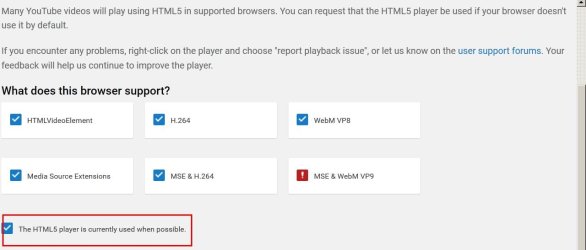
Which player is detected here: https://www.youtube.com/html5
all types are checked!

I have already done clean installs of Flashplayer, as I have already mentioned above! (even previous versions of them, v.21, v.20, v.19) that there was no problem at all, with them; ie. before the latest update of the Flashplayer v.22. :rolleyes:

The problem remains. :(

PS. Let me say that I'm using a previous version of Firefox, v.30, since a year now, and having no problems, what-so-ever, so far. And I'm not intending to update to later/latest versions of it; because of a very inportant plugin, the "CoolPrevious" that, after v29, stopped supporting the new versions of Mozilla. I'm using "CoolPrevious "all the time, I've got used to it, and can not do without!!! So, I will definately stick to this version, because there has been no alternative to CoolPrevious so far.
It would have made sense that, with a previous version (v21/v20) of Flashplayer, all should work fine, as they used to do, with FF v30.0 - for more than a year.
But now, this came up... :confused: :cry:
There must be some workaround, that a tech-genius would think off... :cool:
I hope :) :)
 

My Computer My Computer

Computer type
PC/Desktop
OS
Windows 7 x64
Look - if you watch video on Youtube flash player has nothing to do with it if HTML5 player is detected and used for playback.

Again what does the highlighted box show as in the screenshot below?
YouTube.jpg
 

My Computer My Computer

Computer type
Laptop
Computer Manufacturer/Model Number
ASUS
OS
Microsoft Windows 7 Home Premium 64-bit 7601 Multiprocessor Free Service Pack 1
CPU
AMD C-60 APU with Radeon(tm) HD Graphics
Motherboard
ASUSTeK COMPUTER INC. X501U
Memory
4.00 GB
Graphics Card(s)
AMD Radeon HD 6290 Graphics
Sound Card
(1) AMD High Definition Audio Device (2) Realtek High Defi
Screen Resolution
1366 x 768 x 32 bits (4294967296 colors) @ 60 Hz
Hard Drives
Hitachi HTS545050A7E380 SATA Disk Device
Antivirus
Comodo CIS & FW, SecureAplus App Whitelisting, Threatfire
Browser
Cyberfox 64bit, Opera 64bit, Airfox
Other Info
Spy-The-Spy, HitmanPro.Alert, Norton Connect Safe, MJRegWatcher, BitDefender TrafficLight, Voodoo Shield, Zemana AntiMalware
Yupeeeee!!!!!! thank you! thank you! thank you!
It worked like a charm! Now, "preview-thumb" in progress-bar shows OK!!!

( When I wrote, above, that : "all types are checked ", I was trying the latest version of FF v.47.0.1 and then, of course, the highlighted box showed as above. BUT, when I installed back the preffered version of FF v.30.0 ... it was telling to "ASK for the HTML5 programm", ... I clicked on it, ... refreshed the browser and now ALL is WORKiNG OK. )

It was a headache...
Thanks again.
 

My Computer My Computer

Computer type
PC/Desktop
OS
Windows 7 x64
Thanks for letting us know. Suggest running old versions of Firefox sandboxed or in a VM for added security but it's your call.
 

My Computer My Computer

Computer type
Laptop
Computer Manufacturer/Model Number
ASUS
OS
Microsoft Windows 7 Home Premium 64-bit 7601 Multiprocessor Free Service Pack 1
CPU
AMD C-60 APU with Radeon(tm) HD Graphics
Motherboard
ASUSTeK COMPUTER INC. X501U
Memory
4.00 GB
Graphics Card(s)
AMD Radeon HD 6290 Graphics
Sound Card
(1) AMD High Definition Audio Device (2) Realtek High Defi
Screen Resolution
1366 x 768 x 32 bits (4294967296 colors) @ 60 Hz
Hard Drives
Hitachi HTS545050A7E380 SATA Disk Device
Antivirus
Comodo CIS & FW, SecureAplus App Whitelisting, Threatfire
Browser
Cyberfox 64bit, Opera 64bit, Airfox
Other Info
Spy-The-Spy, HitmanPro.Alert, Norton Connect Safe, MJRegWatcher, BitDefender TrafficLight, Voodoo Shield, Zemana AntiMalware
Back
Top