Previous windows on boot up

mark1up

New member
Local time
1:07 AM
Messages
7
Hi all,how do i get rid of the earlier version of windows option on boot up?I'm running Windows 7 64bit via a clean install.A side note, it took me a couple of attempts to install win7.I deleted 1 failed win7 install from the system configuration,but this earlier version does not show up there.Thanks in advance
Simon:)
 

My Computer

OS
Windows 7 64bit
CPU
2.4 quad core q6600
Motherboard
Asus Striker Extreme
Memory
4gb ddr2 corsair xms
Graphics Card(s)
2xNvidia 8800 GTX
Sound Card
Onboard 5.1
Monitor(s) Displays
24 Samsung Synchmaster
Screen Resolution
1680 x 1050
Hard Drives
2 74gb raptors in raid
500 gb data drive
PSU
1300w Tegan
Case
Thermaltake
Keyboard
Z board
Mouse
X8 microsoft sidewinder
Internet Speed
20mb
Hi all,how do i get rid of the earlier version of windows option on boot up?I'm running Windows 7 64bit via a clean install.A side note, it took me a couple of attempts to install win7.I deleted 1 failed win7 install from the system configuration,but this earlier version does not show up there.Thanks in advance
Simon:)

Just the boot menu is left right? not the previous OS.

If just the menu, you need to use something like BCDedit to edit the boot loader. Instructions for bcedit are here http://www.sevenforums.com/tutorials/2676-bcdedit-how-use.html?ltr=B

Its not that hard.

Hope this helps


Ken
 

My Computer

Computer Manufacturer/Model Number
HP Pavillion dv-7 1005 Tx
OS
Win 8 Release candidate 8400
CPU
[email protected]
Memory
4 gigs
Graphics Card(s)
Nvidia 9600M
Sound Card
HD built-in
Monitor(s) Displays
17" Wxga
Screen Resolution
1440x900
Cooling
none
Internet Speed
45Mb down 5Mb up

My Computer

Computer Manufacturer/Model Number
Keeps changing - (Custom)
OS
Windows 7 Professional x64
CPU
Intel Core i7 860
Motherboard
Gigabyte GA-P55-UD4P
Memory
4GB DDR3 Mushkin 1600Mhz @ 7-8-7-20
Graphics Card(s)
MSI GTS250 1GB DDR3 Twin Frozr
Sound Card
Onboard realtek
Monitor(s) Displays
Samsung SyncMaster 24" P2450 + Samsung 20" 2033
Screen Resolution
1920 X 1080 and 1600 X 900 (#2 system 1440 X 900)
Hard Drives
Patriot Inferno 120GB SSD + 3 WD Blue 640GB drives
PSU
Corsair 750 HX Modular
Case
Lancool PC-K62
Cooling
Cooler Master TX3 CPU cooler and 4-140mm and 1-120mm case
Keyboard
Gigabyte USB keyboard
Mouse
Microsoft wireless laser mouse 5000
Internet Speed
7 Mb down 1.5 up
Other Info
System #2: AMD Phenom II X6 1055T (Freezer 7 Pro cooler) - Gigabyte 880GMA-UD2H - WD 500GB Black - 9500GT (1GB) 500W OCZ modular PSU - Antec 200 case. System #3 (LapTop) Core 2 Duo T6670 - 320GB 7200RPM HD - 4GB DDR3 RAM.
Thx Ken i will try that tomorrow,too tired at the mo.

@Nate: tried that method,but the boot entry does not show there,thx for the help guys :)
 

My Computer

OS
Windows 7 64bit
CPU
2.4 quad core q6600
Motherboard
Asus Striker Extreme
Memory
4gb ddr2 corsair xms
Graphics Card(s)
2xNvidia 8800 GTX
Sound Card
Onboard 5.1
Monitor(s) Displays
24 Samsung Synchmaster
Screen Resolution
1680 x 1050
Hard Drives
2 74gb raptors in raid
500 gb data drive
PSU
1300w Tegan
Case
Thermaltake
Keyboard
Z board
Mouse
X8 microsoft sidewinder
Internet Speed
20mb
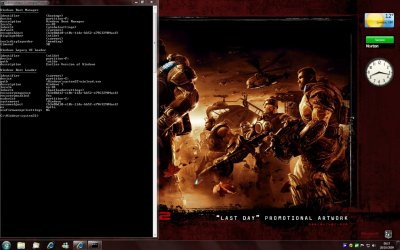
Ok so i get this screen,now can anyone help me as in how to delete the legacy OS bit.
Thanks i'm a bit stuck:sarc:

Hurrah,fixed it,thx :)
 

Attachments

  • Untitled.jpg
    Untitled.jpg
    192 KB · Views: 107
Last edited:

My Computer

OS
Windows 7 64bit
CPU
2.4 quad core q6600
Motherboard
Asus Striker Extreme
Memory
4gb ddr2 corsair xms
Graphics Card(s)
2xNvidia 8800 GTX
Sound Card
Onboard 5.1
Monitor(s) Displays
24 Samsung Synchmaster
Screen Resolution
1680 x 1050
Hard Drives
2 74gb raptors in raid
500 gb data drive
PSU
1300w Tegan
Case
Thermaltake
Keyboard
Z board
Mouse
X8 microsoft sidewinder
Internet Speed
20mb
Back
Top