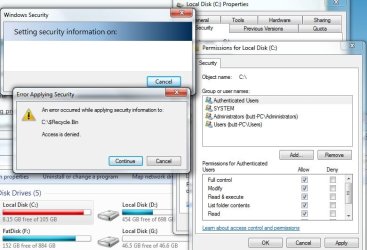
Primary drive got giving full access to my account, which is set admin

dempa

New member
Local time
4:51 AM
Messages
4
I have been having several problems, but I believe they all have one root cause: Windows will not grant me full permissions on my main HDD (C). Problems I notice:

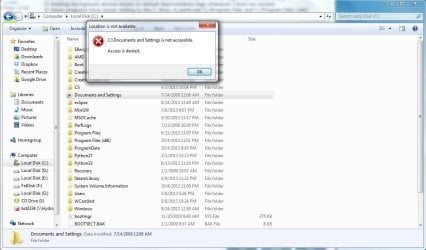
1) See attachment
2) Steam makes me use my username/password every time even if I check 'Log Me In Automatically'
3) Desktop Background always resets to default blue+windows logo whenever I boot my system.
4) Some programs have issues writing to the C drive, in particular C:/Program Files and C:/Program Files (x86)


I apologize in advance if I do not provide ample information. If more is needed to correctly diagnose this issue, I will be actively checking this thread today and tomorrow.
 

Attachments

  • foo.jpg
    foo.jpg
    57.2 KB · Views: 2

My Computer My Computer

At a glance

Windows 7 Home Premiumi5 3750k4gb 1600 mHz ddr3amd 7850
Computer type
PC/Desktop
Computer Manufacturer/Model Number
Custom
OS
Windows 7 Home Premium
CPU
i5 3750k
Motherboard
ASUS p8z77-v lx
Memory
4gb 1600 mHz ddr3
Graphics Card(s)
amd 7850
Hard Drives
OCZ SSD 128GB
750GB WD-Black
1GB WD-Black
Antivirus
Avast Free
Browser
Chromium
The writes to folders under Program Files and variants will be blocked. If you have scripts and other utilities that use the location of the exe as the place to write .ini or other data files, as many of mine do, you can get around it by "installing" them in a folder directly under C:. I put all my scripts and small utilities in C:\Utils but you can create any folder name.

The other items such as wallpaper or splash screens, perhaps someone into customization has run into and may have suggestions.
 

My Computer My Computer

At a glance

Windows 7 32 bitAMD 5200+ dual core2 GBNVidia GeForce 6150SE 128 MB
Computer Manufacturer/Model Number
HP Media Center
OS
Windows 7 32 bit
CPU
AMD 5200+ dual core
Memory
2 GB
Graphics Card(s)
NVidia GeForce 6150SE 128 MB
Monitor(s) Displays
CRT
Screen Resolution
1280x1024
Hard Drives
500 GB Sata internal :

SIIG USB 3.0 docking stations w/WD Caviar Black 6 Gb/s drives
Keyboard
PS/2
Mouse
PS/2 Wheel Mouse
Other Info
SIIG USB 3.0 PCIexpress card.
There is also this.
 

Attachments

  • foo.jpg
    foo.jpg
    82.4 KB · Views: 3

My Computer My Computer

At a glance

Windows 7 Home Premiumi5 3750k4gb 1600 mHz ddr3amd 7850
Computer type
PC/Desktop
Computer Manufacturer/Model Number
Custom
OS
Windows 7 Home Premium
CPU
i5 3750k
Motherboard
ASUS p8z77-v lx
Memory
4gb 1600 mHz ddr3
Graphics Card(s)
amd 7850
Hard Drives
OCZ SSD 128GB
750GB WD-Black
1GB WD-Black
Antivirus
Avast Free
Browser
Chromium
Documents and Settings is XP OS equivalent of \Users on Vista/W7

"there is also this" is kind of nebulous. Is any particular thing likely to trigger it? Or it just pops up at random?

From the error message it looks like a program is assuming the XP folder is there.
 

My Computer My Computer

At a glance

Windows 7 32 bitAMD 5200+ dual core2 GBNVidia GeForce 6150SE 128 MB
Computer Manufacturer/Model Number
HP Media Center
OS
Windows 7 32 bit
CPU
AMD 5200+ dual core
Memory
2 GB
Graphics Card(s)
NVidia GeForce 6150SE 128 MB
Monitor(s) Displays
CRT
Screen Resolution
1280x1024
Hard Drives
500 GB Sata internal :

SIIG USB 3.0 docking stations w/WD Caviar Black 6 Gb/s drives
Keyboard
PS/2
Mouse
PS/2 Wheel Mouse
Other Info
SIIG USB 3.0 PCIexpress card.
Documents and Settings is XP OS equivalent of \Users on Vista/W7

"there is also this" is kind of nebulous. Is any particular thing likely to trigger it? Or it just pops up at random?

From the error message it looks like a program is assuming the XP folder is there.

My apologies for being vague. The window appears when I open the Documents and Settings .lnk file.

Another issue is that I have to run any games that are on C: explicitly in Admin mode or they have unexpected behavior, such as crashing.
 

My Computer My Computer

At a glance

Windows 7 Home Premiumi5 3750k4gb 1600 mHz ddr3amd 7850
Computer type
PC/Desktop
Computer Manufacturer/Model Number
Custom
OS
Windows 7 Home Premium
CPU
i5 3750k
Motherboard
ASUS p8z77-v lx
Memory
4gb 1600 mHz ddr3
Graphics Card(s)
amd 7850
Hard Drives
OCZ SSD 128GB
750GB WD-Black
1GB WD-Black
Antivirus
Avast Free
Browser
Chromium
Documents and Settings does not exist in Vista or W7. It's on XP. When it's saying location not available it just means not found.
 

My Computer My Computer

At a glance

Windows 7 32 bitAMD 5200+ dual core2 GBNVidia GeForce 6150SE 128 MB
Computer Manufacturer/Model Number
HP Media Center
OS
Windows 7 32 bit
CPU
AMD 5200+ dual core
Memory
2 GB
Graphics Card(s)
NVidia GeForce 6150SE 128 MB
Monitor(s) Displays
CRT
Screen Resolution
1280x1024
Hard Drives
500 GB Sata internal :

SIIG USB 3.0 docking stations w/WD Caviar Black 6 Gb/s drives
Keyboard
PS/2
Mouse
PS/2 Wheel Mouse
Other Info
SIIG USB 3.0 PCIexpress card.
Documents and Settings does not exist in Vista or W7. It's on XP. When it's saying location not available it just means not found.

Okay, I deleted it. I'm not going to mark this thread as resolved yet, since I may run into related issues in the future that I will append to this thread.
 

My Computer My Computer

At a glance

Windows 7 Home Premiumi5 3750k4gb 1600 mHz ddr3amd 7850
Computer type
PC/Desktop
Computer Manufacturer/Model Number
Custom
OS
Windows 7 Home Premium
CPU
i5 3750k
Motherboard
ASUS p8z77-v lx
Memory
4gb 1600 mHz ddr3
Graphics Card(s)
amd 7850
Hard Drives
OCZ SSD 128GB
750GB WD-Black
1GB WD-Black
Antivirus
Avast Free
Browser
Chromium
The C drive is almost full. Theirs a very good chance that Windows 7 will not let you install anything of size. Windows needs some free space to operate properly.
 

My Computer My Computer

At a glance

Windows 10 Pro. 64/ version 1709 Windows 7 Pr...Intel i7-6800K @ 4.3Corsair Platinum 16 gig @2400EVGA GTX 1070 OC
Computer type
PC/Desktop
Computer Manufacturer/Model Number
Home made Desktop
OS
Windows 10 Pro. 64/ version 1709 Windows 7 Pro/64
CPU
Intel i7-6800K @ 4.3
Motherboard
ASUS X-99 Deluxe II
Memory
Corsair Platinum 16 gig @2400
Graphics Card(s)
EVGA GTX 1070 OC
Monitor(s) Displays
Asus 27" LED LCD/VE278Q
Screen Resolution
1920-1080 or 1280-720 HDMI
Hard Drives
INTEL SSD 730-240 Gb Sata 3.0/
PSU
EVGA Platium 1200W
Case
Phanteks Luxe Tempered Glass 8 fans/ one radiator
Cooling
XSPC/ Water Cooled CPU
Keyboard
Das 4 Professional
Mouse
Logitech M705/MX Anywhere 2-S
Internet Speed
100 mbits
Antivirus
Microsoft Security Essentials/ Malwarebytes Premium 3.0/ SAS
Browser
I.E. 11 default/Firefox/ ISP Time Warner Cable/Spectrum
Other Info
LG BluRay Burner/
Sound system-KLipsch-THX/
Icy Dock ssd Hot Swap bays.
The C drive is almost full. Theirs a very good chance that Windows 7 will not let you install anything of size. Windows needs some free space to operate properly.

I should have noticed, it being in Red and all. :)
With the page file size fluctuating that can produce all kinds of intermettent problems for sure. :)
 

My Computer My Computer

At a glance

Windows 7 32 bitAMD 5200+ dual core2 GBNVidia GeForce 6150SE 128 MB
Computer Manufacturer/Model Number
HP Media Center
OS
Windows 7 32 bit
CPU
AMD 5200+ dual core
Memory
2 GB
Graphics Card(s)
NVidia GeForce 6150SE 128 MB
Monitor(s) Displays
CRT
Screen Resolution
1280x1024
Hard Drives
500 GB Sata internal :

SIIG USB 3.0 docking stations w/WD Caviar Black 6 Gb/s drives
Keyboard
PS/2
Mouse
PS/2 Wheel Mouse
Other Info
SIIG USB 3.0 PCIexpress card.
Documents and Settings does not exist in Vista or W7. It's on XP. When it's saying location not available it just means not found.

Okay, I deleted it. I'm not going to mark this thread as resolved yet, since I may run into related issues in the future that I will append to this thread.
It is not a good idea to delete that. Some older programs, batch files and scripts depend on it to function properly. Consider setting/leaving the folder options to/on their default settings; then hidden folders like this would not appear to be a problem.

 

My Computer My Computer

At a glance

W7 Pro SP1 64biti78GBIntel HD Graphics
Computer type
Laptop
Computer Manufacturer/Model Number
Employer provided Dell Latitude
OS
W7 Pro SP1 64bit
CPU
i7
Memory
8GB
Graphics Card(s)
Intel HD Graphics
Hard Drives
crappy SSD
Antivirus
Employer mandated Symantec Endpoint Protection
Browser
Pale Moon 64bit, IE11 64bit & Chrome 64bit
Documents and Settings does not exist in Vista or W7. It's on XP. When it's saying location not available it just means not found.

Okay, I deleted it. I'm not going to mark this thread as resolved yet, since I may run into related issues in the future that I will append to this thread.
It is not a good idea to delete that. Some older programs, batch files and scripts depend on it to function properly. Consider setting/leaving the folder options to/on their default settings; then hidden folders like this would not appear to be a problem.

I think he's just talking about the desktop shortcut.
 

My Computer My Computer

At a glance

Windows 7 32 bitAMD 5200+ dual core2 GBNVidia GeForce 6150SE 128 MB
Computer Manufacturer/Model Number
HP Media Center
OS
Windows 7 32 bit
CPU
AMD 5200+ dual core
Memory
2 GB
Graphics Card(s)
NVidia GeForce 6150SE 128 MB
Monitor(s) Displays
CRT
Screen Resolution
1280x1024
Hard Drives
500 GB Sata internal :

SIIG USB 3.0 docking stations w/WD Caviar Black 6 Gb/s drives
Keyboard
PS/2
Mouse
PS/2 Wheel Mouse
Other Info
SIIG USB 3.0 PCIexpress card.
Back
Top