Primary Partition Became Simple Volume

ammar7may

New member
Local time
3:45 AM
Messages
2
Hi,
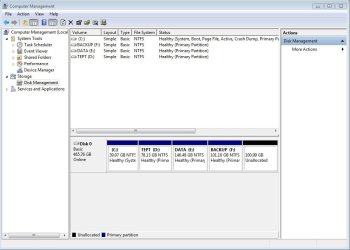
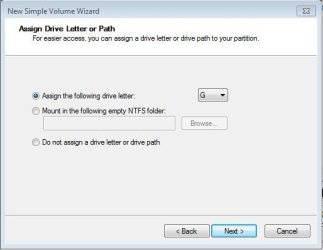
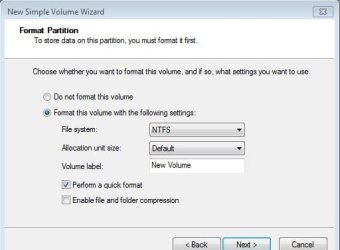
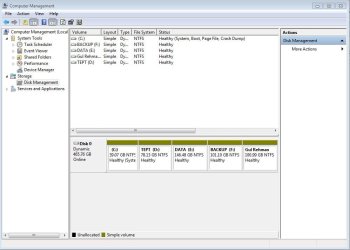
I accidentally converted my Primary Partition into Simple Volume. Please view the exact story in the attached image files, and tell me how can I revert my partition to be Primary Partitions.
 

Attachments

  • 1.jpg
    1.jpg
    61.4 KB · Views: 21
  • 2.jpg
    2.jpg
    19 KB · Views: 35
  • 3.jpg
    3.jpg
    61 KB · Views: 12
  • 4.jpg
    4.jpg
    18.1 KB · Views: 34
  • 5.jpg
    5.jpg
    19.5 KB · Views: 33
  • 6.jpg
    6.jpg
    57.5 KB · Views: 13
  • 7.jpg
    7.jpg
    25.3 KB · Views: 34
  • 8.jpg
    8.jpg
    50.1 KB · Views: 11

My Computer

Computer Manufacturer/Model Number
Lenovo
OS
windows 7
CPU
i3
Did you mean to say you made your disk Dynamic ?

Didn`t you get a message warning you it could turn to Dynamic ?

You can`t have more than 4 primary partitions on 1 hard drive in windows, or it will turn the disc to dynamic.
 

My Computer

Computer type
PC/Desktop
Computer Manufacturer/Model Number
Skylake Special #666
OS
Windows 10 Pro x64
CPU
Intel Core i7 6700K
Motherboard
Asus Sabertooth Z170 Mark 1
Memory
GSkill TridentZ RGB 16GB 3600 16-16-16-36
Graphics Card(s)
EVGA GTX 980 Ti SC x2
Sound Card
Realtek High Definition
Monitor(s) Displays
AOC G2460PG
Screen Resolution
1920 x 1080 144Hz
Hard Drives
Samsung 860 Pro 256GB, Seagate Barracuda 4TB x2
PSU
EVGA 1000 P2, EVGA White Custom Braided Cables
Case
Corsair Vengeance C70 Gunmetal Black
Cooling
Corsair H100i v2, Corsair ML120 x2, Thermal Grizzly Kryonaut
Keyboard
Logitech G910 Orion Spectrum
Mouse
Logitech G700s
Internet Speed
Verizon Fios Quantum Gateway 75/75
Antivirus
Windows Defender, Malwarebytes Free 3.8.3
Browser
Chrome
Other Info
Corsair SP120 x4, LG Blu-ray Drive, Durabrand HT-395 100 Watt Dolby Digital Amp, Corsair H2100 Wireless 7.1 Headset

My Computer

Computer type
PC/Desktop
Computer Manufacturer/Model Number
Custom Build
OS
Windows 7 Home Premium 32-Bit - Build 7600 SP1
CPU
Intel Core i3-2120 3.30Ghz
Motherboard
Asus P8Z68-V LX Intel Z68 Socket H2 ATX
Memory
Kingston 4 GB DDR3 1333 mhz
Graphics Card(s)
AMD Radeon HD6670
Sound Card
Sound Blaster Audigy SE 24-Bit
Monitor(s) Displays
Asus VE228
Screen Resolution
1440 X 900
Hard Drives
OCZ Vertex 3 120 GB Sata 3 SSD ==
Kingston SH103/S3 120 G Hyper X 120 GB SSD ==
Western Digital 500 GB Caviar Green 7200 RPM ==
PSU
Corsair CX600M == 600 Watt
Case
NZXT Apollo - Silver with Clear Side Panel
Cooling
Three 120 mm Fans
Keyboard
Microsoft Natural 4000
Mouse
Microsoft Custom Optical 3000
Internet Speed
AT&T Fiber Optic Wireless Network
Antivirus
Microsoft Security Essentials
Browser
Chrome
Other Info
120 mm Blue LED Fan -- Three Blue LED Lazer Light Sticks
Hi AddRAM,
So, do you mean that my disk has become Dynamic and now I need it to become Basic? Yes, I received the warning message, but I thought the message was for the new partition to be created.
Hi bigmck,
I feel the tutorial you have shared seems much helpful. I shall try to follow option 3 of this tutorial without any third party software. I am away from my desktop PC now, so when I convert my dynamic disk into Basic disk, I shall post again.
Hi all,
I shall
1) copy all my data except windows drive (except C drive) on an external drive,
2) take backup of windows 7 on an external drive,
3) Delete all my dynamic disk partitions one by one except that of windows 7 partition (C drive). It shall now become one big drive (C drive )
4) It shall itself become Primary drive / or I right click on convert to Basic Disk, if it is still Dynamic
5) I shall shrink the C drive (the only drive now) to create unallocated space.
6) I shall create 2 more Basic drives from the unallocated space.
7) Now, I need to create an Extended Partition of rest of the unallocated space, so that I can create as many logical drives, as I need. This was my actual problem before falling into this problem.
So, please also send me a tutorial for how can I create an Extended Partition from unallocated space.
Thanks

 

My Computer

Computer Manufacturer/Model Number
Lenovo
OS
windows 7
CPU
i3

My Computer

Computer Manufacturer/Model Number
Customized build from CyberPower
OS
Windows 7 Home Premium 64bit SP 1
CPU
Intel i5 2500k
Motherboard
Asus P8P67 Deluxe
Memory
8 gigabytes Corsair PC3-12800 DDR3
Graphics Card(s)
EVGA GeForce GTX 460 superclocked
Sound Card
Integrated
Monitor(s) Displays
ViewSonic 23" LCD
Screen Resolution
1980 x 1080
Hard Drives
120 Gb Samsung 840 Pro SSD
120 Gb Kingston Hyper X SSD
1 Tb WD Caviar Black HDD
PSU
Coolermaster 1000 watt modular
Case
Coolermaster HAF X full tower
Cooling
Coolermaster Hyper 212 plus
Keyboard
Logitech USB
Mouse
Microsoft 3 button
Internet Speed
download 1.5 Mb/sec upload 300Kb/sec
I would convert it back to basic using the partition wizard boot cd before you attempt any of that.
 

My Computer

Computer type
PC/Desktop
Computer Manufacturer/Model Number
Skylake Special #666
OS
Windows 10 Pro x64
CPU
Intel Core i7 6700K
Motherboard
Asus Sabertooth Z170 Mark 1
Memory
GSkill TridentZ RGB 16GB 3600 16-16-16-36
Graphics Card(s)
EVGA GTX 980 Ti SC x2
Sound Card
Realtek High Definition
Monitor(s) Displays
AOC G2460PG
Screen Resolution
1920 x 1080 144Hz
Hard Drives
Samsung 860 Pro 256GB, Seagate Barracuda 4TB x2
PSU
EVGA 1000 P2, EVGA White Custom Braided Cables
Case
Corsair Vengeance C70 Gunmetal Black
Cooling
Corsair H100i v2, Corsair ML120 x2, Thermal Grizzly Kryonaut
Keyboard
Logitech G910 Orion Spectrum
Mouse
Logitech G700s
Internet Speed
Verizon Fios Quantum Gateway 75/75
Antivirus
Windows Defender, Malwarebytes Free 3.8.3
Browser
Chrome
Other Info
Corsair SP120 x4, LG Blu-ray Drive, Durabrand HT-395 100 Watt Dolby Digital Amp, Corsair H2100 Wireless 7.1 Headset
ammar7may -- What you are going to do, step by step sounds good. Just make sure you have your backups. Good luck.
 

My Computer

Computer type
PC/Desktop
Computer Manufacturer/Model Number
Custom Build
OS
Windows 7 Home Premium 32-Bit - Build 7600 SP1
CPU
Intel Core i3-2120 3.30Ghz
Motherboard
Asus P8Z68-V LX Intel Z68 Socket H2 ATX
Memory
Kingston 4 GB DDR3 1333 mhz
Graphics Card(s)
AMD Radeon HD6670
Sound Card
Sound Blaster Audigy SE 24-Bit
Monitor(s) Displays
Asus VE228
Screen Resolution
1440 X 900
Hard Drives
OCZ Vertex 3 120 GB Sata 3 SSD ==
Kingston SH103/S3 120 G Hyper X 120 GB SSD ==
Western Digital 500 GB Caviar Green 7200 RPM ==
PSU
Corsair CX600M == 600 Watt
Case
NZXT Apollo - Silver with Clear Side Panel
Cooling
Three 120 mm Fans
Keyboard
Microsoft Natural 4000
Mouse
Microsoft Custom Optical 3000
Internet Speed
AT&T Fiber Optic Wireless Network
Antivirus
Microsoft Security Essentials
Browser
Chrome
Other Info
120 mm Blue LED Fan -- Three Blue LED Lazer Light Sticks
The problem is that you converted your HD to Dynamic which is only meant to be used to span a partition across multiple HD's. Apparently you didn't see the warning message.

The solution to solve this non-destructively is to boot free Partition Wizard CD version 4.2 which is the last one which offers this as a free feature: pw422.zip ISO - Windows Live.

Download the ISO, rightclick to Open with Windows Image Burner, or use ImgBurn to burn to CD.

Boot CD. You will need to delete the extra partition G you created which tipped it to convert to Dynamic before it will convert back to Basic.

Then follow these video steps: How to convert dynamic disk to basic disk with Partition Wizard?

You should never have shrunk the Recovery Partiition to begin with as now it may not run. If you haven't done so yet, after conversion try making your Recovery Disks to see. If Recovery won't boot you can delete it and create new partition there.
 
a little bit different problem

Hi
I recently had an exactly same problem (I turned my primary partition into simple volume too). But it's a little bit different.
I accidentally restart my laptop, so my windows won't start anymore.
What should I do? Thanks before
 
Last edited:

My Computer

Computer type
Laptop
Computer Manufacturer/Model Number
Compaq
OS
Windows 7 Ultimate 32bit
The steps in Post #8 are written so that they can be performed from the Partition Wizard boot disk without having to boot into Win7.

Once you reconvert the Dynamic disk to Basic, if Win7 won't start confirm the Active flag is on C or System Reserved (preferred) and run Startup Repair - Run up to 3 Separate Times from the Win7 Disk or Repair CD. Post back a camera snap of the PW drive map if you have problems.

For a Win7 installation DVD for your version or to rescue important files if needed, see Troubleshooting Windows 7 Failure to Start
 
Back
Top