Primary Partition lost

ilir1

New member
Local time
1:27 PM
Messages
3
Hi everyone,
I have a 500GB HDD divided in to 55.5GB Primary boot partition (C: ) with Win7 and Programs and remaining space ~410GB partitioned (D: ) is where my data is stored.
Somehow my kid touched something, somewhat... and my PC won't boot. When I boot Linux from my USB dongle i see that partition C: has unknown file system, Used/Unused space unknown and it is not mounted. The other partition has the data intact and it is accessible.

I still have some documents on My Documents (C: ) that I need to retrieve. Is there any way to fix this partition so I can retrieve this data on lost partition without risking the remaining data on the other, healthy partition.

Thank you in advance!
 

My Computer

OS
Windows 7 Ultimate x64

My Computer

Computer type
PC/Desktop
Computer Manufacturer/Model Number
Golden Mk. I.4
OS
Windows 10 Pro x64 ; Xubuntu x64
CPU
Intel i7 860 @ 2.80 GHz O/C'ed to 4.0GHz
Motherboard
Gigabyte P55A-UD3R Rev.1. Award BIOS F13
Memory
16GB Corsair Vengance DDR3 @ 661 MHz Dual Channel (9-9-9-24)
Graphics Card(s)
EVGA NVidia GTX 560 1024MB
Sound Card
Realtek Integrated
Monitor(s) Displays
Dual Samsung SyncMaster 2494HS
Screen Resolution
1920*1080 and 1920*1080
Hard Drives
1*Samsung 840 EVO 120GB SSD;
1*OCZ Vertex 2 60GB SSD;
2*Samsung F3 SpinPoint 1TB in RAID0;
1*Samsung F1 SpinPoint 1TB;
2*Western Digital 1TB External USB 3.0
1*Western Digital 500GB External USB 3.0
1*Seagate 500GB External USB 2.0
PSU
Thermaltake ToughPower QFan 750W
Case
Thermaltake Element S VK60001W2Z
Cooling
Corsair H60 Water Cooling, 2*230mm and 2*80mm case fans
Keyboard
Logitech G110
Mouse
Logitech MX518

My Computer

Computer type
PC/Desktop
Computer Manufacturer/Model Number
Golden Mk. I.4
OS
Windows 10 Pro x64 ; Xubuntu x64
CPU
Intel i7 860 @ 2.80 GHz O/C'ed to 4.0GHz
Motherboard
Gigabyte P55A-UD3R Rev.1. Award BIOS F13
Memory
16GB Corsair Vengance DDR3 @ 661 MHz Dual Channel (9-9-9-24)
Graphics Card(s)
EVGA NVidia GTX 560 1024MB
Sound Card
Realtek Integrated
Monitor(s) Displays
Dual Samsung SyncMaster 2494HS
Screen Resolution
1920*1080 and 1920*1080
Hard Drives
1*Samsung 840 EVO 120GB SSD;
1*OCZ Vertex 2 60GB SSD;
2*Samsung F3 SpinPoint 1TB in RAID0;
1*Samsung F1 SpinPoint 1TB;
2*Western Digital 1TB External USB 3.0
1*Western Digital 500GB External USB 3.0
1*Seagate 500GB External USB 2.0
PSU
Thermaltake ToughPower QFan 750W
Case
Thermaltake Element S VK60001W2Z
Cooling
Corsair H60 Water Cooling, 2*230mm and 2*80mm case fans
Keyboard
Logitech G110
Mouse
Logitech MX518
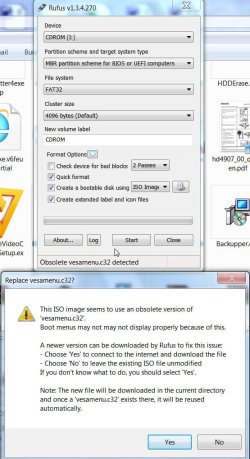
Yes. Use Rufus to create a bootable pen drive with pwhe811.iso. During the process if it offers to download the new vesa32 menu say yes. It will download and use the new vesa menu to create the pendrive.

31-10-2013 08-31-06.jpg

Otherwise, when booting with it, against the command prompt you have to type linux0 and ENTER to boot PW. (linux1 to boot PW in safe mode, and local to boot from HDD)

The second thing, you merely said you are unable to boot your PC. If you tell what exactly happens when you try to boot, it may throw some light on what could have happened and may be there can be some alternate method to set it right.
 

My Computer

OS
Windows 7 Home Premium 32 bit
Back
Top