Solved Primary Partition Name Change Needed

fanazak3

New member
Local time
8:31 AM
Messages
3
Location
Las Vegas, NV
Hi, I A 7 Home Premium i3 laptop. I am giving it to my daughter and I would like when you click on the Button the folder name to be her name, not the previous owners. The files in the File would stay, just want the name changed. Currently, this is the only partition on the HD. I understand that I can add a partition, but do not feel quite secure in my abilities to pull this off successfully. I am quite unclear on the whole shrinking part of it - I seen the tutorial on this sight. Is there anyway to just change the name on the file? If not, can you tell me in a different way about the partitioning? I get the actual steps, tutorial is very well done for the steps, but some of the warnings I do not understand. Also, even though I understand what to do, I do not understand what it means. I really do not want to fry my HD. Help? thx in advance. Sorry if I sound too uneducatede :o
 

My Computer

Computer Manufacturer/Model Number
Toshiba Satellite P500
OS
Windows7 x64 Home Premium
CPU
Intel Core i3 M 330 @ 2.13GHz
Motherboard
Intel Havendale/Clarkdale Host Bridge; Intel HM55
Memory
DDR3 4096 MBytes; Dual Channel Symmetric
Graphics Card(s)
Intel Graphics Media Acceleration HD
Screen Resolution
1680x945
Hello Fanazak, and welcome to Seven Forums.

I'm a bit confused if you mean the name of a folder (user folder??) or a partition by what you described. Could you post a screenshot showing what you would like to change just to be certain and make sure we are helping you with the right one? :)
 

My Computer

Computer type
PC/Desktop
Computer Manufacturer/Model Number
Self built custom
OS
64-bit Windows 11 Pro for Workstations
CPU
Intel i7-8700K OC'd to 5 GHz
Motherboard
ASUS ROG Maximus XI Formula Z390
Memory
64 GB (4x16GB) G.SKILL TridentZ RGB DDR4 3600 MHz
Graphics Card(s)
ASUS ROG-STRIX-GTX1080TI-O11G-GAMING
Sound Card
Integrated
Monitor(s) Displays
2 x Samsung Odyssey G7 27"
Screen Resolution
2560x1440
Hard Drives
1TB Samsung 990 PRO M.2,
4TB Samsung 990 PRO PRO M.2,
TerraMaster F8 SSD Plus NAS
PSU
Seasonic Prime Titanium 850W
Case
Thermaltake Core P3
Cooling
Corsair Hydro H115i
Keyboard
Logitech wireless K800
Mouse
Logitech MX Master 4
Internet Speed
2 Gb/s Download and 100 Mb/s Upload
Antivirus
Malwarebyte Anti-Malware Premium
Browser
Google Chrome
Other Info
Logitech Z625 speaker system,
Logitech BRIO 4K Pro webcam,
HP Color LaserJet Pro MFP M477fdn,
APC SMART-UPS RT 1000 XL - SURT1000XLI,
Galaxy S23 Plus phone
Primary Name Change Needed

Hi, thanx for the quick response...
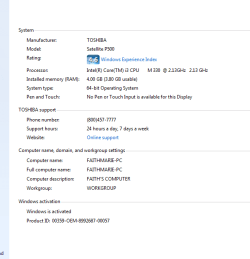
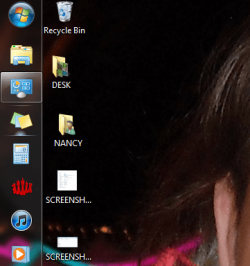
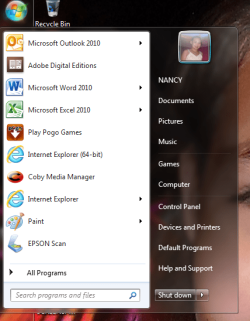
The first screenshot I would have wanted to show you would be when you click on the circle Windows button on the task bar. I cannot use the snip it tool for this because it closes the menu, and I tried to do it with the print screen button, but the file was too large, and your system would not take it. When that menu pops up, you see the user picture and just below that is a name - currently reading 'NANCY'. When you right click on this name, there is no 'rename' option. I clicked 'show on desktop' and still not 'rename' option (this is SCREENSHOT5, this screenshot shows the circle button in the upper left of the pic.) Also, I have included SCREENSHOT2 which shows the name I changed this computer to 'FAITHMARIE-PC'.

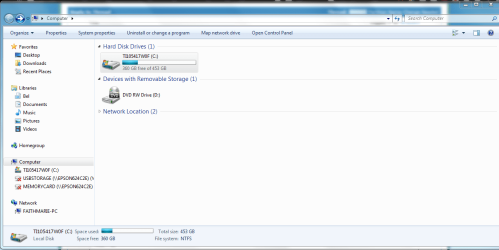
SCREENSHOT4 shows what I believe to mean only one partition.

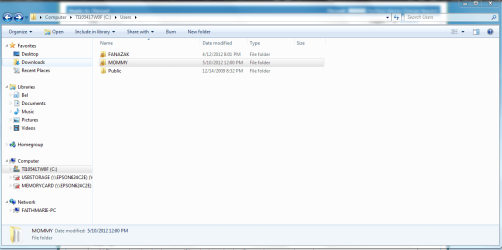
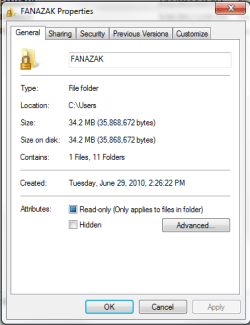
SCREENSHOT3 shows the User file. I am highly confused about this, as well. As you see there is 3 files, FANAZAK, MOMMY, and Public. SCREENSHOT6 is the properties for FANAZAK, but if you click on the file, it is completely empty. MOMMY and Public seem to be as they should be.

Basically, I have 3 laptops, 2 had to go into warranty repair-one twice and the other going out for the fourth time this week...(do not love Toshiba's warranty repair dept, but that is another story)....2 of the computers were the ones the 2 people in this house used for daily use. This was an extra saved until my daughter was old enough to send to her, and I used it while the other 2 were serviced. I used Windows Transfer between all the computers, first to set this up to use when the others were out, and also because they reformatted the others some of the times they 'fixed' them (this has caused havoc on all my files, most notably MS OneNote). During this time of the other computers being bounced back in forth, I had changed the name on this one to the other person in the house so that when the other one got back it would save that for my daughter. Well, now I have decided that it is time to send it to her, I want to send this one because the case is in better condition than the other one , if not the file situation...Sorry for the long explanation :o

What I want is for this one to have the same files on it. I just want the primary name to be 'FAITH' and not 'NANCY'. I do not relish the idea of partitioning, as I said originally. I am not totally dumb on the computer, but I try to stay away from actually monkeying with the HD.

More questions - ask at your own risk, I tend to be way too thorough - though I do not mind answering...:huh: oops

 

Attachments

  • SCREENSHOT2.PNG
    SCREENSHOT2.PNG
    11.8 KB · Views: 14
  • SCREENSHOT3.PNG
    SCREENSHOT3.PNG
    40 KB · Views: 17
  • SCREENSHOT4.PNG
    SCREENSHOT4.PNG
    40.5 KB · Views: 11
  • SCREENSHOT5.PNG
    SCREENSHOT5.PNG
    59.7 KB · Views: 6
  • SCREENSHOT6.PNG
    SCREENSHOT6.PNG
    11.9 KB · Views: 8

My Computer

Computer Manufacturer/Model Number
Toshiba Satellite P500
OS
Windows7 x64 Home Premium
CPU
Intel Core i3 M 330 @ 2.13GHz
Motherboard
Intel Havendale/Clarkdale Host Bridge; Intel HM55
Memory
DDR3 4096 MBytes; Dual Channel Symmetric
Graphics Card(s)
Intel Graphics Media Acceleration HD
Screen Resolution
1680x945
One question I have is were did the Nancy user folder located at and where did it come from? I see it on your desktop, but there is not a C:\Users\Nancy folder to show that you have a user account named Nancy? Is Nancy just a folder you have on your desktop?

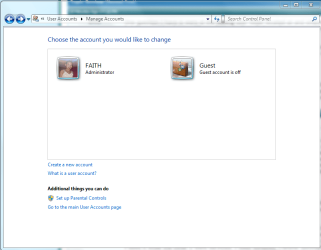
You could open User Accounts from the Control Panel (icons view), click on Manage another account, and post a screenshot showing what user accounts you have on the computer to see if that may help with the questions I asked above?

For you question about the partition:

Yes screenshot 4 indications that you only have one partition C on the HDD. If you wanted to create another partition to say keep data and backups on, then it's really easy to do in Disk Management. You would shrink C by how much you want the second partition to be, then create a new partition with the unallocated space you shrank from C. Afterwards, you will have new partition next to C.
 
Last edited:

My Computer

Computer type
PC/Desktop
Computer Manufacturer/Model Number
Self built custom
OS
64-bit Windows 11 Pro for Workstations
CPU
Intel i7-8700K OC'd to 5 GHz
Motherboard
ASUS ROG Maximus XI Formula Z390
Memory
64 GB (4x16GB) G.SKILL TridentZ RGB DDR4 3600 MHz
Graphics Card(s)
ASUS ROG-STRIX-GTX1080TI-O11G-GAMING
Sound Card
Integrated
Monitor(s) Displays
2 x Samsung Odyssey G7 27"
Screen Resolution
2560x1440
Hard Drives
1TB Samsung 990 PRO M.2,
4TB Samsung 990 PRO PRO M.2,
TerraMaster F8 SSD Plus NAS
PSU
Seasonic Prime Titanium 850W
Case
Thermaltake Core P3
Cooling
Corsair Hydro H115i
Keyboard
Logitech wireless K800
Mouse
Logitech MX Master 4
Internet Speed
2 Gb/s Download and 100 Mb/s Upload
Antivirus
Malwarebyte Anti-Malware Premium
Browser
Google Chrome
Other Info
Logitech Z625 speaker system,
Logitech BRIO 4K Pro webcam,
HP Color LaserJet Pro MFP M477fdn,
APC SMART-UPS RT 1000 XL - SURT1000XLI,
Galaxy S23 Plus phone
I am very embarrassed! I restarted it to see if it would change the name and it did. On the screenshot i just did, you see that under the picture it says 'NANCY' although I had just changed the name and that pic, but the name stayed. After I restarted it, it was correct.

I am still confused about some of these user issues, but my daughter will not care about the nuts and bolts of the inner workings, she will just like to have her own files.

Thank you for your patience, and forgive me for troubling you.

BTW, the explanation regarding partitioning I do appreciate. You wrote it in terms I understand and if I need to do it I will understand how. Thank you again!

Bel
 

Attachments

  • Window's button meun.png
    Window's button meun.png
    52.7 KB · Views: 4
  • User acct page.PNG
    User acct page.PNG
    23.9 KB · Views: 7

My Computer

Computer Manufacturer/Model Number
Toshiba Satellite P500
OS
Windows7 x64 Home Premium
CPU
Intel Core i3 M 330 @ 2.13GHz
Motherboard
Intel Havendale/Clarkdale Host Bridge; Intel HM55
Memory
DDR3 4096 MBytes; Dual Channel Symmetric
Graphics Card(s)
Intel Graphics Media Acceleration HD
Screen Resolution
1680x945
That's great news Bel. It's no trouble at all. :)

Did the user name change from FAITH to NANCY in User Accounts as well?

Please feel free to ask any questions that you may have.
 

My Computer

Computer type
PC/Desktop
Computer Manufacturer/Model Number
Self built custom
OS
64-bit Windows 11 Pro for Workstations
CPU
Intel i7-8700K OC'd to 5 GHz
Motherboard
ASUS ROG Maximus XI Formula Z390
Memory
64 GB (4x16GB) G.SKILL TridentZ RGB DDR4 3600 MHz
Graphics Card(s)
ASUS ROG-STRIX-GTX1080TI-O11G-GAMING
Sound Card
Integrated
Monitor(s) Displays
2 x Samsung Odyssey G7 27"
Screen Resolution
2560x1440
Hard Drives
1TB Samsung 990 PRO M.2,
4TB Samsung 990 PRO PRO M.2,
TerraMaster F8 SSD Plus NAS
PSU
Seasonic Prime Titanium 850W
Case
Thermaltake Core P3
Cooling
Corsair Hydro H115i
Keyboard
Logitech wireless K800
Mouse
Logitech MX Master 4
Internet Speed
2 Gb/s Download and 100 Mb/s Upload
Antivirus
Malwarebyte Anti-Malware Premium
Browser
Google Chrome
Other Info
Logitech Z625 speaker system,
Logitech BRIO 4K Pro webcam,
HP Color LaserJet Pro MFP M477fdn,
APC SMART-UPS RT 1000 XL - SURT1000XLI,
Galaxy S23 Plus phone
Back
Top