

pinkbellbird
New member
- Local time
- 6:37 PM
- Messages
- 3
Hey all,
Ive gone to print a bunch of photos, usually print preview pops up, i select the style I want to print out, 1 pic per page, 4 pics per page or wallet size etc etc.
But its completely gone!
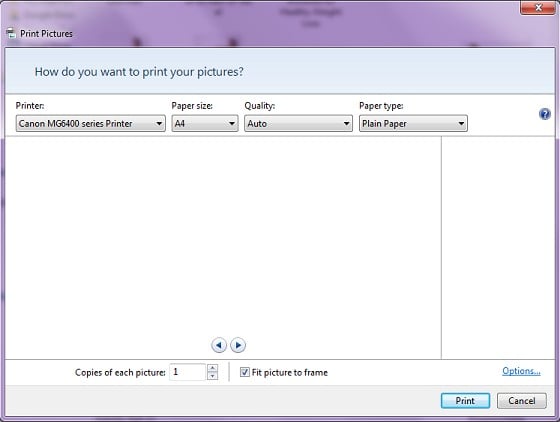
My pc is HP Touchsmart 610a, i5, windows 7 ulitmate, about 3yrs old now
Have never had this issue before. I uninstalled my old printer about 3 weeks ago, was a HP photosmart.
And now have a Canon Pixmar MG6460 since then. I have printed plenty on it, but not many photos, but last time, print preview was working like normal
I have a Acer i7 notebook on W8.1, the same Canon printer is set up on the notebook over a shared network & print preview works normal just as it should.
I did a system check via SFC.exe, system file checker tool, my pc came up fine, no issues at all.
I managed to find & make sure that the box for 'show print preview' was checked, but after checking the box, preview still is a no go
anyother issue im having is with windows help... i click the Question mark & get this error, every single time....
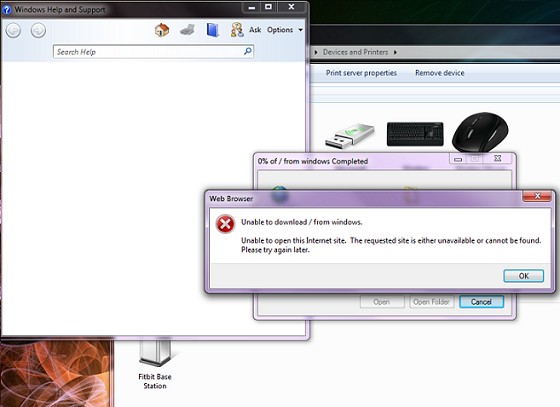
I found a fix for it via a microsoft, but that supposed fix did nothing.
any have idea ideas or dealt with either of these issues?
Ive gone to print a bunch of photos, usually print preview pops up, i select the style I want to print out, 1 pic per page, 4 pics per page or wallet size etc etc.
But its completely gone!
My pc is HP Touchsmart 610a, i5, windows 7 ulitmate, about 3yrs old now
Have never had this issue before. I uninstalled my old printer about 3 weeks ago, was a HP photosmart.
And now have a Canon Pixmar MG6460 since then. I have printed plenty on it, but not many photos, but last time, print preview was working like normal
I have a Acer i7 notebook on W8.1, the same Canon printer is set up on the notebook over a shared network & print preview works normal just as it should.
I did a system check via SFC.exe, system file checker tool, my pc came up fine, no issues at all.
I managed to find & make sure that the box for 'show print preview' was checked, but after checking the box, preview still is a no go
anyother issue im having is with windows help... i click the Question mark & get this error, every single time....
I found a fix for it via a microsoft, but that supposed fix did nothing.
any have idea ideas or dealt with either of these issues?
My Computer
- Computer type
- PC/Desktop
- Computer Manufacturer/Model Number
- HP Touchsmart HP610-1220a
- OS
- windows 7 Ultimate 64Bit
- CPU
- i5-2500
- Motherboard
- WJ1 (Inglewood)
- Memory
- 6GB
- Graphics Card(s)
- AMD Radeon HD6550A + Integrated Intel HD DX10.1
- Hard Drives
- 1.5TB Sata - 3.0Gb/sec,