Print Screen key not working

Joona

New member
Local time
5:14 AM
Messages
14
Hello! I recently built a new PC, and took the keyboard (Logitech G15) from the old one, but the print screen button is not working. I also posted about this on Reddit.

I can copy and paste (print screen does not do anything to clipboard)
Uninstalling/reinstalling Logitech Gaming Software (only downloadable file from Logitech) does not do anything
On-Screen Keyboard's Print Screen does not work either
On-Screen Keyboard's Fn does not do anything

So, it seems that somehow the Print Screen command itself is not working. Is there any way to re-enable it?

Thanks
 

My Computer

OS
Windows 7 Home Premium 64bit
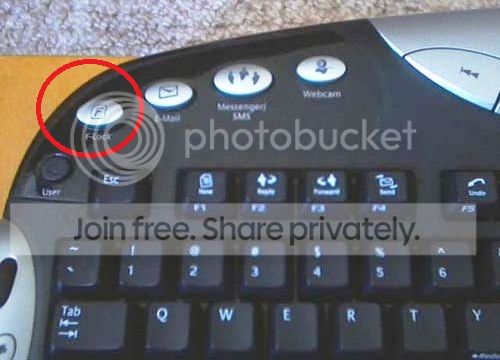
The Logitech G-15 has a switch to turn off the Windows key, try pressing F lock key.
 

My Computer

Computer type
PC/Desktop
Computer Manufacturer/Model Number
Dell inspiron 1564
OS
MS Windows 8
CPU
Intel Core i5 @ 2.27GHz Arrandale 32nm Technology
Motherboard
Dell Inc. 0M9XW4 (U2E1)
Memory
8.0GB Dual-Channel DDR3 @ 532MHz (7-7-7-20)
Graphics Card(s)
ATI Mobility Radeon HD 4300 Series (Dell)
Sound Card
Realtek High Definition Audio
Monitor(s) Displays
Generic PnP Monitor on ATI Mobility Radeon HD 4330
Screen Resolution
1366x768 pixels
Hard Drives
1 tb TOSHIBA (SATA)
PSU
built-in
Case
Dell Laptop
Cooling
built-in
Keyboard
built-in
Mouse
Dell Touchpad/Microsoft Arc Mouse
Other Info
Snake Laptop Skin, Detachable Alfa USB wifi with custom 15dbi antenna (for better signal range)
The Logitech G-15 has a switch to turn off the Windows key, try pressing F lock key.

If you mean the switch that disables Windows key and Alt-Tab, then it does not do anything.
 

My Computer

OS
Windows 7 Home Premium 64bit
if you have this on your keyboard.


f-lock_zps61066005.jpg
[/URL][/IMG]
 

My Computer

Computer type
PC/Desktop
Computer Manufacturer/Model Number
Dell inspiron 1564
OS
MS Windows 8
CPU
Intel Core i5 @ 2.27GHz Arrandale 32nm Technology
Motherboard
Dell Inc. 0M9XW4 (U2E1)
Memory
8.0GB Dual-Channel DDR3 @ 532MHz (7-7-7-20)
Graphics Card(s)
ATI Mobility Radeon HD 4300 Series (Dell)
Sound Card
Realtek High Definition Audio
Monitor(s) Displays
Generic PnP Monitor on ATI Mobility Radeon HD 4330
Screen Resolution
1366x768 pixels
Hard Drives
1 tb TOSHIBA (SATA)
PSU
built-in
Case
Dell Laptop
Cooling
built-in
Keyboard
built-in
Mouse
Dell Touchpad/Microsoft Arc Mouse
Other Info
Snake Laptop Skin, Detachable Alfa USB wifi with custom 15dbi antenna (for better signal range)
try to Disable User Account Control (UAC). The UAC component will disable some of the G15's functions.

To disable it by going to the Control Panel, selecting "User Accounts" and then clicking on "Turn User Account Control on or off." Then uncheck "Use User Account Control (UAC) to help protect this computer" and press "OK." Then reboot the computer.
 

My Computer

Computer type
PC/Desktop
Computer Manufacturer/Model Number
Dell inspiron 1564
OS
MS Windows 8
CPU
Intel Core i5 @ 2.27GHz Arrandale 32nm Technology
Motherboard
Dell Inc. 0M9XW4 (U2E1)
Memory
8.0GB Dual-Channel DDR3 @ 532MHz (7-7-7-20)
Graphics Card(s)
ATI Mobility Radeon HD 4300 Series (Dell)
Sound Card
Realtek High Definition Audio
Monitor(s) Displays
Generic PnP Monitor on ATI Mobility Radeon HD 4330
Screen Resolution
1366x768 pixels
Hard Drives
1 tb TOSHIBA (SATA)
PSU
built-in
Case
Dell Laptop
Cooling
built-in
Keyboard
built-in
Mouse
Dell Touchpad/Microsoft Arc Mouse
Other Info
Snake Laptop Skin, Detachable Alfa USB wifi with custom 15dbi antenna (for better signal range)
try to Disable User Account Control (UAC). The UAC component will disable some of the G15's functions.

To disable it by going to the Control Panel, selecting "User Accounts" and then clicking on "Turn User Account Control on or off." Then uncheck "Use User Account Control (UAC) to help protect this computer" and press "OK." Then reboot the computer.

UAC is not enabled.
 

My Computer

OS
Windows 7 Home Premium 64bit
try using combination of Alt+print screen
 

My Computer

Computer type
PC/Desktop
Computer Manufacturer/Model Number
Dell inspiron 1564
OS
MS Windows 8
CPU
Intel Core i5 @ 2.27GHz Arrandale 32nm Technology
Motherboard
Dell Inc. 0M9XW4 (U2E1)
Memory
8.0GB Dual-Channel DDR3 @ 532MHz (7-7-7-20)
Graphics Card(s)
ATI Mobility Radeon HD 4300 Series (Dell)
Sound Card
Realtek High Definition Audio
Monitor(s) Displays
Generic PnP Monitor on ATI Mobility Radeon HD 4330
Screen Resolution
1366x768 pixels
Hard Drives
1 tb TOSHIBA (SATA)
PSU
built-in
Case
Dell Laptop
Cooling
built-in
Keyboard
built-in
Mouse
Dell Touchpad/Microsoft Arc Mouse
Other Info
Snake Laptop Skin, Detachable Alfa USB wifi with custom 15dbi antenna (for better signal range)
for now use Snipping Tool until we find a solution for you. :o
 

My Computer

Computer type
PC/Desktop
Computer Manufacturer/Model Number
Dell inspiron 1564
OS
MS Windows 8
CPU
Intel Core i5 @ 2.27GHz Arrandale 32nm Technology
Motherboard
Dell Inc. 0M9XW4 (U2E1)
Memory
8.0GB Dual-Channel DDR3 @ 532MHz (7-7-7-20)
Graphics Card(s)
ATI Mobility Radeon HD 4300 Series (Dell)
Sound Card
Realtek High Definition Audio
Monitor(s) Displays
Generic PnP Monitor on ATI Mobility Radeon HD 4330
Screen Resolution
1366x768 pixels
Hard Drives
1 tb TOSHIBA (SATA)
PSU
built-in
Case
Dell Laptop
Cooling
built-in
Keyboard
built-in
Mouse
Dell Touchpad/Microsoft Arc Mouse
Other Info
Snake Laptop Skin, Detachable Alfa USB wifi with custom 15dbi antenna (for better signal range)
Hi, it's been a week and I have no idea what could fix this. Does anyone else have anything?
 

My Computer

OS
Windows 7 Home Premium 64bit
Have you tried "Fn + Print Screen"? I've seen a lot of people going through this, most of them solved by using this combination. But if it still doesn't work on your PC, you can use other screenshot tools, such as Free Screenshot Capture and Snagit. Other than taking screenshots, these applications also provide annotating, uploading and sharing options.
 

My Computer

Computer type
PC/Desktop
OS
Windows 7 Home Premium 32bit
Have you tried "Fn + Print Screen"? I've seen a lot of people going through this, most of them solved by using this combination. But if it still doesn't work on your PC, you can use other screenshot tools, such as Free Screenshot Capture and Snagit. Other than taking screenshots, these applications also provide annotating, uploading and sharing options.

Hi, this was not the problem in my case. I'm sorry I forgot to post the solution here, but here it is, a bit late: Dxtory has a setting called "Disable PrintScreen Snapshot", which disabled PrintScreen functionality. Just uncheck that if it's checked!
 

My Computer

OS
Windows 7 Home Premium 64bit
Back
Top