Printer problems

jvsimo1

New member
Member
Local time
8:16 PM
Messages
73
Location
Carnarvon, North west australia
OK, I have a Dell Inspiron 560 Computer and a HP F4480 printer:cool:. My problem is, I click print, then the print page comes up and I select No off, 5 or 10, and it only prints one page at a time:(. I produce a monthly newsletter for our local Senior Citizens Club and need to print at least 30 to 40 copies. It is probably a minor problem, but if anybody can tell me how to fix it, I will be Greatfull. :D
 

My Computer

Computer Manufacturer/Model Number
Dell inspiron 560 MT desktop
OS
Windows 7 Home Premium 32 bit
CPU
500 GB Sata
Memory
4 GB ( 4X 1 GB)
Hard Drives
One Sata
hi :)
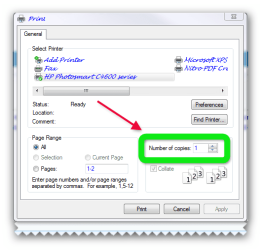
have a look at the pic does it look the same?
 

Attachments

  • Brys snap ?25 ?September ?2011 09h19m50s 01.png
    Brys snap ?25 ?September ?2011 09h19m50s 01.png
    19.8 KB · Views: 3

My Computer

Computer Manufacturer/Model Number
packard bell IXTREME M5722
OS
Operating System : Windows 7 Home Premium Edition 6.01.7600 SP1 (x64)
CPU
Processor : Intel Core 2 Quad Q8300 @ 2500 MHz
Motherboard
Mainboard : Packard Bell (Acer EG43M )
Memory
Physical Memory :8GB Corsair4x 2GB 800MHz C5 DDR2
Graphics Card(s)
Video Card : XFX 6700 AMD
Monitor(s) Displays
Maestro 234DL - BenQ V2220 - BenQ VW2420H
Screen Resolution
Current Display :1920x1080p pixels at 60 Hz in HD LED
Hard Drives
Hard Disks : WDC (1000 GB)
Drive C: (Hard Disk) : 428 GB available on 491 GB
Drive D: (Hard Disk) : 426 GB available on 492 GB
SAMSUNG spinpoint HD103SJ 1000.2 GB
(X 2) KINGSTON SSD NOW V 30GB
PSU
XFX ProSeries 550W PSU
Case
PACKARD BELL IXTREME
Cooling
System Blower Current: 150mA Air Flow16CFM ;Akasa 90mm rear
Keyboard
Gigabyte Aivia K8100
Mouse
TRUST-Wireless Laser Mouse - Carbon edition MI-7770C
Internet Speed
TP-LINK > TL-WN951N / AV500 Gigabit Powerline Adapters
Browser
chrome dev
Other Info
EXTRA COOLING>(FAN CONTROLLER) PC Bay Cooler 3 x 40mm fans; Akasa AK-HD-BL Blue hard drive cooler 2 x 40 mm fan 4500 rpm 29.7 dBA
Bios> American Megatrends Inc.
Version : P01-A1
Date : 08/31/2009
Yeh Brian, that's it and I can click up to 5 or 20 copies but only get one. Not sure if the problem is in the computer, printer or softwear.
 

My Computer

Computer Manufacturer/Model Number
Dell inspiron 560 MT desktop
OS
Windows 7 Home Premium 32 bit
CPU
500 GB Sata
Memory
4 GB ( 4X 1 GB)
Hard Drives
One Sata
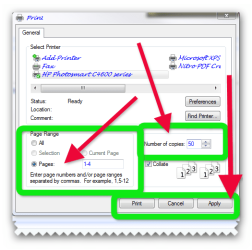
When you selected how many pages you want to print, did you click Apply>OK to save your change?
 

My Computer

Computer Manufacturer/Model Number
HP Pavilion Elite 495UK
OS
Windows 7 Ultimate SP1 64-Bit
CPU
Intel Core i7 870 @ 2.93GHz
Motherboard
MSI 2A9C (CPU1)
Memory
8Gb Dual-Channel DDR3 @ 664MHz
Graphics Card(s)
nVidia GeForce GTX 460 1024MB dedicated RAM
Sound Card
Realtek HD Audio
Monitor(s) Displays
HP2310i
Screen Resolution
1920 x 1080
Hard Drives
1x1954GB Hitachi HDS22020ALA 330 (RAID), 1x1954GB Hitachi External for backup and storage
PSU
460W
Case
HP Elite
Cooling
Air cooled
Keyboard
Logitech K750 solar-powered keyboard
Mouse
Logitech Wireless M180 mouse
Internet Speed
2Mb
Other Info
Pure Avanti Flow Internet Radio with iPod Dock, 64Gb iPod, HP USB Speakers, Sony MDR-V500 Headphones, Sony Vaio F-Series Laptop
I click OK, but I cannot see APPLY anywhere.
 

My Computer

Computer Manufacturer/Model Number
Dell inspiron 560 MT desktop
OS
Windows 7 Home Premium 32 bit
CPU
500 GB Sata
Memory
4 GB ( 4X 1 GB)
Hard Drives
One Sata
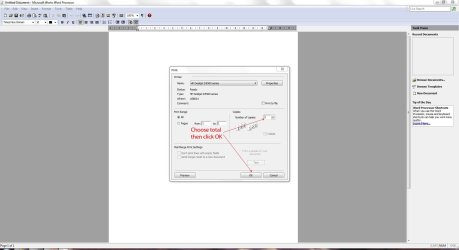
The bottom line on the print window only has Preveiw on the left side and OK & Cancel on the left side.
 

My Computer

Computer Manufacturer/Model Number
Dell inspiron 560 MT desktop
OS
Windows 7 Home Premium 32 bit
CPU
500 GB Sata
Memory
4 GB ( 4X 1 GB)
Hard Drives
One Sata
have a look at the pic :)
 

Attachments

  • Brys snap ?25 ?September ?2011 10h35m59s 02.png
    Brys snap ?25 ?September ?2011 10h35m59s 02.png
    25 KB · Views: 1

My Computer

Computer Manufacturer/Model Number
packard bell IXTREME M5722
OS
Operating System : Windows 7 Home Premium Edition 6.01.7600 SP1 (x64)
CPU
Processor : Intel Core 2 Quad Q8300 @ 2500 MHz
Motherboard
Mainboard : Packard Bell (Acer EG43M )
Memory
Physical Memory :8GB Corsair4x 2GB 800MHz C5 DDR2
Graphics Card(s)
Video Card : XFX 6700 AMD
Monitor(s) Displays
Maestro 234DL - BenQ V2220 - BenQ VW2420H
Screen Resolution
Current Display :1920x1080p pixels at 60 Hz in HD LED
Hard Drives
Hard Disks : WDC (1000 GB)
Drive C: (Hard Disk) : 428 GB available on 491 GB
Drive D: (Hard Disk) : 426 GB available on 492 GB
SAMSUNG spinpoint HD103SJ 1000.2 GB
(X 2) KINGSTON SSD NOW V 30GB
PSU
XFX ProSeries 550W PSU
Case
PACKARD BELL IXTREME
Cooling
System Blower Current: 150mA Air Flow16CFM ;Akasa 90mm rear
Keyboard
Gigabyte Aivia K8100
Mouse
TRUST-Wireless Laser Mouse - Carbon edition MI-7770C
Internet Speed
TP-LINK > TL-WN951N / AV500 Gigabit Powerline Adapters
Browser
chrome dev
Other Info
EXTRA COOLING>(FAN CONTROLLER) PC Bay Cooler 3 x 40mm fans; Akasa AK-HD-BL Blue hard drive cooler 2 x 40 mm fan 4500 rpm 29.7 dBA
Bios> American Megatrends Inc.
Version : P01-A1
Date : 08/31/2009
I get that window if I want to print an e-mail, but get a different window when I want to print a Works Word page.
 

My Computer

Computer Manufacturer/Model Number
Dell inspiron 560 MT desktop
OS
Windows 7 Home Premium 32 bit
CPU
500 GB Sata
Memory
4 GB ( 4X 1 GB)
Hard Drives
One Sata
Like this one?

WorksWord.JPG

If this doesn't work, it must be something to do with the printer settings within the printer's options.
 

My Computer

Computer Manufacturer/Model Number
HP Pavilion Elite 495UK
OS
Windows 7 Ultimate SP1 64-Bit
CPU
Intel Core i7 870 @ 2.93GHz
Motherboard
MSI 2A9C (CPU1)
Memory
8Gb Dual-Channel DDR3 @ 664MHz
Graphics Card(s)
nVidia GeForce GTX 460 1024MB dedicated RAM
Sound Card
Realtek HD Audio
Monitor(s) Displays
HP2310i
Screen Resolution
1920 x 1080
Hard Drives
1x1954GB Hitachi HDS22020ALA 330 (RAID), 1x1954GB Hitachi External for backup and storage
PSU
460W
Case
HP Elite
Cooling
Air cooled
Keyboard
Logitech K750 solar-powered keyboard
Mouse
Logitech Wireless M180 mouse
Internet Speed
2Mb
Other Info
Pure Avanti Flow Internet Radio with iPod Dock, 64Gb iPod, HP USB Speakers, Sony MDR-V500 Headphones, Sony Vaio F-Series Laptop
Back
Top