
flowingfire
New member
- Local time
- 3:29 PM
- Messages
- 12
Hi. I'm running Windows 7 Ultimate 64-bit. Suddenly, my printer no longer receives recognition from the computer. It worked just fine for over 6 months, and simply won't be recognized any longer. Re-installing drivers doesn't help. Any ideas?
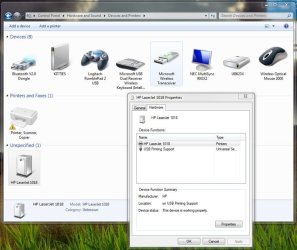
I have attached some pictures for reference. It seems the computer recognizes the hardware is there, and that it is an HP Laserjet 1018 installed. The services that normally run in the background responsible for printing seem to be haywire, though.
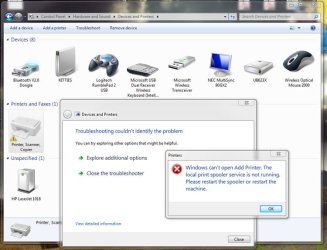
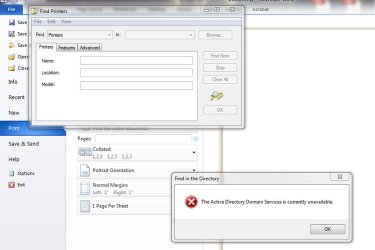
One dialogue says that the "print spooler service" is not running. Huh? Another said, "The Active Directory Domain Services is currently unavailable."
I have attached some pictures for reference. It seems the computer recognizes the hardware is there, and that it is an HP Laserjet 1018 installed. The services that normally run in the background responsible for printing seem to be haywire, though.
One dialogue says that the "print spooler service" is not running. Huh? Another said, "The Active Directory Domain Services is currently unavailable."
Attachments
My Computer
- Computer Manufacturer/Model Number
- HP Pavilion m7560n
- OS
- Windows 7 Ultimate
- CPU
- AMD Athlon Dual Core 4400+
- Memory
- 4 GB
- Graphics Card(s)
- NVIDIA GeForce 6150
- Monitor(s) Displays
- NEC MultiSync 90GX2
- Hard Drives
- 350 GB WD
500 GB Hitachi