- Local time
- 5:28 PM
- Messages
- 67
Hello all,
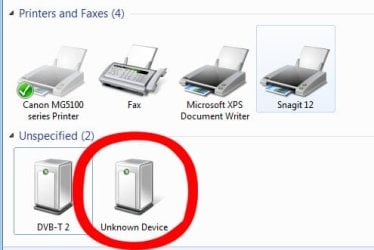
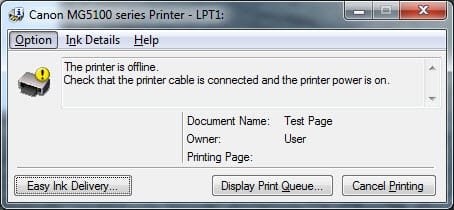
for some unknown reason our Canon MG5150 InkJet Printer doesnt get recognized by any of the computers or laptops in our house. i have re-installed the drivers on several of those pc's but its had no effect.
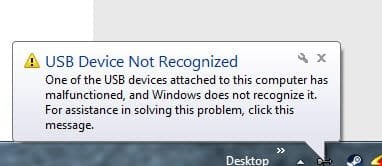
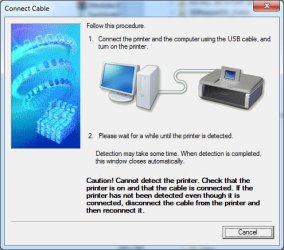
during the driver install the software fails to detect any device. but any other time you plug the usb cable in a message box appears saying USB Device Not Recognized.
i recently bought a new pc tower, using win7 Pro and 64bit system with 32GB ram, i downloaded the 64 bit drivers for the printer from the Canon website but even that gets the same errors when installing the drivers.
my 10 year old son was printing stuff off about 3 weeks ago and since then we've had this problem. ive even tried searching for ways to reset the printer back to factory defaults but had no luck with that either.
can anyone give me some advice as to how to fix this issue.
cheers
for some unknown reason our Canon MG5150 InkJet Printer doesnt get recognized by any of the computers or laptops in our house. i have re-installed the drivers on several of those pc's but its had no effect.
during the driver install the software fails to detect any device. but any other time you plug the usb cable in a message box appears saying USB Device Not Recognized.
i recently bought a new pc tower, using win7 Pro and 64bit system with 32GB ram, i downloaded the 64 bit drivers for the printer from the Canon website but even that gets the same errors when installing the drivers.
my 10 year old son was printing stuff off about 3 weeks ago and since then we've had this problem. ive even tried searching for ways to reset the printer back to factory defaults but had no luck with that either.
can anyone give me some advice as to how to fix this issue.
cheers
Attachments
My Computer
- Computer type
- PC/Desktop
- Computer Manufacturer/Model Number
- Computer Retailer
- OS
- Windows 7 Professional x64 (6.1, Build 7601)
- CPU
- Core i5-4460 3.2GHz
- Motherboard
- Gigabyte H97M-D3H
- Memory
- 4 x 8GB 1333 DDR3
- Graphics Card(s)
- nVidia GeForce GTX760 4GB
- Sound Card
- on board
- Monitor(s) Displays
- Samsung 23" LCD & Acer 22" LCD
- Hard Drives
- 250GB SSD
WD 1TB SATA
- PSU
- Thermaltake 850w
- Case
- Thermaltake Versa H22
- Mouse
- Logitech
- Internet Speed
- ADSL2+
- Antivirus
- Norton 360
- Browser
- Mozilla Firefox