
I have printers that are like the zombies from a resident evil movie. I need to find out how to do a head shot.
SKIP this paragraph is you are not into the tale of drunkenness and cruelty.
While trying to install an older legacy printer I triued out a bunch od driver types.
You know how HP is they produce a line with a prinary designation like LASERJET 5 and then produce a whole sles of other printers like PC PCL M N and a whole alphabet soup of names while also failing to put those additional designations on the printer - anywhere front back rear factory label you name it ain't there, and HP doesn't even have away to associate the serial number with the type of printer. It's nutz.
So anyway~ ~ ~ ~ ~
I have all these ghost printers installed with no physical printer and it bugs me. It feels untidy
When I go to Control Panel - - Hardware and Sound - - Devices and Printers and then use the Remove Device option from the right click drop down menu the printer icon disappears ONLY to return later.
Later as in if I close the control panel and then reopen it they are back
Here is Control Panel After I deleted them
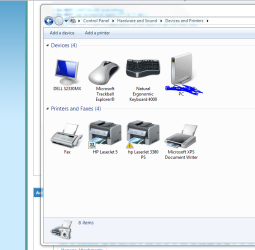
Here it is AFTER I deleted them and Re opened Control Panel and They're BAAAACCCKKK
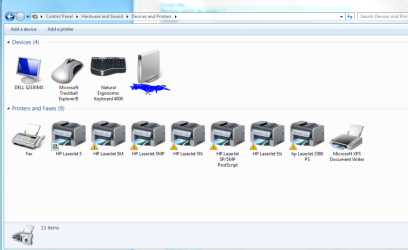
Any one got a clue what I'm doing wrong??
SKIP this paragraph is you are not into the tale of drunkenness and cruelty.
While trying to install an older legacy printer I triued out a bunch od driver types.
You know how HP is they produce a line with a prinary designation like LASERJET 5 and then produce a whole sles of other printers like PC PCL M N and a whole alphabet soup of names while also failing to put those additional designations on the printer - anywhere front back rear factory label you name it ain't there, and HP doesn't even have away to associate the serial number with the type of printer. It's nutz.
So anyway~ ~ ~ ~ ~
I have all these ghost printers installed with no physical printer and it bugs me. It feels untidy
When I go to Control Panel - - Hardware and Sound - - Devices and Printers and then use the Remove Device option from the right click drop down menu the printer icon disappears ONLY to return later.
Later as in if I close the control panel and then reopen it they are back
Here is Control Panel After I deleted them
Here it is AFTER I deleted them and Re opened Control Panel and They're BAAAACCCKKK
Any one got a clue what I'm doing wrong??
My Computer
- Computer type
- PC/Desktop
- Computer Manufacturer/Model Number
- Home built
- OS
- ASUS X79 DELUXE LGA 2011 Intel X79 SATA 6Gb/s USB 3.0 ATX
- CPU
- Intel Core i7-4930K Ivy Bridge-E 3.4GHz LGA 2011 130W 6-Core
- Motherboard
- ASUS X79 DELUXE LGA 2011 Intel X79 SATA 6Gb/s USB 3.0 ATX
- Memory
- CORSAIR Dominator Platinum 16GB (4 x 4GB) 240-Pin DDR3 SDRAM
- Graphics Card(s)
- ASUS EAH6450 Silent/DI/1GD3(LP) Radeon HD 6450 1GB 64-bit DD
- Sound Card
- onboard
- Monitor(s) Displays
- Dell lcd 32"
- Hard Drives
- 1tb SATA, 2tb SATA, 500 gig SATA, 500 Gig SATA, 500 Gig IDE
- PSU
- CORSAIR HX Series HX750 750W ATX12V 2.3 / EPS12V 2.91 SLI Re
- Case
- something colored black
- Cooling
- Cooler Master Seidon 120XL
- Keyboard
- this thing with buttons on it
- Mouse
- a tailed devil
- Internet Speed
- whizzing along
- Antivirus
- KASPERSKY
- Browser
- Firefox. Opra, Explorer.
- Other Info
- I am naked and outside your window shouting Non Sequiturs in a loony high pitched voice.


