Printing a pdf from Adobe Pro

mod9k

New member
Local time
5:52 AM
Messages
35
I have Adobe Pro 6 and in XP I was able to print pdf's with this program but in Windows 7 the option is not there. Does anyone know a fix for this?

I'm guessing that Windows is trying to kill Adobe by removing the option and replacing it with there version, the XPS. I really hope not.....if so I think I might just have to buy a Mac.
 

My Computer

Computer Manufacturer/Model Number
Dell XPS 400
OS
Windows 7
CPU
Dual 2.60 GHz Intel Pentium
Memory
2 Gig
Graphics Card(s)
256 mb Nvidia GeForce 6800
Hi there
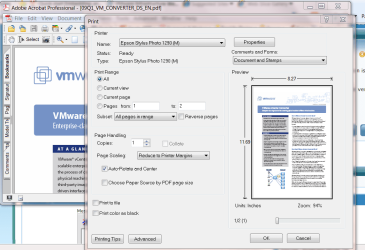
I think you actually have to open a document first then just click on the print icon or select print from the menu

screenshot enc

cheers
jimbo
 

Attachments

  • adobeprn.png
    adobeprn.png
    69.3 KB · Views: 37

My Computer

Computer type
PC/Desktop
Computer Manufacturer/Model Number
Custom built, several laptops HP/ASUS
OS
Linux CENTOS 7 / various Windows OS'es and servers
CPU
Intel i7 Intel i5
Memory
8GB, 16GB
Graphics Card(s)
On Motherboard
Sound Card
Realtek HD audio
Monitor(s) Displays
Apple Cinema display, Samsung LCD
Screen Resolution
1920 X 1080
Hard Drives
4 X 1TB SATA
Mouse
Toshiba wireless laser
Internet Speed
> 20MB up
That is how I would usually do it but there is no option to print a pdf. Usually there is an Adobe PDF Printer avaiable just like there would be any other printer in the list but in Windows 7 there isn't an option there.
 

My Computer

Computer Manufacturer/Model Number
Dell XPS 400
OS
Windows 7
CPU
Dual 2.60 GHz Intel Pentium
Memory
2 Gig
Graphics Card(s)
256 mb Nvidia GeForce 6800
Can't you update the program?
 

My Computer

Computer Manufacturer/Model Number
Sony Vaio Z46GDU
OS
Windows 7 Ultimate x86-64
CPU
[email protected] 1066MHz FSB
Motherboard
Sony branded
Memory
6GB DDR3 1066MHz
Graphics Card(s)
9300M GS 256MB Dedicated (Speed) + Intel4500MHD (Stamina)
Sound Card
Realtek HD Audio
Monitor(s) Displays
13.1' WXGA
Screen Resolution
1600x900
Hard Drives
320GB 7200RPM w/ 16MB cache
Internet Speed
1MB/s
I could but I would have to pay for the new program AND I don't know if 7 will support it. I've been reading that windows is trying to kill the pdf and the easiest way to do that is by not making it work in the biggest operating system around.
 

My Computer

Computer Manufacturer/Model Number
Dell XPS 400
OS
Windows 7
CPU
Dual 2.60 GHz Intel Pentium
Memory
2 Gig
Graphics Card(s)
256 mb Nvidia GeForce 6800
Have you set up a printer?
 

My Computer

Computer Manufacturer/Model Number
Sony Vaio Z46GDU
OS
Windows 7 Ultimate x86-64
CPU
[email protected] 1066MHz FSB
Motherboard
Sony branded
Memory
6GB DDR3 1066MHz
Graphics Card(s)
9300M GS 256MB Dedicated (Speed) + Intel4500MHD (Stamina)
Sound Card
Realtek HD Audio
Monitor(s) Displays
13.1' WXGA
Screen Resolution
1600x900
Hard Drives
320GB 7200RPM w/ 16MB cache
Internet Speed
1MB/s
I've tried that route but I can't find a pdf printer to load.
 

My Computer

Computer Manufacturer/Model Number
Dell XPS 400
OS
Windows 7
CPU
Dual 2.60 GHz Intel Pentium
Memory
2 Gig
Graphics Card(s)
256 mb Nvidia GeForce 6800
Another pdf issue I'm having is that they won't open in a windows explorer window. I'm using IE8, same as in XP when it worked. I've unloaded and loaded the program but that didn't do anything.
 

My Computer

Computer Manufacturer/Model Number
Dell XPS 400
OS
Windows 7
CPU
Dual 2.60 GHz Intel Pentium
Memory
2 Gig
Graphics Card(s)
256 mb Nvidia GeForce 6800
I just solved the opening pdf files inside EI8 by uninstalling, rebooting, reinstalling, rebooting.
 

My Computer

Computer Manufacturer/Model Number
Dell XPS 400
OS
Windows 7
CPU
Dual 2.60 GHz Intel Pentium
Memory
2 Gig
Graphics Card(s)
256 mb Nvidia GeForce 6800
Back
Top