Printing full page on computer

denwilliam

New member
Member
VIP
Local time
3:21 AM
Messages
201
What am I doing wrong with my computer/printer setup.When I enlarge the image on my Toshiba Satellite Pro C870-1E2 laptop to print on my Epson Stylus SX515W printer it still prints small and fails to enlarge the image to the size I require.Please help as my eyesight ain't what it was.
 

My Computer

Computer type
Laptop
Computer Manufacturer/Model Number
Toshiba Satellite Pro C870-1E2
OS
Windows 7 Professional 64 Bit
As you found out, enlarging the view does not always enlarge to print...
...very few applications work that way.

What application are you working in?
 

My Computer

Computer type
Laptop
Computer Manufacturer/Model Number
Employer provided Dell Latitude
OS
W7 Pro SP1 64bit
CPU
i7
Memory
8GB
Graphics Card(s)
Intel HD Graphics
Hard Drives
crappy SSD
Antivirus
Employer mandated Symantec Endpoint Protection
Browser
Pale Moon 64bit, IE11 64bit & Chrome 64bit
My setting for scripture size on my computer is 125% for normal everyday use but there are times when I raise this to 200% for some item I wish to print.My system is Windows 7 Pro.
 

My Computer

Computer type
Laptop
Computer Manufacturer/Model Number
Toshiba Satellite Pro C870-1E2
OS
Windows 7 Professional 64 Bit
Are you looking at the text inside Internet Explorer?
 

My Computer

Computer type
Laptop
Computer Manufacturer/Model Number
Employer provided Dell Latitude
OS
W7 Pro SP1 64bit
CPU
i7
Memory
8GB
Graphics Card(s)
Intel HD Graphics
Hard Drives
crappy SSD
Antivirus
Employer mandated Symantec Endpoint Protection
Browser
Pale Moon 64bit, IE11 64bit & Chrome 64bit
Sorry,but I fail to understand the gist of your reply.Will give example of problem:-I enter Google maps and seek directions to a destination,I then enlarge scripture to 200% from 125% but when printed it comes out at less than 125%.
 

My Computer

Computer type
Laptop
Computer Manufacturer/Model Number
Toshiba Satellite Pro C870-1E2
OS
Windows 7 Professional 64 Bit
Okay, so you are using a web browser to see and then print the information.

It is hard to print things as you want them while using a browser.

Maybe others know of a simpler way, but you can try this:

(Your screens will look different because I do not have the printer that you have.)

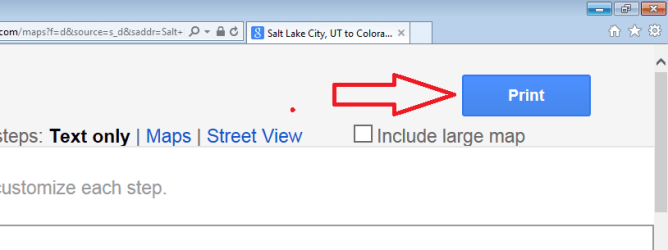
Start with the Print button on the map website:
print1.png

print2.png

print3.png

print4.png

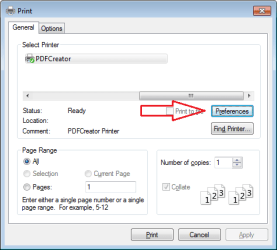
You can change that 100 to 200 and then click on OK for each window until you can click on Print.
 
Last edited:

My Computer

Computer type
Laptop
Computer Manufacturer/Model Number
Employer provided Dell Latitude
OS
W7 Pro SP1 64bit
CPU
i7
Memory
8GB
Graphics Card(s)
Intel HD Graphics
Hard Drives
crappy SSD
Antivirus
Employer mandated Symantec Endpoint Protection
Browser
Pale Moon 64bit, IE11 64bit & Chrome 64bit
One way to print larger Google Map directions with IE 11:

1. Open Google
2. Type in first address
3. Click Maps
4. Click Directions
5. Type in second address
6. Select Get Directions
7. Click on Print
8. Right click blank area
9. Select Print Preview
10. Click drop down arrow on shrink to fit box
11. Select 100%
12. Print
 

My Computers

System One System Two

  • Computer type
    PC/Desktop
    Computer Manufacturer/Model Number
    HP Pavilion 6751c
    OS
    Win7, Win10, Win11
    Internet Speed
    100 Mbps
    Antivirus
    Norton 360
    Browser
    IE 11
  • Computer type
    PC/Desktop
    System Manufacturer/Model Number
    HP ENVY 750-514 & Dell XPS 8960
    OS
    Win7, Win10, Win11
    Antivirus
    Norton 360
Excellent, johnsmith45jock.

That can be adjusted each time you print something and it seems to work back to at least IE8.


denwilliam,
I should warn that the method that I mentioned might keep the 200% setting for every document that you print. You might want to set it back to normal 100% or to 125%. Some things might not print too well using increased percentages. Info might go off of the side of the page.
 

My Computer

Computer type
Laptop
Computer Manufacturer/Model Number
Employer provided Dell Latitude
OS
W7 Pro SP1 64bit
CPU
i7
Memory
8GB
Graphics Card(s)
Intel HD Graphics
Hard Drives
crappy SSD
Antivirus
Employer mandated Symantec Endpoint Protection
Browser
Pale Moon 64bit, IE11 64bit & Chrome 64bit
I had tried 303665 and 303666 before I asked for help and will try 303667,303668 and if they fail will give our American cousin's suggestion a try when time permits.Thanks for your help,much appreciated.
 

My Computer

Computer type
Laptop
Computer Manufacturer/Model Number
Toshiba Satellite Pro C870-1E2
OS
Windows 7 Professional 64 Bit
Back
Top