Printing multiple pdfs at once

aekblade

New member
Local time
10:05 PM
Messages
13
Does anyone know a way to send more that 1 pdf to the printer? I do not get any print option when i select them all. I have to open each pdf then print, and it takes a very long time.
 

My Computer

OS
windows 7
CPU
i7 975
Memory
12 GB
Graphics Card(s)
HD Radeon 5870
Could you combine them into one file? What about right-clicking on each one and choosing print?
 

My Computer

OS
Windows 7 Ultimate x64 SP1
CPU
Intel Core i7-2600
Motherboard
Gigabyte GA-P67A-UD3P-B3
Memory
12 GB Patriot Extreme DDR3-1333
Graphics Card(s)
Nvidia GTX 470
Monitor(s) Displays
Dell UltraSharp 2209WA
Hard Drives
OCZ Agility3 240 GB, WD5001AALS, WD7501AALS
PSU
OCZ ModStream 700W
Case
CoolerMaster HAF 912 Advanced
Cooling
CoolerMaster Hyper 212 Plus
we dont have adobe pro to combine them. it was so much easier in xp, i would just highlight them all, then right click Print.
 

My Computer

OS
windows 7
CPU
i7 975
Memory
12 GB
Graphics Card(s)
HD Radeon 5870

My Computer

OS
Windows 7 Ultimate x64 SP1
CPU
Intel Core i7-2600
Motherboard
Gigabyte GA-P67A-UD3P-B3
Memory
12 GB Patriot Extreme DDR3-1333
Graphics Card(s)
Nvidia GTX 470
Monitor(s) Displays
Dell UltraSharp 2209WA
Hard Drives
OCZ Agility3 240 GB, WD5001AALS, WD7501AALS
PSU
OCZ ModStream 700W
Case
CoolerMaster HAF 912 Advanced
Cooling
CoolerMaster Hyper 212 Plus
Hi aekblade,

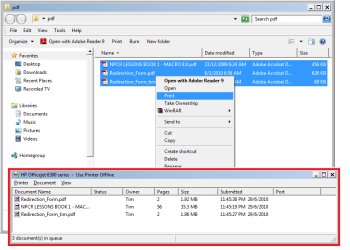
I 'can' just highlight them, right click and choose print. It takes a little while for them all to spool. Maybe 15 seconds before the second one appeared, but quicker for the third (depends on file size and pages).

Check if your Print spooler is running by running net start spooler from an elevated command prompt.
 

Attachments

  • Untitled.png
    Untitled.png
    21.3 KB · Views: 304
Last edited:

My Computer

Computer Manufacturer/Model Number
Custom Hack job
OS
Windows 7 Ultimate 64 bit
CPU
Intel(R) Core(TM)2 Quad CPU Q8200 @ 2.33GHz
Motherboard
GigaByte EP45-UD3
Memory
8 GB Kingston
Graphics Card(s)
Nvidia GeForce 9600GT
Sound Card
Soundblaster Audigy
Monitor(s) Displays
AOC x2 22"
Hard Drives
2 x Samsung 500GB (RAID)
2 x Samsung 2TB
1 x WD Green 2TB
1 x Seagate 1TB
1 x Samsung 500GB
PSU
Thermaltake QFan 750W
Case
CM Scout Gaming
Cooling
Coolermaster V10
Keyboard
Microsoft Wireless Keyboard 1000
Mouse
Microsoft Wireless Optical 2000
Internet Speed
320
Other Info
Winfast PVR2000CP
LG DVD-RAM DVD/RW/DL Super Multi
Linksys WMP300Nx2 Wireless Adapter
hmm, are those files local? or only the server? we have server 2008 x64
 

My Computer

OS
windows 7
CPU
i7 975
Memory
12 GB
Graphics Card(s)
HD Radeon 5870
hmm, are those files local? or only the server? we have server 2008 x64

Hi aekblade,

They are local files on a local (USB) printer with windows 7 64bit.

Are you working from windows 7 ?
OR is your problem on Server 2008?
OR are you navigating to a network share or DFS share hosted on Server 2008?
OR is the printer hosted on Server 2008 (locally or via the print server role).
Or something else ;)

I'm a little confused as to your set-up; but I'm happy to test on a copy of Server 2008 here if you explain it.

-Timo
 

My Computer

Computer Manufacturer/Model Number
Custom Hack job
OS
Windows 7 Ultimate 64 bit
CPU
Intel(R) Core(TM)2 Quad CPU Q8200 @ 2.33GHz
Motherboard
GigaByte EP45-UD3
Memory
8 GB Kingston
Graphics Card(s)
Nvidia GeForce 9600GT
Sound Card
Soundblaster Audigy
Monitor(s) Displays
AOC x2 22"
Hard Drives
2 x Samsung 500GB (RAID)
2 x Samsung 2TB
1 x WD Green 2TB
1 x Seagate 1TB
1 x Samsung 500GB
PSU
Thermaltake QFan 750W
Case
CM Scout Gaming
Cooling
Coolermaster V10
Keyboard
Microsoft Wireless Keyboard 1000
Mouse
Microsoft Wireless Optical 2000
Internet Speed
320
Other Info
Winfast PVR2000CP
LG DVD-RAM DVD/RW/DL Super Multi
Linksys WMP300Nx2 Wireless Adapter
Hi aekblade,

They are local files on a local (USB) printer with windows 7 64bit.

Are you working from windows 7 ? - yes 64x
OR is your problem on Server 2008? they are from network drives based off a x64 server 2008
OR are you navigating to a network share or DFS share hosted on Server 2008? yes
OR is the printer hosted on Server 2008 (locally or via the print server role).
Or something else ;) yes printers are also hosted off 2008 server

I'm a little confused as to your set-up; but I'm happy to test on a copy of Server 2008 here if you explain it.

-Timo[/QUOTE]
 

My Computer

OS
windows 7
CPU
i7 975
Memory
12 GB
Graphics Card(s)
HD Radeon 5870
Hi aekblade,

They are local files on a local (USB) printer with windows 7 64bit.

Are you working from windows 7 ? - yes 64x
OR is your problem on Server 2008? they are from network drives based off a x64 server 2008
OR are you navigating to a network share or DFS share hosted on Server 2008? yes
OR is the printer hosted on Server 2008 (locally or via the print server role).
Or something else ;) yes printers are also hosted off 2008 server

I'm a little confused as to your set-up; but I'm happy to test on a copy of Server 2008 here if you explain it.

-Timo

One question before I set up a mini vmware aekblade network. Are they Distributed File System shares or just a shared directory on a single server. S2008 offers DFS shares where you can share folders from many repositories and many servers, but through one single IPaddress. Potentially this could make our scenario play differently, so I'd rather create your setup as is.

EDIT: By the way does the option to right click and print exist? and are you sure it's not denied via group policy?
 

My Computer

Computer Manufacturer/Model Number
Custom Hack job
OS
Windows 7 Ultimate 64 bit
CPU
Intel(R) Core(TM)2 Quad CPU Q8200 @ 2.33GHz
Motherboard
GigaByte EP45-UD3
Memory
8 GB Kingston
Graphics Card(s)
Nvidia GeForce 9600GT
Sound Card
Soundblaster Audigy
Monitor(s) Displays
AOC x2 22"
Hard Drives
2 x Samsung 500GB (RAID)
2 x Samsung 2TB
1 x WD Green 2TB
1 x Seagate 1TB
1 x Samsung 500GB
PSU
Thermaltake QFan 750W
Case
CM Scout Gaming
Cooling
Coolermaster V10
Keyboard
Microsoft Wireless Keyboard 1000
Mouse
Microsoft Wireless Optical 2000
Internet Speed
320
Other Info
Winfast PVR2000CP
LG DVD-RAM DVD/RW/DL Super Multi
Linksys WMP300Nx2 Wireless Adapter
no DFS - just a simple share on a single server.
 

My Computer

OS
windows 7
CPU
i7 975
Memory
12 GB
Graphics Card(s)
HD Radeon 5870
Ok I firing up the network now. I'll tell you if I have the same issue within 15 the next 15 minutes.

If I can recreate it, I might be able to fix it for you. *fingers crossed*.
 

My Computer

Computer Manufacturer/Model Number
Custom Hack job
OS
Windows 7 Ultimate 64 bit
CPU
Intel(R) Core(TM)2 Quad CPU Q8200 @ 2.33GHz
Motherboard
GigaByte EP45-UD3
Memory
8 GB Kingston
Graphics Card(s)
Nvidia GeForce 9600GT
Sound Card
Soundblaster Audigy
Monitor(s) Displays
AOC x2 22"
Hard Drives
2 x Samsung 500GB (RAID)
2 x Samsung 2TB
1 x WD Green 2TB
1 x Seagate 1TB
1 x Samsung 500GB
PSU
Thermaltake QFan 750W
Case
CM Scout Gaming
Cooling
Coolermaster V10
Keyboard
Microsoft Wireless Keyboard 1000
Mouse
Microsoft Wireless Optical 2000
Internet Speed
320
Other Info
Winfast PVR2000CP
LG DVD-RAM DVD/RW/DL Super Multi
Linksys WMP300Nx2 Wireless Adapter
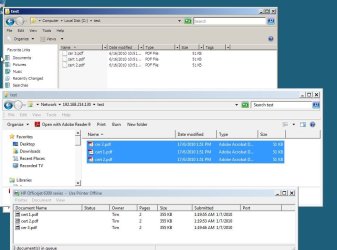
I ran two tests.
1. Test one - batch print 3 pdf's hosted on Server2008 to a local printer hosted on WINDOWS 7= SUCCESS
2. Test two - batch print 3 pdf's hosted on Server2008 to a network printer hosted = SUCCESS

I really can't recreate your issue.... and I was hoping to.

Some thoughts:
1. Is it unique to your network or is it just that PC? Can you please try to batch print from another machine or two if you have different OS' and see if that works. If the problem is only that WIn7 box then it's likely to be corruption with the context menu, printing, or PDF install. Less likely is that a security policy is not letting that machine or user print.
2. Does it work under another user? - This will narrow it down to a user profile or security policy issue.
3. Does it work under the Domain administrator user? This should rule out the users (but not the machine for security policy's).
4. If you share to another machine or server on the network does the same issue occur? This may tell us if the server itself is the issue.
5. Is every machine on the network effected? - This may tell us if it's a global policy lockout or if a localized running app unique to your network is responsible. 3rd party apps such as payroll applications can share (or steal) windows print functionality. If you suspect this, then install a fresh machine (even a virtual machine will work), only install a PDF reader and a printer, turn on network discovery and see if your issue occurs.

All we can do now is cross out the symptoms until we are left with the problem.

I would also just double check that the print spooler is working on the server, the printer, and your win7 box.

I'm off now it's almost 2am. Goodluck.
 

Attachments

  • test 1 - Win7-S2008Share-LocalPrinter.JPG
    test 1 - Win7-S2008Share-LocalPrinter.JPG
    80.6 KB · Views: 47

My Computer

Computer Manufacturer/Model Number
Custom Hack job
OS
Windows 7 Ultimate 64 bit
CPU
Intel(R) Core(TM)2 Quad CPU Q8200 @ 2.33GHz
Motherboard
GigaByte EP45-UD3
Memory
8 GB Kingston
Graphics Card(s)
Nvidia GeForce 9600GT
Sound Card
Soundblaster Audigy
Monitor(s) Displays
AOC x2 22"
Hard Drives
2 x Samsung 500GB (RAID)
2 x Samsung 2TB
1 x WD Green 2TB
1 x Seagate 1TB
1 x Samsung 500GB
PSU
Thermaltake QFan 750W
Case
CM Scout Gaming
Cooling
Coolermaster V10
Keyboard
Microsoft Wireless Keyboard 1000
Mouse
Microsoft Wireless Optical 2000
Internet Speed
320
Other Info
Winfast PVR2000CP
LG DVD-RAM DVD/RW/DL Super Multi
Linksys WMP300Nx2 Wireless Adapter
Add your server/computer/network to Trusted

Try adding your shared computer IP or computer name into the Local Intranet sites in Internet Options.

open Internet Explorer | Tools | Internet Options | Security | Local Intranet

of course you can also get there via Control Panel.
 

My Computer

OS
win7
Limitation on number of prints

You are limited to printing max of 15 PDFs at once. More than that it won't show you the print option.
 

My Computer

Computer type
PC/Desktop
OS
windows 7 32
Back
Top