Printing software?

Jobe77

New member
Local time
12:12 AM
Messages
27
Hi All!

I got a small problem.

How come that no software prints photos as it should do?

For example, If i have a picture, 12x12cm, and for example open it with picasa, and print it, it will never be 12x12cm?

The same happens to gimp, paint, it seems like they don't care how big the picture is, if i have selected A4 paper, it will print on that, and ignore that my picture is 12x12.

The result usually becomes like 14x14 or something like that..

Does anybody know some software that can print the photos AS THEY ARE?
 

My Computer

Computer Manufacturer/Model Number
Home-made
OS
Windows 7 home premium X64
CPU
Amd 3.1 Blackboxed X4
Motherboard
Amd
Memory
8Gb
Graphics Card(s)
ATI 5770 HD 1gig
Monitor(s) Displays
Tripple Full HD screen
Screen Resolution
Full Hd
Hard Drives
500GB, 500GB
2000GB, 2000GB, 2000GB, 2000GB
1000GB, 1000GB, 1000GB
PSU
640W + 1800VA UPS
Case
Own Wodden box
Cooling
AC Cooling Device 1800BTU
Keyboard
Logitech G11
Mouse
Logitec
Internet Speed
16<->5
There is no "print photos as they are" ;)
And who says your picture is 12x12cm?
It all depends on the amount of pixels and what resolution you choose for a print.

1417x1417 pixels printed at a resolution of 300dpi = 12x12cm
1417x1417 pixels printed at a resolution of 72dpi = 50x50cm

The picture itself is always the same, only the distribution of pixels in relation to the paper size changes.

You should check your printing dialogue for resolution settings.
 

My Computer

OS
Win 7 Professional 64bit
CPU
Intel i7-3930K @ 3.2GHz
Memory
16 GB
Graphics Card(s)
NVIDIA GeForce GTX 650
Monitor(s) Displays
1 CRT, 1 LCD
Hard Drives
3 hard drives
Printer driver could be scaling the image to max size on selected paper.
One of my side jobs is printing portraits on site and all the software I have used (Primarily Photoshop) will print the picture in it's correct size.

Just verify that the image you are printing is indeed 12cmx12cm.

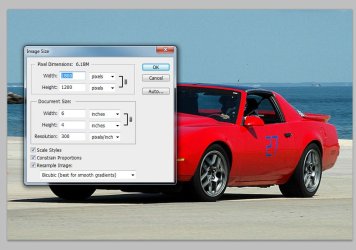
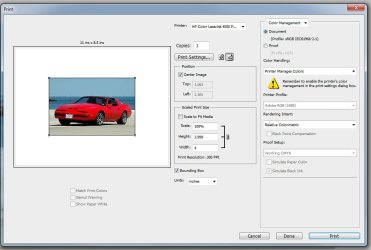
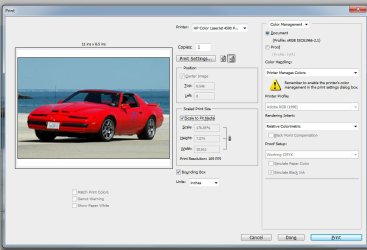
In the attached image, I have the document size set to 6"x4" so it will print in that size as long as you don't have the printer driver scale the image.
 

Attachments

  • print size.jpg
    print size.jpg
    85.3 KB · Views: 23
  • print-1.jpg
    print-1.jpg
    74.2 KB · Views: 20
  • print-2.jpg
    print-2.jpg
    78.1 KB · Views: 16

My Computer

Computer Manufacturer/Model Number
HAL-9000
OS
Windows 7 Ultimate 64bit
CPU
Intel i7 3770K
Motherboard
Asus Sabertooth Z77
Memory
16GB DDR3 1333 Corsair XMS3
Graphics Card(s)
XFX HD6950 2GB EyeFinity
Sound Card
Logitech G35 & Sennheiser PC135 & VIA HD
Monitor(s) Displays
23" HP 2310e, 23" Samsung B2230, 21.5" Viewsonic
Screen Resolution
5760x1080
Hard Drives
16TB of Storage
128GB & 256GB Crucial M4 SSD's, 2X 1TB WD Black, 3x 2TB WD, 3x 2TB Samsung F4, 1.5TB Seagate, WD 500GB,
PSU
Antec True Power New 650watt
Case
Cooler Master HAF-932
Cooling
Corsair H60 Hydro Cooler, 3x 230mm Fans, 2x120mm Fan
Keyboard
Logitech G15 and G13
Mouse
Logitech G700 Gaming Mouse
Internet Speed
50/10 Mbit
Other Info
Speakers : Alesis M1 Active Mk2 Studio Monitors , APC RS 1200 UPS, HP 4500DN Color Laser, HP P1006 mono Laser, Kodak 8500 Dye-Sub, Epson 1280 inkjet, Epson Worforce 610 MFC
You should check your printing dialogue for resolution settings.

I've been using Gimp most of the time, and i think that software has a screwed printing system.

Because I create a photo in it, and sets the dpi to 300, and the size to 12x12.
If i then press print, I think that the software should print it as 12x12....

Maybe i need to get a better photo software:o .
 

My Computer

Computer Manufacturer/Model Number
Home-made
OS
Windows 7 home premium X64
CPU
Amd 3.1 Blackboxed X4
Motherboard
Amd
Memory
8Gb
Graphics Card(s)
ATI 5770 HD 1gig
Monitor(s) Displays
Tripple Full HD screen
Screen Resolution
Full Hd
Hard Drives
500GB, 500GB
2000GB, 2000GB, 2000GB, 2000GB
1000GB, 1000GB, 1000GB
PSU
640W + 1800VA UPS
Case
Own Wodden box
Cooling
AC Cooling Device 1800BTU
Keyboard
Logitech G11
Mouse
Logitec
Internet Speed
16<->5
I'll try photoshop, Haven't been using it since photoshop 5-6 :rolleyes:
 

My Computer

Computer Manufacturer/Model Number
Home-made
OS
Windows 7 home premium X64
CPU
Amd 3.1 Blackboxed X4
Motherboard
Amd
Memory
8Gb
Graphics Card(s)
ATI 5770 HD 1gig
Monitor(s) Displays
Tripple Full HD screen
Screen Resolution
Full Hd
Hard Drives
500GB, 500GB
2000GB, 2000GB, 2000GB, 2000GB
1000GB, 1000GB, 1000GB
PSU
640W + 1800VA UPS
Case
Own Wodden box
Cooling
AC Cooling Device 1800BTU
Keyboard
Logitech G11
Mouse
Logitec
Internet Speed
16<->5
There's nothing wrong with Picasa or Gimp. Have you compared your system to that shown by Zepher above? Are you absolutely certain you have set the parameters correctly?
 

My Computer

Computer type
PC/Desktop
OS
Microsoft Windows 7 Home Premium 64-bit 7601 Multiprocessor Free Service Pack 1
CPU
Intel(R) Core(TM) i7-3770 CPU @ 3.40GHz
Motherboard
ASUSTeK COMPUTER INC. P8H77-M
Memory
8.00 GB
Graphics Card(s)
Intel(R) HD Graphics 4000
Sound Card
On Board
Monitor(s) Displays
Dell 24"
Screen Resolution
1920 x 1080
Hard Drives
(1) INTEL SSDSC2CT180A3 ATA Device (2) ST500DM002-1BD142 ATA Device (3) WDC WD3200AAKS-75L9A0 ATA Device (4) Generic- Compact Flash USB Device (5) Generic- MS/MS-Pro USB Device (6) Generic- SD/MMC USB Device (7) Generic- SM/xD-Picture USB
PSU
500w Corsair
Case
Cooler Master
Cooling
3 Fans
Keyboard
Logitech MK300
Mouse
Logitech WOM
Internet Speed
75Mb
Antivirus
Norton 360
Browser
Firefox, Opera, IE
There's nothing wrong with Picasa or Gimp. Have you compared your system to that shown by Zepher above? Are you absolutely certain you have set the parameters correctly?


What a :sarc: Strange, Now i tried Gimp again, now it does what it's suppose to do, really strange.
It has failed so many times before... hm...

Picasa, however is not god for printing, it only has 4-5 sizes you can print, and it'd don't support A3.., or have i missed something there?, well, never mind.
Gimp seems to work fine now, so I will be using it.

Thanx all!
 

My Computer

Computer Manufacturer/Model Number
Home-made
OS
Windows 7 home premium X64
CPU
Amd 3.1 Blackboxed X4
Motherboard
Amd
Memory
8Gb
Graphics Card(s)
ATI 5770 HD 1gig
Monitor(s) Displays
Tripple Full HD screen
Screen Resolution
Full Hd
Hard Drives
500GB, 500GB
2000GB, 2000GB, 2000GB, 2000GB
1000GB, 1000GB, 1000GB
PSU
640W + 1800VA UPS
Case
Own Wodden box
Cooling
AC Cooling Device 1800BTU
Keyboard
Logitech G11
Mouse
Logitec
Internet Speed
16<->5
Actually, I take that Back - Gimp Sucks!

IT can't handle A3, and nor does picassa.

The picture i'm trying to print in 5292x3515, 44,8cm x 29,7

Before I'm printing, I'm setting the printer to A3 Landscape, all other settings to A3 Landscape mode.
Of course the photo is landscape.

But before i print, i go and check in the "picture settings" where you can change the size, dpi, and position of the photo on the paper.
The problem here is that it says that the printing size is 29,7x19,7, and I can't increase it.

It seems like it stuck on A4.. So I'm back at the original Request, A software that can print pictures without any stupid limitations..:devil:
 

My Computer

Computer Manufacturer/Model Number
Home-made
OS
Windows 7 home premium X64
CPU
Amd 3.1 Blackboxed X4
Motherboard
Amd
Memory
8Gb
Graphics Card(s)
ATI 5770 HD 1gig
Monitor(s) Displays
Tripple Full HD screen
Screen Resolution
Full Hd
Hard Drives
500GB, 500GB
2000GB, 2000GB, 2000GB, 2000GB
1000GB, 1000GB, 1000GB
PSU
640W + 1800VA UPS
Case
Own Wodden box
Cooling
AC Cooling Device 1800BTU
Keyboard
Logitech G11
Mouse
Logitec
Internet Speed
16<->5
Gimp and Picasa can handle A3. If you have an A3 printer and you have the correct drivers it will work. It is not the software that defines the maximum print size but the printer! I have used Gimp for printing in the past on a Canon A3 printer.
 

My Computer

Computer type
PC/Desktop
OS
Microsoft Windows 7 Home Premium 64-bit 7601 Multiprocessor Free Service Pack 1
CPU
Intel(R) Core(TM) i7-3770 CPU @ 3.40GHz
Motherboard
ASUSTeK COMPUTER INC. P8H77-M
Memory
8.00 GB
Graphics Card(s)
Intel(R) HD Graphics 4000
Sound Card
On Board
Monitor(s) Displays
Dell 24"
Screen Resolution
1920 x 1080
Hard Drives
(1) INTEL SSDSC2CT180A3 ATA Device (2) ST500DM002-1BD142 ATA Device (3) WDC WD3200AAKS-75L9A0 ATA Device (4) Generic- Compact Flash USB Device (5) Generic- MS/MS-Pro USB Device (6) Generic- SD/MMC USB Device (7) Generic- SM/xD-Picture USB
PSU
500w Corsair
Case
Cooler Master
Cooling
3 Fans
Keyboard
Logitech MK300
Mouse
Logitech WOM
Internet Speed
75Mb
Antivirus
Norton 360
Browser
Firefox, Opera, IE
Gimp and Picasa can handle A3. If you have an A3 printer and you have the correct drivers it will work. It is not the software that defines the maximum print size but the printer! I have used Gimp for printing in the past on a Canon A3 printer.

Ok, well, I got an update on Gimp, after i restarted gimp, it changed it to a3...
I have however not yet tested to print it.

I expect that if i select A3 full paper, it should print on that, and not print an a4 photo on an a3 paper..

In picasa i Can't change the printing to higher that a4.. hm...

I guess that I must test the software more...
 

My Computer

Computer Manufacturer/Model Number
Home-made
OS
Windows 7 home premium X64
CPU
Amd 3.1 Blackboxed X4
Motherboard
Amd
Memory
8Gb
Graphics Card(s)
ATI 5770 HD 1gig
Monitor(s) Displays
Tripple Full HD screen
Screen Resolution
Full Hd
Hard Drives
500GB, 500GB
2000GB, 2000GB, 2000GB, 2000GB
1000GB, 1000GB, 1000GB
PSU
640W + 1800VA UPS
Case
Own Wodden box
Cooling
AC Cooling Device 1800BTU
Keyboard
Logitech G11
Mouse
Logitec
Internet Speed
16<->5
To save paper why not use he Print Preview facility. That will show you if your photo is filling the full A3 sheet. As you say, familiarise yourself with the software!
 

My Computer

Computer type
PC/Desktop
OS
Microsoft Windows 7 Home Premium 64-bit 7601 Multiprocessor Free Service Pack 1
CPU
Intel(R) Core(TM) i7-3770 CPU @ 3.40GHz
Motherboard
ASUSTeK COMPUTER INC. P8H77-M
Memory
8.00 GB
Graphics Card(s)
Intel(R) HD Graphics 4000
Sound Card
On Board
Monitor(s) Displays
Dell 24"
Screen Resolution
1920 x 1080
Hard Drives
(1) INTEL SSDSC2CT180A3 ATA Device (2) ST500DM002-1BD142 ATA Device (3) WDC WD3200AAKS-75L9A0 ATA Device (4) Generic- Compact Flash USB Device (5) Generic- MS/MS-Pro USB Device (6) Generic- SD/MMC USB Device (7) Generic- SM/xD-Picture USB
PSU
500w Corsair
Case
Cooler Master
Cooling
3 Fans
Keyboard
Logitech MK300
Mouse
Logitech WOM
Internet Speed
75Mb
Antivirus
Norton 360
Browser
Firefox, Opera, IE
Back
Top