
You are using an out of date browser. It may not display this or other websites correctly.
You should upgrade or use an alternative browser.
You should upgrade or use an alternative browser.
probably a simple answer
- Thread starter tyson
- Start date
Code Hunter
New member
No, it is not. Did you recently upgrade to Windows 7? You may need to reinstall the program.
My Computer
- OS
- Windows 7 Ultimate

- Local time
- 6:37 AM
- Messages
- 7,877
I had the same problem with Mozilla minefield on my computer. Here is how I fixed it.
Launch your application which is acting flakey, once opened, right click on the icon in the taskbar and pin it to the taskbar. Now, delete the first icon. Just launch now from that second icon and it should stay put.
Launch your application which is acting flakey, once opened, right click on the icon in the taskbar and pin it to the taskbar. Now, delete the first icon. Just launch now from that second icon and it should stay put.
My Computer
- Computer Manufacturer/Model Number
- Self-Built in July 2009
- OS
- Windows 7 Ultimate x64
- CPU
- Intel Q9550 2.83Ghz OC'd to 3.40Ghz
- Motherboard
- Gigabyte GA-EP45-UD3R rev. 1.1, F12 BIOS
- Memory
- 8GB G.Skill PI DDR2-800, 4-4-4-12 timings
- Graphics Card(s)
- EVGA 1280MB Nvidia GeForce GTX570
- Sound Card
- Realtek ALC899A 8 channel onboard audio
- Monitor(s) Displays
- 23" Acer x233H
- Screen Resolution
- 1920x1080
- Hard Drives
- Intel X25-M 80GB Gen 2 SSD
Western Digital 1TB Caviar Black, 32MB cache. WD1001FALS
- PSU
- Corsair 620HX modular
- Case
- Antec P182
- Cooling
- stock
- Keyboard
- ABS M1 Mechanical
- Mouse
- Logitech G9 Laser Mouse
- Internet Speed
- 15/2 cable modem
- Other Info
- Windows and Linux enthusiast. Logitech G35 Headset.
Code Hunter
New member
I had the same problem with Mozilla minefield on my computer. Here is how I fixed it.
Launch your application which is acting flakey, once opened, right click on the icon in the taskbar and pin it to the taskbar. Now, delete the first icon. Just launch now from that second icon and it should stay put.
Why go through all that trouble when simply reinstalling will do the trick?
iTunes is the only program that I had that problem with when upgrading to Windows 7.
My Computer
- OS
- Windows 7 Ultimate

zigzag3143
New member
- Local time
- 7:37 AM
- Messages
- 27,140
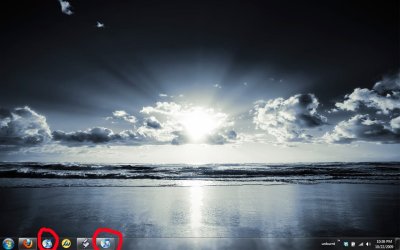
I'm loving the new taskbar, but for some reason itunes doesn't act like other programs, it opens a second icon on my taskbar...is this normal for the program?
View attachment 32569
No. did you: upgrade to a newer version of itunes? drag the icon off the taskbar to move it around. why not jist trash the socond one?
Ken
Last edited:
My Computer
- Computer Manufacturer/Model Number
- HP Pavillion dv-7 1005 Tx
- OS
- Win 8 Release candidate 8400
- Memory
- 4 gigs
- Graphics Card(s)
- Nvidia 9600M
- Sound Card
- HD built-in
- Monitor(s) Displays
- 17" Wxga
- Screen Resolution
- 1440x900
- Cooling
- none
- Internet Speed
- 45Mb down 5Mb up
I had the same problem with Mozilla minefield on my computer. Here is how I fixed it.
Launch your application which is acting flakey, once opened, right click on the icon in the taskbar and pin it to the taskbar. Now, delete the first icon. Just launch now from that second icon and it should stay put.
that worked brilliantly, i had already tried unpinning and pinning the direct .exe from the programs folder and that didn't work, so i'm not sure why this was any different. thanks though.
My Computer
- OS
- windows 7 home premium
- Local time
- 6:37 AM
- Messages
- 7,877
Cool. Not sure what causes that to happen, but it's pretty darn simple to fix once you know.
Glad that got you squared away. A whole lot faster then uninstalling and reinstalling...which may not have fixed the issue.
Glad that got you squared away. A whole lot faster then uninstalling and reinstalling...which may not have fixed the issue.
My Computer
- Computer Manufacturer/Model Number
- Self-Built in July 2009
- OS
- Windows 7 Ultimate x64
- CPU
- Intel Q9550 2.83Ghz OC'd to 3.40Ghz
- Motherboard
- Gigabyte GA-EP45-UD3R rev. 1.1, F12 BIOS
- Memory
- 8GB G.Skill PI DDR2-800, 4-4-4-12 timings
- Graphics Card(s)
- EVGA 1280MB Nvidia GeForce GTX570
- Sound Card
- Realtek ALC899A 8 channel onboard audio
- Monitor(s) Displays
- 23" Acer x233H
- Screen Resolution
- 1920x1080
- Hard Drives
- Intel X25-M 80GB Gen 2 SSD
Western Digital 1TB Caviar Black, 32MB cache. WD1001FALS
- PSU
- Corsair 620HX modular
- Case
- Antec P182
- Cooling
- stock
- Keyboard
- ABS M1 Mechanical
- Mouse
- Logitech G9 Laser Mouse
- Internet Speed
- 15/2 cable modem
- Other Info
- Windows and Linux enthusiast. Logitech G35 Headset.
Code Hunter
New member
I had the same problem with Mozilla minefield on my computer. Here is how I fixed it.
Launch your application which is acting flakey, once opened, right click on the icon in the taskbar and pin it to the taskbar. Now, delete the first icon. Just launch now from that second icon and it should stay put.
that worked brilliantly, i had already tried unpinning and pinning the direct .exe from the programs folder and that didn't work, so i'm not sure why this was any different. thanks though.
Glad you got it worked out! Enjoy your Windows 7! It is working very nice for me so far.
@pparks- Ah, I see what you mean now! I wish I would have thought of that, but reinstalling did the trick for me too.
My Computer
- OS
- Windows 7 Ultimate

I had the same problem with Mozilla minefield on my computer. Here is how I fixed it.
Launch your application which is acting flakey, once opened, right click on the icon in the taskbar and pin it to the taskbar. Now, delete the first icon. Just launch now from that second icon and it should stay put.
Why go through all that trouble when simply reinstalling will do the trick?
iTunes is the only program that I had that problem with when upgrading to Windows 7.
All that trouble? It Requires 1 Double-Click, and 4 Single-Clicks.
My Computer
- Computer Manufacturer/Model Number
- Custom | Whitebox
- OS
- Windows 7 Ultimate, OS X 10.7, Ubuntu 11.04
- CPU
- Intel E6750 @ 3.80GHz
- Motherboard
- Gigabyte GA-EP45-UD3L (Revision 1.1)
- Memory
- 2x2GB & 2x1GB (6GB) OCZ Reaper 1066MHz @ 1080MHz
- Graphics Card(s)
- EVGA nVidia GTX 260 896mb (216 Core) FTW Edition
- Sound Card
- Realtek ALC888
- Monitor(s) Displays
- 21" VIZIO TV
- Screen Resolution
- 1680x1050 @ 60Hz
- Hard Drives
- Western Digital WD6401AALS - 640GB
Hitachi HDP725016GLA380 - 160GB
- PSU
- Corsair 750W
- Case
- NZXT Nemesis Elite
- Cooling
- Thermaltake SpinQ
- Keyboard
- Logitech Wireless S520
- Mouse
- Logitech Wireless S520 - Microsoft Wireless Arc Mouse
- Internet Speed
- Download: 20mbps, Upload: 3mbps
- Local time
- 6:37 AM
- Messages
- 7,877
Yeah, I just thought at first that it was a Mozilla Minefield update which caused it....since I hadn't even seen it before. So, I just experimented a bit with it and determined that after opening it, I could repin it to the super bar and that worked.@pparks- Ah, I see what you mean now! I wish I would have thought of that, but reinstalling did the trick for me too.
It's good to see that reinstalling is also an option...in the event the other workaround doesn't....well...work.
My Computer
- Computer Manufacturer/Model Number
- Self-Built in July 2009
- OS
- Windows 7 Ultimate x64
- CPU
- Intel Q9550 2.83Ghz OC'd to 3.40Ghz
- Motherboard
- Gigabyte GA-EP45-UD3R rev. 1.1, F12 BIOS
- Memory
- 8GB G.Skill PI DDR2-800, 4-4-4-12 timings
- Graphics Card(s)
- EVGA 1280MB Nvidia GeForce GTX570
- Sound Card
- Realtek ALC899A 8 channel onboard audio
- Monitor(s) Displays
- 23" Acer x233H
- Screen Resolution
- 1920x1080
- Hard Drives
- Intel X25-M 80GB Gen 2 SSD
Western Digital 1TB Caviar Black, 32MB cache. WD1001FALS
- PSU
- Corsair 620HX modular
- Case
- Antec P182
- Cooling
- stock
- Keyboard
- ABS M1 Mechanical
- Mouse
- Logitech G9 Laser Mouse
- Internet Speed
- 15/2 cable modem
- Other Info
- Windows and Linux enthusiast. Logitech G35 Headset.