problem: 3.2GB RAM usable out of 8GB!!

josencv

New member
Local time
6:26 AM
Messages
3
Well, this seems to be a common problem. Before answering please read well this thread.

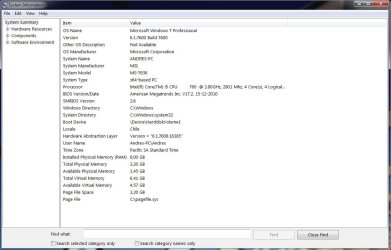
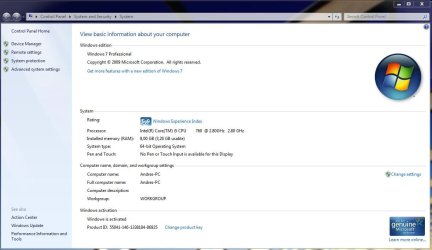
I Have Windows 7 Professional x64 with 8GB installed (2x4GB DDR3 Kingston). I installed the windows with the 8GB from the start. Windows recognizes 8GB installed but only 3.2GB usable.

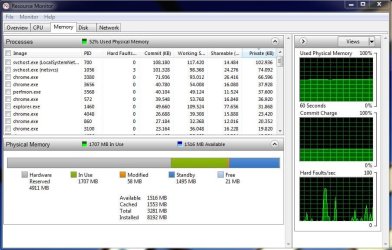
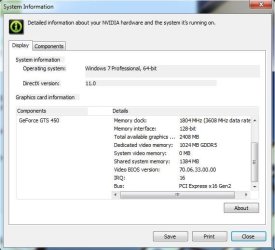
In the Resource Monitor 4.9GB are "Hardware Reserved". I have a nVidia GTS450 graphic card, but the nvidia control Panel "System Information" shows that it uses 1GB from the card framebuffer and 1.4 GB shared system memory.

The M/B supports 8GB

I didn't find any memory remap option on the BIOS, but it clearly detects 8GB (the BIOS).

I tried checking (and unchecking) the "Maximum memory" option in the msconfig > Advanced Options. When i chek it it automatically appears "8192" (8GB?), but when i reboot and check again it appears "0" (which means auto??). Nothing happens at all.

Further PC specifications:

MSI H55M-E21 M/B (socket 1156)
Intel i5-760
nVidia GTS450
2x4GB DDR3 Kingston (PC3 - 10600 CL9 240 - Pin DIMM)

See the images below

Any Ideas?

P.S: please dont tell me to check if my OS is 64 bit. It is
 

Attachments
  • propiedades.jpg
    propiedades.jpg
    66.4 KB · Views: 558
  • Resource Monitor.jpg
    Resource Monitor.jpg
    82.5 KB · Views: 386
  • System Information.jpg
    System Information.jpg
    68 KB · Views: 299
  • tgrafica.jpg
    tgrafica.jpg
    34.7 KB · Views: 264

My Computer My Computer

At a glance

Windows 7 Professional x64
OS
Windows 7 Professional x64
UN-check Max memory so itr will auto sense.
 

My Computer My Computer

At a glance

Win 8 Release candidate 8400[email protected]4 gigsNvidia 9600M
Computer Manufacturer/Model Number
HP Pavillion dv-7 1005 Tx
OS
Win 8 Release candidate 8400
CPU
[email protected]
Memory
4 gigs
Graphics Card(s)
Nvidia 9600M
Sound Card
HD built-in
Monitor(s) Displays
17" Wxga
Screen Resolution
1440x900
Cooling
none
Internet Speed
45Mb down 5Mb up
i did uncheck it... nothing happened
 

My Computer My Computer

At a glance

Windows 7 Professional x64
OS
Windows 7 Professional x64
Why use that motherboard with the CPU? The H55 is a cheapo chipset where you'd use the onboard graphics of a supported CPU . . . . try taking out one RAM module and see what happens.
 

My Computer My Computer

At a glance

Debian Squeeze Stable 64-bit
OS
Debian Squeeze Stable 64-bit
This is primarily dealing with the x58 chipset but can apply to pretty much any Intel chipset,

Asus X58 + 6/12GB memory overclocking - detecting less memory than installed - i4memory.com - different look at memory

Is this a recent build? If not has the full 8 GB ever been fully available? If not #8 from that link might be the cause. If you check would be a good idea to pull the heatsink and CPU and check the pins in the socket and see if any of them are bent, seen quite a few reports elsewhere where a bent pin or two can cause the memory to act like yours is (if the bent pins don't render the whole issue inoperative).
 

My Computer My Computer

At a glance

Win 7 Ultimate x64FX-8350 @ 4.6 GHz so farADATA XPG V1 Series Black 8GB DDR3 1600Sapphire R9 270x Dual-X
Computer type
PC/Desktop
Computer Manufacturer/Model Number
Me
OS
Win 7 Ultimate x64
CPU
FX-8350 @ 4.6 GHz so far
Motherboard
Asus M5A97 EVO
Memory
ADATA XPG V1 Series Black 8GB DDR3 1600
Graphics Card(s)
Sapphire R9 270x Dual-X
Sound Card
Xonar DGX w/ Corsair Vengence 1300
Monitor(s) Displays
Acer S232HL Abid
Screen Resolution
1920x1080
Hard Drives
120 GB OCZ Vertex 3
500 GB Seagate 7200.12
PSU
Antec Earthwatts 650W Green
Case
Antec Three Hundred
Cooling
Cooler Master 212 EVO
Keyboard
Logitech G510
Mouse
Logitech G500s
Internet Speed
35000/3000
it is a recent build... i don't think #8 is the cause... i reinstalled the heatsink... but no changes

i removed the ram from slot 2.... result: 3.2GB usable out of 4

changed the memory stick..... result: the same

put then the second stick on the second slot.... result: back to "normal": 3.2GB usable out of 8...

conclussion: the memory sticks seems to be OK.

i also checked the socket pins... it looks like they're ok too...

nothing changed
 

My Computer My Computer

At a glance

Windows 7 Professional x64
OS
Windows 7 Professional x64
Try an Ubuntu live CD. Does it still happen? Or is all RAM usable?
 

My Computer My Computer

At a glance

Debian Squeeze Stable 64-bit
OS
Debian Squeeze Stable 64-bit
As you can see, 5 GB of memory is "hardware reserved" which is usually due to the motherboard allotting it for graphics. Your motherboard might simply be confused or have it allotted still. I will check on some ways to fix this.
 

My Computer My Computer

At a glance

W7 Professional x64AMD Athlon II X3 445 Rana 3.10 GHzPNY XLR DDR3 1600 4x2GBNVIDIA GeForce GTS 450 (fermi) 1GB GDDR5
Computer Manufacturer/Model Number
Pugh Technologies
OS
W7 Professional x64
CPU
AMD Athlon II X3 445 Rana 3.10 GHz
Motherboard
MSI 870A-G54
Memory
PNY XLR DDR3 1600 4x2GB
Graphics Card(s)
NVIDIA GeForce GTS 450 (fermi) 1GB GDDR5
Sound Card
Realtek ALC892 onboard
Monitor(s) Displays
ASUS VE205t, Viewsonic VX2035WM
Screen Resolution
1600x900, 1600x1050
Hard Drives
977GB Hitachi Hitachi HDS721010CLA332
244GB Western Digital WDC WD2500AAJS-65B4A0
488GB Western Digital WDC WD5000AAJS-00A8B0
488GB Western Digital WDC WD5000AAKS-00UU3A0
PSU
Antec EarthWatts EA650 650W
Case
ThermalTake Armor A90 Mid Tower
Cooling
3x 120mm in, 1x 120mm & 200mm out, self built hydro-cooler
Keyboard
Logitec 55
Mouse
Razer Deathadder
Internet Speed
20 Mbps D/L, 9 Mbps U/L
;)I have mine unchecked and its showing 2MB H/R
 

My Computer My Computer

At a glance

Windows 8 ProAMD 1090 T Black 6 CORES 4.0+ overclocked8gigsHisHDx2
OS
Windows 8 Pro
CPU
AMD 1090 T Black 6 CORES 4.0+ overclocked
Motherboard
Asus Crosshair IV Formula
Memory
8gigs
Graphics Card(s)
HisHDx2
Monitor(s) Displays
42 inch vizio
Screen Resolution
HD
Hard Drives
4x1000mb
PSU
Corsair
Case
Coolermaster
Cooling
Corsair
Keyboard
logitech
Mouse
logitech
Internet Speed
Wideband
So far my research is putting the blame on a BIOS setting or update. Memory remapping in BIOS (or something similar) could fix the problem by unchecking that option. The other option is to look into BIOS updates and see if this issue is mentioned in any updates after your BIOS release.
 

My Computer My Computer

At a glance

W7 Professional x64AMD Athlon II X3 445 Rana 3.10 GHzPNY XLR DDR3 1600 4x2GBNVIDIA GeForce GTS 450 (fermi) 1GB GDDR5
Computer Manufacturer/Model Number
Pugh Technologies
OS
W7 Professional x64
CPU
AMD Athlon II X3 445 Rana 3.10 GHz
Motherboard
MSI 870A-G54
Memory
PNY XLR DDR3 1600 4x2GB
Graphics Card(s)
NVIDIA GeForce GTS 450 (fermi) 1GB GDDR5
Sound Card
Realtek ALC892 onboard
Monitor(s) Displays
ASUS VE205t, Viewsonic VX2035WM
Screen Resolution
1600x900, 1600x1050
Hard Drives
977GB Hitachi Hitachi HDS721010CLA332
244GB Western Digital WDC WD2500AAJS-65B4A0
488GB Western Digital WDC WD5000AAJS-00A8B0
488GB Western Digital WDC WD5000AAKS-00UU3A0
PSU
Antec EarthWatts EA650 650W
Case
ThermalTake Armor A90 Mid Tower
Cooling
3x 120mm in, 1x 120mm & 200mm out, self built hydro-cooler
Keyboard
Logitec 55
Mouse
Razer Deathadder
Internet Speed
20 Mbps D/L, 9 Mbps U/L
Memory remapping wouldn't help if you have 8GB installed and your motherboard only supports 8GB of address space - the motherboard would still need to map the PCI-x video hardware into the 8GB of address space.

A wild hunch - does your MB have two PCI-e graphics card slots and have you recently moved your graphics card between them?
 

My Computer My Computer

At a glance

Windows 10 Pro. EFI boot partition, full EFI ...i7 4770k 4.4GHz (44-44-43-43 turbo) @ 1.248V16GB (8GBx2) @2200 MHz G.skill Sniper 10-11-1...MSI GTX 970 Gaming 4G
Computer type
PC/Desktop
Computer Manufacturer/Model Number
Home built (GeneO industries)/Model 4
OS
Windows 10 Pro. EFI boot partition, full EFI boot
CPU
i7 4770k 4.4GHz (44-44-43-43 turbo) @ 1.248V
Motherboard
ASUS Maximus VI Hero
Memory
16GB (8GBx2) @2200 MHz G.skill Sniper 10-11-10-30-1, 1.6V
Graphics Card(s)
MSI GTX 970 Gaming 4G
Sound Card
Onboard SupremeFX Audio
Monitor(s) Displays
NEC Spectraview 2490WUXi-SV
Screen Resolution
1920 x 1200
Hard Drives
Samsung 850 Pro 256GB (OS), Samsung 2x 128GB 840 Pro SSD in RAID0, 3x WD Blue 6Gb/s 1TB RAID0, WD 2TB Black external USB 3.0, 2TB WD20EARS Green external USB 3.0, 2x 500GB Seagate and 1 750 GB external USB, 1x 350GB external USB3
PSU
Seasonic X-850 (2012 KM3 model)
Case
Fractal Design Define R4
Cooling
NH-D14, NF-F12, NF-A15; NF-P14, NF-P12,NF-A14, S12A PWM
Keyboard
Cooler Master Storm Quickfire Rapid - Brown
Mouse
Logitech G602
Internet Speed
126.4 Mb/s down, 24.3 Mb/s up
Other Info
USB 3.0 x8 , SATA III x8, eSATA, USB 2.0 x6. Samsung DVD R/W drive.

WEI: CPU 7.8, Memory 7.9, Graphics 7.9, Disk 7.9
Back
Top