Solved Problem Accessing shared drives

nikeshkm

New member
Local time
5:05 AM
Messages
7
Hi everyone,

I have connected the laptop and a desktop using a lan cable. Both the system are on Windows 7.

I shared a drive each on laptop and the desktop.

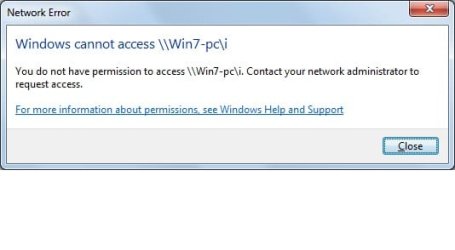
But when i try to access the drive from laptop to desktop (or vice versa) it gives the error (check screenshot for the error message)

I can see the drive but cannot access them. Although i can access the Public folder but not any other folder or drives.

Password sharing is off
Firewall is off

What can be the issue?

Please suggest thanks...
 

Attachments
  • error.jpg
    error.jpg
    14.7 KB · Views: 10

My Computer

OS
Windows 7 ultimate
HI all,

Please suggest something for this issue

Thanks
 

My Computer

OS
Windows 7 ultimate
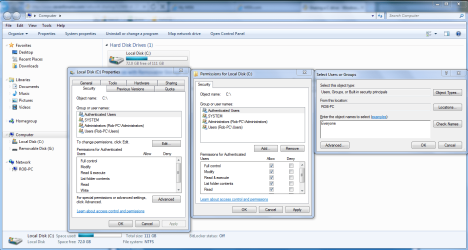
To have access to an entire drive you need to allow for sharing by using the permissions tab of the drive but more importantly you need to allow for sharing with the Security tab of the drive. The picture below shows you how.
 

Attachments

  • Sharing C drive with Everyone.PNG
    Sharing C drive with Everyone.PNG
    76.9 KB · Views: 168

My Computer

Computer type
PC/Desktop
Computer Manufacturer/Model Number
Home built
OS
Windows 7 Ult, Windows 8.1 Pro,
CPU
Q9650-4.275GHz, E8600 4.5GHz, E6750-3.8GHz
Motherboard
Evga 780i FTW
Memory
G.Skill PC2 9600 1200Mhz 5 5 5 15 2T
Graphics Card(s)
GTX480
Sound Card
Asus Xonar D2
Monitor(s) Displays
HannsG
Screen Resolution
1680X1050
Hard Drives
GSkill Phoenix Pro 120GB SSD
PSU
ThermalTake Toughpower 1000Watt modular
Case
ThermalTake XaserV
Cooling
Xigmatek S1283
Keyboard
Logitech G15
Mouse
Logitech G9
Internet Speed
T1
Thanks bro...
it worked..dint realize that i have to make changes in Security tab too.. as i already selected full control in Sharing tab...
But any ways thanks a ton...

Will post other problems too if i encounter any :)...
 

My Computer

OS
Windows 7 ultimate
Thanks bro...
it worked..dint realize that i have to make changes in Security tab too.. as i already selected full control in Sharing tab...
But any ways thanks a ton...

Will post other problems too if i encounter any :)...

No problem nikeshkm, that Security tab throws everyone off on the drive sharing. Just have to add Everyone to the allowed list for drive access which is different than it was in XP or Vista.
 

My Computer

Computer type
PC/Desktop
Computer Manufacturer/Model Number
Home built
OS
Windows 7 Ult, Windows 8.1 Pro,
CPU
Q9650-4.275GHz, E8600 4.5GHz, E6750-3.8GHz
Motherboard
Evga 780i FTW
Memory
G.Skill PC2 9600 1200Mhz 5 5 5 15 2T
Graphics Card(s)
GTX480
Sound Card
Asus Xonar D2
Monitor(s) Displays
HannsG
Screen Resolution
1680X1050
Hard Drives
GSkill Phoenix Pro 120GB SSD
PSU
ThermalTake Toughpower 1000Watt modular
Case
ThermalTake XaserV
Cooling
Xigmatek S1283
Keyboard
Logitech G15
Mouse
Logitech G9
Internet Speed
T1
Back
Top