aboutwhat57
New member
- Local time
- 8:57 AM
- Messages
- 3
Hello, I installed the Windows 7 Release Candiate build 7100 yesterday and now when I try to access a website via Internet Explorer or Safari(the windows version) and Firefox I get a page time-out message.
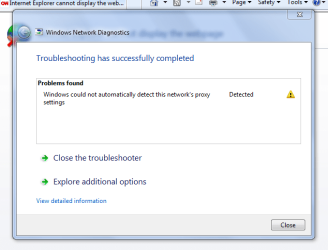
I ran the Network Diagnostic tool and the message I get is "Windows could not automatically detect the networks proxy settings".
I am connected to the internet via Ethernet cable to my dsl modem. I restarted the modem, I restarted the computer several times.
The network says I have internet access, but it will not let me onto the internet.
My computer is a HP pavilion dv7-1020US.
Edit: Forgot to mention, I did try un-installing the driver for my ethernet adaptor. Also I am able to connect to the internet on my other computers with no problems.
I ran the Network Diagnostic tool and the message I get is "Windows could not automatically detect the networks proxy settings".
I am connected to the internet via Ethernet cable to my dsl modem. I restarted the modem, I restarted the computer several times.
The network says I have internet access, but it will not let me onto the internet.
My computer is a HP pavilion dv7-1020US.
Edit: Forgot to mention, I did try un-installing the driver for my ethernet adaptor. Also I am able to connect to the internet on my other computers with no problems.
My Computer
- Computer Manufacturer/Model Number
- Hp Pavilion dv7 1020US
- OS
- Windows 7 Release Candidate 1
- CPU
- Intel Centrino Core 2 Duo
- Memory
- 4.00 GB Ram
- Graphics Card(s)
- NVIDIA GeForce 9600M GT
- Screen Resolution
- 1440x900
- Hard Drives
- 298 GB Hard Drive