Problem After ADSL2+ Modem Replaced

PCrazy123

New member
Local time
11:16 PM
Messages
46
Problem After DSL Modem Replaced

Hi everyone. A few days ago I replaced my old DSL modem after the old one stoppped working. After that I noticed that :

1. After I turn on the modem the LAN & Internet lights blink every few seconds even when idle.
2. The LAN light blinks like this during the startup of the modem before the DSL light has stabilized and I have enabled Internet by right-clicking the Local Area Connection icon.
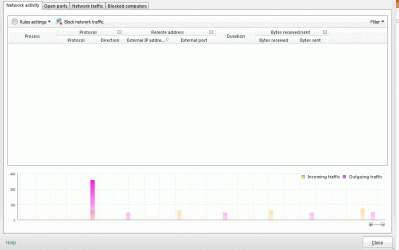
3. Also everytime the lights blink there is some incoming\outgoing data (size is usually less than 50 bytes) shown in my AVs network activity monitor but no ips are shown.
4. This happens even when I use my AVs 'Block All Network Traffic' option.

I haven't installed any new software since I replaced the modem and the system is working fine. Also this doesn't affect my internet during browsing or gaming in any way.

I had been using the old modem for two years and never noticed this behaviour. Is this normal in new DSL modems ? I also checked this on another new modem of a different brand and both modems on two different systems.

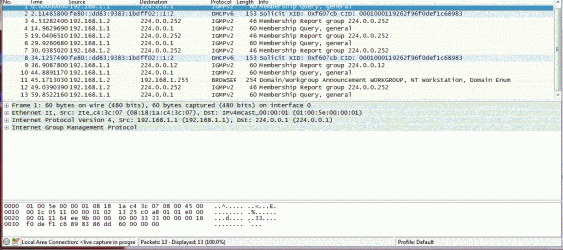
I checked using Wireshark and this is what happens.
 

Attachments
  • screen1.gif
    screen1.gif
    51.4 KB · Views: 0
  • screen5b.gif
    screen5b.gif
    129.9 KB · Views: 0
Last edited:

My Computer

Computer type
PC/Desktop
OS
Win7 Ultimate 32bit
Please someone guide me if the Wireshark screenshot shows something wrong with the modem or PC. Or is this normal modem behaviour ?
 

My Computer

Computer type
PC/Desktop
OS
Win7 Ultimate 32bit
Please someone guide me if the Wireshark screenshot shows something wrong with the modem or PC. Or is this normal modem behaviour ?

It's usually required that you register a new modem with your ISP, often times they tie the MAC address of the main PC with the modem so it can't be used any place else.

Sometimes modems have a "clone MAC address" setting which allows the modem to be used with more than one machine.
 

My Computer

Computer type
PC/Desktop
Computer Manufacturer/Model Number
Home built
OS
Windows 7 Ult, Windows 8.1 Pro,
CPU
Q9650-4.275GHz, E8600 4.5GHz, E6750-3.8GHz
Motherboard
Evga 780i FTW
Memory
G.Skill PC2 9600 1200Mhz 5 5 5 15 2T
Graphics Card(s)
GTX480
Sound Card
Asus Xonar D2
Monitor(s) Displays
HannsG
Screen Resolution
1680X1050
Hard Drives
GSkill Phoenix Pro 120GB SSD
PSU
ThermalTake Toughpower 1000Watt modular
Case
ThermalTake XaserV
Cooling
Xigmatek S1283
Keyboard
Logitech G15
Mouse
Logitech G9
Internet Speed
T1
Thanks for helping.

It's usually required that you register a new modem with your ISP, often times they tie the MAC address of the main PC with the modem so it can't be used any place else.

Sometimes modems have a "clone MAC address" setting which allows the modem to be used with more than one machine.

These modems were replaced by the ISP when the old one stopped working. So is this happening because these modems are registered to another MAC address ? Do I have to call my ISP and ask them to change this or I can do this through the modem settings page ?

I don't have much knowledge about modem settings so please forgive my foolish questions.
 

My Computer

Computer type
PC/Desktop
OS
Win7 Ultimate 32bit
Thanks for helping.

It's usually required that you register a new modem with your ISP, often times they tie the MAC address of the main PC with the modem so it can't be used any place else.

Sometimes modems have a "clone MAC address" setting which allows the modem to be used with more than one machine.

These modems were replaced by the ISP when the old one stopped working. So is this happening because these modems are registered to another MAC address ? Do I have to call my ISP and ask them to change this or I can do this through the modem settings page ?

I don't have much knowledge about modem settings so please forgive my foolish questions.

Usually it's required for the ISP to make changes on their end in order for you to use the new modem.

Have you tried calling the ISP for help?
 

My Computer

Computer type
PC/Desktop
Computer Manufacturer/Model Number
Home built
OS
Windows 7 Ult, Windows 8.1 Pro,
CPU
Q9650-4.275GHz, E8600 4.5GHz, E6750-3.8GHz
Motherboard
Evga 780i FTW
Memory
G.Skill PC2 9600 1200Mhz 5 5 5 15 2T
Graphics Card(s)
GTX480
Sound Card
Asus Xonar D2
Monitor(s) Displays
HannsG
Screen Resolution
1680X1050
Hard Drives
GSkill Phoenix Pro 120GB SSD
PSU
ThermalTake Toughpower 1000Watt modular
Case
ThermalTake XaserV
Cooling
Xigmatek S1283
Keyboard
Logitech G15
Mouse
Logitech G9
Internet Speed
T1
Thanks for helping.

Usually it's required for the ISP to make changes on their end in order for you to use the new modem.

Have you tried calling the ISP for help?

I called my ISP and their reply was that "something is wrong with your PC".

From my modem settings I disabled Multicast and IGMP Snoop and now the problem is 90% fixed. Now everytime I connect to the internet for a few seconds my modem recieves queries from the Multicast 244 ip then the queries stop. Haven't found a way to completely stop this.
 

My Computer

Computer type
PC/Desktop
OS
Win7 Ultimate 32bit
Thanks for helping.

Usually it's required for the ISP to make changes on their end in order for you to use the new modem.

Have you tried calling the ISP for help?

I called my ISP and their reply was that "something is wrong with your PC".

From my modem settings I disabled Multicast and IGMP Snoop and now the problem is 90% fixed. Now everytime I connect to the internet for a few seconds my modem recieves queries from the Multicast 244 ip then the queries stop. Haven't found a way to completely stop this.

Yes typical ISP, they tell you the PC is the problem then you make adjustments to the modem "as I implied earlier" and what do you know, things start working again. These ISP's and their holier than God attitude needs to change, I see this bad attitude from them all the time IMO. ;)

Did you see any settings that mention clone mac address? That setting should allow your machine to associate with the new modem.

Other than that the problem is indeed with the new modem but the ISP needs to step up here.

If you can post the ipconfig/all I might be able to help more.
 

My Computer

Computer type
PC/Desktop
Computer Manufacturer/Model Number
Home built
OS
Windows 7 Ult, Windows 8.1 Pro,
CPU
Q9650-4.275GHz, E8600 4.5GHz, E6750-3.8GHz
Motherboard
Evga 780i FTW
Memory
G.Skill PC2 9600 1200Mhz 5 5 5 15 2T
Graphics Card(s)
GTX480
Sound Card
Asus Xonar D2
Monitor(s) Displays
HannsG
Screen Resolution
1680X1050
Hard Drives
GSkill Phoenix Pro 120GB SSD
PSU
ThermalTake Toughpower 1000Watt modular
Case
ThermalTake XaserV
Cooling
Xigmatek S1283
Keyboard
Logitech G15
Mouse
Logitech G9
Internet Speed
T1
Yes typical ISP, they tell you the PC is the problem then you make adjustments to the modem "as I implied earlier" and what do you know, things start working again. These ISP's and their holier than God attitude needs to change, I see this bad attitude from them all the time IMO. ;)

Did you see any settings that mention clone mac address? That setting should allow your machine to associate with the new modem.

Other than that the problem is indeed with the new modem but the ISP needs to step up here.

If you can post the ipconfig/all I might be able to help more.

Thanks for helping.

Sorry for the late reply. This is what happens for a few seconds everytime I connect to the internet. And this doesn't happen again unless I disconnect/reconnect.


I tried ipconfig /all but the ip in the screenshot doesn't show up in it.
 

Attachments

  • screen1.gif
    screen1.gif
    29.2 KB · Views: 13

My Computer

Computer type
PC/Desktop
OS
Win7 Ultimate 32bit
Yes typical ISP, they tell you the PC is the problem then you make adjustments to the modem "as I implied earlier" and what do you know, things start working again. These ISP's and their holier than God attitude needs to change, I see this bad attitude from them all the time IMO. ;)

Did you see any settings that mention clone mac address? That setting should allow your machine to associate with the new modem.

Other than that the problem is indeed with the new modem but the ISP needs to step up here.

If you can post the ipconfig/all I might be able to help more.

Thanks for helping.

Sorry for the late reply. This is what happens for a few seconds everytime I connect to the internet. And this doesn't happen again unless I disconnect/reconnect.


I tried ipconfig /all but the ip in the screenshot doesn't show up in it.

The ipconfig/all command needs to be typed into an elevated command prompt in order to show results.

I've never actually seen this ICMP echo request in my life but the following link shows adjustments that may help. :party:

How to unblock ICMP echo requests from windows firewall?? - Windows 7 Antivirus and Security - Help and Discussion
 

My Computer

Computer type
PC/Desktop
Computer Manufacturer/Model Number
Home built
OS
Windows 7 Ult, Windows 8.1 Pro,
CPU
Q9650-4.275GHz, E8600 4.5GHz, E6750-3.8GHz
Motherboard
Evga 780i FTW
Memory
G.Skill PC2 9600 1200Mhz 5 5 5 15 2T
Graphics Card(s)
GTX480
Sound Card
Asus Xonar D2
Monitor(s) Displays
HannsG
Screen Resolution
1680X1050
Hard Drives
GSkill Phoenix Pro 120GB SSD
PSU
ThermalTake Toughpower 1000Watt modular
Case
ThermalTake XaserV
Cooling
Xigmatek S1283
Keyboard
Logitech G15
Mouse
Logitech G9
Internet Speed
T1
Thanks for helping.

The ipconfig/all command needs to be typed into an elevated command prompt in order to show results.

I've never actually seen this ICMP echo request in my life but the following link shows adjustments that may help. :party:

How to unblock ICMP echo requests from windows firewall?? - Windows 7 Antivirus and Security - Help and Discussion

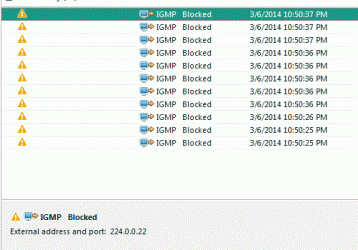
I blocked the IGMP Inbound\Outbound from my antivirus firewall and disabled Multicast form my modem and now this issue is almost solved as everytime I enable internet upto 10 IGMP requests are sent, the firewall blocks these initial requests and then no further requests are sent for the duration of the connection.
 

My Computer

Computer type
PC/Desktop
OS
Win7 Ultimate 32bit
Thanks for helping.

The ipconfig/all command needs to be typed into an elevated command prompt in order to show results.

I've never actually seen this ICMP echo request in my life but the following link shows adjustments that may help. :party:

How to unblock ICMP echo requests from windows firewall?? - Windows 7 Antivirus and Security - Help and Discussion

I blocked the IGMP Inbound\Outbound from my antivirus firewall and disabled Multicast form my modem and now this issue is almost solved as everytime I enable internet upto 10 IGMP requests are sent, the firewall blocks these initial requests and then no further requests are sent for the duration of the connection.

The anti virus firewall may be causing the remainder of this problem because with Windows I've never seen this type of problem.
 

My Computer

Computer type
PC/Desktop
Computer Manufacturer/Model Number
Home built
OS
Windows 7 Ult, Windows 8.1 Pro,
CPU
Q9650-4.275GHz, E8600 4.5GHz, E6750-3.8GHz
Motherboard
Evga 780i FTW
Memory
G.Skill PC2 9600 1200Mhz 5 5 5 15 2T
Graphics Card(s)
GTX480
Sound Card
Asus Xonar D2
Monitor(s) Displays
HannsG
Screen Resolution
1680X1050
Hard Drives
GSkill Phoenix Pro 120GB SSD
PSU
ThermalTake Toughpower 1000Watt modular
Case
ThermalTake XaserV
Cooling
Xigmatek S1283
Keyboard
Logitech G15
Mouse
Logitech G9
Internet Speed
T1
Back
Top