Problem after installing XP on a different HD

gfmzidane

New member
Local time
9:45 PM
Messages
13
Location
São Paulo - Brazil
Hello,​

I have a big problem here. My printer isn't working on W7 so I installed XP on my Slave HD (which was being used only to storage files) to see if it was a compatibility issue. The problem is that now I can't initialize the PC through W7, only through XP. I'm booting through the HD which has W7 installed but it stills keep opening XP. Here's a SS of my Disk Management:​


The W7 is installed on C: and XP on D:. D: status is marked as Healthy (Boot) and I don't know how to change it to C: (if that's even possible).​

How can I get back to W7 without install the system again?​

Thanks!​
 

My Computer

OS
Windows 7 x64 Ultimate
CPU
Athlon 64 X2 4200+
Motherboard
Asus M2N68-AM SE2
Memory
4GB DDR2 800
Graphics Card(s)
GeForce 7600GS 256mb
Hard Drives
HD 160GB SATA II
HD 80GB IDE
Thanks a lot theog, I could manage to load W7. Now another question: can I just format D: if I don't want to use XP anymore or formatting it will get me in trouble concerning the use of W7?

Thanks again!
 

My Computer

OS
Windows 7 x64 Ultimate
CPU
Athlon 64 X2 4200+
Motherboard
Asus M2N68-AM SE2
Memory
4GB DDR2 800
Graphics Card(s)
GeForce 7600GS 256mb
Hard Drives
HD 160GB SATA II
HD 80GB IDE
It's on Disk0 (D: )
 

My Computer

OS
Windows 7 x64 Ultimate
CPU
Athlon 64 X2 4200+
Motherboard
Asus M2N68-AM SE2
Memory
4GB DDR2 800
Graphics Card(s)
GeForce 7600GS 256mb
Hard Drives
HD 160GB SATA II
HD 80GB IDE
We have just repair your Dual boot & now you what to delete, is this right?
 

My Computer

OS
ME/XP/Vista/Win7
I'm not sure if I understood your last post but I want to format my D: disk, in other words, uninstall XP, so I can get back to the scenario I was before installing XP (use the D: disk just to storage files and use W7 as the only OS in the PC).
 

My Computer

OS
Windows 7 x64 Ultimate
CPU
Athlon 64 X2 4200+
Motherboard
Asus M2N68-AM SE2
Memory
4GB DDR2 800
Graphics Card(s)
GeForce 7600GS 256mb
Hard Drives
HD 160GB SATA II
HD 80GB IDE
As your Win XP install is on the Master Drive, you will need to copy the boot files to your Win 7 drive.

Than do a startup Repair.
 

My Computer

OS
ME/XP/Vista/Win7
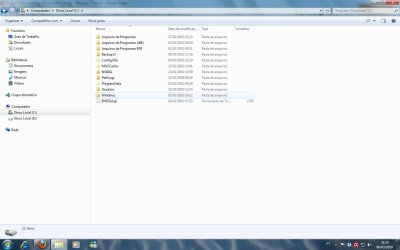
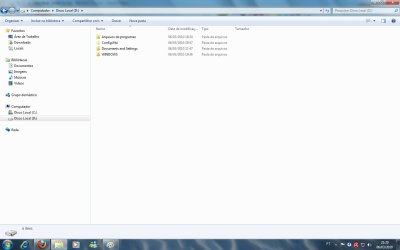
Sorry about the noobish questions, but where can I find those boot files, what are their names and where exactly do I put them after find them?

After doing this and the startup repair, can I finally uninstall XP?

Thanks for the patience.
 

My Computer

OS
Windows 7 x64 Ultimate
CPU
Athlon 64 X2 4200+
Motherboard
Asus M2N68-AM SE2
Memory
4GB DDR2 800
Graphics Card(s)
GeForce 7600GS 256mb
Hard Drives
HD 160GB SATA II
HD 80GB IDE
Here you are:
 

Attachments

  • Sem título.jpg
    Sem título.jpg
    67.1 KB · Views: 3
  • Sem título1.jpg
    Sem título1.jpg
    53 KB · Views: 2

My Computer

OS
Windows 7 x64 Ultimate
CPU
Athlon 64 X2 4200+
Motherboard
Asus M2N68-AM SE2
Memory
4GB DDR2 800
Graphics Card(s)
GeForce 7600GS 256mb
Hard Drives
HD 160GB SATA II
HD 80GB IDE
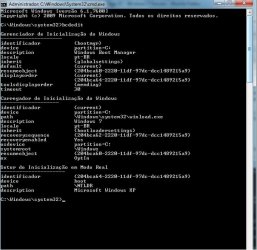
I'm posting also a SS of my bcdedit below:
 

Attachments

  • Sem título2.jpg
    Sem título2.jpg
    54.8 KB · Views: 2

My Computer

OS
Windows 7 x64 Ultimate
CPU
Athlon 64 X2 4200+
Motherboard
Asus M2N68-AM SE2
Memory
4GB DDR2 800
Graphics Card(s)
GeForce 7600GS 256mb
Hard Drives
HD 160GB SATA II
HD 80GB IDE
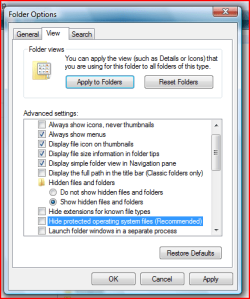
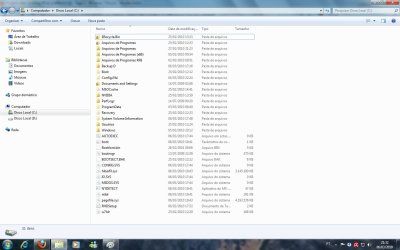
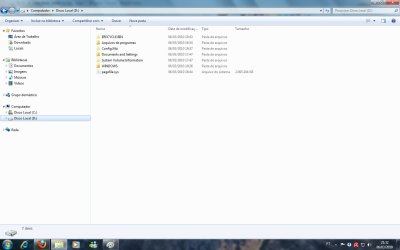
Can you unhide root files.
 

Attachments

  • Capture2.PNG
    Capture2.PNG
    16 KB · Views: 1

My Computer

OS
ME/XP/Vista/Win7
Here it is:
 

Attachments

  • Sem título.jpg
    Sem título.jpg
    102.8 KB · Views: 2
  • Sem título1.jpg
    Sem título1.jpg
    59.5 KB · Views: 2

My Computer

OS
Windows 7 x64 Ultimate
CPU
Athlon 64 X2 4200+
Motherboard
Asus M2N68-AM SE2
Memory
4GB DDR2 800
Graphics Card(s)
GeForce 7600GS 256mb
Hard Drives
HD 160GB SATA II
HD 80GB IDE
That's fine, the HD containing C is first with an active partition in the Bios boot order.

You should be able to delete the D partition with Disk Management.

Remove the Xp entry from 7 boot menu with bcdedit, or under the Boot Tab in msconfig.
 

My Computers

System One System Two

  • Computer type
    PC/Desktop
    OS
    7 X64
    CPU
    i5 8400
    Motherboard
    gigabyte b365m ds3h
    Memory
    2x8gb 3200mhz
    Hard Drives
    various
    PSU
    pure power 11 400w cm
    Case
    Coolermaster
    Cooling
    cryorig m9i
  • Computer type
    PC/Desktop
    OS
    7x64
    CPU
    g5400
    Motherboard
    ga b365m ds3h
    Memory
    8gb ddr4 2400
    PSU
    xfx pro 450w
My problem was fully solved.

Thanks a lot guys! Reps given!
 

My Computer

OS
Windows 7 x64 Ultimate
CPU
Athlon 64 X2 4200+
Motherboard
Asus M2N68-AM SE2
Memory
4GB DDR2 800
Graphics Card(s)
GeForce 7600GS 256mb
Hard Drives
HD 160GB SATA II
HD 80GB IDE
Back
Top