Solved Problem connecting to NAS

marco1990

New member
Local time
9:36 AM
Messages
9
Hello,

I'm having trouble connecting to my NAS server from my laptop.
I can see the NAS but I cant make a networkmap.
The strange thing is that I works on my PC, only my laptop gives a error 0x800704cf
And says I have no access, which it says to all paths I try to make a map to.

Does anyone know how to fix this?
 

My Computer

Computer type
Laptop
Computer Manufacturer/Model Number
custom
OS
windows 7 x64
Memory
4GB DDR3 SDRAM

My Computer

Computer type
PC/Desktop
Computer Manufacturer/Model Number
Custom
OS
Dual Boot: Windows 8.1 & Server 2012r2 VMs: Kali Linux, Backbox, Matriux, Windows 8.1
CPU
A10 7700 Kavari SteamRoller
Motherboard
ASUS A88XM-PLUS (FM2+ )
Memory
8GB DDR3 SDRAM PC3-8500
Graphics Card(s)
1024MB ATI AMD Radeon R7 Graphics
Sound Card
Realtek High Definition Audio
Monitor(s) Displays
Samsung
Hard Drives
SSD Crucial 120gb
WD VelociRaptor 1tb
PSU
Rosewill Gaming 650w
Case
Rosewill Galaxy 2
Internet Speed
55/12
Antivirus
Malwarebytes, MSE, SAS
Browser
FireFox, Chrome
Hello,

I'm having trouble connecting to my NAS server from my laptop.
I can see the NAS but I cant make a networkmap.
The strange thing is that I works on my PC, only my laptop gives a error 0x800704cf
And says I have no access, which it says to all paths I try to make a map to.

Does anyone know how to fix this?

Can you post a screen shot of the ipconfig/all form this machine?
 

My Computer

Computer type
PC/Desktop
Computer Manufacturer/Model Number
Home built
OS
Windows 7 Ult, Windows 8.1 Pro,
CPU
Q9650-4.275GHz, E8600 4.5GHz, E6750-3.8GHz
Motherboard
Evga 780i FTW
Memory
G.Skill PC2 9600 1200Mhz 5 5 5 15 2T
Graphics Card(s)
GTX480
Sound Card
Asus Xonar D2
Monitor(s) Displays
HannsG
Screen Resolution
1680X1050
Hard Drives
GSkill Phoenix Pro 120GB SSD
PSU
ThermalTake Toughpower 1000Watt modular
Case
ThermalTake XaserV
Cooling
Xigmatek S1283
Keyboard
Logitech G15
Mouse
Logitech G9
Internet Speed
T1
Can you try this?

Can't map network drive - Network Error 0x800704cf - Microsoft Community

Scroll passed the person directing them to technet and try what the other answer suggests.

I followed the steps but it still gives the same error.
When I enter NET VIEW it says the list is empty, even after 'netsh winsock reset' The site says ignore the warnings, but there were no warnings.

Can you post a screen shot of the ipconfig/all form this machine?

It is in dutch, hope that it is oke

Windows IP-configuratie

Hostnaam . . . . . . . . . . . . : Marco-Laptop
Primair DNS-achtervoegsel . . . . :
Knooppunttype . . . . . . . . . . : hybride
IP-routering ingeschakeld . . . . : nee
WINS-proxy ingeschakeld . . . . . : nee
DNS-achtervoegselzoeklijst. . . . : lan

Ethernet-adapter voor LAN-verbinding 3:

Mediumstatus. . . . . . . . . . . : medium ontkoppeld
Verbindingsspec. DNS-achtervoegsel:
Beschrijving. . . . . . . . . . . : Iomega Virtual Ethernet Adapter
Fysiek adres. . . . . . . . . . . : 00-00-00-3D-04-00
DHCP ingeschakeld . . . . . . . . : ja
Autom. configuratie ingeschakeld : ja

Draadloos LAN-adapter voor Draadloze netwerkverbinding:

Verbindingsspec. DNS-achtervoegsel: lan
Beschrijving. . . . . . . . . . . : Intel(R) WiFi Link 5100 AGN
Fysiek adres. . . . . . . . . . . : 00-22-FA-04-2D-7A
DHCP ingeschakeld . . . . . . . . : ja
Autom. configuratie ingeschakeld : ja
Link-local IPv6-adres . . . . . . : fe80::9ce9:cee1:d833:1a81%11(voorkeur)
IPv4-adres. . . . . . . . . . . . : 192.168.1.116(voorkeur)
Subnetmasker. . . . . . . . . . . : 255.255.255.0
Lease verkregen . . . . . . . . . : dinsdag 3 december 2013 21:30:38
Lease verlopen. . . . . . . . . . : woensdag 4 december 2013 21:30:38
Standaardgateway. . . . . . . . . : 192.168.1.254
DHCP-server . . . . . . . . . . . : 192.168.1.254
DHCPv6 IAID . . . . . . . . . . . : 218112762
DHCPv6-client DUID. . . . . . . . : 00-01-00-01-14-E4-81-6B-00-90-F5-90-01-E9
DNS-servers . . . . . . . . . . . : 192.168.1.254
NetBIOS via TCPIP . . . . . . . . : ingeschakeld

Ethernet-adapter voor LAN-verbinding:

Mediumstatus. . . . . . . . . . . : medium ontkoppeld
Verbindingsspec. DNS-achtervoegsel:
Beschrijving. . . . . . . . . . . : Realtek PCIe GBE Family Controller
Fysiek adres. . . . . . . . . . . : 00-90-F5-90-01-E9
DHCP ingeschakeld . . . . . . . . : ja
Autom. configuratie ingeschakeld : ja

 

My Computer

Computer type
Laptop
Computer Manufacturer/Model Number
custom
OS
windows 7 x64
Memory
4GB DDR3 SDRAM
I have solved this type of problem before but it was caused by too many tunnel adaptors and it didn't have anything to do with NAS access, in this case I don't see too many tunnel adaptors but that may be because I'm not seeing the entire ipconfig/all.

http://www.sevenforums.com/network-sharing/113133-0x800704cf-error.html

Can you repost the ipconfig using the command ipconfig/all this time? It looks like I am missing some information here.

Has this laptop ever been connected to this NAS?

Make sure that Client For Microsoft Networks is enabled in the IPv4 properties for this connection.

Is this laptop running Windows 7 Pro, Enterprise or Ultimate version?
 

My Computer

Computer type
PC/Desktop
Computer Manufacturer/Model Number
Home built
OS
Windows 7 Ult, Windows 8.1 Pro,
CPU
Q9650-4.275GHz, E8600 4.5GHz, E6750-3.8GHz
Motherboard
Evga 780i FTW
Memory
G.Skill PC2 9600 1200Mhz 5 5 5 15 2T
Graphics Card(s)
GTX480
Sound Card
Asus Xonar D2
Monitor(s) Displays
HannsG
Screen Resolution
1680X1050
Hard Drives
GSkill Phoenix Pro 120GB SSD
PSU
ThermalTake Toughpower 1000Watt modular
Case
ThermalTake XaserV
Cooling
Xigmatek S1283
Keyboard
Logitech G15
Mouse
Logitech G9
Internet Speed
T1
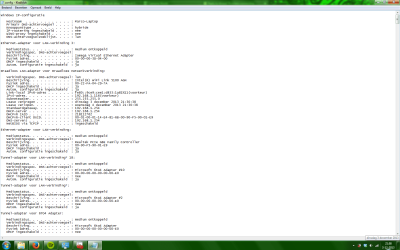
I thought the tunnel adaptors where not important to show, but there is large list of tunnels behind the piece I send.
I've attachted a screenshot
 

Attachments

  • Screenshot 2013-12-03 21.58.06.png
    Screenshot 2013-12-03 21.58.06.png
    141 KB · Views: 1

My Computer

Computer type
Laptop
Computer Manufacturer/Model Number
custom
OS
windows 7 x64
Memory
4GB DDR3 SDRAM
I thought the tunnel adaptors where not important to show, but there is large list of tunnels behind the piece I send.
I've attachted a screenshot

Yes in this case showing the entire ipconfig/all is what matters most so that I can determine if you have the tunnel adaptor problem.

Since you can see the rest of the list and the extra adaptors seem to be there you need to run the file below which will remove them for you automatically.

There is a 32/64 bit version so run the version that applies. It may be required to reboot after running the remover tool then reboot and run it again.

After that repost the ipconfig/all again so we can make sure they are all gone. :)
 

Attachments

My Computer

Computer type
PC/Desktop
Computer Manufacturer/Model Number
Home built
OS
Windows 7 Ult, Windows 8.1 Pro,
CPU
Q9650-4.275GHz, E8600 4.5GHz, E6750-3.8GHz
Motherboard
Evga 780i FTW
Memory
G.Skill PC2 9600 1200Mhz 5 5 5 15 2T
Graphics Card(s)
GTX480
Sound Card
Asus Xonar D2
Monitor(s) Displays
HannsG
Screen Resolution
1680X1050
Hard Drives
GSkill Phoenix Pro 120GB SSD
PSU
ThermalTake Toughpower 1000Watt modular
Case
ThermalTake XaserV
Cooling
Xigmatek S1283
Keyboard
Logitech G15
Mouse
Logitech G9
Internet Speed
T1
I tried to run the x64 version, because i'm using 64 bits windows 7.
But it says it wont work, and when i start the x86 version it starts to run.
But it only says remove failed.
 

My Computer

Computer type
Laptop
Computer Manufacturer/Model Number
custom
OS
windows 7 x64
Memory
4GB DDR3 SDRAM
I tried to run the x64 version, because i'm using 64 bits windows 7.
But it says it wont work, and when i start the x86 version it starts to run.
But it only says remove failed.

Did you right click and then extract them first? After that right click the 64 version and choose "Run As Administrator"

There is another way to do this from Device Manager but it's much slower to remove them that way.
 

My Computer

Computer type
PC/Desktop
Computer Manufacturer/Model Number
Home built
OS
Windows 7 Ult, Windows 8.1 Pro,
CPU
Q9650-4.275GHz, E8600 4.5GHz, E6750-3.8GHz
Motherboard
Evga 780i FTW
Memory
G.Skill PC2 9600 1200Mhz 5 5 5 15 2T
Graphics Card(s)
GTX480
Sound Card
Asus Xonar D2
Monitor(s) Displays
HannsG
Screen Resolution
1680X1050
Hard Drives
GSkill Phoenix Pro 120GB SSD
PSU
ThermalTake Toughpower 1000Watt modular
Case
ThermalTake XaserV
Cooling
Xigmatek S1283
Keyboard
Logitech G15
Mouse
Logitech G9
Internet Speed
T1
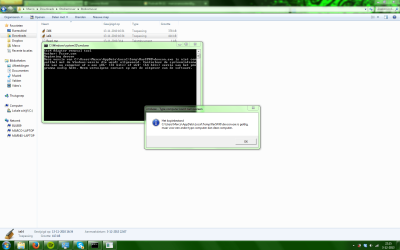
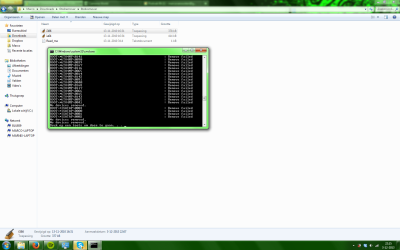
Yes I did.
The first screenshot is when I run the x64 (it is in dutch, but it says that it is not compatible)
The second when I run x86
 

Attachments

  • Screenshot 2013-12-03 22.15.17(2).png
    Screenshot 2013-12-03 22.15.17(2).png
    185.3 KB · Views: 3
  • Screenshot 2013-12-03 22.15.24.png
    Screenshot 2013-12-03 22.15.24.png
    181.6 KB · Views: 2

My Computer

Computer type
Laptop
Computer Manufacturer/Model Number
custom
OS
windows 7 x64
Memory
4GB DDR3 SDRAM
Hmm it could be with the file being in English and you are using a different language because it usually works fine. I'm sure you tried running as Admin.

Ok, you can do this manually. Open up Device Manger, go to View tab, select "show hidden devices" then open up Network Adaptors, you should see all the extra tunnel adaptors there as 'teredo tunneling pseudo device, right click each one then uninstall them all, reboot and check if they are all gone except for one that Windows will make on it's own, if the list of them isn't gone then repeat procedure.
 

My Computer

Computer type
PC/Desktop
Computer Manufacturer/Model Number
Home built
OS
Windows 7 Ult, Windows 8.1 Pro,
CPU
Q9650-4.275GHz, E8600 4.5GHz, E6750-3.8GHz
Motherboard
Evga 780i FTW
Memory
G.Skill PC2 9600 1200Mhz 5 5 5 15 2T
Graphics Card(s)
GTX480
Sound Card
Asus Xonar D2
Monitor(s) Displays
HannsG
Screen Resolution
1680X1050
Hard Drives
GSkill Phoenix Pro 120GB SSD
PSU
ThermalTake Toughpower 1000Watt modular
Case
ThermalTake XaserV
Cooling
Xigmatek S1283
Keyboard
Logitech G15
Mouse
Logitech G9
Internet Speed
T1
This will take a lot of time, but I'll report back when i'm finished ;)
 

My Computer

Computer type
Laptop
Computer Manufacturer/Model Number
custom
OS
windows 7 x64
Memory
4GB DDR3 SDRAM
This will take a lot of time, but I'll report back when i'm finished ;)

Ok yes it's a pain to do this manually which is why the 6to4 remover comes in handy.

If they all don't show up you can change a registry setting to make them all show up "backup the registry first".

Registry Settings, navigate too the following key.
System Key: [HKEY_LOCAL_MACHINE\SYSTE\CurrentControlSet\Control \Session Manager\Environment]

Data Type: REG_SZ (String Value)Value Name: DEVMGR_SHOW_NONPRESENT_DEVICES
Value Data: (1 = show all hidden devices)
 

My Computer

Computer type
PC/Desktop
Computer Manufacturer/Model Number
Home built
OS
Windows 7 Ult, Windows 8.1 Pro,
CPU
Q9650-4.275GHz, E8600 4.5GHz, E6750-3.8GHz
Motherboard
Evga 780i FTW
Memory
G.Skill PC2 9600 1200Mhz 5 5 5 15 2T
Graphics Card(s)
GTX480
Sound Card
Asus Xonar D2
Monitor(s) Displays
HannsG
Screen Resolution
1680X1050
Hard Drives
GSkill Phoenix Pro 120GB SSD
PSU
ThermalTake Toughpower 1000Watt modular
Case
ThermalTake XaserV
Cooling
Xigmatek S1283
Keyboard
Logitech G15
Mouse
Logitech G9
Internet Speed
T1
I found a different 6to4 remover on this site
Tunnel Adapter remover | Sordum.org

Which did work and made it go a lot faster than manually removing over a 100 tunnel addapters

And I can connect with my NAS now :D
Thank you for your help!
 

My Computer

Computer type
Laptop
Computer Manufacturer/Model Number
custom
OS
windows 7 x64
Memory
4GB DDR3 SDRAM
I found a different 6to4 remover on this site
Tunnel Adapter remover | Sordum.org

Which did work and made it go a lot faster than manually removing over a 100 tunnel addapters

And I can connect with my NAS now :D
Thank you for your help!

Hey great, that is the same place that made the old version but they updated it because of Windows 7 security problems with Devcon so thanks for pointing out the new version which will help others in the future. :)
 

My Computer

Computer type
PC/Desktop
Computer Manufacturer/Model Number
Home built
OS
Windows 7 Ult, Windows 8.1 Pro,
CPU
Q9650-4.275GHz, E8600 4.5GHz, E6750-3.8GHz
Motherboard
Evga 780i FTW
Memory
G.Skill PC2 9600 1200Mhz 5 5 5 15 2T
Graphics Card(s)
GTX480
Sound Card
Asus Xonar D2
Monitor(s) Displays
HannsG
Screen Resolution
1680X1050
Hard Drives
GSkill Phoenix Pro 120GB SSD
PSU
ThermalTake Toughpower 1000Watt modular
Case
ThermalTake XaserV
Cooling
Xigmatek S1283
Keyboard
Logitech G15
Mouse
Logitech G9
Internet Speed
T1
Back
Top