problem dualboot vista and 7 winload.exe error

Milite777

New member
Local time
10:39 AM
Messages
13
First of all sorry for my bad english (i'm italian) but on any italian forum no one can help me.
I have installed on a second partition of my first hard disk seven (in a first partition I have vista). The first start of 7 goes well and I can see the desktop without any problem. Then I restart my pc to change the boot priority and set the hard disk as default. Then I restart again and I see the vista boot manager that ask me to select the os to start. When I select 7 I get an error that say:

FILE \windows\system32\winload.exe

Status: 0xc0000428

info: windows cannot verify the digital signature for this file.

(I think that is the english version of my error, the code match)

I try to repair the windows starup with the wizard on 7's dvd but it doesn't work. I unistall, reburn, reinstall 7 but the result was the same.
If I open (when I running vista) the property of winload in 7's directory I see that the digital signature of the item doesn't match (a screen of property in italian: http://img29.imageshack.us/img29/5007/catturahw.jpg)

Please help me in a basilar english, thx a lot in advance
 

My Computer My Computer

OS
Vista + Seven
FILE \windows\system32\winload.exe

Status: 0xc0000428

Welcome to Seven Forums.

What graphics card are you using?
Do you have on board graphics?
Take the graphics card out if you can.
You might try getting the latest graphics card driver and loading it during the install.

Another option might be to check for the latest BIOS update.

What speed are you burning the DVD at?
What program are you using?

Try installing with a USB Memory key, min 4GB. You can find a good tutorial here.
USB Windows 7 Installation Key Drive - Create

Run the Windows 7 Upgrade Advisor found in this tutorial How to Use Windows 7 Upgrade Advisor

It might find something.

Let us know your progress.
 

My Computer My Computer

Computer type
PC/Desktop
Computer Manufacturer/Model Number
76~2.0
OS
Windows 7 Ult x64 - SP1/ Windows 8 Pro x64
CPU
Intel Core i5-3570K 4.6GHz
Motherboard
Gigabyte GA-Z77X UD3H, f18
Memory
8GB (2X4GB) DDR3 1600 Corsair Vengeance CL8 1.5v
Graphics Card(s)
Sapphire HD 7770 Vapor-X OC 1GB DDR5
Sound Card
Onboard VIA VT2021
Monitor(s) Displays
22" LCD Dell
Screen Resolution
1680x1050
Hard Drives
Samsung 840Pro 128GB SSD,
Seagate Barracuda 500GB SATA2 7200rpm 32MB cache, Seagate Barracuda 1TB SATA2 7200rpm 32MB cache,
PSU
Corsair HX650W
Case
Cooler Master Storm Scout
Cooling
Corsair H80 2x12cm Noctua NF P12 , 2x14cm case fans
Keyboard
Logitech Wave
Mouse
CM Sentinel
Internet Speed
Dismal
Antivirus
Avast
Browser
Opera Next
Other Info
Haswell laptop: HP Envy 17t-j, i7-4700MQ, GeForce 740M 2GB DDR3, 17.3" Full HD 1920x1080, 16GB RAM, Samsung 840 Pro 128GB, 1TB Hitachi 7200 HDD,
Desktop: eSATA ports,
External eSATA Seagate 500GB SATA2 7200rpm,
External WD USB 500GB
Ciao Milite, benvenuto (that is all my Grandma taught me...) :)
Pls try what Dave instructed, and also check if your ISO file is OK (I believe you downloaded it) before putting it in the USB drive. MD5 checksum is a good program to check the file's MD5 code
Also, try to format your partition and do a clean install, rather than repairing it.
Let us know!
 

My Computer My Computer

Computer Manufacturer/Model Number
Wally, Innc.
OS
Windows 7 x64 finally!
CPU
AMD Athlon II X2 240
Motherboard
Biostar TA790GX XE
Memory
OCZ Platinum 4GB DDR2 1066 (will not work past 800MHz)
Graphics Card(s)
MSI R4670-MD1G Radeon HD 4670 1GB 128-bit GDDR3
Sound Card
ATI High Definition Audio Device Realtek ALC888
Monitor(s) Displays
HP w19e
Screen Resolution
1440x900
Hard Drives
Western Digital Caviar Green WD5000AADS 500GB SATA
Western Digital Caviar Blue WD5000AAKS 500GB SATA
PSU
Athena Power Micro ATX 400W
Case
HEC 6T 6T10BB Black MicroATX Mini Tower
Cooling
stock
Keyboard
wired, many keys
Mouse
HP wireless, 2 buttons, 1 wheel
Internet Speed
DSL 2Mb (recently getting 1.65M!)
Ciao Milite, benvenuto (that is all my Grandma taught me...) :)
:D great!!
Thanks to all for your answer. I answer to you in order:

I have a Ati Radeon Express 1250.
What do you mean for on board graphics?
I prefer try another solution first and take out the graphic card only if is very needful
I try it but I don't have any difference.
I think I have the last bios version
I burn at 4x speed with nero 9 on a dvd rw
I can use an external hard disk? I have only a 2 gb memory key.
I run the Windows 7 Upgrade Advisor (I can't save the report), it say that I have only 768 mb di ram (vista say 1 gb) and that I have 5 program that I should reinstall after I update to seven.
I check md5 and it's ok.
I already format the partition and do a clean install, but I have always the same result
Also I find this on this forum (http://www.sevenforums.com/installation-setup/29015-dual-boot-windows-7-vista-boot-error-winload-exe.html) can it help you?
 

My Computer My Computer

OS
Vista + Seven
Milite, I am checking with SIW for the solution he had in that case.
There are a couple of problems I see though:
1G RAM is the minimum for 32 bit version, you need more for 64bit (which one are you trying?)
I have never tried with a DVD RW, but that might be a potential problem. Do you have a read only DVD you can burn?
Finally, you can unpack the ISO to the external drive and run setup.exe on that.
By the way, remoning your graphics card might be the simple solution here. Does your motherboard have on-board graphics? Do you have a VGA connector from the motherboard or only from the card?
Let us know
 

My Computer My Computer

Computer Manufacturer/Model Number
Wally, Innc.
OS
Windows 7 x64 finally!
CPU
AMD Athlon II X2 240
Motherboard
Biostar TA790GX XE
Memory
OCZ Platinum 4GB DDR2 1066 (will not work past 800MHz)
Graphics Card(s)
MSI R4670-MD1G Radeon HD 4670 1GB 128-bit GDDR3
Sound Card
ATI High Definition Audio Device Realtek ALC888
Monitor(s) Displays
HP w19e
Screen Resolution
1440x900
Hard Drives
Western Digital Caviar Green WD5000AADS 500GB SATA
Western Digital Caviar Blue WD5000AAKS 500GB SATA
PSU
Athena Power Micro ATX 400W
Case
HEC 6T 6T10BB Black MicroATX Mini Tower
Cooling
stock
Keyboard
wired, many keys
Mouse
HP wireless, 2 buttons, 1 wheel
Internet Speed
DSL 2Mb (recently getting 1.65M!)
1G RAM is the minimum for 32 bit version, you need more for 64bit (which one are you trying?)
32 bit

And if I want to try to install from external drive, how I can launch the installation? If I unpack the iso, how I can launch the setup file from boot? I should use the tutorial posted from Dave76?

We'll talk after of the graphics card as a last hypothesis
 

My Computer My Computer

OS
Vista + Seven

My Computers My Computers

System One System Two

  • Computer type
    PC/Desktop
    OS
    7 X64
    CPU
    i5 8400
    Motherboard
    gigabyte b365m ds3h
    Memory
    2x8gb 3200mhz
    Hard Drives
    various
    PSU
    pure power 11 400w cm
    Case
    Coolermaster
    Cooling
    cryorig m9i
  • Computer type
    PC/Desktop
    OS
    7x64
    CPU
    g5400
    Motherboard
    ga b365m ds3h
    Memory
    8gb ddr4 2400
    PSU
    xfx pro 450w
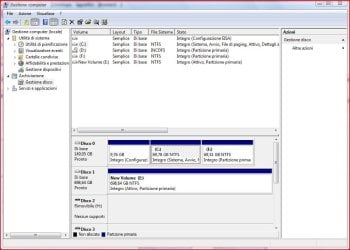
I think you need this screen:

Cattura1.JPG

it's the right window?

c is the vista partition, f is the 7 partition, d is the dvd driver, e is a external hard disk that I open (because I have some alimentation problem) and I adapted to be a internal hard disk
 

My Computer My Computer

OS
Vista + Seven
In Vista, open an elevated command prompt, Type( or copy and paste these if you like).

cd /d f:\windows\system32

then press enter

bcdboot f:\windows /s c:

then press enter.

Close command prompt.

Restart the pc.

;)
 

My Computers My Computers

System One System Two

  • Computer type
    PC/Desktop
    OS
    7 X64
    CPU
    i5 8400
    Motherboard
    gigabyte b365m ds3h
    Memory
    2x8gb 3200mhz
    Hard Drives
    various
    PSU
    pure power 11 400w cm
    Case
    Coolermaster
    Cooling
    cryorig m9i
  • Computer type
    PC/Desktop
    OS
    7x64
    CPU
    g5400
    Motherboard
    ga b365m ds3h
    Memory
    8gb ddr4 2400
    PSU
    xfx pro 450w
In Vista, open an elevated command prompt, Type( or copy and paste these if you like).

cd /d f:\windows\system32

then press enter

bcdboot f:\windows /s c:

then press enter.

Close command prompt.

Restart the pc.

;)

:shock: it... woooorks!!! thanks!!! thanks a lot!:)

1 little (and off topic) question: how I can thank you and the other for your fantastic help? there is a button on this forum? I can't see it
 

My Computer My Computer

OS
Vista + Seven

My Computer My Computer

Computer Manufacturer/Model Number
Wally, Innc.
OS
Windows 7 x64 finally!
CPU
AMD Athlon II X2 240
Motherboard
Biostar TA790GX XE
Memory
OCZ Platinum 4GB DDR2 1066 (will not work past 800MHz)
Graphics Card(s)
MSI R4670-MD1G Radeon HD 4670 1GB 128-bit GDDR3
Sound Card
ATI High Definition Audio Device Realtek ALC888
Monitor(s) Displays
HP w19e
Screen Resolution
1440x900
Hard Drives
Western Digital Caviar Green WD5000AADS 500GB SATA
Western Digital Caviar Blue WD5000AAKS 500GB SATA
PSU
Athena Power Micro ATX 400W
Case
HEC 6T 6T10BB Black MicroATX Mini Tower
Cooling
stock
Keyboard
wired, many keys
Mouse
HP wireless, 2 buttons, 1 wheel
Internet Speed
DSL 2Mb (recently getting 1.65M!)
This explains it: http://www.sevenforums.com/chillout-room/4192-donate-button-7.html#post294860
Milite, if you want to stay and help others, that is good retribution. And in the process you will learn a lot and have fun. Personal experience.
thanks, I will try to do this. But now I have another problem: now when I boot from the primary hard disk, the boot always stop to "verifying DMI Pool data..........." and I can only shutdown from the bottom on pc case. When I boot from dvd drive it start without any problem. And now? I don't think that is a seven problem because yesterday and today I use it and I haven't any problem. What do you advise to me?

EDIT: sorry I find the solution, the bios was configured wrong and it boot from second hard disk (why this? I don't touch it)
 
Last edited:

My Computer My Computer

OS
Vista + Seven
In Vista, open an elevated command prompt, Type( or copy and paste these if you like).

cd /d f:\windows\system32

then press enter

bcdboot f:\windows /s c:

then press enter.

Close command prompt.

Restart the pc.

;)

Hi! I am having the same issue with me but a bit different scenario.. I was using Ubuntu 9.04 and Windwos 7 (64-bit) but then needed to have an older version of Windows. I installed vista (32-bit) on the spare partition I had, then reinstalled grub, and then copied the Boot directory from vista partition (C:) to windows 7 partition (D:) along with bootmgr and exported the BCD file too from vista. Now when I run Windows 7 I get the error "Windows cannot verify the digital signature for this file" (and the file is windload.exe in system32 folder).

I tried what you said in the quoted post but got this error:
"This version of d:\Windows\System32\bcdboot.exe is not compatible with the version of Windows you're running. Check your computer's system information to see whether you need a x86 (32-bit) or x64 (64-bit) version of the program, and then contact the software publisher."

Can you please guide how to solve this issue?
 

My Computer My Computer

OS
Ubuntu/Vista/Seven
Extract bcdboot.exe file from this zip this and copy it into in Vista Windows\System32

View attachment bcdboot.zip

open an elevated command type:

bcdboot d:\windows /s c:

press enter.

Hope it helps.
 

My Computers My Computers

System One System Two

  • Computer type
    PC/Desktop
    OS
    7 X64
    CPU
    i5 8400
    Motherboard
    gigabyte b365m ds3h
    Memory
    2x8gb 3200mhz
    Hard Drives
    various
    PSU
    pure power 11 400w cm
    Case
    Coolermaster
    Cooling
    cryorig m9i
  • Computer type
    PC/Desktop
    OS
    7x64
    CPU
    g5400
    Motherboard
    ga b365m ds3h
    Memory
    8gb ddr4 2400
    PSU
    xfx pro 450w
You're welcome.

Glad it worked for you.
 

My Computers My Computers

System One System Two

  • Computer type
    PC/Desktop
    OS
    7 X64
    CPU
    i5 8400
    Motherboard
    gigabyte b365m ds3h
    Memory
    2x8gb 3200mhz
    Hard Drives
    various
    PSU
    pure power 11 400w cm
    Case
    Coolermaster
    Cooling
    cryorig m9i
  • Computer type
    PC/Desktop
    OS
    7x64
    CPU
    g5400
    Motherboard
    ga b365m ds3h
    Memory
    8gb ddr4 2400
    PSU
    xfx pro 450w
Solved Boot winload.exe signature problem

About same action to solve Win 7 and Vista dual Boot problem.
Vista was already installed, then I install successfuly cold Win7 on another H: Disk.
Then somedays after I dont know how, I got Boot signature error when booting Win7, no problem booting Vista.

The BootMgr was on c: Vista disk

I tried the Win7 rescue disk to restore BCD, dont work.
I remove the C: Vista disk.
Then restart with Win7 rescue DVD and restore BCD.
After this action a was able to Boot only Win7

Then attach C: Vista Disk
While on Win7
I renamed BootMgr of C:Vista to zzBootMgr
Then I used EasyBCD 1.7 (free program) to install the second Vista entry to BootMgr on H:Win7.
Download EasyBCD 1.7.2 - NeoSmart Technologies
Then delete C: zzBootmgr and Boot files
Then all was correct. :D

Thanks
 

My Computer My Computer

OS
win 7 & Vista
Glad to hear you got it all sorted out.

EasyBCD is a great program.
 

My Computer My Computer

Computer type
PC/Desktop
Computer Manufacturer/Model Number
76~2.0
OS
Windows 7 Ult x64 - SP1/ Windows 8 Pro x64
CPU
Intel Core i5-3570K 4.6GHz
Motherboard
Gigabyte GA-Z77X UD3H, f18
Memory
8GB (2X4GB) DDR3 1600 Corsair Vengeance CL8 1.5v
Graphics Card(s)
Sapphire HD 7770 Vapor-X OC 1GB DDR5
Sound Card
Onboard VIA VT2021
Monitor(s) Displays
22" LCD Dell
Screen Resolution
1680x1050
Hard Drives
Samsung 840Pro 128GB SSD,
Seagate Barracuda 500GB SATA2 7200rpm 32MB cache, Seagate Barracuda 1TB SATA2 7200rpm 32MB cache,
PSU
Corsair HX650W
Case
Cooler Master Storm Scout
Cooling
Corsair H80 2x12cm Noctua NF P12 , 2x14cm case fans
Keyboard
Logitech Wave
Mouse
CM Sentinel
Internet Speed
Dismal
Antivirus
Avast
Browser
Opera Next
Other Info
Haswell laptop: HP Envy 17t-j, i7-4700MQ, GeForce 740M 2GB DDR3, 17.3" Full HD 1920x1080, 16GB RAM, Samsung 840 Pro 128GB, 1TB Hitachi 7200 HDD,
Desktop: eSATA ports,
External eSATA Seagate 500GB SATA2 7200rpm,
External WD USB 500GB
Back
Top